---
source: https://carbone.io/documentation/design/advanced-features/barcode.html
title: "How to integrate barcode in your template?"
description: "How to integrate barcode in your template?"
generated_at: "2026-07-13"
---
# Barcode
How to integrate barcode in your template?
ENTERPRISE FEATURE Available for:
✓ Carbone Cloud
✓ Carbone On-premise
✗ Embedded Carbone JS v3.4.6+
## Overview
> ℹ️ **Note:** Compatible with PDF, ODT, ODS, ODP, ODG, PPTX, XLSX, DOCX, and HTML files
Carbone supports **107 barcodes**.
There are two ways to insert a barcode:
- [As a dynamic image](#barcodes-as-image): the **recommended solution** for generating industry-standard barcodes.
- [As a font](#barcodes-as-font): the previous solution, which is not recommended, and only supports 4 barcodes.
Both solutions require the `:barcode(type)` tag in the template. Check the examples below for each method.
Get inspired by one of our real-life examples: [Barcode Label](/examples/label-barcode/index.md), [Ticket](/examples/ticket/index.md) or [E-Ticket](/examples/eticket/index.md)
## Barcodes as image
Generating a barcode as an image follows the same logic as [dynamic pictures](pictures.md) and involves three steps:
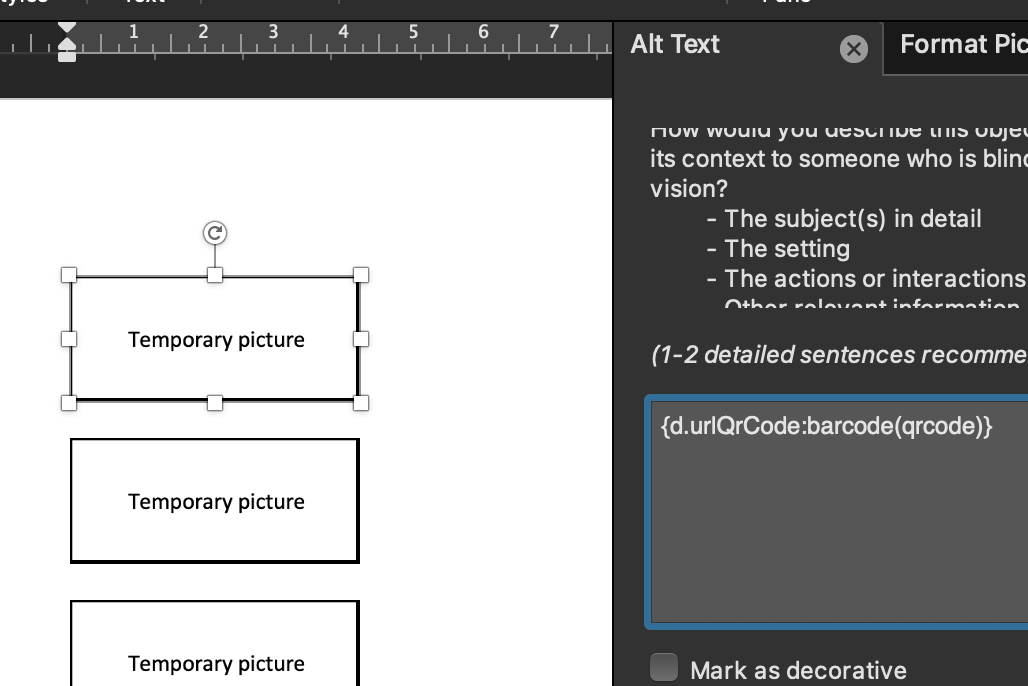
1. Insert a [temporary picture](/img/doc/image-placeholder.png) in your template. This will help Carbone determine where to insert the barcode.
2. Write the Carbone tag (ex. `{d.value:barcode(type)}`) followed by the barcode formatter in the alternative text, description, or title of the image. Refer to the [dynamic pictures](pictures.md) documentation for details.
3. Specify the `type` of barcode as the first argument of the `:barcode` formatter. Check the [list of supported barcodes](#barcodes-as-image-supported-barcodes). Finally, generate the document, and voilà!
Barcode options are available and can be passed to the `:barcode` formatter as additional arguments, such as `:barcode(type, options1, options2, ...)`. See the [list of barcode options](#barcodes-as-image-barcodes-options) for details.
### Supported barcodes
| Barcode name | Type |
| --- | --- |
| EAN-5 (5 digit addon) | ean5 |
| EAN-2 (2 digit addon) | ean2 |
| EAN-13 | ean13 |
| EAN-8 | ean8 |
| UPC-A | upca |
| UPC-E | upce |
| ISBN | isbn |
| ISMN | ismn |
| ISSN | issn |
| Code 128 | code128 |
| GS1-128 | gs1-128 |
| GS1-14 | ean14 |
| SSCC-18 | sscc18 |
| Code 39 | code39 |
| Code 39 Extended | code39ext |
| Italian Pharmacode | code32 |
| Pharmazentralnummer (PZN) | pzn |
| Code 93 | code93 |
| Code 93 Extended | code93ext |
| Interleaved 2 of 5 (ITF) | interleaved2of5 |
| ITF-14 | itf14 |
| Deutsche Post Identcode | identcode |
| Deutsche Post Leitcode | leitcode |
| GS1 DataBar Omnidirectional | databaromni |
| GS1 DataBar Stacked | databarstacked |
| GS1 DataBar Stacked Omnidirectional | databarstackedomni |
| GS1 DataBar Truncated | databartruncated |
| GS1 DataBar Limited | databarlimited |
| GS1 DataBar Expanded | databarexpanded |
| GS1 DataBar Expanded Stacked | databarexpandedstacked |
| GS1 North American Coupon | gs1northamericancoupon |
| Pharmaceutical Binary Code | pharmacode |
| Two-track Pharmacode | pharmacode2 |
| Code 25 | code2of5 |
| Industrial 2 of 5 | industrial2of5 |
| IATA 2 of 5 | iata2of5 |
| Matrix 2 of 5 | matrix2of5 |
| COOP 2 of 5 | coop2of5 |
| Datalogic 2 of 5 | datalogic2of5 |
| Code 11 | code11 |
| BC412 | bc412 |
| Codabar | rationalizedCodabar |
| USPS Intelligent Mail | onecode |
| USPS POSTNET | postnet |
| USPS PLANET | planet |
| Royal Mail 4 State Customer Code | royalmail |
| AusPost 4 State Customer Code | auspost |
| Royal Dutch TPG Post KIX | kix |
| Japan Post 4 State Customer Code | japanpost |
| MSI Modified Plessey | msi |
| Plessey UK | plessey |
| Telepen | telepen |
| Telepen Numeric | telepennumeric |
| PosiCode | posicode |
| Codablock F | codablockf |
| Code 16K | code16k |
| Code 49 | code49 |
| Channel Code | channelcode |
| Flattermarken | flattermarken |
| Custom 1D symbology | raw |
| Custom 4 state symbology | daft |
| Miscellaneous symbols | symbol |
| PDF417 | pdf417 |
| Compact PDF417 | pdf417compact |
| MicroPDF417 | micropdf417 |
| Data Matrix | datamatrix |
| Data Matrix Rectangular | datamatrixrectangular |
| Data Matrix Rectangular Extension | datamatrixrectangularextension |
| Royal Mail Mailmark | mailmark |
| QR Code | qrcode |
| Swiss QR Code | swissqrcode |
| Micro QR Code | microqrcode |
| Rectangular Micro QR Code | rectangularmicroqrcode |
| MaxiCode | maxicode |
| Aztec Code | azteccode |
| Compact Aztec Code | azteccodecompact |
| Aztec Runes | aztecrune |
| Code One | codeone |
| Han Xin Code | hanxin |
| DotCode | dotcode |
| Ultracode | ultracode |
| GS1 Composite 2D Component | gs1-cc |
| EAN-13 Composite | ean13composite |
| EAN-8 Composite | ean8composite |
| UPC-A Composite | upcacomposite |
| UPC-E Composite | upcecomposite |
| GS1 DataBar Omnidirectional Composite | databaromnicomposite |
| GS1 DataBar Stacked Composite | databarstackedcomposite |
| GS1 DataBar Stacked Omnidirectional Composite | databarstackedomnicomposite |
| GS1 DataBar Truncated Composite | databartruncatedcomposite |
| GS1 DataBar Limited Composite | databarlimitedcomposite |
| GS1 DataBar Expanded Composite | databarexpandedcomposite |
| GS1 DataBar Expanded Stacked Composite | databarexpandedstackedcomposite |
| GS1-128 Composite | gs1-128composite |
| GS1 Data Matrix | gs1datamatrix |
| GS1 Data Matrix Rectangular | gs1datamatrixrectangular |
| GS1 QR Code | gs1qrcode |
| GS1 DotCode | gs1dotcode |
| HIBC Code 39 | hibccode39 |
| HIBC Code 128 | hibccode128 |
| HIBC Data Matrix | hibcdatamatrix |
| HIBC Data Matrix Rectangular | hibcdatamatrixrectangular |
| HIBC PDF417 | hibcpdf417 |
| HIBC MicroPDF417 | hibcmicropdf417 |
| HIBC QR Code | hibcqrcode |
| HIBC Codablock F | hibccodablockf |
| HIBC Aztec Code | hibcazteccode |
### Barcodes options
Options must be passed as a second argument in any order, and must keep the format "optionName:value", such as: `{d.number:barcode(qrcode, width:300, height:100, includetext:false, scale:1)}`.
| Option name | Type | Description |
| --- | --- | --- |
| svg | boolean | Generate SVG images (no pixels) Example: `{d.number:barcode(qrcode, svg:true)}` |
| width | integer | Width of the barcode in millimeters. Example: `{d.number:barcode(qrcode, width:300)}` Can be combined with :imageFit, e.g., `{d.number:barcode(qrcode, width:300):imageFit(contain)}` |
| height | integer | Height of the barcode in millimeters. Example: `{d.number:barcode(qrcode, height:10)}` |
| scale | integer | Barcode quality (1-10). Multiplies width and height for higher resolution. Example: `{d.number:barcode(qrcode, scale:3)}` |
| includetext | boolean | Display the text (`true/false`). Example: `{d.number:barcode(qrcode, includetext:false)}` |
| textsize | integer | Size of the text. Example: `{d.number:barcode(qrcode, textsize:20)}` |
| textxalign | string | Horizontal alignment of text: `left`, `center`, `right`, or `justify` (default: `center`). Example: `{d.number:barcode(qrcode, textxalign:right)}` |
| textyalign | string | Vertical alignment of text: `below`, `center`, or `above` (default: `below`). Example: `{d.number:barcode(qrcode, textyalign:above)}` |
| rotate | string | Rotate the barcode/text: `N` (no rotation), `R` (90° right), `L` (90° left), `I` (180°). Example: `{d.number:barcode(qrcode, rotate:R)}` |
| barcolor | string | Color of the bars in hexadecimal `#RRGGBB`. Example: `{d.number:barcode(qrcode, barcolor:#1FDE25)}` |
| textcolor | string | Color of the text in hexadecimal `#RRGGBB`. Example: `{d.number:barcode(qrcode, textcolor:#1FDE25)}` |
| backgroundcolor | string | Background color in hexadecimal `#RRGGBB`. Example: `{d.number:barcode(qrcode, backgroundcolor:#1FDE25)}` |
| eclevel | string | Error correction level for QR codes: `L` (Low), `M` (Medium, default), `Q` (Quality), `H` (High). Example: `{d.number:barcode(qrcode, eclevel:Q)}` |
## DOCX Barcode Example
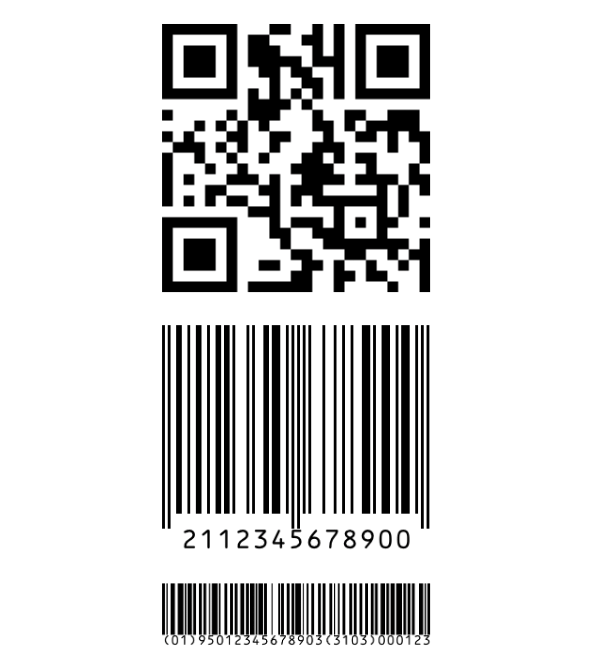
This example demonstrates how to insert three barcodes as images: `ean13`, `qrcode`, and `gs1`. First, retrieve your barcode data as JSON from your database.
**Data**
```json
{
"urlQrCode" : "http://carbone.io/",
"productCodeBarEan13" : "2112345678900",
"productGs1" : "(01)95012345678903(3103)000123"
}
```
**Template**
Edit your template with your text editor, insert three temporary images, and for each image, add the corresponding Carbone tags as alternative text:
- For the first image: `{d.urlQrCode:barcode(qrcode)}`
- For the second image: `{d.productCodeBarEan13:barcode(ean13)}`
- For the third image: `{d.productGs1:barcode(gs1-128)}`
To scale the barcode, you can chain the `:imageFit` formatter, like this: `{d.urlQrCode:barcode(qrcode):imageFit(contain)}`.
Click to learn more about the [imageFit](pictures.md#how-to-insert-picture-image-aspect-ratio-imagefit) formatter.
**Result**
## HTML Barcode Example
To inject a barcode in HTML templates, insert a Carbone tag within the **src** attribute of an image tag, and chain it with the `:barcode` formatter, specifying the type as an argument. For example, this will inject the barcode as a Data-URI in SVG format:
```html
QR-CODE:
}) ```
You can adjust the dimensions of the barcode in two ways:
- Using the `
```
You can adjust the dimensions of the barcode in two ways:
- Using the `![]() ` Tag: Set the **width** and **height** attributes directly on the `
` Tag: Set the **width** and **height** attributes directly on the `![]() ` tag.
- Using the Barcode Tag: Specify dimensions within the barcode tag options, for example: `{d.code:barcode(qrcode, 'width:120;height:80')}`
## Barcodes as font
> ⚠️ **Warning:** We recommend using the [`Barcodes as Image`](#barcodes-as-image) solution instead of this older font method.
Using fonts, only **4 barcodes** are supported: `ean8`, `ean13`, `ean128`, and `code39`. You need to install specific fonts to use the barcode formatter:
- Install ean13.ttf for `ean8` or `ean13` barcodes: [click to download](/file/ean13.ttf).
- Install code128.ttf for the `ean128` barcode: [click to download](/file/code128.ttf).
- Install code39.ttf for the `code39` barcode: [click to download](/file/code39.ttf).
Thanks to [grandzebu.net](https://grandzebu.net/) for providing the fonts.
### Barcodes as font example
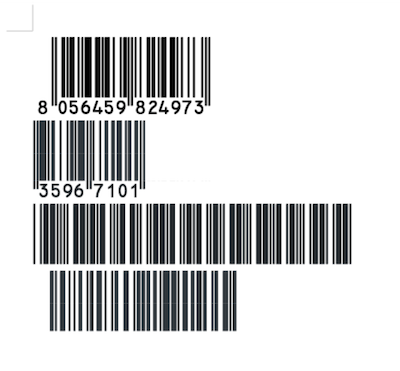
Here’s an example of generating 4 types of barcodes in an ODT document. This method also works with DOCX, XLSX, ODS, and other supported document formats.
**Data**
```json
{
"productValueEan13" : "8056459824973",
"productValueEan8" : "35967101",
"productValueCode39" : "GSJ-220097",
"productValueCode128": "0312345600001"
};
```
**Template**
First, insert the following tags and formatters into your template:
```text
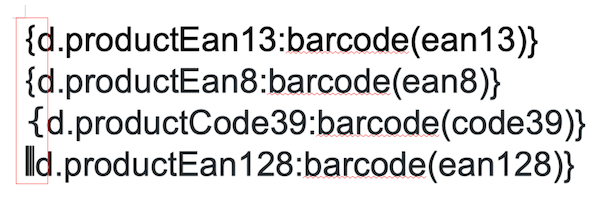
{ d.productValueEan13:barcode(ean13) }
{ d.productValueEan8:barcode(ean8) }
{ d.productValueCode39:barcode(code39) }
{ d.productValueCode128:barcode(ean128) }
```
Next, apply the barcode FONT to the **FIRST** curly bracket (download links are provided above). Here’s the template before rendering:
**Result**
## Related topics
- [Translations i18n](/documentation/design/advanced-features/translations-i18n.md)
- [Transform](/documentation/design/advanced-features/transform.md)
- [Digital signatures](/documentation/design/advanced-features/signatures.md)
- [Pictures](/documentation/design/advanced-features/pictures.md)
- [Pagination](/documentation/design/advanced-features/pagination.md)
- [Key-value mapping](/documentation/design/advanced-features/key-value-mapping.md)
` tag.
- Using the Barcode Tag: Specify dimensions within the barcode tag options, for example: `{d.code:barcode(qrcode, 'width:120;height:80')}`
## Barcodes as font
> ⚠️ **Warning:** We recommend using the [`Barcodes as Image`](#barcodes-as-image) solution instead of this older font method.
Using fonts, only **4 barcodes** are supported: `ean8`, `ean13`, `ean128`, and `code39`. You need to install specific fonts to use the barcode formatter:
- Install ean13.ttf for `ean8` or `ean13` barcodes: [click to download](/file/ean13.ttf).
- Install code128.ttf for the `ean128` barcode: [click to download](/file/code128.ttf).
- Install code39.ttf for the `code39` barcode: [click to download](/file/code39.ttf).
Thanks to [grandzebu.net](https://grandzebu.net/) for providing the fonts.
### Barcodes as font example
Here’s an example of generating 4 types of barcodes in an ODT document. This method also works with DOCX, XLSX, ODS, and other supported document formats.
**Data**
```json
{
"productValueEan13" : "8056459824973",
"productValueEan8" : "35967101",
"productValueCode39" : "GSJ-220097",
"productValueCode128": "0312345600001"
};
```
**Template**
First, insert the following tags and formatters into your template:
```text
{ d.productValueEan13:barcode(ean13) }
{ d.productValueEan8:barcode(ean8) }
{ d.productValueCode39:barcode(code39) }
{ d.productValueCode128:barcode(ean128) }
```
Next, apply the barcode FONT to the **FIRST** curly bracket (download links are provided above). Here’s the template before rendering:

**Result**

## Related topics
- [Translations i18n](/documentation/design/advanced-features/translations-i18n.md)
- [Transform](/documentation/design/advanced-features/transform.md)
- [Digital signatures](/documentation/design/advanced-features/signatures.md)
- [Pictures](/documentation/design/advanced-features/pictures.md)
- [Pagination](/documentation/design/advanced-features/pagination.md)
- [Key-value mapping](/documentation/design/advanced-features/key-value-mapping.md)