---
source: https://carbone.io/documentation/design/template-formats/docx.html
title: "DOCX Templates | Generate Word Documents from JSON | Carbone"
description: "Generate Word documents and PDFs from DOCX templates and JSON with the Carbone API. Loops, conditions, pictures, charts and page numbers follow your data."
generated_at: "2026-11-10"
---
# DOCX templates
Design a document in Word, add Carbone tags, and generate it from JSON data as a Word file or a PDF.
COMMUNITY FEATURE Available for:
✓ Carbone Cloud
✓ Carbone On-premise
✓ Embedded Carbone JS v2.0+
Any DOCX file can be a template. Write Carbone tags in its text, tables, headers and footers, and send your JSON data to the API. You get back a Word document or a PDF that keeps the layout of the template.
## Basic
Write a tag in the document to insert a value from the JSON data. In `{d.customer.name}`, `d` is the root of the data and `customer.name` is the path to the value. The value takes the formatting of its tag: font, size, color and bold, like the order number.
**Data** ([basic-data.json](/file/docx/basic-data.json)):
```json
{
"date": "November 10, 2026",
"customer": {
"firstName": "Emma",
"name": "Emma Johnson",
"company": "Bluebird Logistics",
"address": "350 Fifth Avenue, Suite 4100\nNew York, NY 10118"
},
"order": { "id": "SO-2026-0042", "items": 12, "deliveryDate": "November 17, 2026" },
"manager": { "name": "Jane Smith", "title": "Account Manager" }
}
```
**Template** ([basic-template.docx](/file/docx/basic-template.docx)):
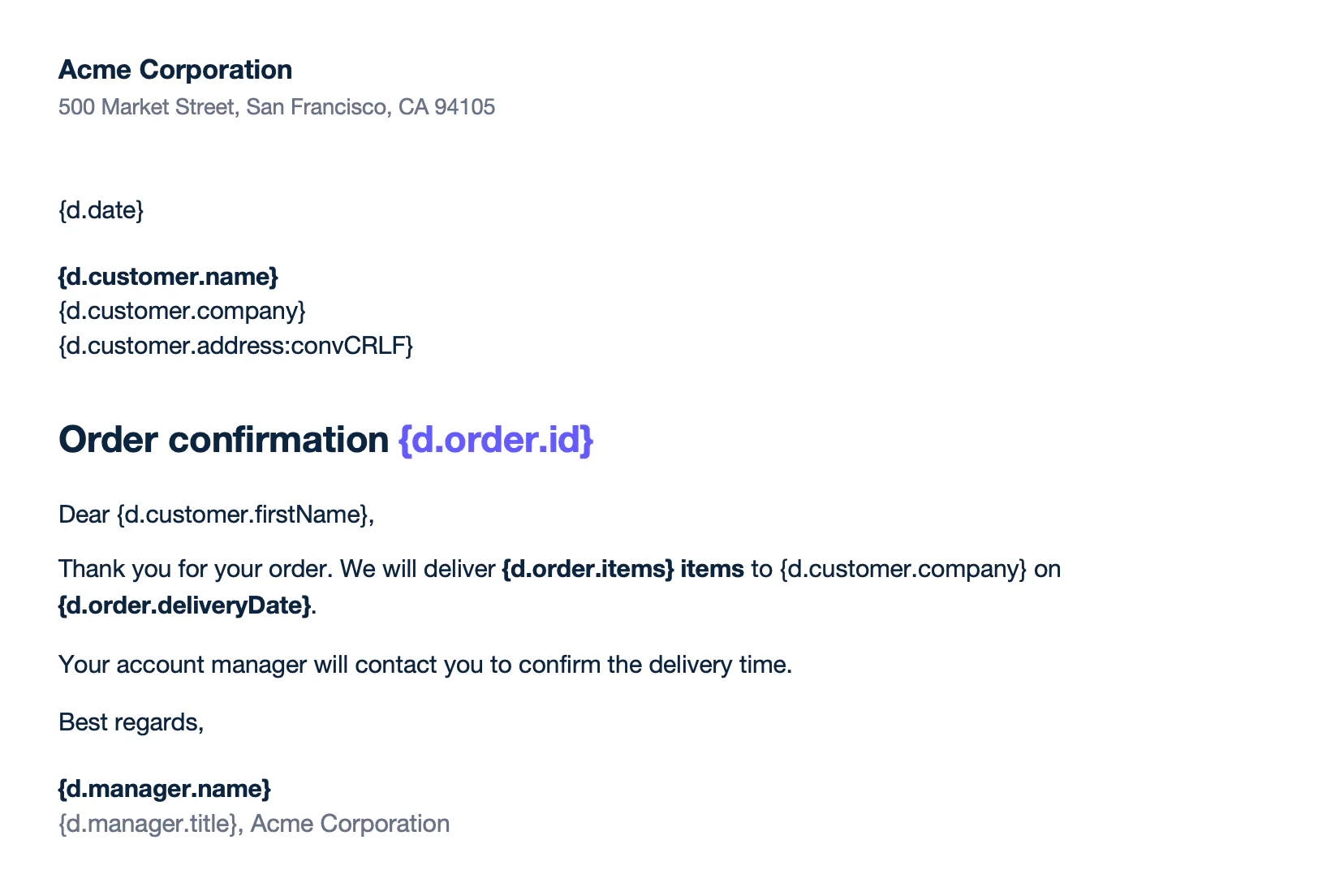
Text of template.docx:
```text
Acme Corporation
500 Market Street, San Francisco, CA 94105
{d.date}
{d.customer.name}
{d.customer.company}
{d.customer.address:convCRLF}
Order confirmation {d.order.id}
Dear {d.customer.firstName},
Thank you for your order. We will deliver {d.order.items} items to {d.customer.company} on {d.order.deliveryDate}.
Your account manager will contact you to confirm the delivery time.
Best regards,
{d.manager.name}
{d.manager.title}, Acme Corporation
```
**Result** ([basic-report.docx](/file/docx/basic-report.docx)):
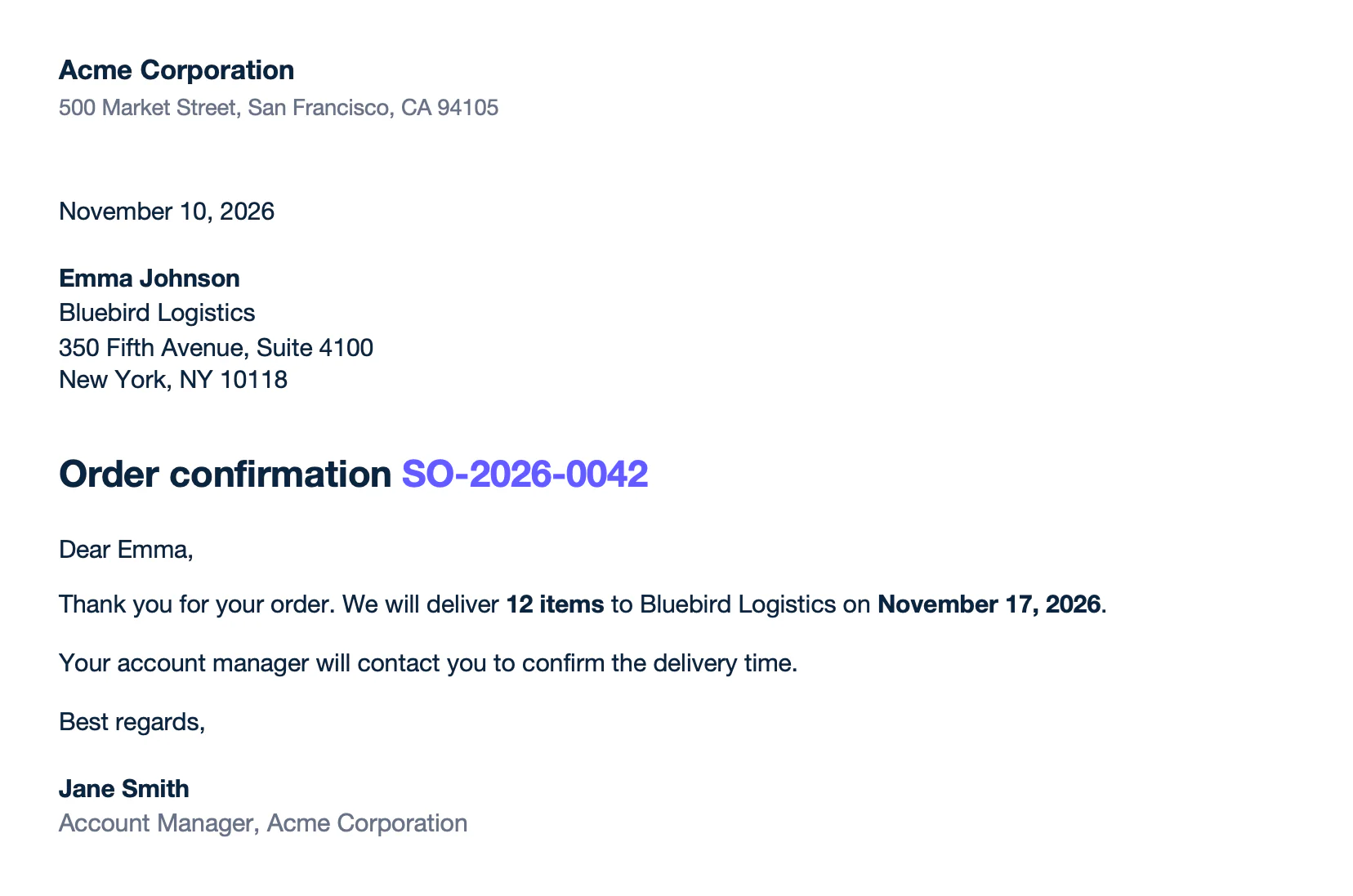
Text of report.docx:
```text
Acme Corporation
500 Market Street, San Francisco, CA 94105
November 10, 2026
Emma Johnson
Bluebird Logistics
350 Fifth Avenue, Suite 4100 New York, NY 10118
Order confirmation SO-2026-0042
Dear Emma,
Thank you for your order. We will deliver 12 items to Bluebird Logistics on November 17, 2026.
Your account manager will contact you to confirm the delivery time.
Best regards,
Jane Smith
Account Manager, Acme Corporation
```
- Add `:convCRLF` to keep the line breaks of a value, like the address: `{d.customer.address:convCRLF}`.
- Turn off smart quotes in Word (AutoCorrect > AutoFormat As You Type). Formatters need straight quotes, like `:formatD('LL')`. [Learn more](/documentation/design/overview/design-best-practices.md#configuration-of-microsoft-word-and-libreoffice)
Learn more about [tags](/documentation/design/substitutions/the-basics.md).
## Loops
A loop repeats a table row for each item of an array. The template needs two rows:
- **The row to repeat**, with `[i]` in its tags: `{d.items[i].name}`.
- **The next row**, with `[i+1]` in one cell: `{d.items[i+1].name}`. It marks the end of the loop and is removed from the report.
Carbone copies the row with its formatting and moves the content below it down, like the total.
**Data** ([loops-data.json](/file/docx/loops-data.json)):
```json
{
"invoice": { "number": "INV-2026-0042", "date": "November 10, 2026", "due": "December 10, 2026" },
"customer": { "company": "Bluebird Logistics", "email": "billing@bluebird.example" },
"items": [
{ "name": "Laptop Pro 14", "qty": 4, "price": 1899, "amount": 7596 },
{ "name": "27-inch monitor", "qty": 4, "price": 349, "amount": 1396 },
{ "name": "USB-C dock", "qty": 4, "price": 189, "amount": 756 },
{ "name": "Wireless keyboard", "qty": 4, "price": 79, "amount": 316 },
{ "name": "Setup and onboarding", "qty": 1, "price": 450, "amount": 450 }
],
"total": 10514
}
```
**Template** ([loops-template.docx](/file/docx/loops-template.docx)):
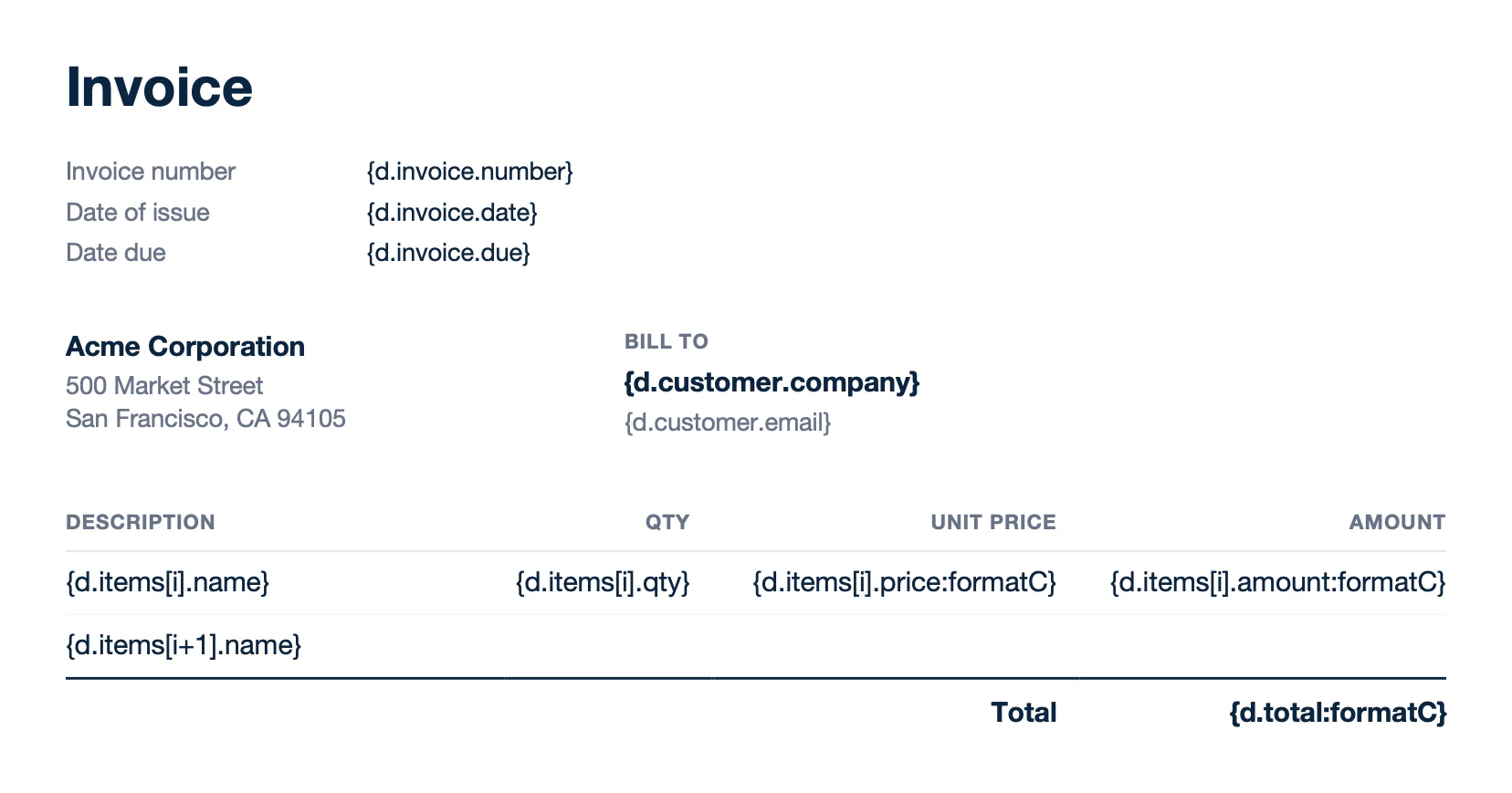
Text of template.docx:
```text
Invoice
Invoice number
{d.invoice.number}
Date of issue
{d.invoice.date}
Date due
{d.invoice.due}
Acme Corporation
500 Market Street
San Francisco, CA 94105
Bill to
{d.customer.company}
{d.customer.email}
Description
Qty
Unit price
Amount
{d.items[i].name}
{d.items[i].qty}
{d.items[i].price:formatC}
{d.items[i].amount:formatC}
{d.items[i+1].name}
Total
{d.total:formatC}
```
**Result** ([loops-report.docx](/file/docx/loops-report.docx)):
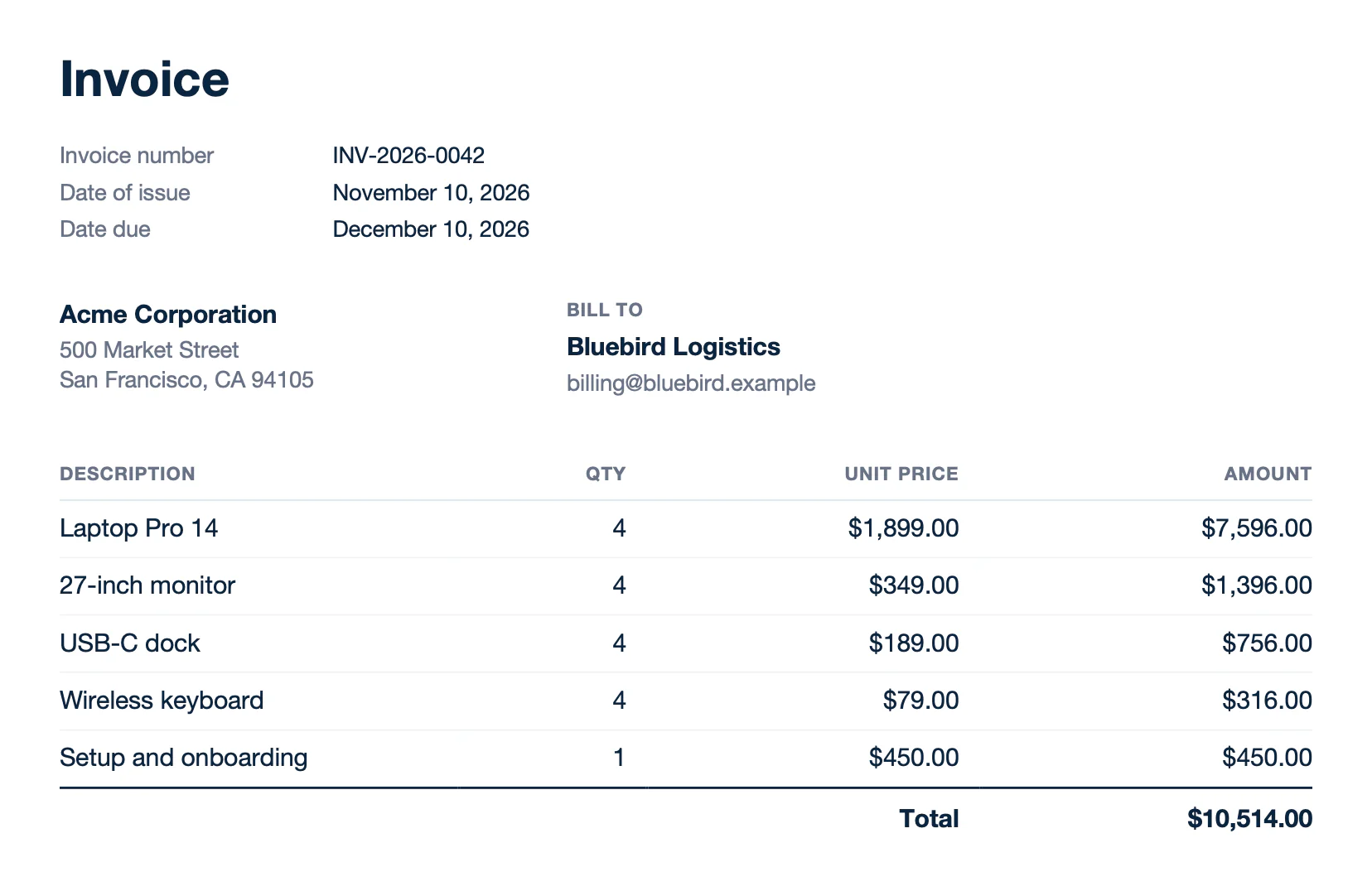
Text of report.docx:
```text
Invoice
Invoice number
INV-2026-0042
Date of issue
November 10, 2026
Date due
December 10, 2026
Acme Corporation
500 Market Street
San Francisco, CA 94105
Bill to
Bluebird Logistics
billing@bluebird.example
Description
Qty
Unit price
Amount
Laptop Pro 14
4
$1,899.00
$7,596.00
27-inch monitor
4
$349.00
$1,396.00
USB-C dock
4
$189.00
$756.00
Wireless keyboard
4
$79.00
$316.00
Setup and onboarding
1
$450.00
$450.00
Total
$10,514.00
```
### Sort and filter
Add an attribute before `i` to sort the items: `{d.items[sku, i].sku}` sorts the products by SKU, and the end tag becomes `[sku+1, i+1]`. Add a condition to the `[i+1]` tag to filter them: `type!='service'` removes the services from the packing slip. Learn more about [sorting](/documentation/design/repetitions/sorting.md) and [filtering](/documentation/design/repetitions/filtering.md).
**Data** ([sort-filter-data.json](/file/docx/sort-filter-data.json)):
```json
{
"order": { "number": "SO-2026-0042", "shipDate": "November 12, 2026", "carrier": "UPS Ground" },
"shipTo": { "company": "Bluebird Logistics", "address": "350 Fifth Avenue, Suite 4100, New York, NY 10118" },
"items": [
{ "sku": "LAP-14-SLV", "name": "Laptop Pro 14", "type": "product", "qty": 4 },
{ "sku": "SRV-SETUP", "name": "Setup and onboarding", "type": "service", "qty": 1 },
{ "sku": "MON-27-4K", "name": "27-inch monitor", "type": "product", "qty": 4 },
{ "sku": "ACC-DOCK-C", "name": "USB-C dock", "type": "product", "qty": 4 },
{ "sku": "SRV-WARR-3", "name": "Extended warranty, 3 years", "type": "service", "qty": 4 },
{ "sku": "ACC-KB-W", "name": "Wireless keyboard", "type": "product", "qty": 4 }
]
}
```
**Template** ([sort-filter-template.docx](/file/docx/sort-filter-template.docx)):
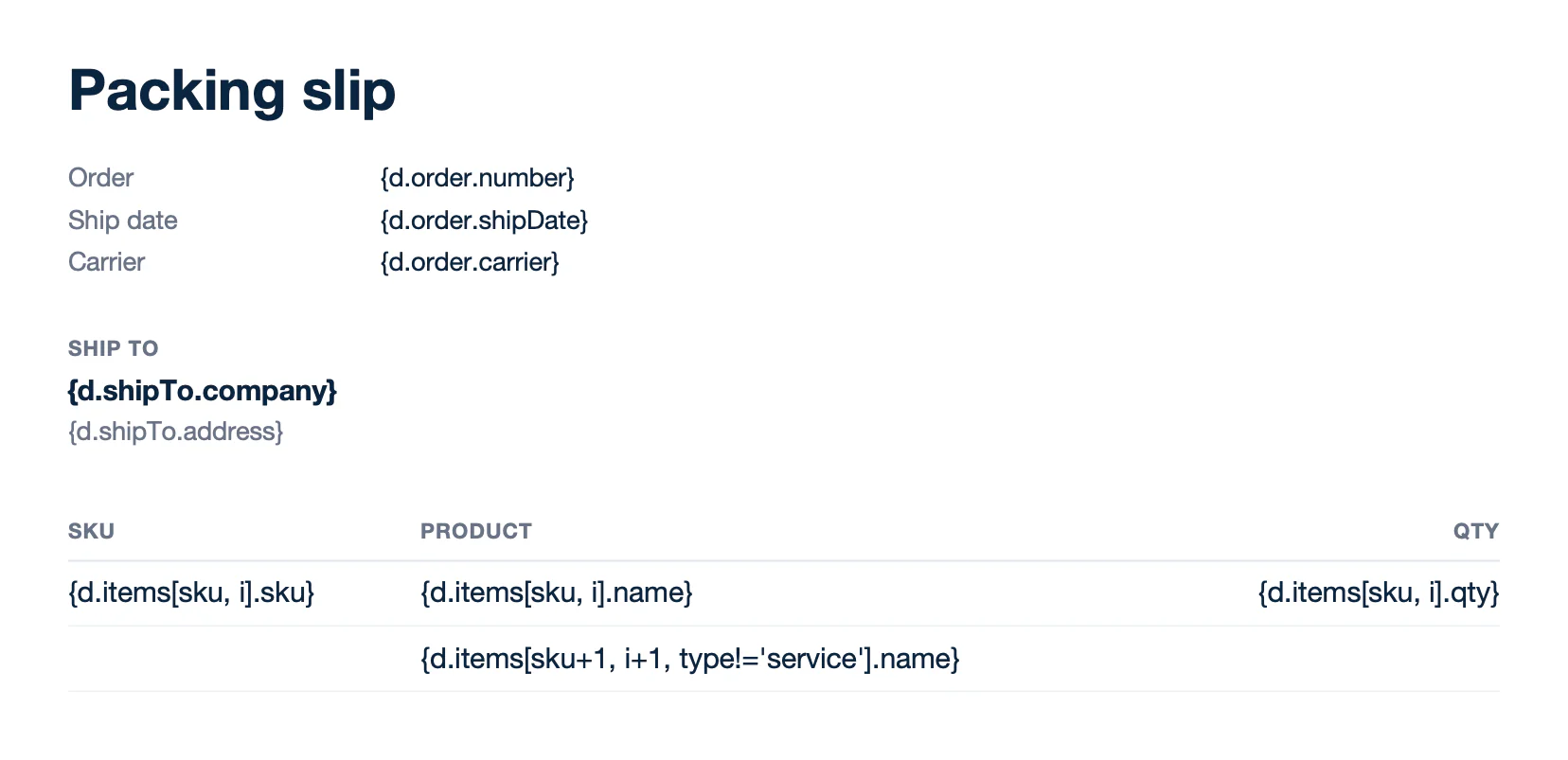
Text of template.docx:
```text
Packing slip
Order
{d.order.number}
Ship date
{d.order.shipDate}
Carrier
{d.order.carrier}
Ship to
{d.shipTo.company}
{d.shipTo.address}
SKU
Product
Qty
{d.items[sku, i].sku}
{d.items[sku, i].name}
{d.items[sku, i].qty}
{d.items[sku+1, i+1, type!='service'].name}
```
**Result** ([sort-filter-report.docx](/file/docx/sort-filter-report.docx)):
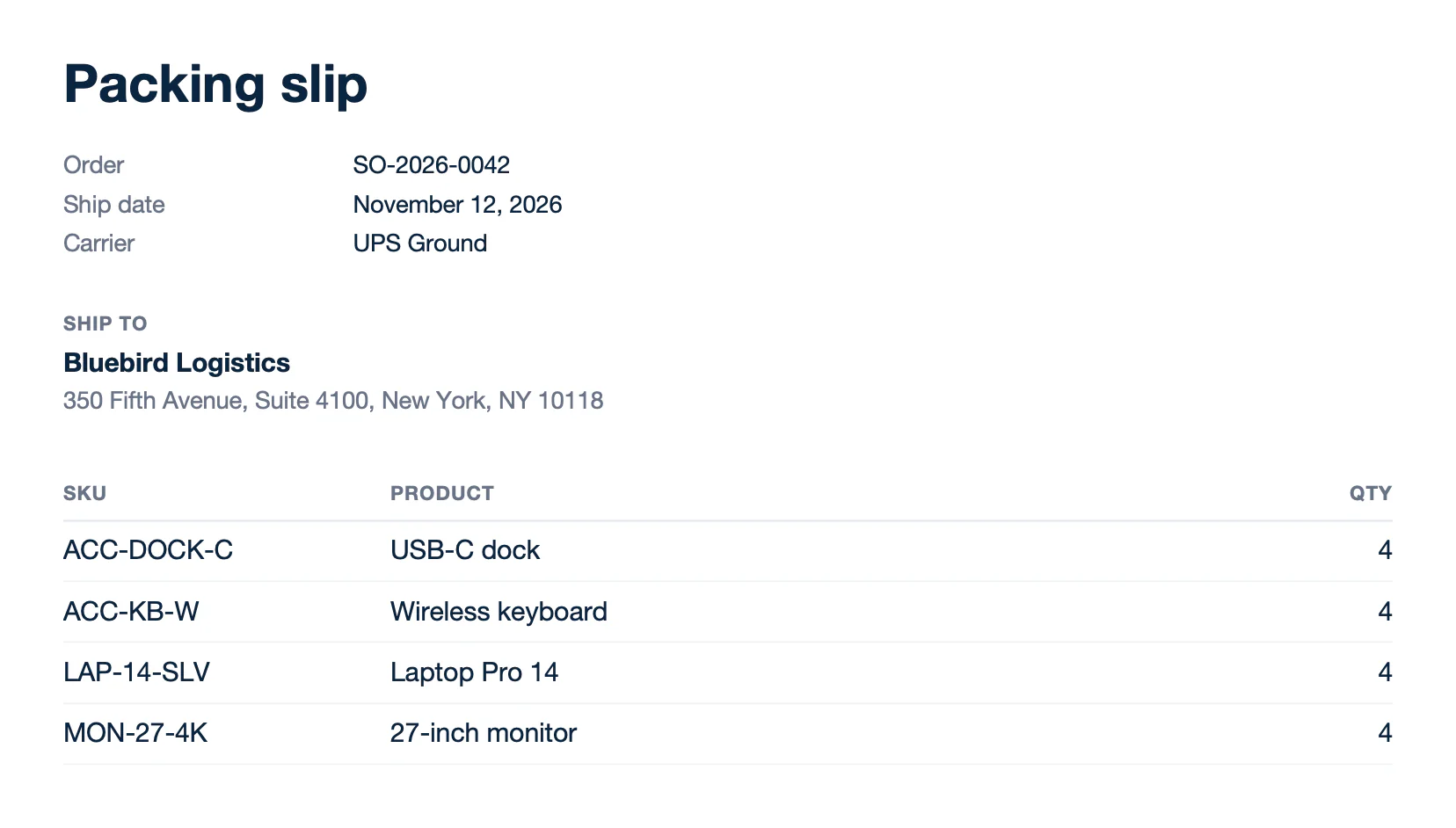
Text of report.docx:
```text
Packing slip
Order
SO-2026-0042
Ship date
November 12, 2026
Carrier
UPS Ground
Ship to
Bluebird Logistics
350 Fifth Avenue, Suite 4100, New York, NY 10118
SKU
Product
Qty
ACC-DOCK-C
USB-C dock
4
ACC-KB-W
Wireless keyboard
4
LAP-14-SLV
Laptop Pro 14
4
MON-27-4K
27-inch monitor
4
```
### Nested loops
A loop repeats the part of the document between its `[i]` and `[i+1]` tags. Here, it repeats a heading and its table for each category. `{d.categories[i].items[i].name}` repeats the items of each category, and the `{d.categories[i+1].name}` paragraph closes the category loop.
**Data** ([nested-data.json](/file/docx/nested-data.json)):
```json
{
"quote": { "number": "Q-2026-0187", "date": "November 10, 2026", "validUntil": "December 10, 2026" },
"categories": [
{
"name": "Hardware",
"subtotal": 9748,
"items": [
{ "name": "Laptop Pro 14 (x4)", "amount": 7596 },
{ "name": "27-inch monitor (x4)", "amount": 1396 },
{ "name": "USB-C dock (x4)", "amount": 756 }
]
},
{
"name": "Services",
"subtotal": 1246,
"items": [
{ "name": "Setup and onboarding", "amount": 450 },
{ "name": "Extended warranty, 3 years (x4)", "amount": 796 }
]
}
],
"total": 10994
}
```
**Template** ([nested-template.docx](/file/docx/nested-template.docx)):
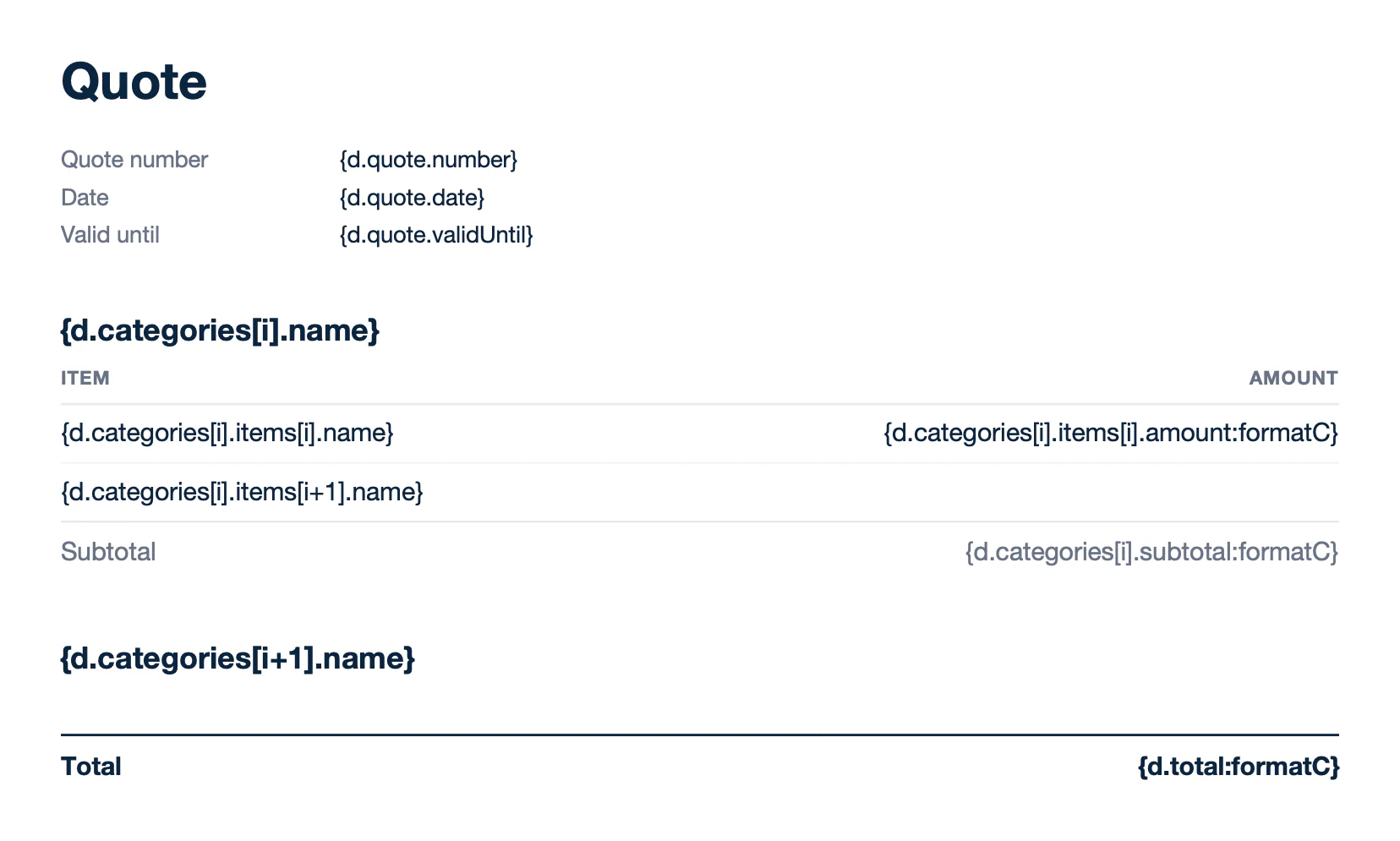
Text of template.docx:
```text
Quote
Quote number
{d.quote.number}
Date
{d.quote.date}
Valid until
{d.quote.validUntil}
{d.categories[i].name}
Item
Amount
{d.categories[i].items[i].name}
{d.categories[i].items[i].amount:formatC}
{d.categories[i].items[i+1].name}
Subtotal
{d.categories[i].subtotal:formatC}
{d.categories[i+1].name}
Total
{d.total:formatC}
```
**Result** ([nested-report.docx](/file/docx/nested-report.docx)):
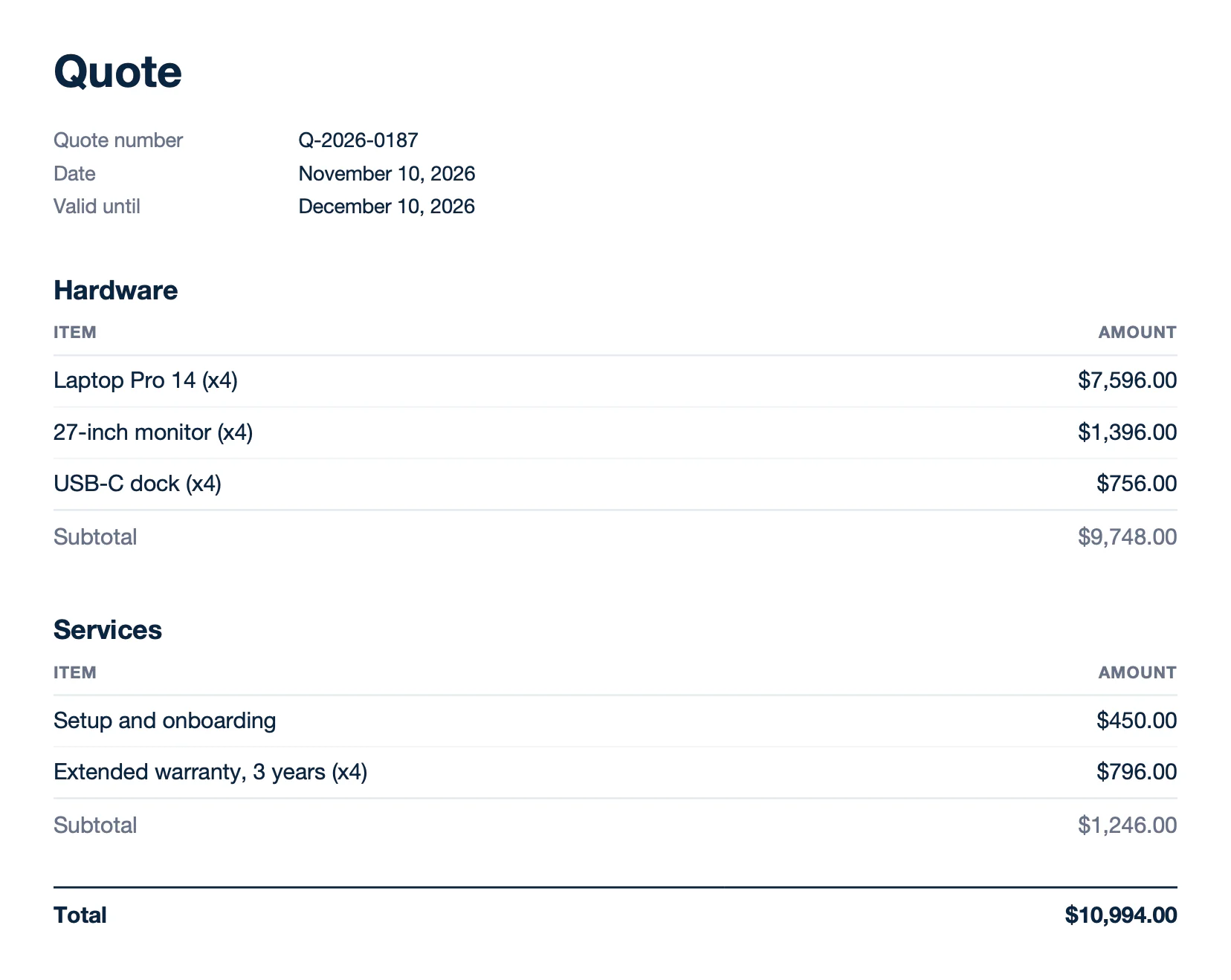
Text of report.docx:
```text
Quote
Quote number
Q-2026-0187
Date
November 10, 2026
Valid until
December 10, 2026
Hardware
Item
Amount
Laptop Pro 14 (x4)
$7,596.00
27-inch monitor (x4)
$1,396.00
USB-C dock (x4)
$756.00
Subtotal
$9,748.00
Services
Item
Amount
Setup and onboarding
$450.00
Extended warranty, 3 years (x4)
$796.00
Subtotal
$1,246.00
Total
$10,994.00
```
### Lists
Loops repeat paragraphs too. Write the `[i]` and `[i+1]` tags in two consecutive items of a bulleted or numbered list. Word numbers the generated items. `deliverables` is an array of strings, so the tag has no attribute: `{d.deliverables[i]}`.
**Data** ([lists-data.json](/file/docx/lists-data.json)):
```json
{
"project": { "name": "Workplace refresh", "client": "Bluebird Logistics", "start": "December 1, 2026" },
"deliverables": [
"40 laptops imaged and enrolled in device management",
"Docking stations and monitors installed at each desk",
"Onboarding session for 40 employees",
"Asset inventory delivered as a spreadsheet"
],
"milestones": [
{ "name": "Kick-off meeting", "date": "December 1" },
{ "name": "Hardware delivery", "date": "December 8" },
{ "name": "Installation and training", "date": "December 10" },
{ "name": "Acceptance", "date": "December 15" }
]
}
```
**Template** ([lists-template.docx](/file/docx/lists-template.docx)):
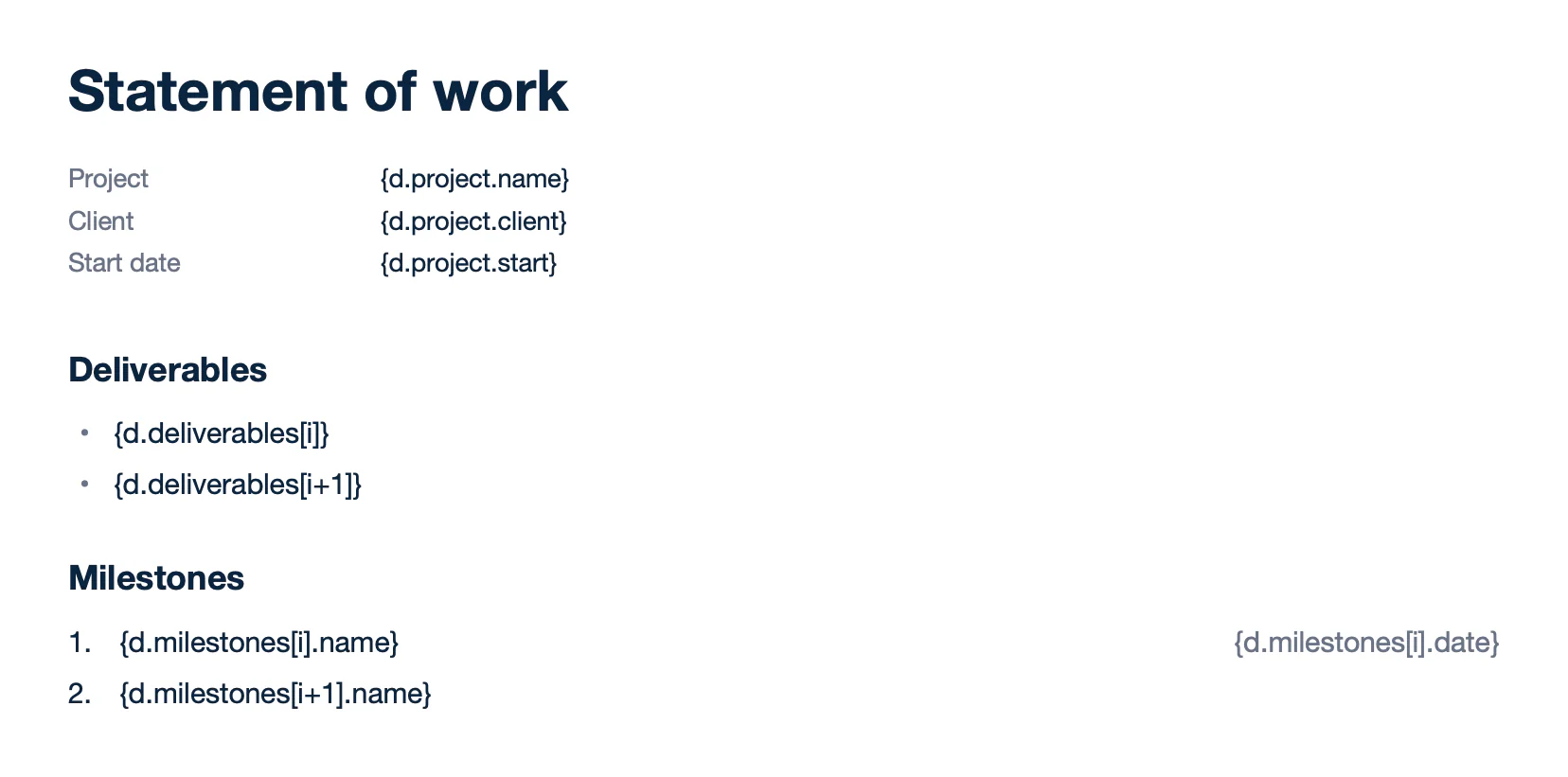
Text of template.docx:
```text
Statement of work
Project
{d.project.name}
Client
{d.project.client}
Start date
{d.project.start}
Deliverables
{d.deliverables[i]}
{d.deliverables[i+1]}
Milestones
{d.milestones[i].name} {d.milestones[i].date}
{d.milestones[i+1].name}
```
**Result** ([lists-report.docx](/file/docx/lists-report.docx)):
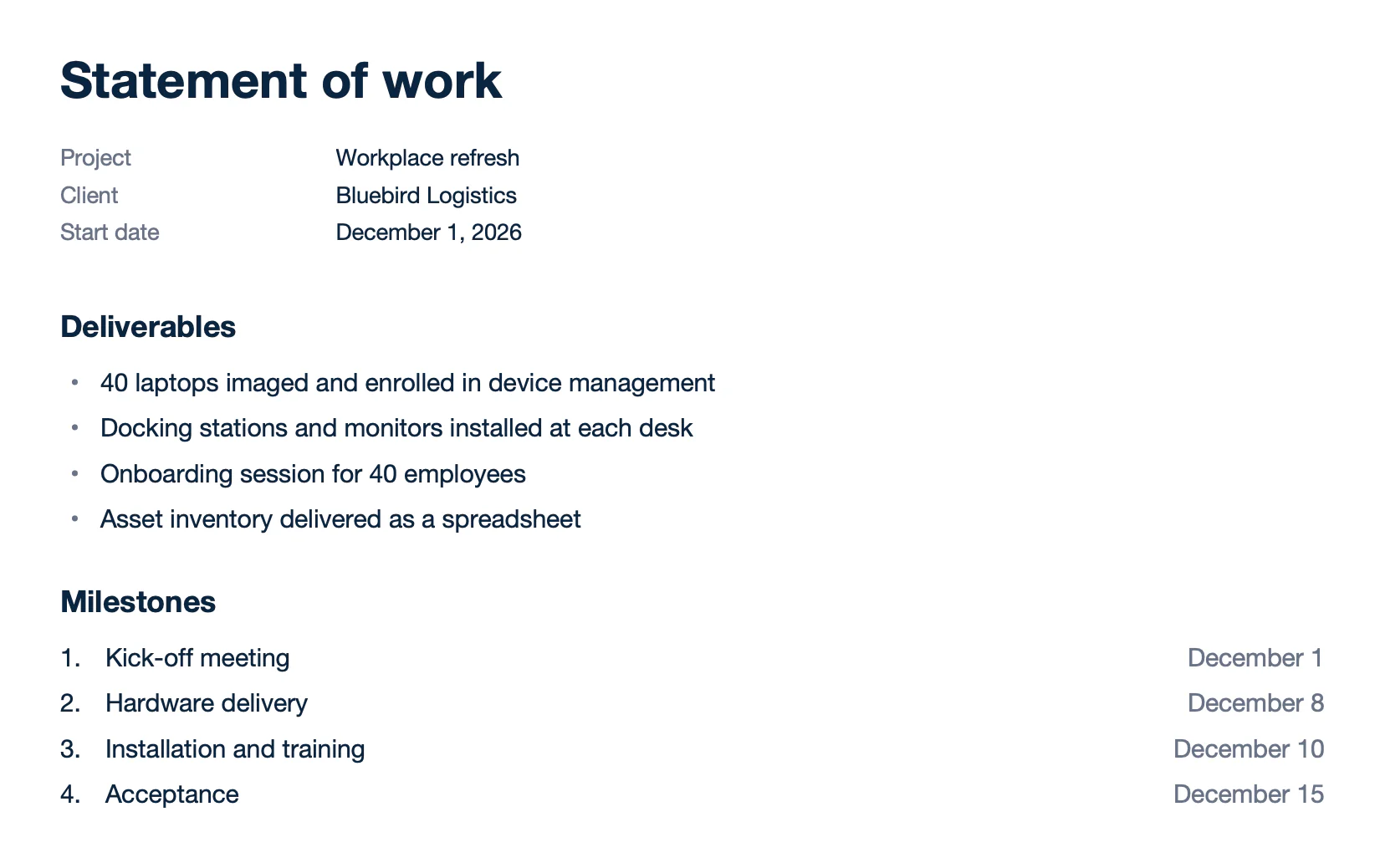
Text of report.docx:
```text
Statement of work
Project
Workplace refresh
Client
Bluebird Logistics
Start date
December 1, 2026
Deliverables
40 laptops imaged and enrolled in device management
Docking stations and monitors installed at each desk
Onboarding session for 40 employees
Asset inventory delivered as a spreadsheet
Milestones
Kick-off meeting December 1
Hardware delivery December 8
Installation and training December 10
Acceptance December 15
```
### Horizontal loops
Write the `[i]` and `[i+1]` tags in two adjacent columns to repeat columns instead of rows. Each row needs its own `[i+1]` tag, like `{d.plans[i+1]}`. Learn more about [horizontal loops](/documentation/design/repetitions/with-arrays.md#horizontal-loops-repeat-columns).
**Data** ([horizontal-data.json](/file/docx/horizontal-data.json)):
```json
{
"plans": [
{ "name": "Starter", "price": 29, "users": "5", "storage": "100 GB", "support": "Email" },
{ "name": "Business", "price": 99, "users": "25", "storage": "1 TB", "support": "Email and chat" },
{ "name": "Enterprise", "price": 299, "users": "Unlimited", "storage": "10 TB", "support": "24/7 phone" }
]
}
```
**Template** ([horizontal-template.docx](/file/docx/horizontal-template.docx)):
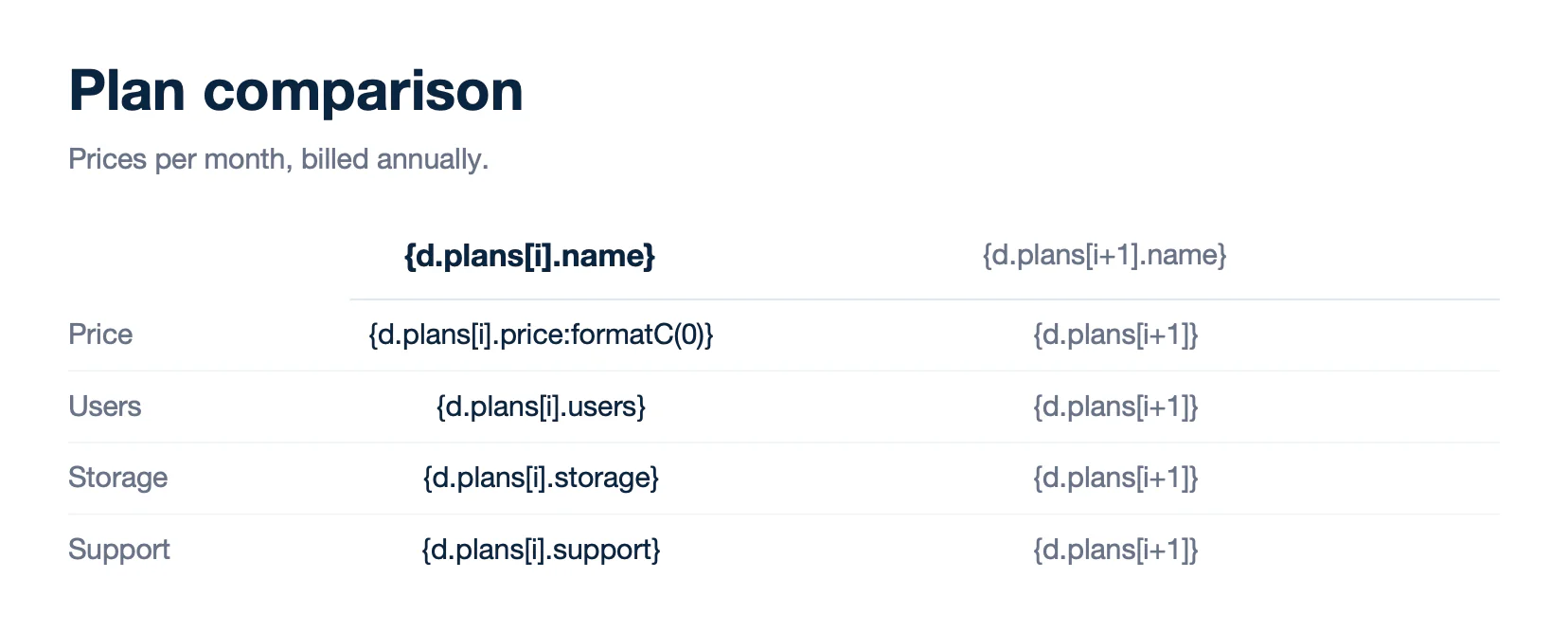
Text of template.docx:
```text
Plan comparison
Prices per month, billed annually.
{d.plans[i].name}
{d.plans[i+1].name}
Price
{d.plans[i].price:formatC(0)}
{d.plans[i+1]}
Users
{d.plans[i].users}
{d.plans[i+1]}
Storage
{d.plans[i].storage}
{d.plans[i+1]}
Support
{d.plans[i].support}
{d.plans[i+1]}
```
**Result** ([horizontal-report.docx](/file/docx/horizontal-report.docx)):
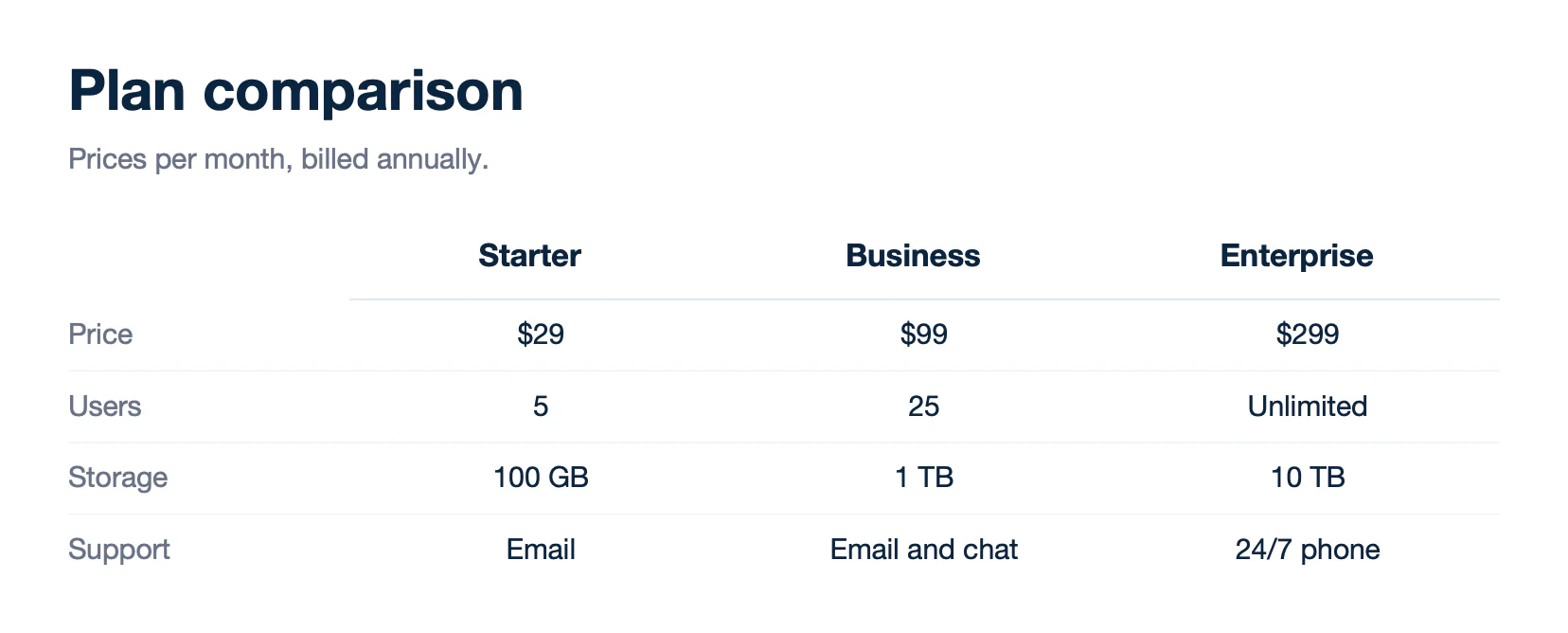
Text of report.docx:
```text
Plan comparison
Prices per month, billed annually.
Starter
Business
Enterprise
Price
$29
$99
$299
Users
5
25
Unlimited
Storage
100 GB
1 TB
10 TB
Support
Email
Email and chat
24/7 phone
```
Each generated column takes the width of the `[i]` column. Size it for the number of columns in your data.
### Pages
Repeat a whole page to generate one page per item, like certificates, letters or payslips. Write the first `[i]` tag in the first paragraph of the page. Then set **Page break before** on this paragraph (Paragraph > Line and Page Breaks).
**Data** ([pages-data.json](/file/docx/pages-data.json)):
```json
{
"course": { "name": "Advanced device management", "date": "November 6, 2026", "hours": 14 },
"attendees": [
{ "number": "C-2026-0107", "name": "Emma Johnson", "company": "Bluebird Logistics" },
{ "number": "C-2026-0108", "name": "Lucas Martin", "company": "Bluebird Logistics" }
]
}
```
**Template** ([pages-template.docx](/file/docx/pages-template.docx)):
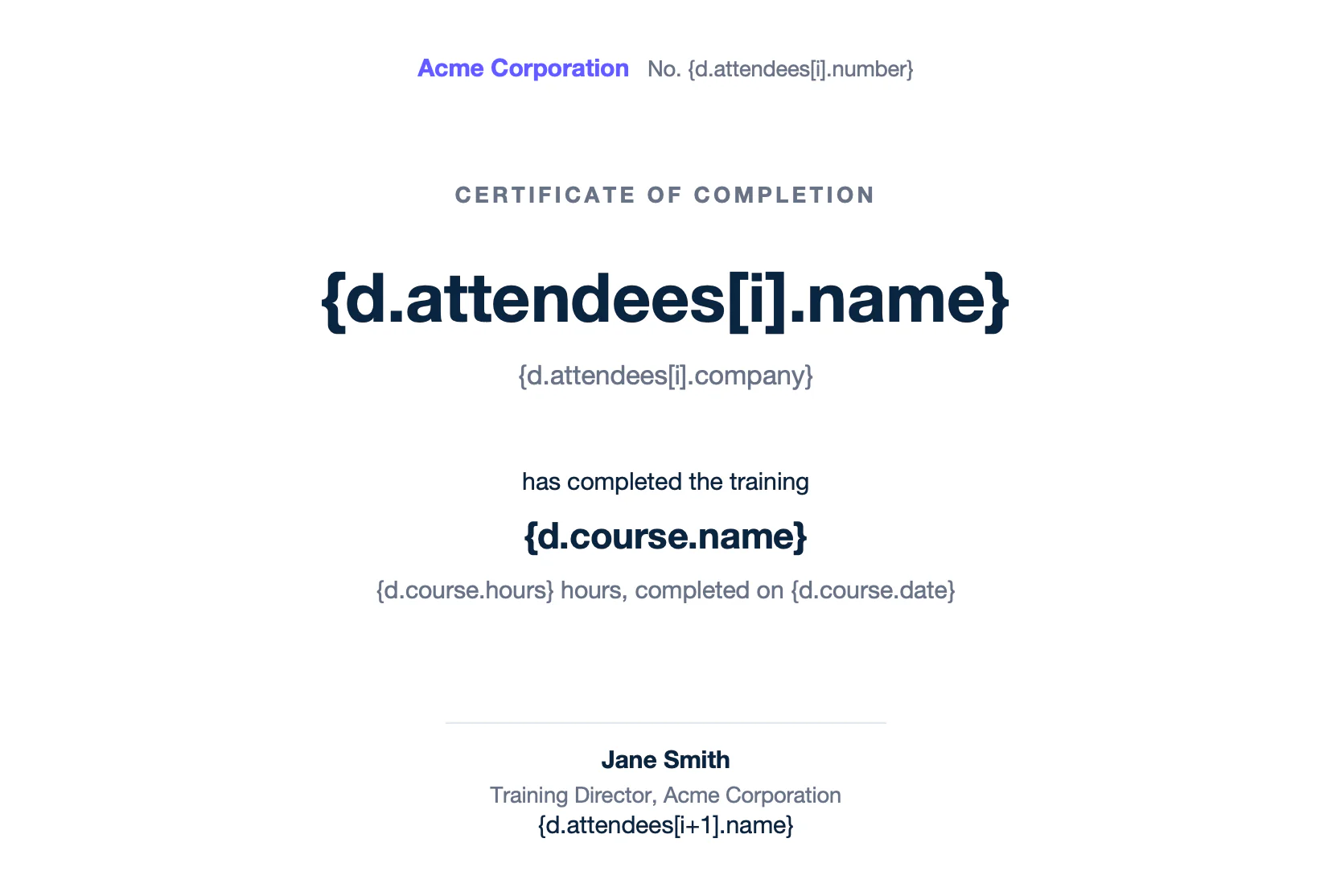
Text of template.docx:
```text
Acme Corporation No. {d.attendees[i].number}
Certificate of completion
{d.attendees[i].name}
{d.attendees[i].company}
has completed the training
{d.course.name}
{d.course.hours} hours, completed on {d.course.date}
Jane Smith
Training Director, Acme Corporation
{d.attendees[i+1].name}
```
**Result** ([pages-report.docx](/file/docx/pages-report.docx)):
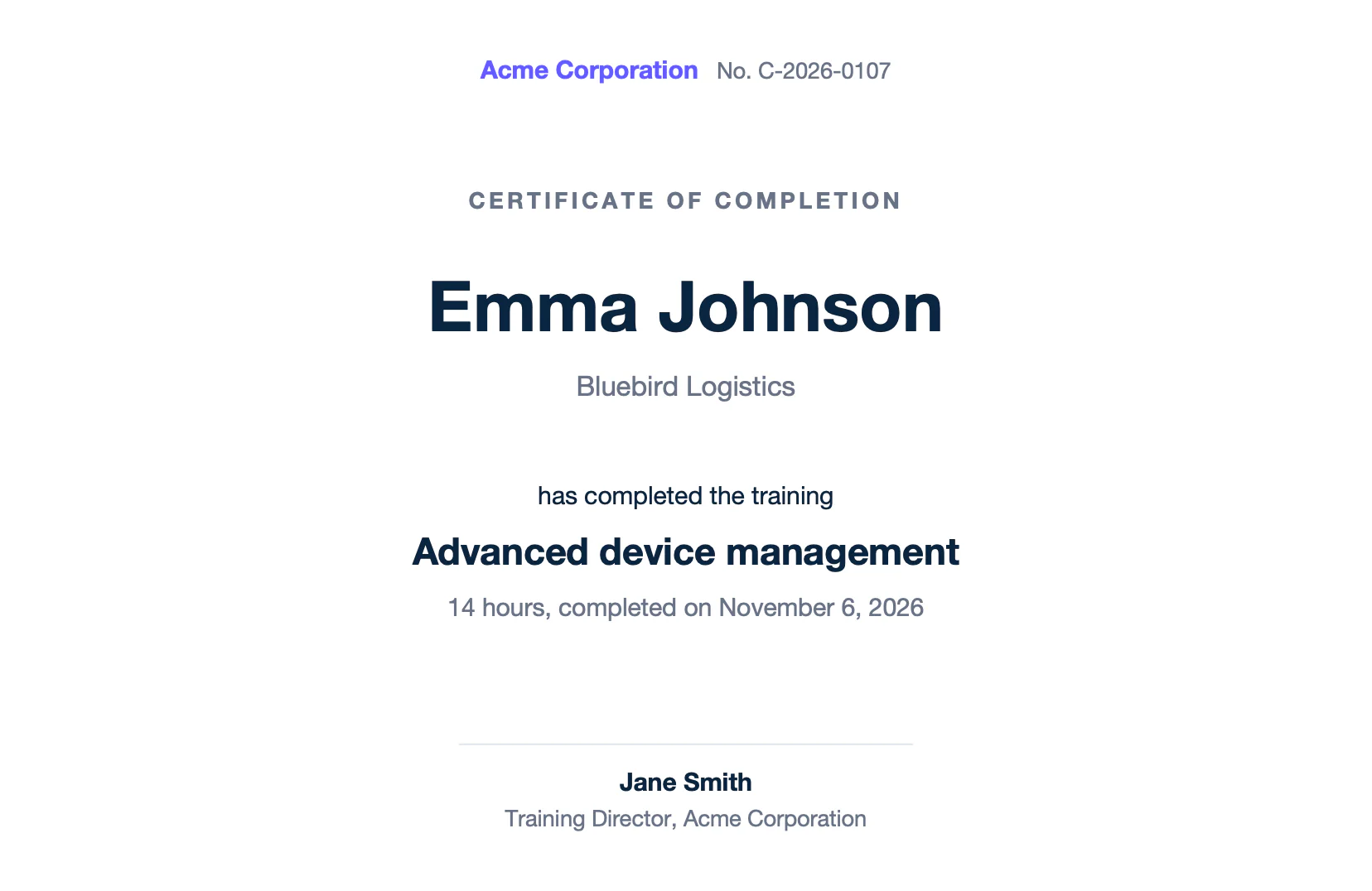
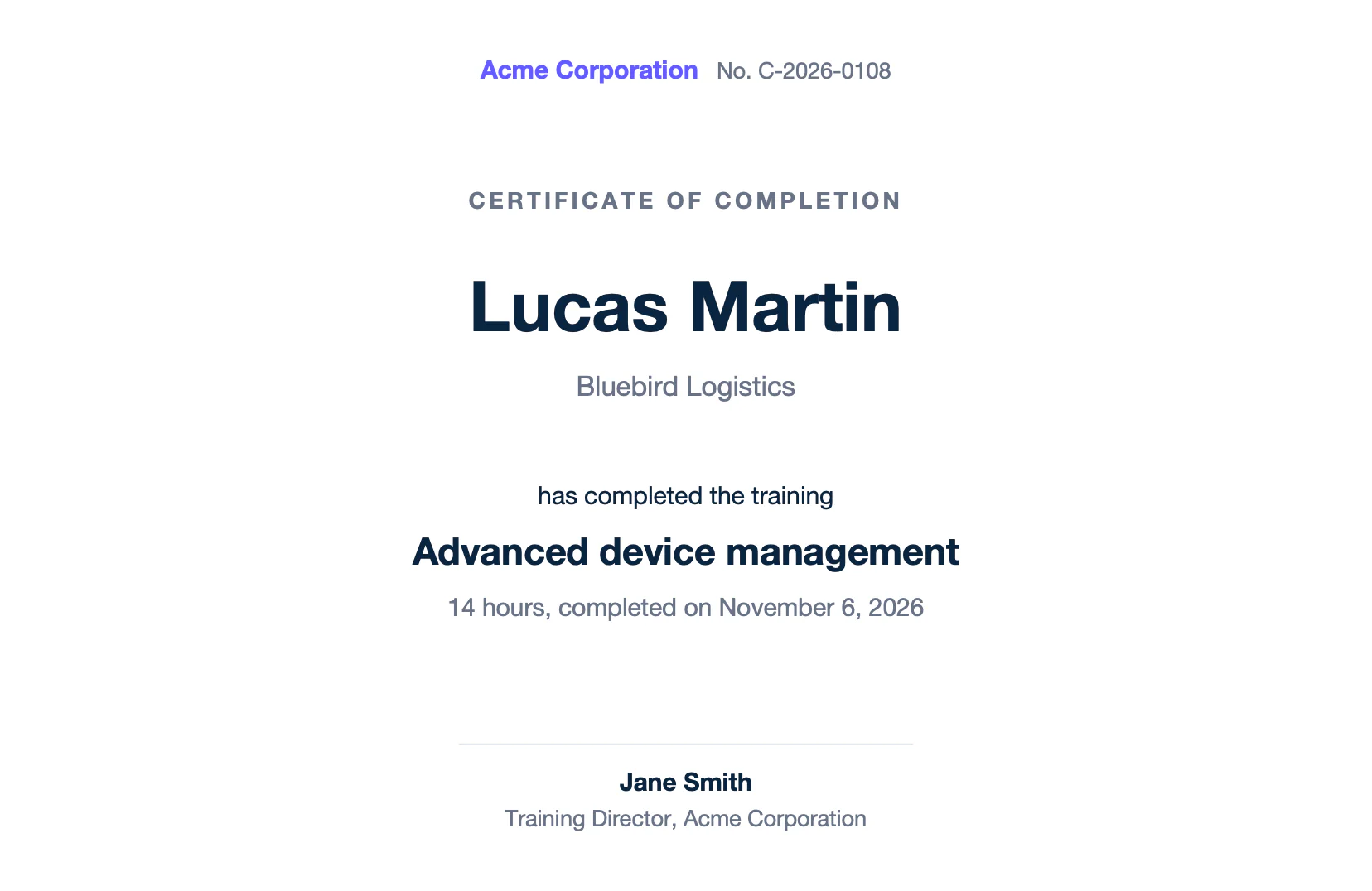
Text of report.docx:
```text
Acme Corporation No. C-2026-0107
Certificate of completion
Emma Johnson
Bluebird Logistics
has completed the training
Advanced device management
14 hours, completed on November 6, 2026
Jane Smith
Training Director, Acme Corporation
Acme Corporation No. C-2026-0108
Certificate of completion
Lucas Martin
Bluebird Logistics
has completed the training
Advanced device management
14 hours, completed on November 6, 2026
Jane Smith
Training Director, Acme Corporation
```
The loop starts at the paragraph that contains the first `[i]` tag. The paragraphs above it are printed once.
## Numbers and dates
Formatters print numbers, amounts and dates in the language of the report. This example uses `"lang": "en-us"`.
- `:formatC` prints currencies, and `:formatC(L, acc)` prints accounting amounts, like ($120.00).
- `:toWord(C)` writes an amount in words, for checks and contracts.
- `:formatN(1)` prints a number with one decimal, and `:formatD('LL')` prints a date.
**Data** ([numbers-data.json](/file/docx/numbers-data.json)):
```json
{
"receipt": "RCT-2026-0318",
"paidAt": "2026-11-10",
"method": "Bank transfer",
"amount": 1234.5,
"lateFee": 1.5,
"balance": -120
}
```
**Template** ([numbers-template.docx](/file/docx/numbers-template.docx)):
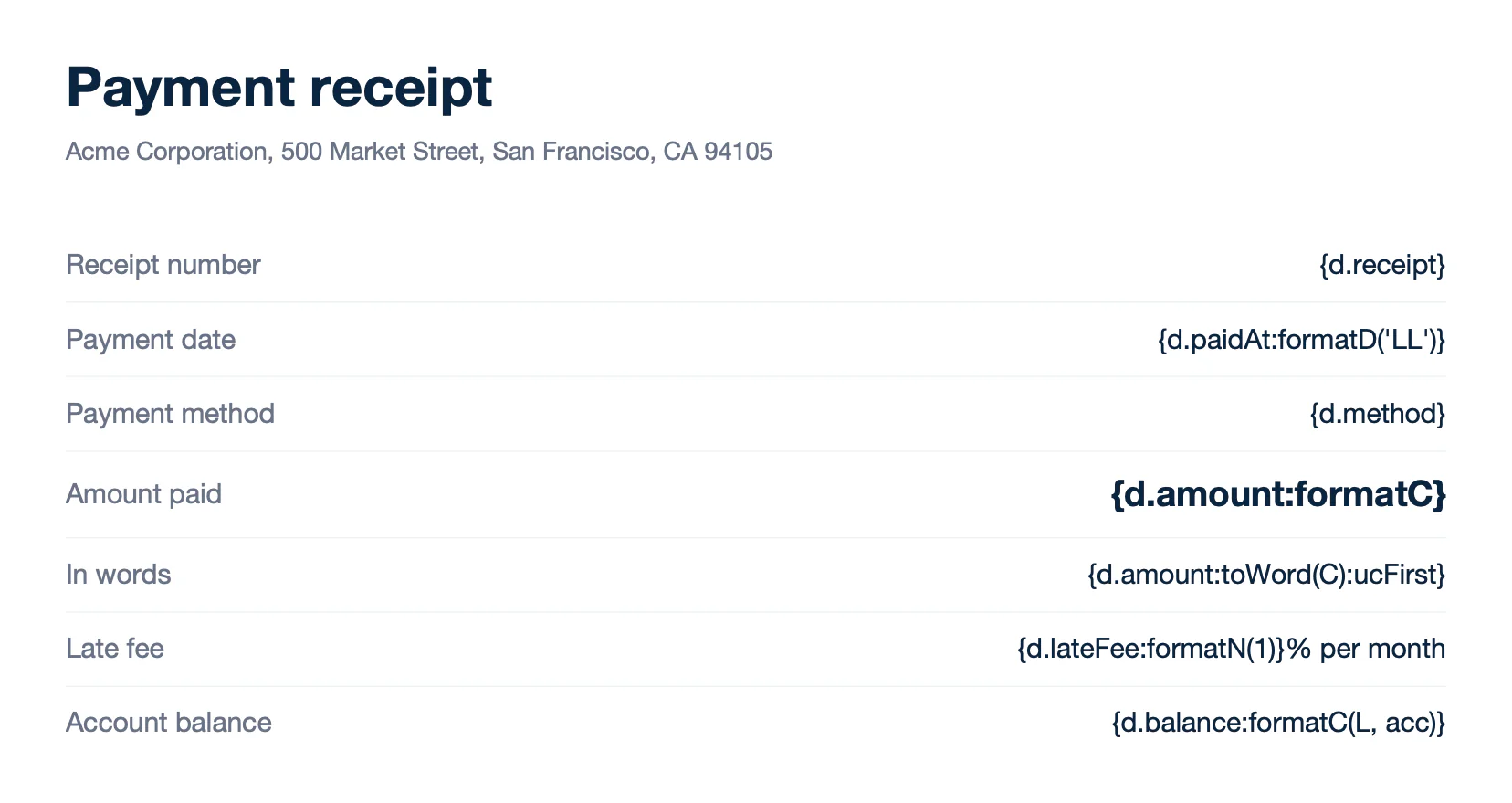
Text of template.docx:
```text
Payment receipt
Acme Corporation, 500 Market Street, San Francisco, CA 94105
Receipt number
{d.receipt}
Payment date
{d.paidAt:formatD('LL')}
Payment method
{d.method}
Amount paid
{d.amount:formatC}
In words
{d.amount:toWord(C):ucFirst}
Late fee
{d.lateFee:formatN(1)}% per month
Account balance
{d.balance:formatC(L, acc)}
```
**Result** ([numbers-report.docx](/file/docx/numbers-report.docx)):
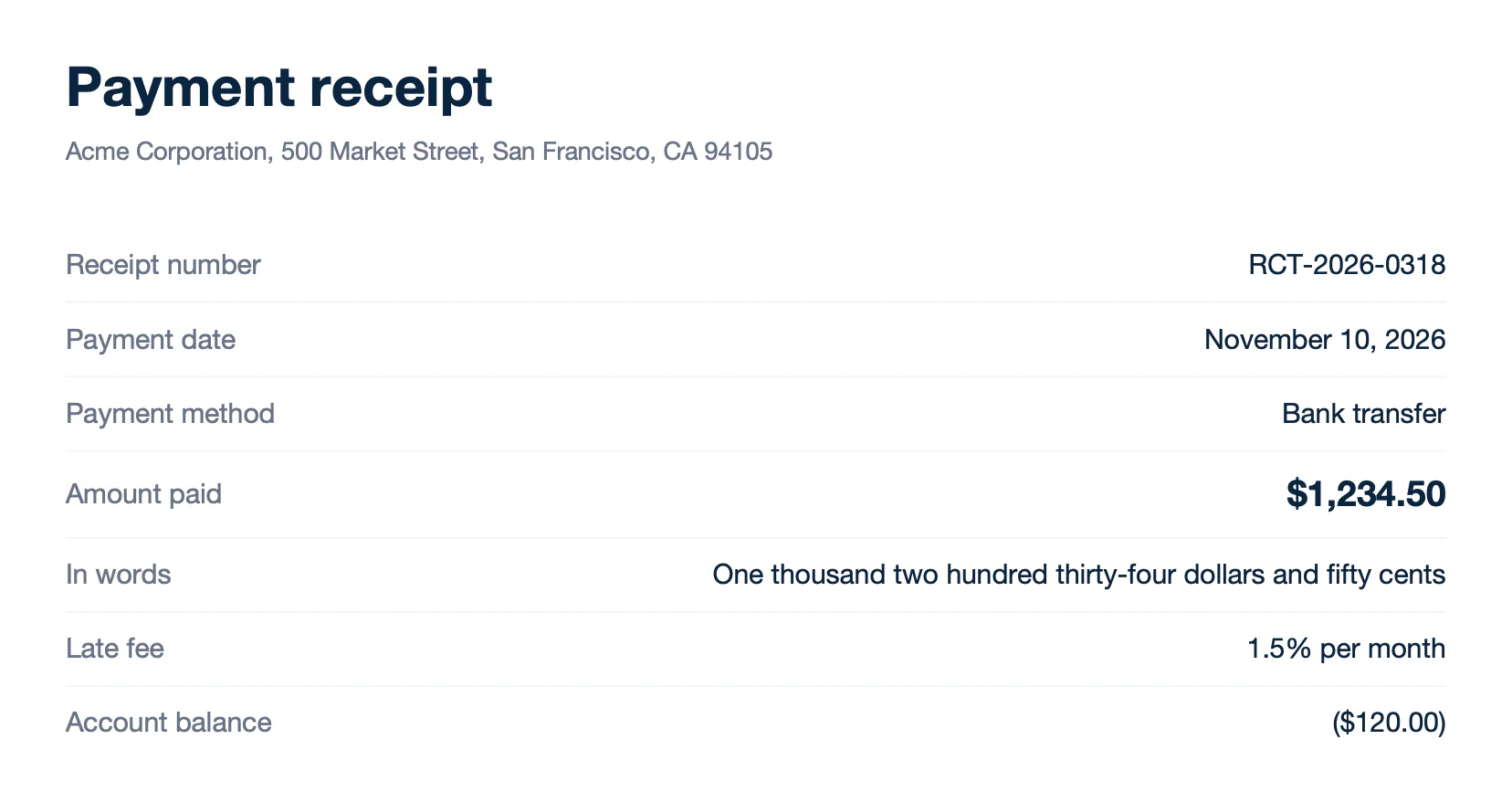
Text of report.docx:
```text
Payment receipt
Acme Corporation, 500 Market Street, San Francisco, CA 94105
Receipt number
RCT-2026-0318
Payment date
November 10, 2026
Payment method
Bank transfer
Amount paid
$1,234.50
In words
One thousand two hundred thirty-four dollars and fifty cents
Late fee
1.5% per month
Account balance
($120.00)
```
See the [number](/documentation/design/formatters/number.md), [currency](/documentation/design/formatters/currency.md) and [date](/documentation/design/formatters/date.md) formatters.
## Conditions
Conditions print a value or remove an element, depending on the data:
- **Inline conditions** print one value or another: `{d.order.paid:ifEQ(true):show('Paid'):elseShow('Payment due')}`, or a checkbox with `show('☒'):elseShow('☐')`.
- **Smart conditions** remove the element that contains their tag: `{d.discount:ifEQ(0):drop(row)}` removes the discount row, and `{d.note:ifEM:drop(p)}` removes the paragraph of an empty note.
**Data** ([conditions-data.json](/file/docx/conditions-data.json)):
```json
{
"order": { "number": "SO-2026-0042", "paid": false, "due": "December 10, 2026" },
"options": { "warranty": true, "installation": false, "recycling": true },
"subtotal": 10514,
"discount": 0,
"total": 10514,
"note": ""
}
```
**Template** ([conditions-template.docx](/file/docx/conditions-template.docx)):
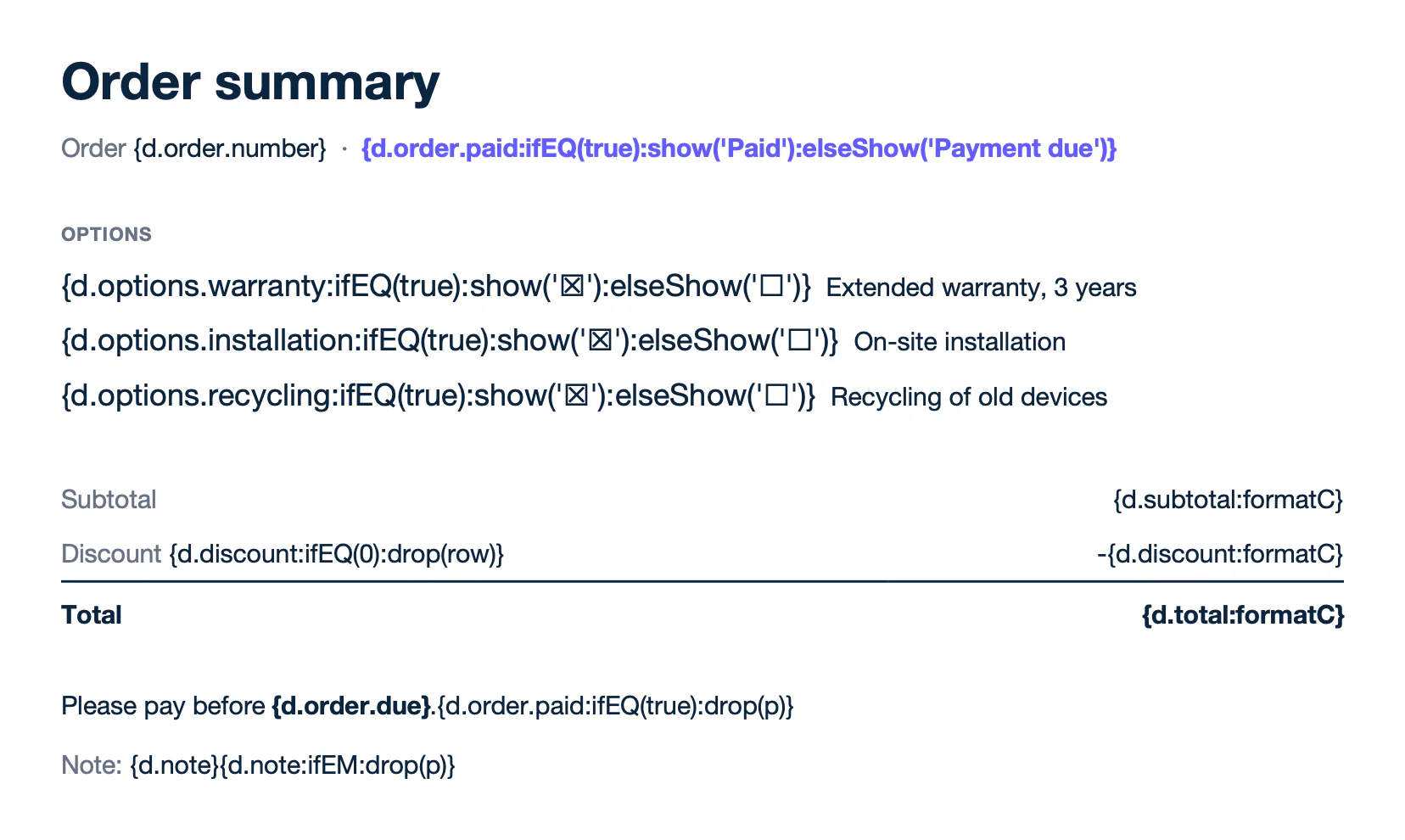
Text of template.docx:
```text
Order summary
Order {d.order.number} · {d.order.paid:ifEQ(true):show('Paid'):elseShow('Payment due')}
Options
{d.options.warranty:ifEQ(true):show('☒'):elseShow('☐')} Extended warranty, 3 years
{d.options.installation:ifEQ(true):show('☒'):elseShow('☐')} On-site installation
{d.options.recycling:ifEQ(true):show('☒'):elseShow('☐')} Recycling of old devices
Subtotal
{d.subtotal:formatC}
Discount {d.discount:ifEQ(0):drop(row)}
-{d.discount:formatC}
Total
{d.total:formatC}
Please pay before {d.order.due}.{d.order.paid:ifEQ(true):drop(p)}
Note: {d.note}{d.note:ifEM:drop(p)}
```
**Result** ([conditions-report.docx](/file/docx/conditions-report.docx)):
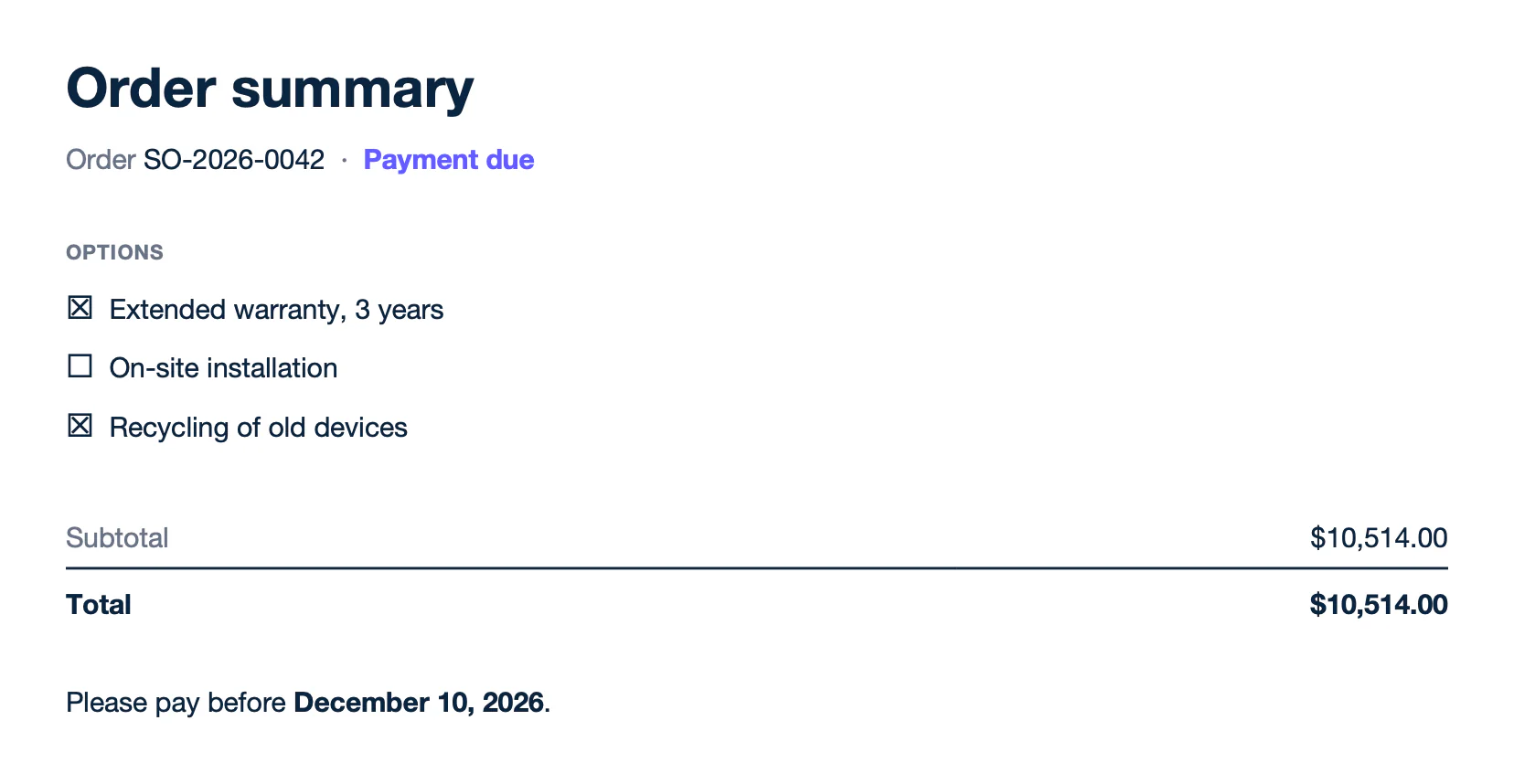
Text of report.docx:
```text
Order summary
Order SO-2026-0042 · Payment due
Options
☒ Extended warranty, 3 years
☐ On-site installation
☒ Recycling of old devices
Subtotal
$10,514.00
Total
$10,514.00
Please pay before December 10, 2026.
```
`:drop` also removes a table `(table)`, a picture `(img)` or a chart `(chart)`. Add a count to remove several paragraphs or rows: `:drop(p, 3)` removes the paragraph of the tag and the next two. Learn more about [inline conditions](/documentation/design/conditions/inline-conditions.md) and [smart conditions](/documentation/design/conditions/smart-conditions.md).
### Conditional blocks
Write `:showBegin` and `:showEnd` around several paragraphs to print them only when a condition is true, like the clauses of a contract. Write the begin tag at the end of the paragraph above the block, and the end tag at the end of the last paragraph of the block. When the condition is false, the block is removed without leaving an empty paragraph, and Word renumbers the clauses.
**Data** ([blocks-data.json](/file/docx/blocks-data.json)):
```json
{
"customer": { "company": "Bluebird Logistics", "region": "US" },
"plan": "Enterprise",
"fee": 2490,
"start": "December 1, 2026"
}
```
**Template** ([blocks-template.docx](/file/docx/blocks-template.docx)):
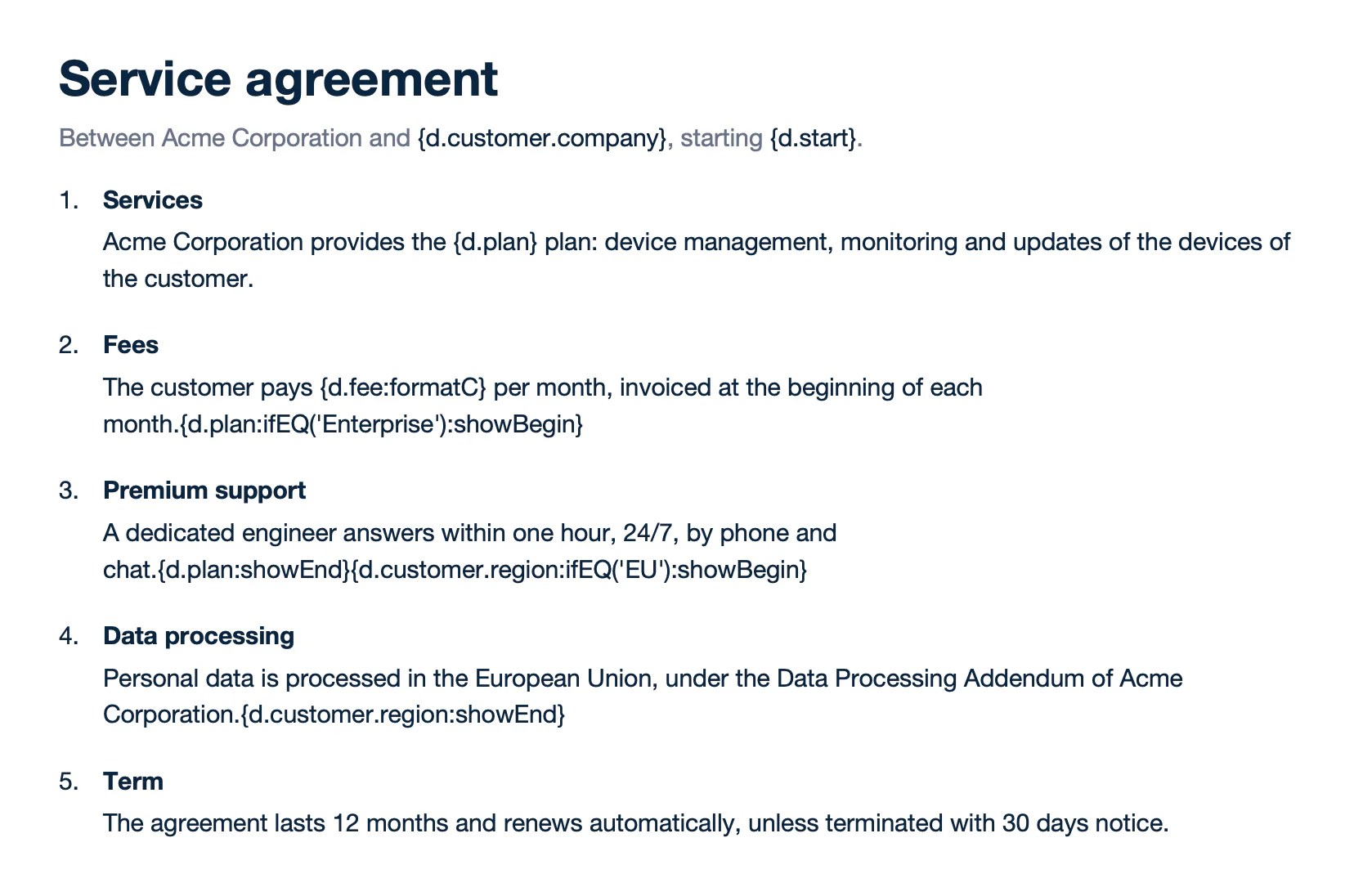
Text of template.docx:
```text
Service agreement
Between Acme Corporation and {d.customer.company}, starting {d.start}.
Services
Acme Corporation provides the {d.plan} plan: device management, monitoring and updates of the devices of the customer.
Fees
The customer pays {d.fee:formatC} per month, invoiced at the beginning of each month.{d.plan:ifEQ('Enterprise'):showBegin}
Premium support
A dedicated engineer answers within one hour, 24/7, by phone and chat.{d.plan:showEnd}{d.customer.region:ifEQ('EU'):showBegin}
Data processing
Personal data is processed in the European Union, under the Data Processing Addendum of Acme Corporation.{d.customer.region:showEnd}
Term
The agreement lasts 12 months and renews automatically, unless terminated with 30 days notice.
```
**Result** ([blocks-report.docx](/file/docx/blocks-report.docx)):
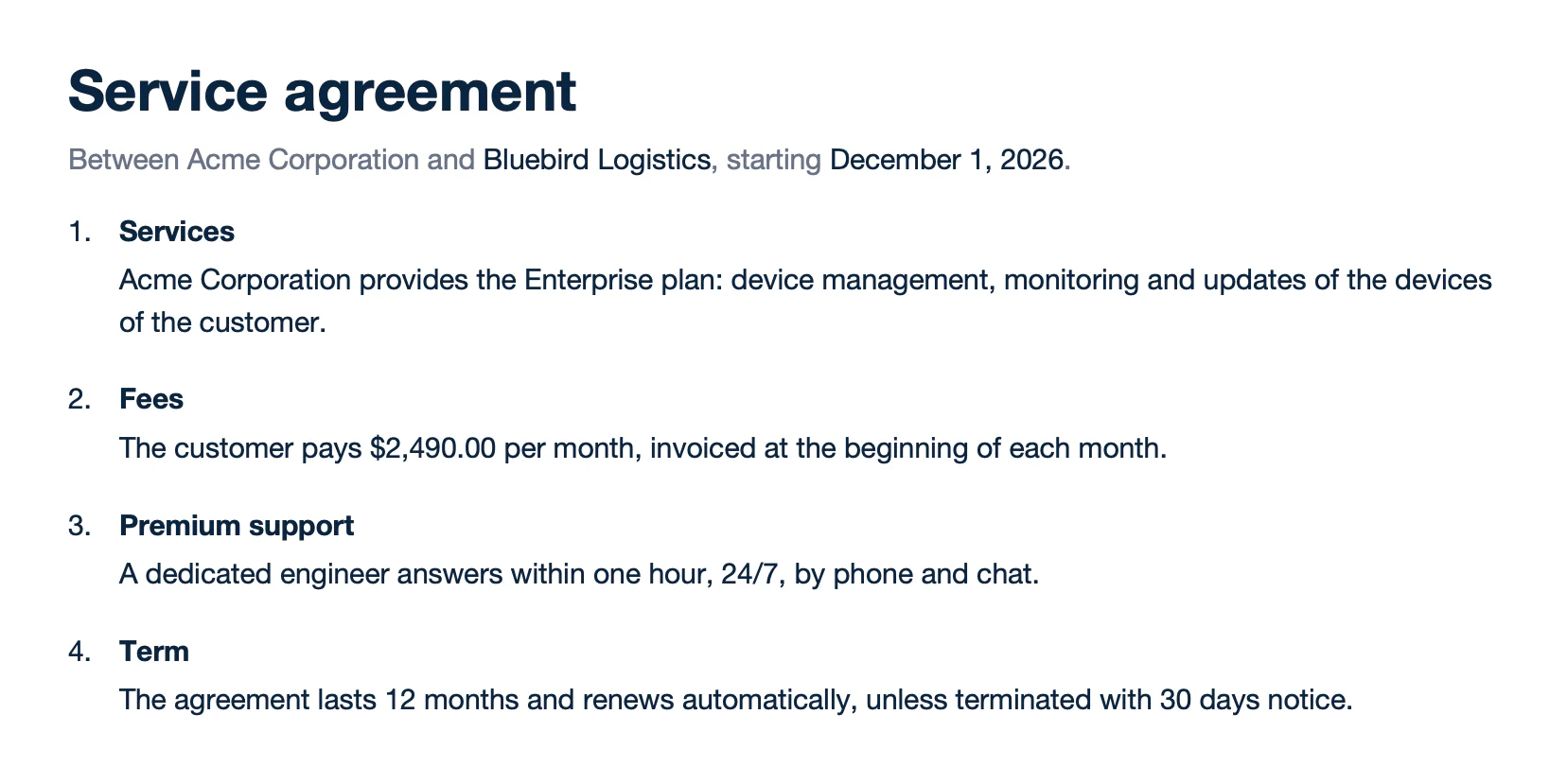
Text of report.docx:
```text
Service agreement
Between Acme Corporation and Bluebird Logistics, starting December 1, 2026.
Services
Acme Corporation provides the Enterprise plan: device management, monitoring and updates of the devices of the customer.
Fees
The customer pays $2,490.00 per month, invoiced at the beginning of each month.
Premium support
A dedicated engineer answers within one hour, 24/7, by phone and chat.
Term
The agreement lasts 12 months and renews automatically, unless terminated with 30 days notice.
```
A begin tag at the start of a paragraph leaves an empty paragraph in the report. `:hideBegin` and `:hideEnd` work the same way. Learn more about [conditional blocks](/documentation/design/conditions/conditional-blocks.md).
### Remove columns
`:drop(col)` removes the table column that contains its tag. Write it in one cell of the column: `{d.hasDiscount:ifEQ(false):drop(col)}` removes the discount column when no item has a discount.
**Data** ([columns-data.json](/file/docx/columns-data.json)):
```json
{
"quote": "Q-2026-0188",
"hasDiscount": false,
"items": [
{ "name": "Laptop Pro 14", "qty": 4, "discount": 0, "amount": 7596 },
{ "name": "27-inch monitor", "qty": 4, "discount": 0, "amount": 1396 },
{ "name": "USB-C dock", "qty": 4, "discount": 0, "amount": 756 }
]
}
```
**Template** ([columns-template.docx](/file/docx/columns-template.docx)):
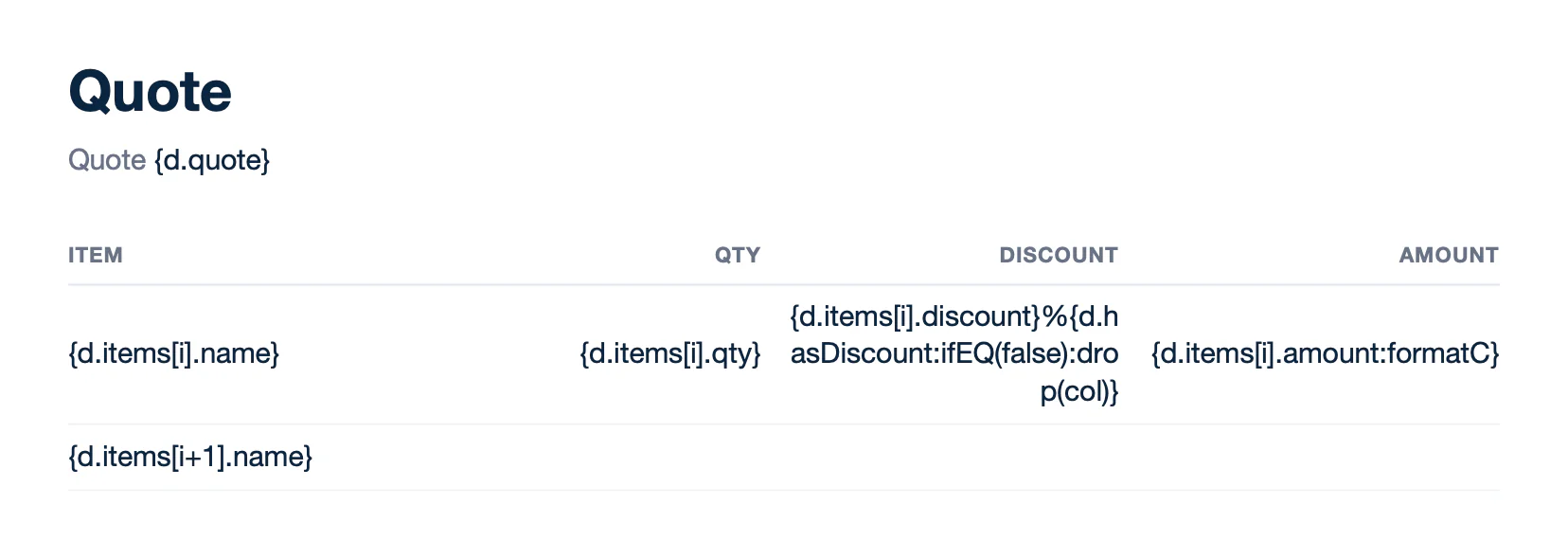
Text of template.docx:
```text
Quote
Quote {d.quote}
Item
Qty
Discount
Amount
{d.items[i].name}
{d.items[i].qty}
{d.items[i].discount}%{d.hasDiscount:ifEQ(false):drop(col)}
{d.items[i].amount:formatC}
{d.items[i+1].name}
```
**Result** ([columns-report.docx](/file/docx/columns-report.docx)):
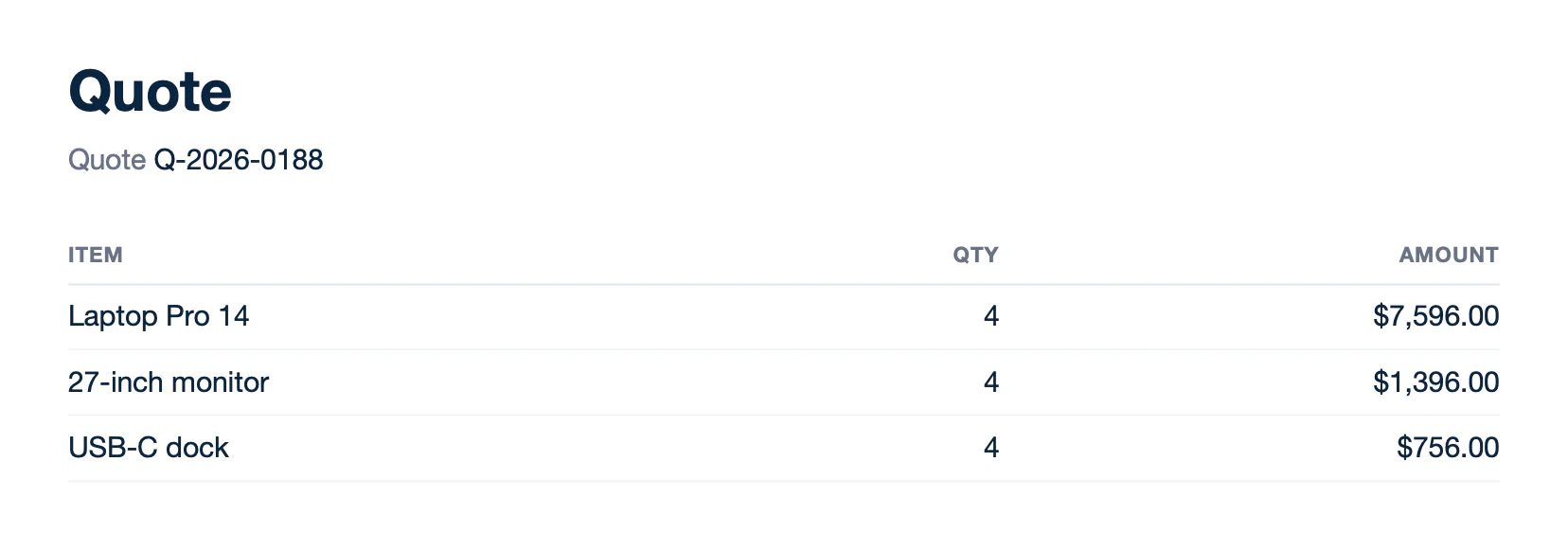
Text of report.docx:
```text
Quote
Quote Q-2026-0188
Item
Qty
Amount
Laptop Pro 14
4
$7,596.00
27-inch monitor
4
$1,396.00
USB-C dock
4
$756.00
```
Columns with merged cells cannot be removed. Learn more about [removing columns](/documentation/design/conditions/smart-conditions.md#drop-keep-element).
## Totals
Math formatters compute a value for each row: `{d.items[i].qty:mul(.price)}` multiplies the quantity by the price of the item. Aggregators compute a value for the whole array: `{d.items[].qty:mul(.price):aggSum}` sums the row amounts. Store a result with `:set` to reuse it, like the subtotal used for the tax and the total.
**Data** ([totals-data.json](/file/docx/totals-data.json)):
```json
{
"invoice": "INV-2026-0043",
"taxRate": 8.25,
"items": [
{ "name": "Laptop Pro 14", "qty": 4, "price": 1899 },
{ "name": "27-inch monitor", "qty": 4, "price": 349 },
{ "name": "USB-C dock", "qty": 4, "price": 189 },
{ "name": "Wireless keyboard", "qty": 4, "price": 79 }
]
}
```
**Template** ([totals-template.docx](/file/docx/totals-template.docx)):
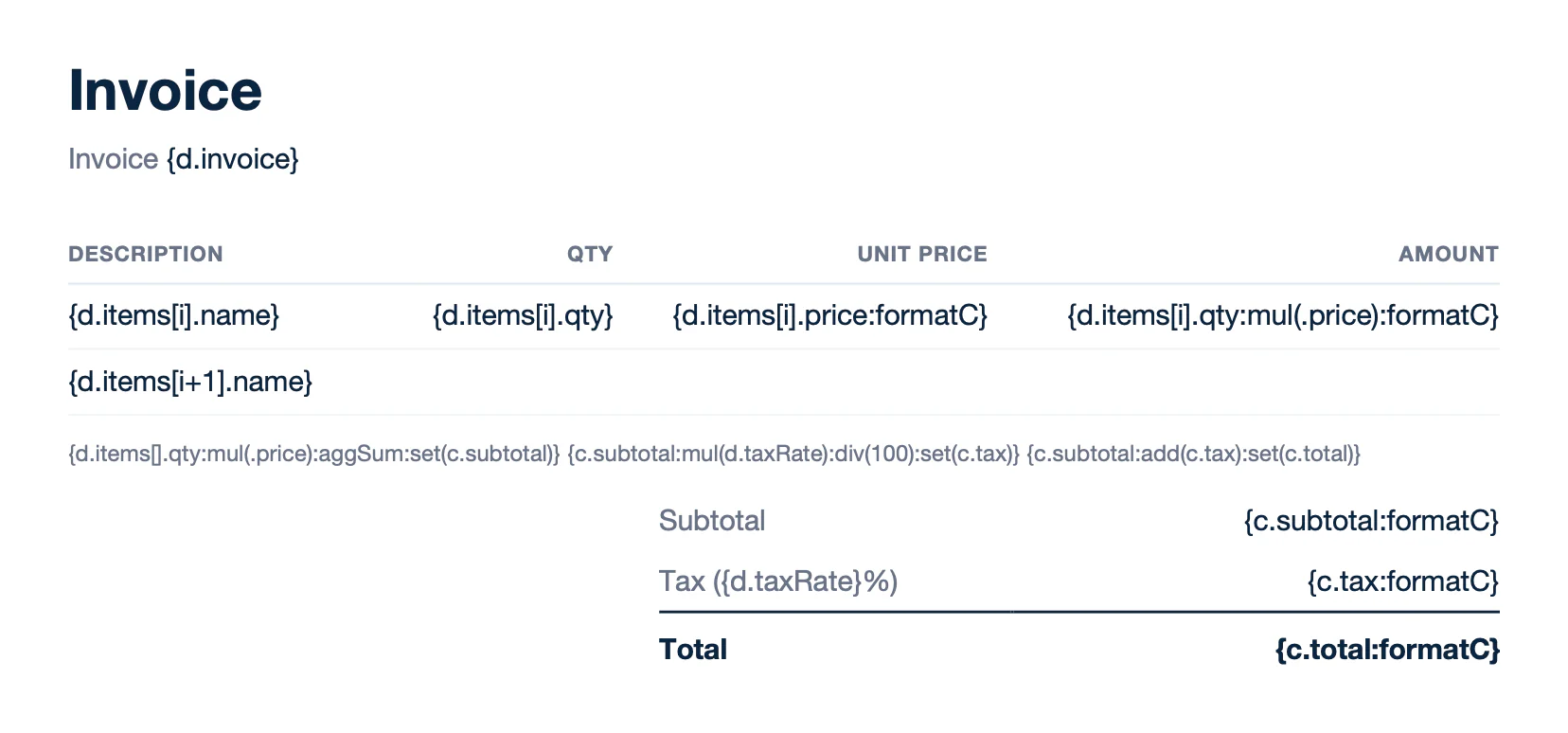
Text of template.docx:
```text
Invoice
Invoice {d.invoice}
Description
Qty
Unit price
Amount
{d.items[i].name}
{d.items[i].qty}
{d.items[i].price:formatC}
{d.items[i].qty:mul(.price):formatC}
{d.items[i+1].name}
{d.items[].qty:mul(.price):aggSum:set(c.subtotal)} {c.subtotal:mul(d.taxRate):div(100):set(c.tax)} {c.subtotal:add(c.tax):set(c.total)}
Subtotal
{c.subtotal:formatC}
Tax ({d.taxRate}%)
{c.tax:formatC}
Total
{c.total:formatC}
```
**Result** ([totals-report.docx](/file/docx/totals-report.docx)):
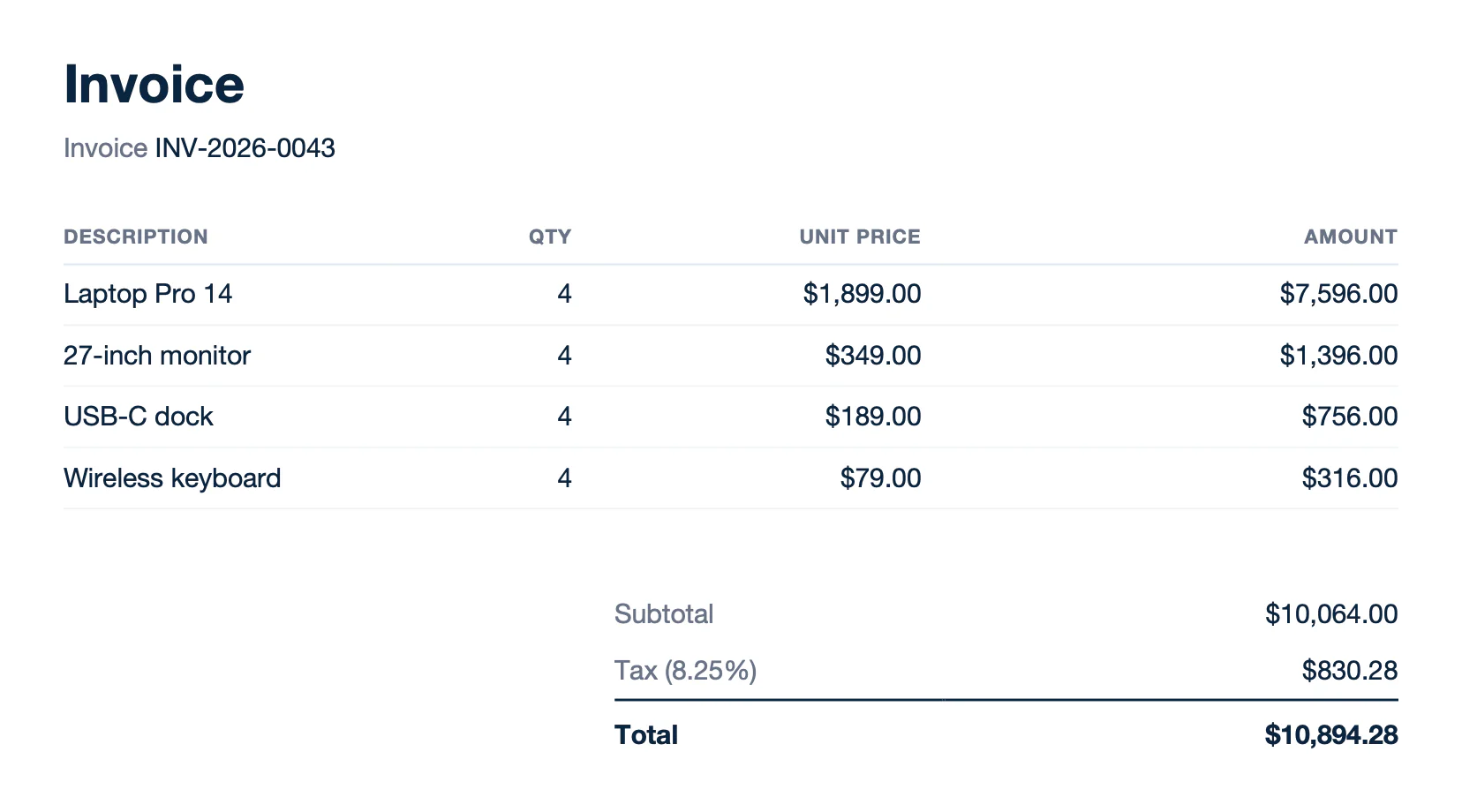
Text of report.docx:
```text
Invoice
Invoice INV-2026-0043
Description
Qty
Unit price
Amount
Laptop Pro 14
4
$1,899.00
$7,596.00
27-inch monitor
4
$349.00
$1,396.00
USB-C dock
4
$189.00
$756.00
Wireless keyboard
4
$79.00
$316.00
Subtotal
$10,064.00
Tax (8.25%)
$830.28
Total
$10,894.28
```
A `:set` tag prints nothing. Write it above the tags that read its value. Aggregators are an Enterprise feature. Learn more about [math formatters](/documentation/design/computation/simple-mathematics.md), [aggregators](/documentation/design/computation/aggregation.md) and [`:set`](/documentation/design/computation/store-and-transform.md).
## Colors
`:color` applies a color from the data. `{d.invoices[i].color:color(p)}` colors the text of the status, and `{d.invoices[i].background:color(row, background)}` colors the background of the overdue row. Use `cell` to color a single table cell.
**Data** ([colors-data.json](/file/docx/colors-data.json)):
```json
{
"customer": "Bluebird Logistics",
"date": "November 10, 2026",
"invoices": [
{
"number": "INV-2026-0031",
"due": "October 10, 2026",
"status": "Overdue",
"amount": 2140,
"color": "#C0123C",
"background": "#FDF2F4"
},
{
"number": "INV-2026-0036",
"due": "November 5, 2026",
"status": "Paid",
"amount": 4380,
"color": "#1F8A5B",
"background": "#FFFFFF"
},
{
"number": "INV-2026-0042",
"due": "December 10, 2026",
"status": "Due",
"amount": 10514,
"color": "#B54708",
"background": "#FFFFFF"
},
{
"number": "INV-2026-0043",
"due": "December 10, 2026",
"status": "Due",
"amount": 10894.28,
"color": "#B54708",
"background": "#FFFFFF"
}
]
}
```
**Template** ([colors-template.docx](/file/docx/colors-template.docx)):
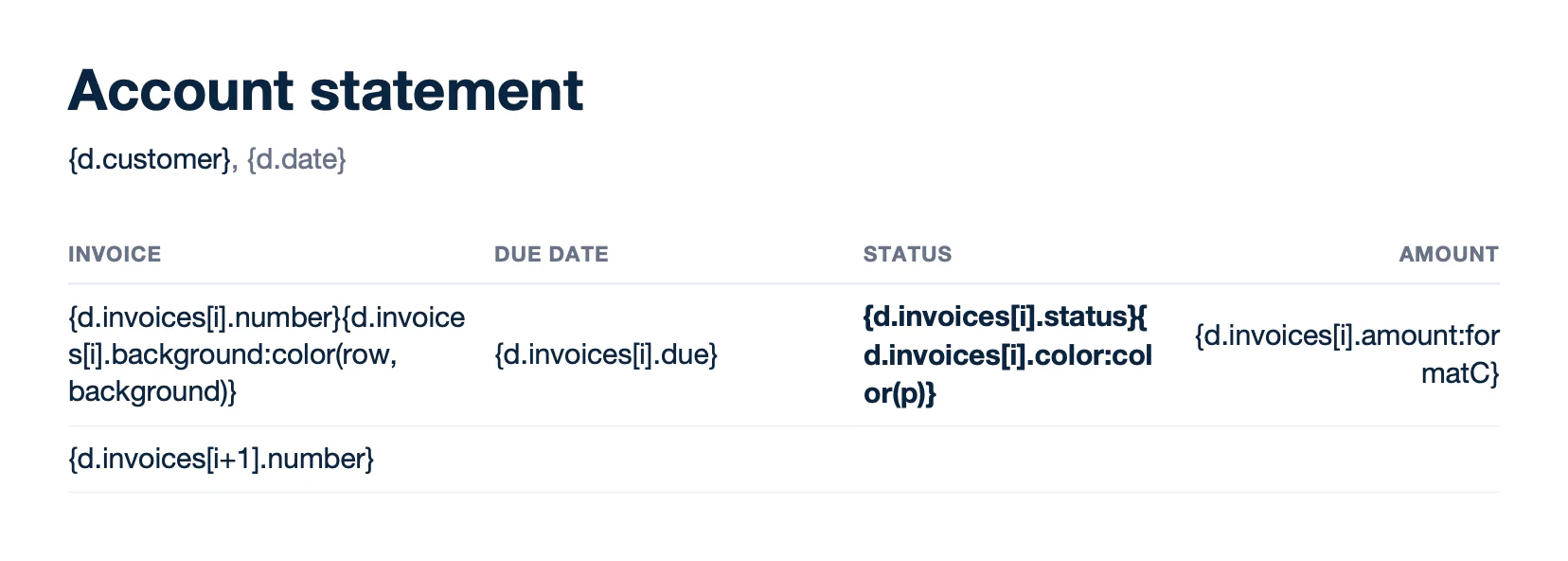
Text of template.docx:
```text
Account statement
{d.customer}, {d.date}
Invoice
Due date
Status
Amount
{d.invoices[i].number}{d.invoices[i].background:color(row, background)}
{d.invoices[i].due}
{d.invoices[i].status}{d.invoices[i].color:color(p)}
{d.invoices[i].amount:formatC}
{d.invoices[i+1].number}
```
**Result** ([colors-report.docx](/file/docx/colors-report.docx)):
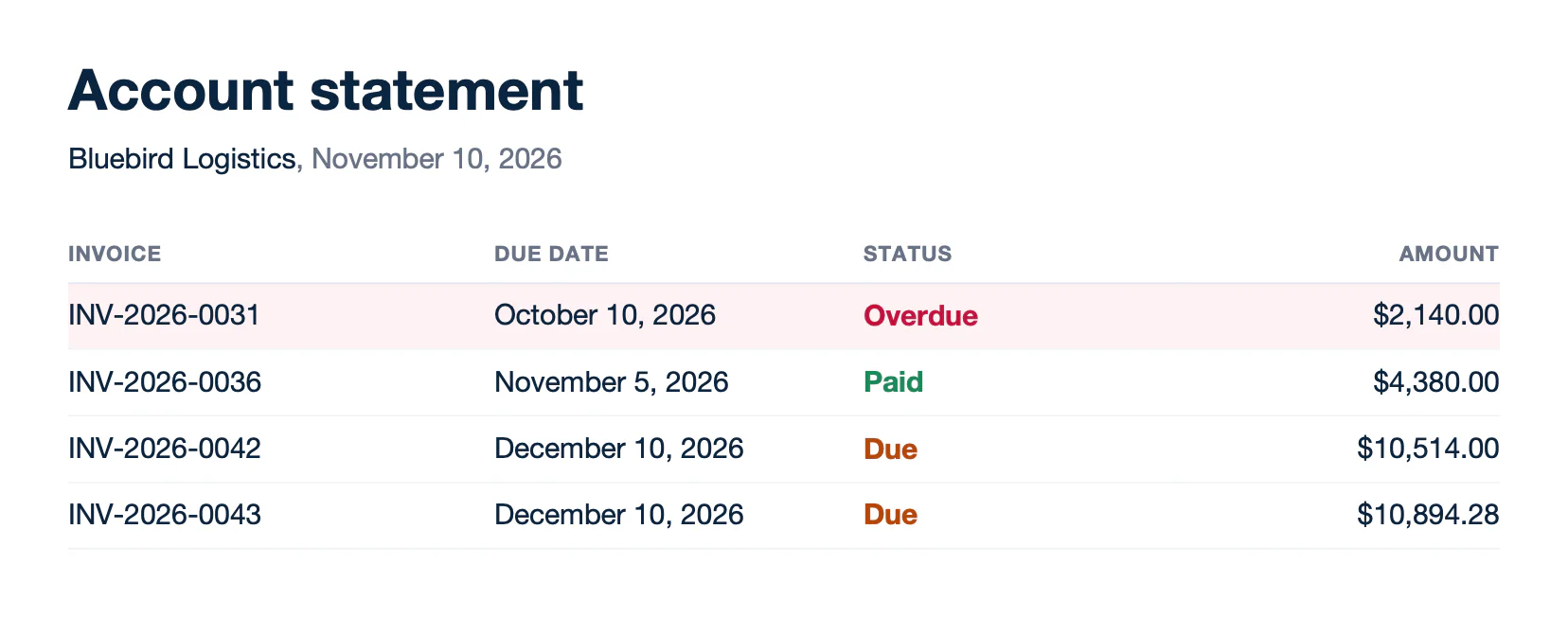
Text of report.docx:
```text
Account statement
Bluebird Logistics, November 10, 2026
Invoice
Due date
Status
Amount
INV-2026-0031
October 10, 2026
Overdue
$2,140.00
INV-2026-0036
November 5, 2026
Paid
$4,380.00
INV-2026-0042
December 10, 2026
Due
$10,514.00
INV-2026-0043
December 10, 2026
Due
$10,894.28
```
The color is a 6-digit hex code, like `#C0123C`. Apply a font color to the text in the template. Carbone replaces it with the color from the data. Learn more about [colors](/documentation/design/advanced-features/colors.md).
## Pictures
Insert a temporary picture and write the tag in its alt text (right-click > Edit Alt Text), like `{d.logo}`. Carbone replaces it with the image from the data, given as a public URL or a Base64 data URI. In a table row, the loop repeats the picture, like the photo of each product.
**Data** ([pictures-data.json](/file/docx/pictures-data.json)):
```json
{
"logo": "https://carbone.io/img/doc/docx-acme-logo.png",
"quote": "Q-2026-0189",
"items": [
{
"name": "Laptop Pro 14",
"description": "M-series chip, 16 GB memory, 512 GB SSD",
"price": 1899,
"photo": "https://carbone.io/img/doc/docx-product-laptop.png"
},
{
"name": "27-inch monitor",
"description": "4K display, USB-C with 90 W charging",
"price": 349,
"photo": "https://carbone.io/img/doc/docx-product-monitor.png"
},
{
"name": "USB-C dock",
"description": "Two displays, Ethernet, five USB ports",
"price": 189,
"photo": "https://carbone.io/img/doc/docx-product-dock.png"
},
{
"name": "Wireless keyboard",
"description": "Backlit keys, three paired devices",
"price": 79,
"photo": "https://carbone.io/img/doc/docx-product-keyboard.png"
}
]
}
```
**Template** ([pictures-template.docx](/file/docx/pictures-template.docx)):
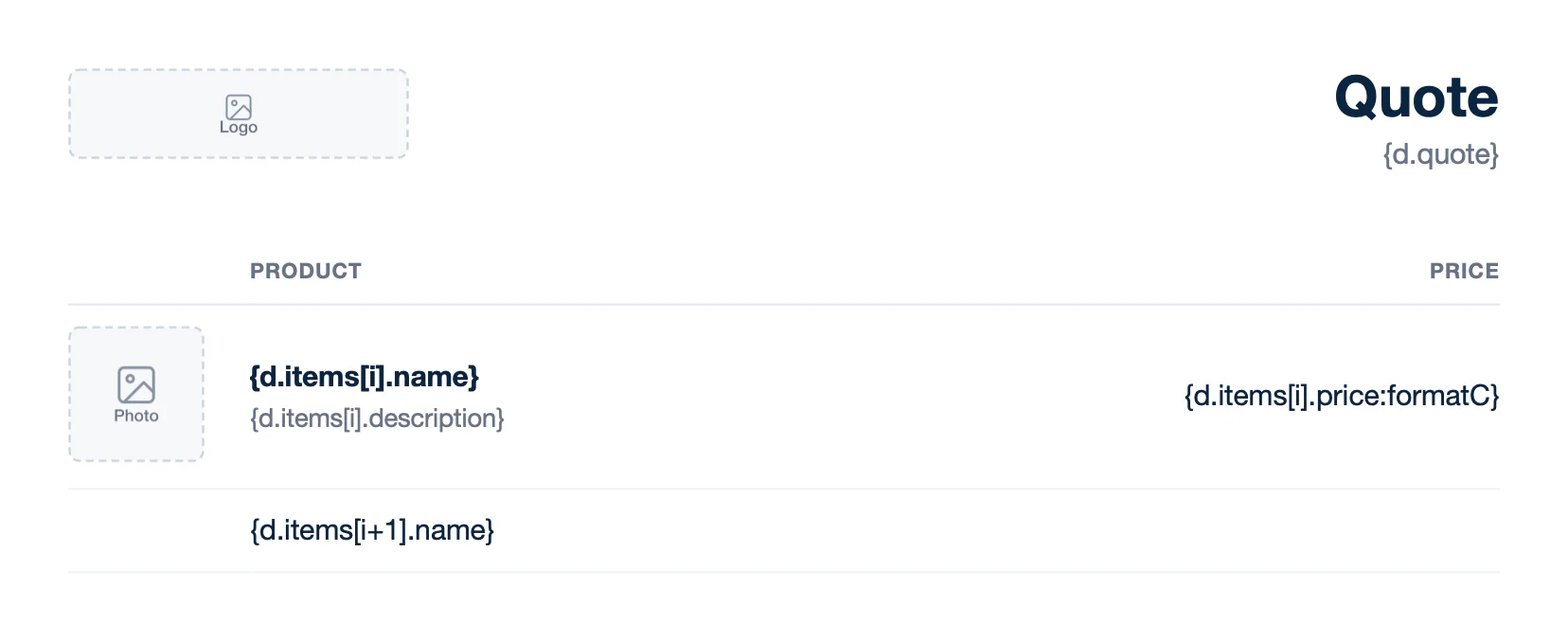
Text of template.docx:
```text
[Picture: {d.logo}]
Quote
{d.quote}
Product
Price
[Picture: {d.items[i].photo:imageFit(contain)}]
{d.items[i].name}
{d.items[i].description}
{d.items[i].price:formatC}
{d.items[i+1].name}
```
**Result** ([pictures-report.docx](/file/docx/pictures-report.docx)):
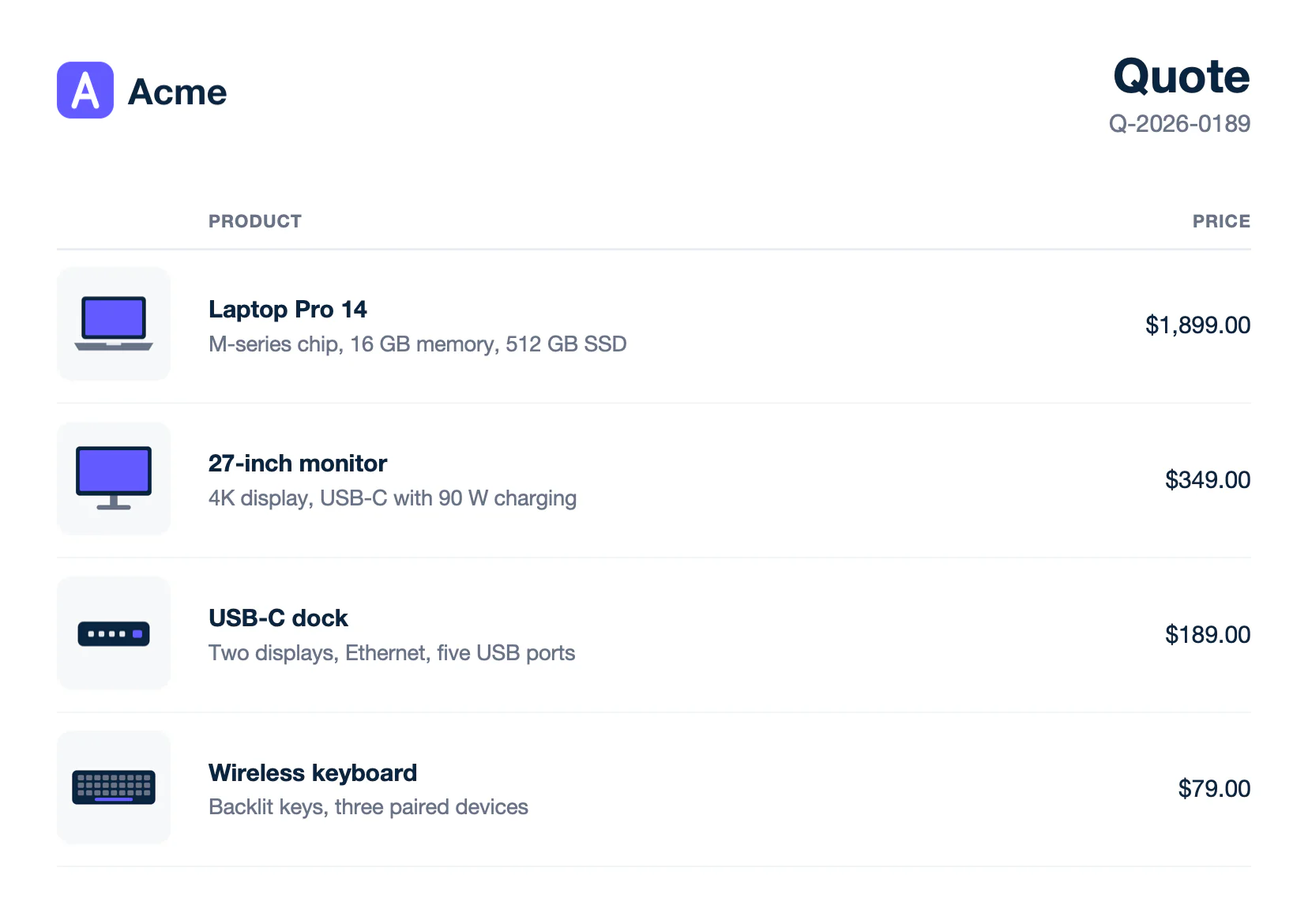
Text of report.docx:
```text
[Picture]
Quote
Q-2026-0189
Product
Price
[Picture]
Laptop Pro 14
M-series chip, 16 GB memory, 512 GB SSD
$1,899.00
[Picture]
27-inch monitor
4K display, USB-C with 90 W charging
$349.00
[Picture]
USB-C dock
Two displays, Ethernet, five USB ports
$189.00
[Picture]
Wireless keyboard
Backlit keys, three paired devices
$79.00
```
- Set the temporary picture to **In Line with Text** (Wrap Text). A floating picture is replaced, but a loop does not repeat it.
- The image takes the width of the temporary picture and keeps its own proportions. `:imageFit(contain)` fits it inside the temporary picture, like the product photos.
- `:autoOrient` rotates photos taken with a phone, based on their orientation metadata.
Learn more about [pictures](/documentation/design/advanced-features/pictures.md).
## Barcodes
Barcodes are pictures too: write the `:barcode` formatter in the alt text of a temporary picture. `{d.tracking:barcode(code128, scale:4)}` draws the tracking number, and `{d.trackingUrl:barcode(qrcode, scale:4)}` draws a QR code of the tracking page.
**Data** ([barcodes-data.json](/file/docx/barcodes-data.json)):
```json
{
"order": "SO-2026-0042",
"weight": "18.4 lb",
"shipTo": { "company": "Bluebird Logistics", "address": "350 Fifth Avenue, Suite 4100\nNew York, NY 10118" },
"tracking": "1Z999AA10123456784",
"trackingUrl": "https://carbone.io/documentation/design/template-formats/docx.html"
}
```
**Template** ([barcodes-template.docx](/file/docx/barcodes-template.docx)):
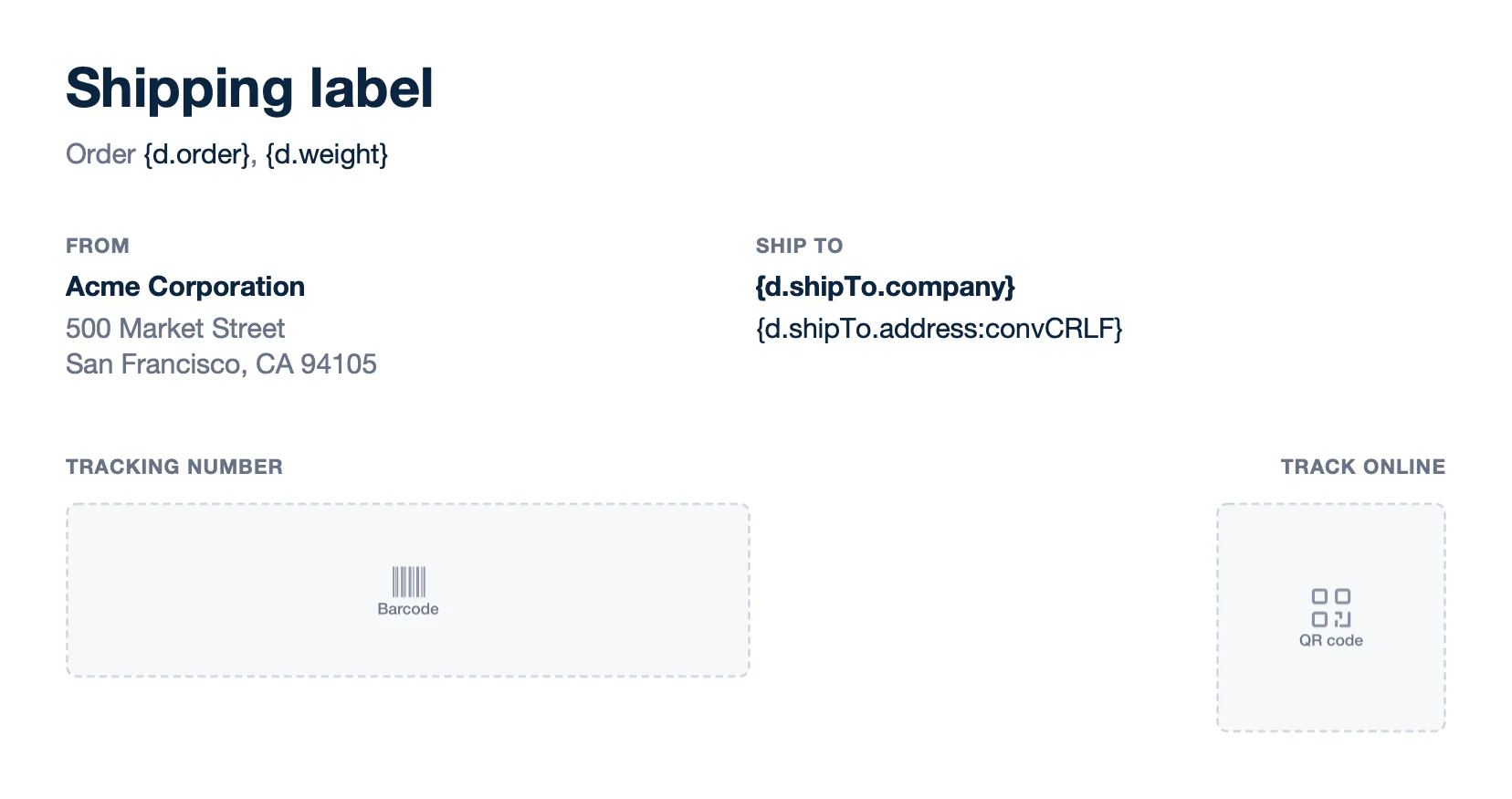
Text of template.docx:
```text
Shipping label
Order {d.order}, {d.weight}
From
Acme Corporation
500 Market Street
San Francisco, CA 94105
Ship to
{d.shipTo.company}
{d.shipTo.address:convCRLF}
Tracking number
[Picture: {d.tracking:barcode(code128, scale:4)}]
Track online
[Picture: {d.trackingUrl:barcode(qrcode, scale:4)}]
```
**Result** ([barcodes-report.docx](/file/docx/barcodes-report.docx)):
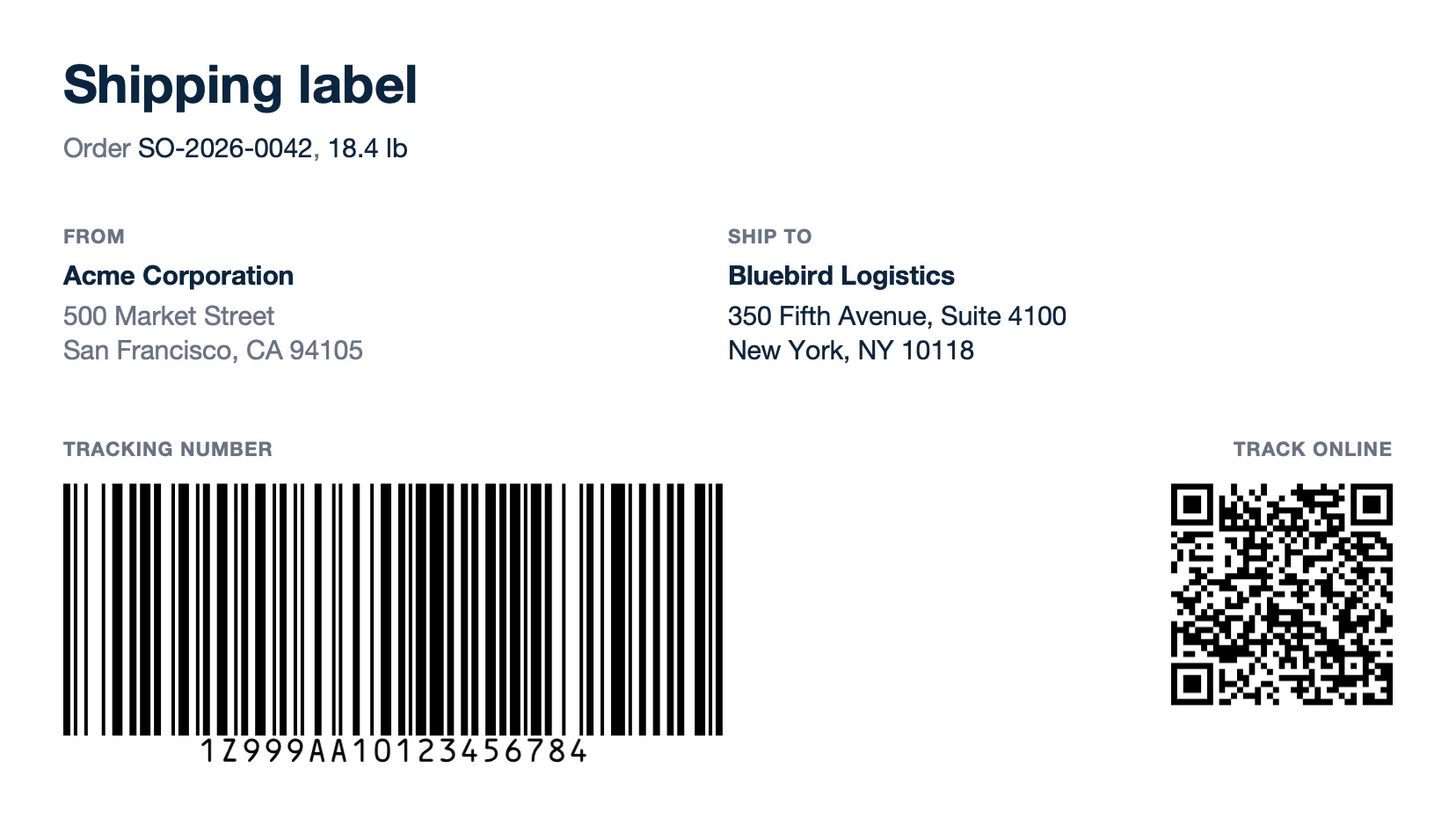
Text of report.docx:
```text
Shipping label
Order SO-2026-0042, 18.4 lb
From
Acme Corporation
500 Market Street
San Francisco, CA 94105
Ship to
Bluebird Logistics
350 Fifth Avenue, Suite 4100 New York, NY 10118
Tracking number
[Picture]
Track online
[Picture]
```
The barcode takes the width of the temporary picture. `scale` sets the resolution, from 1 to 10 (3 by default). Learn more about the [barcode types and options](/documentation/design/advanced-features/barcode.md).
## Charts
Insert a chart in Word (Insert > Chart) and write the tags in its data sheet (right-click > Edit Data). Write `{d.months[i].name}` and `{d.months[i].revenue}` on row 2, under the header row, and `{d.months[i+1].name}` and `{d.months[i+1].revenue}` on row 3. Each column needs its `[i+1]` cell. Carbone fills the chart with all the items and keeps its type, colors and labels.
**Data** ([chart-data.json](/file/docx/chart-data.json)):
```json
{
"period": "July to December 2026",
"total": 1298050,
"months": [
{ "name": "Jul", "revenue": 182400 },
{ "name": "Aug", "revenue": 196750 },
{ "name": "Sep", "revenue": 204300 },
{ "name": "Oct", "revenue": 221900 },
{ "name": "Nov", "revenue": 238600 },
{ "name": "Dec", "revenue": 254100 }
]
}
```
**Template** ([chart-template.docx](/file/docx/chart-template.docx)):
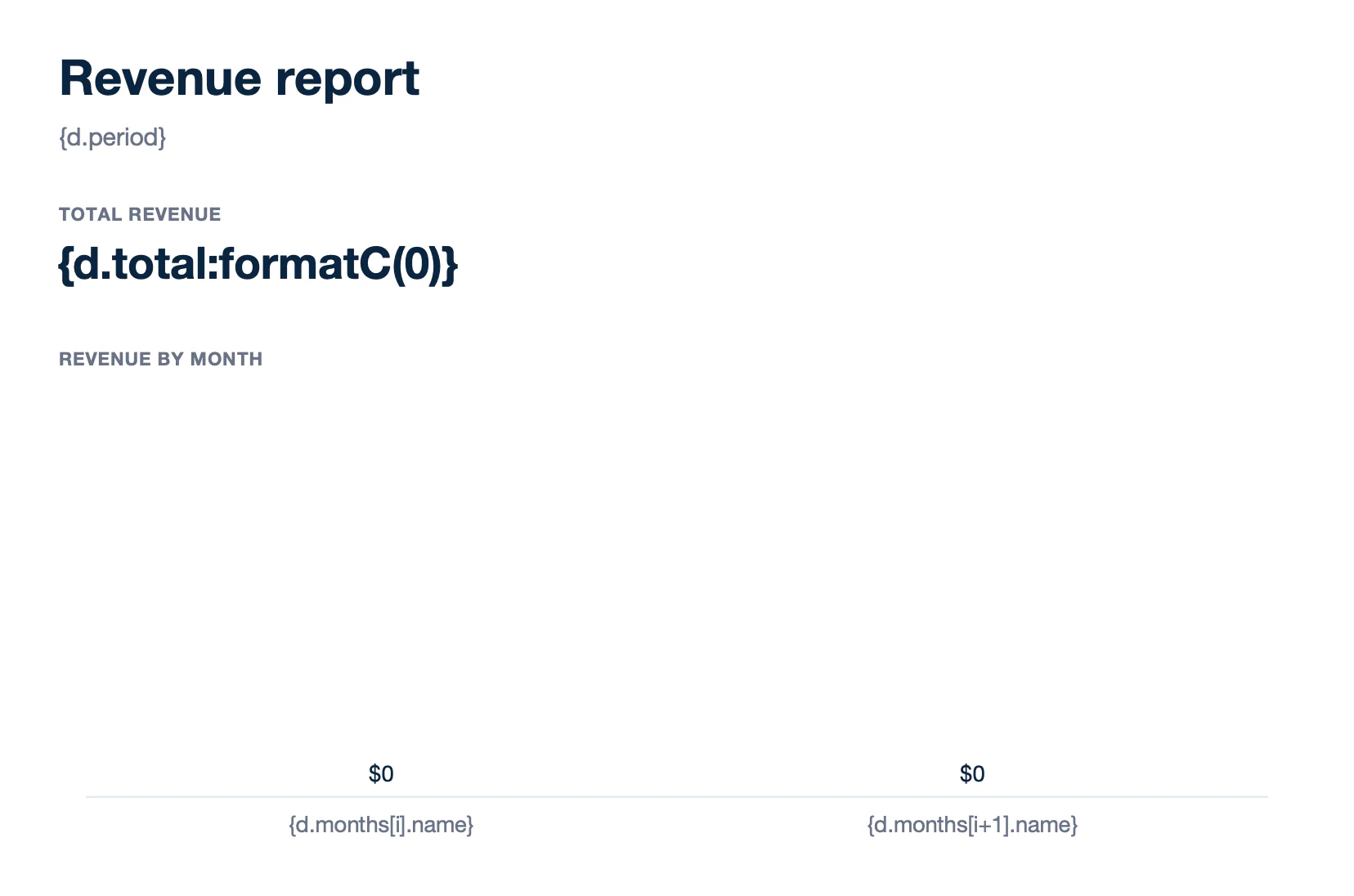
Text of template.docx:
```text
Revenue report
{d.period}
Total revenue
{d.total:formatC(0)}
Revenue by month
```
**Result** ([chart-report.docx](/file/docx/chart-report.docx)):
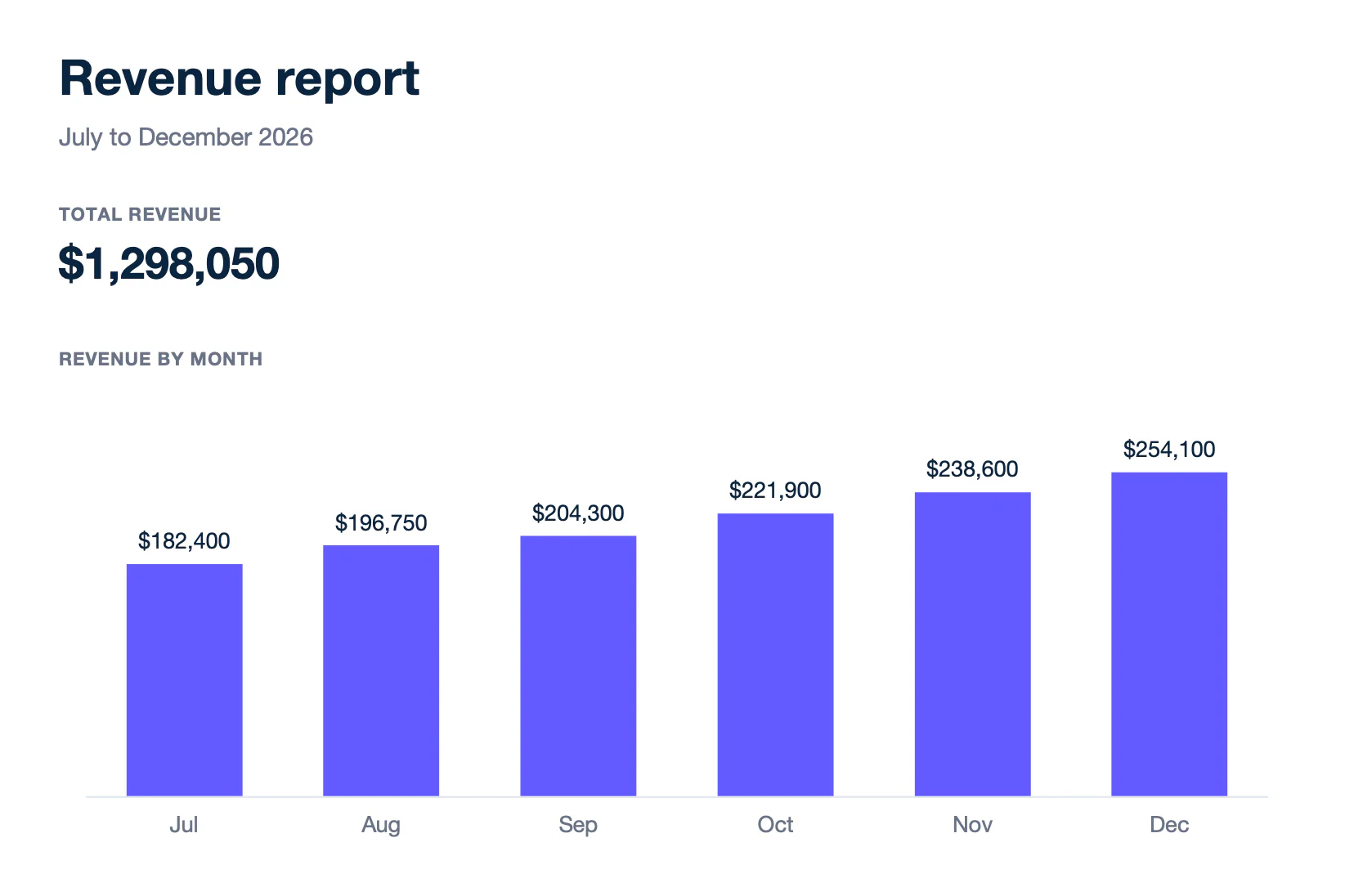
Text of report.docx:
```text
Revenue report
July to December 2026
Total revenue
$1,298,050
Revenue by month
```
In the template, Word shows the tags as empty categories. To draw a chart image from the data instead, use the [:chart formatter](/documentation/design/advanced-features/charts.md#advanced-echarts).
## HTML
`:html` renders HTML from a web editor or a CRM as Word formatting: paragraphs, bold, italic, links and lists. By default, the HTML starts a new paragraph. Add `(inline)` to keep it in the paragraph of its tag, like `{d.note:html(inline)}`.
**Data** ([html-data.json](/file/docx/html-data.json)):
```json
{
"proposal": { "title": "Workplace refresh", "client": "Bluebird Logistics" },
"scope": "Acme Corporation replaces the laptops of the New York office in two phases:
- Phase 1: imaging and enrollment of 40 laptops
- Phase 2: delivery and installation at each desk
Every device is covered by the 3-year extended warranty. Read the deployment plan.
"
}
```
**Template** ([html-template.docx](/file/docx/html-template.docx)):
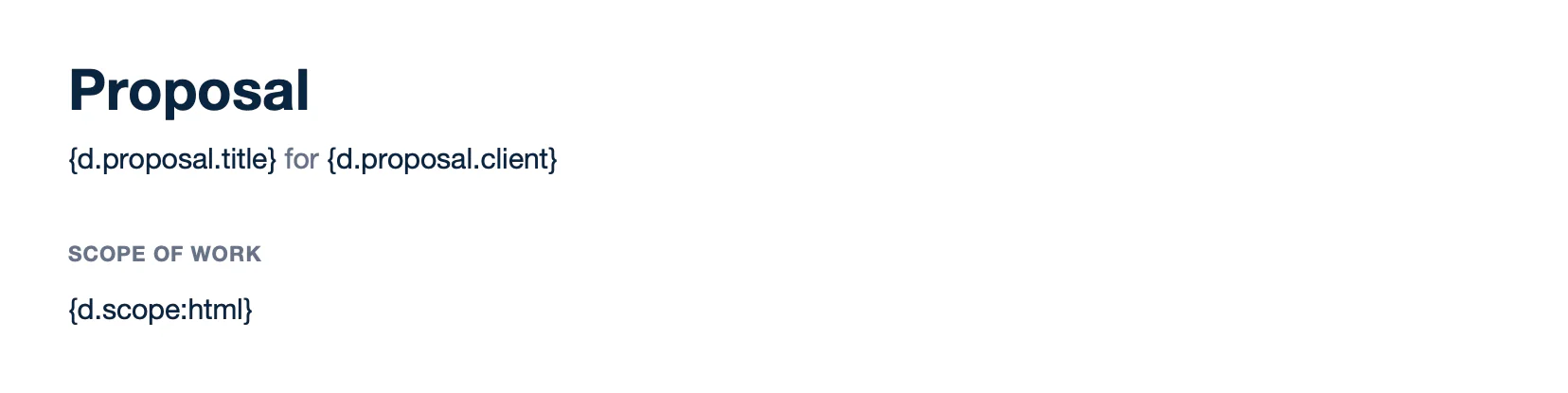
Text of template.docx:
```text
Proposal
{d.proposal.title} for {d.proposal.client}
Scope of work
{d.scope:html}
```
**Result** ([html-report.docx](/file/docx/html-report.docx)):
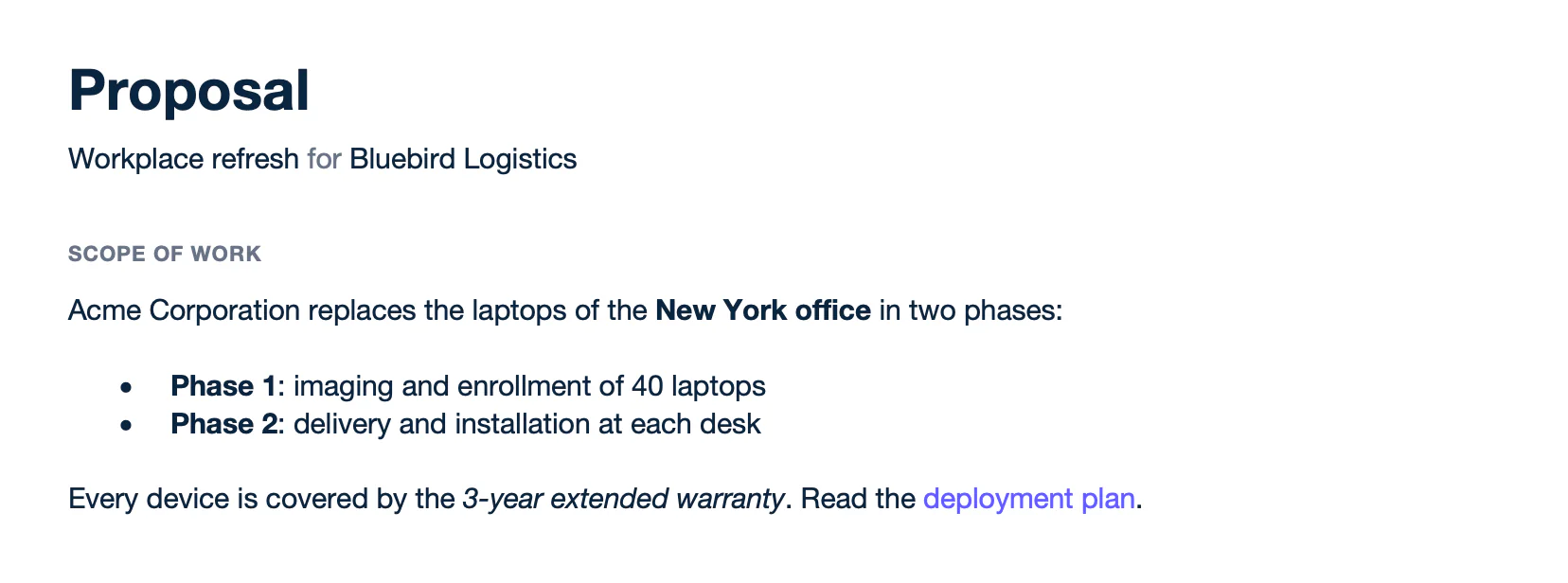
Text of report.docx:
```text
Proposal
Workplace refresh for Bluebird Logistics
Scope of work
Acme Corporation replaces the laptops of the New York office in two phases:
Phase 1: imaging and enrollment of 40 laptops
Phase 2: delivery and installation at each desk
Every device is covered by the 3-year extended warranty. Read the deployment plan.
```
PRE-RELEASE v5.11.0+ Add `{o.preReleaseFeatureIn=5011000}` to the template to render the tables, headings, page breaks and quotes of the HTML. Without it, their text is printed without formatting. [Learn more](/documentation/design/advanced-features/html.md)
## Hyperlinks
Select some text, insert a link (Insert > Link) and write a tag as its address, like `{d.paymentUrl}` for the payment button. In a loop, each row gets the address of its item: `{d.items[i].url}`.
**Data** ([links-data.json](/file/docx/links-data.json)):
```json
{
"invoice": "INV-2026-0044",
"total": 2488,
"paymentUrl": "https://carbone.io/documentation/design/advanced-features/hyperlinks.html",
"items": [
{
"name": "Laptop Pro 14",
"url": "https://carbone.io/documentation/design/template-formats/docx.html",
"amount": 1899
},
{
"name": "USB-C dock",
"url": "https://carbone.io/documentation/design/template-formats/xlsx.html",
"amount": 189
},
{
"name": "Noise-cancelling headset",
"url": "https://carbone.io/documentation/design/advanced-features/pictures.html",
"amount": 400
}
]
}
```
**Template** ([links-template.docx](/file/docx/links-template.docx)):
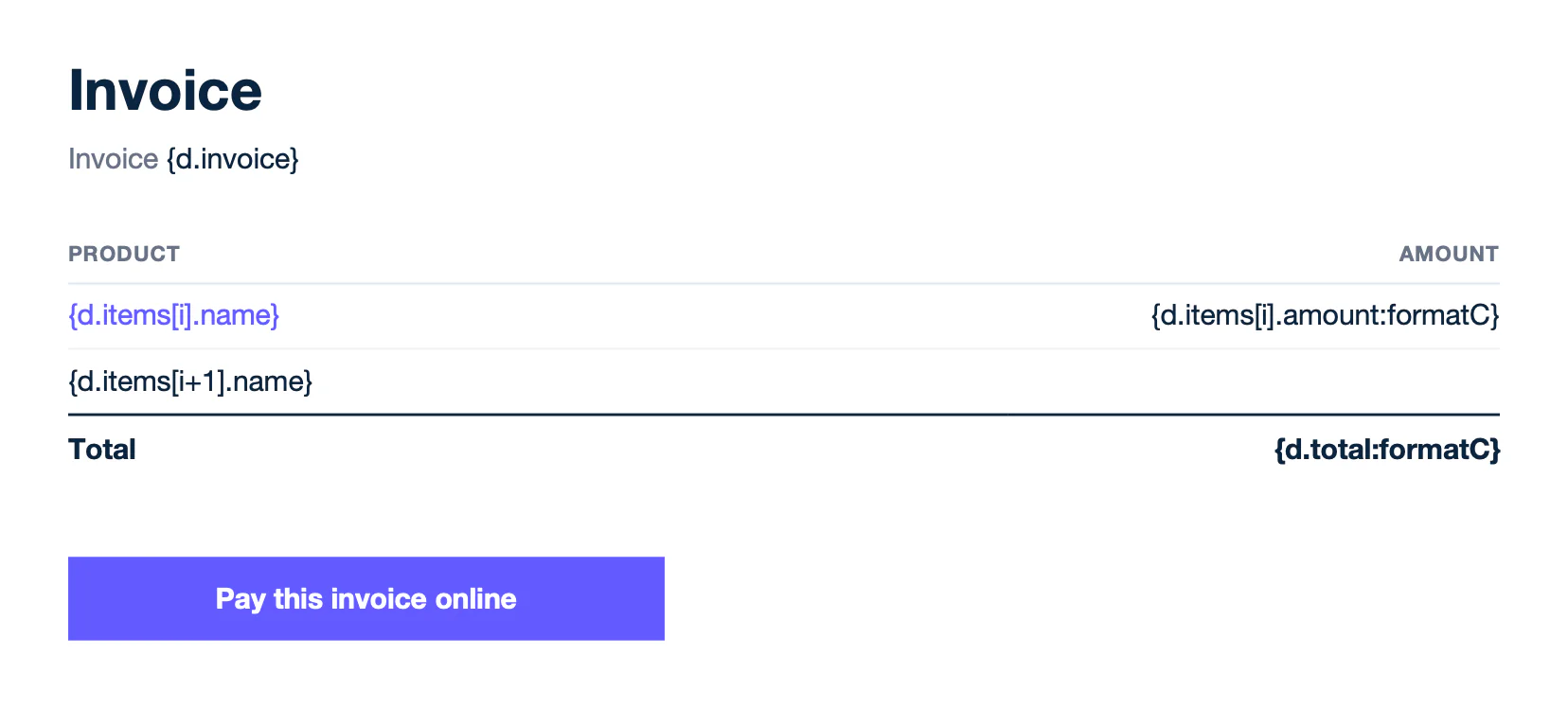
Text of template.docx:
```text
Invoice
Invoice {d.invoice}
Product
Amount
{d.items[i].name}
{d.items[i].amount:formatC}
{d.items[i+1].name}
Total
{d.total:formatC}
Pay this invoice online
```
**Result** ([links-report.docx](/file/docx/links-report.docx)):
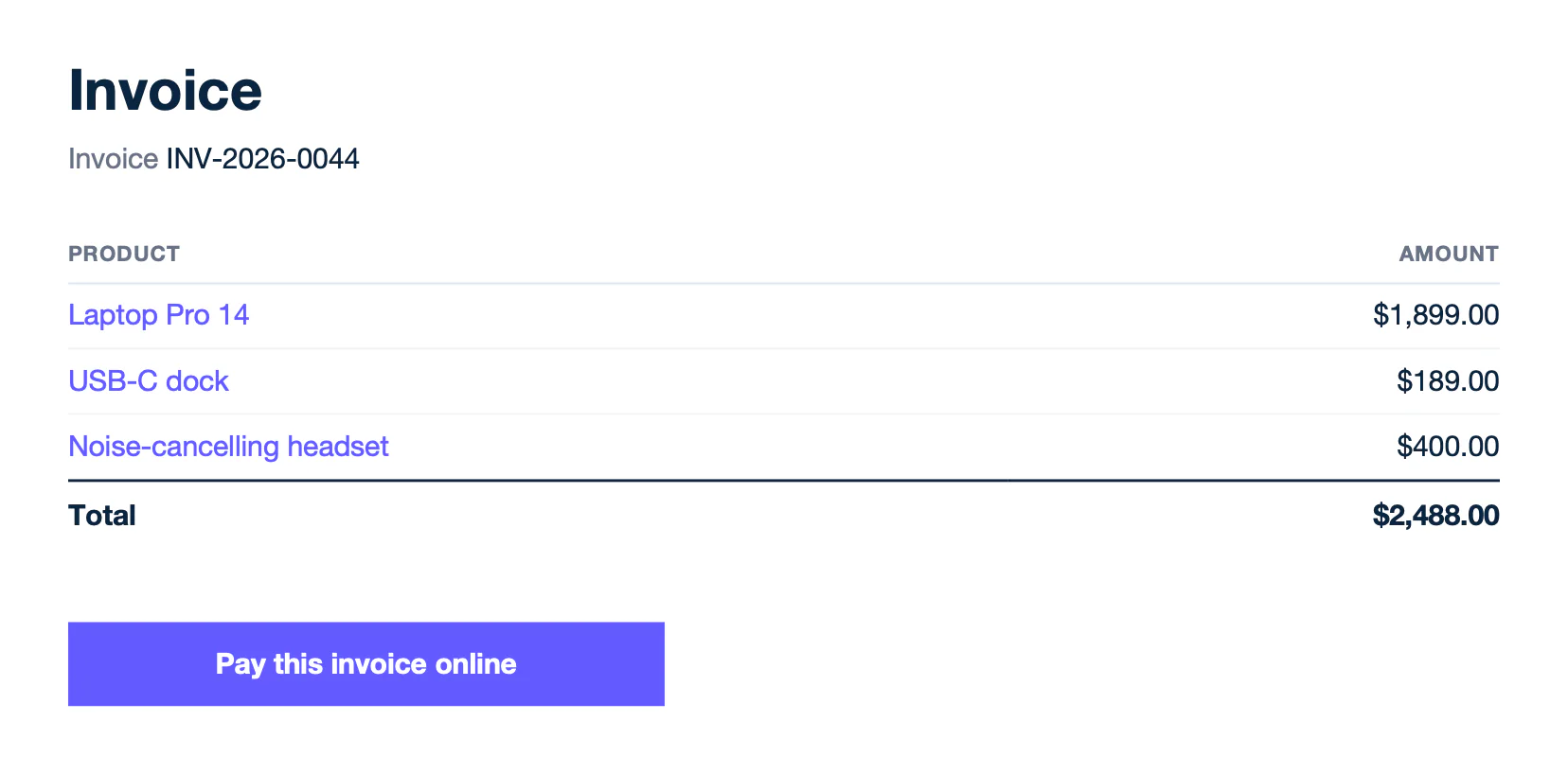
Text of report.docx:
```text
Invoice
Invoice INV-2026-0044
Product
Amount
Laptop Pro 14
$1,899.00
USB-C dock
$189.00
Noise-cancelling headset
$400.00
Total
$2,488.00
Pay this invoice online
```
Carbone checks each address and replaces an invalid one with a default address. Set your own with `:defaultURL`. Learn more about [dynamic hyperlinks](/documentation/design/advanced-features/hyperlinks.md).
## Translations
Write static text in `{t( )}` tags, and add the `:t` formatter to translate values from the data. Carbone uses the translations for the `lang` of the report. This example uses `"lang": "fr-fr"` and the dictionary in the Translations tab. Dates and amounts follow the language too.
**Data** ([translations-data.json](/file/docx/translations-data.json)):
```json
{
"invoice": { "number": "INV-2026-0045", "date": "2026-11-10" },
"customer": "Maison Lefèvre",
"items": [
{ "name": "Laptop Pro 14", "qty": 2, "amount": 3798 },
{ "name": "Setup and onboarding", "qty": 1, "amount": 450 },
{ "name": "Extended warranty, 3 years", "qty": 2, "amount": 398 }
],
"total": 4646
}
```
**Translations** ([translations-translations.json](/file/docx/translations-translations.json)):
```json
{
"fr-fr": {
"Invoice": "Facture",
"Invoice number": "Numéro de facture",
"Date of issue": "Date d’émission",
"Description": "Désignation",
"Qty": "Qté",
"Amount": "Montant",
"Total": "Total",
"Setup and onboarding": "Installation et prise en main",
"Extended warranty, 3 years": "Garantie étendue, 3 ans",
"Thank you for your business.": "Merci pour votre confiance."
}
}
```
**Template** ([translations-template.docx](/file/docx/translations-template.docx)):
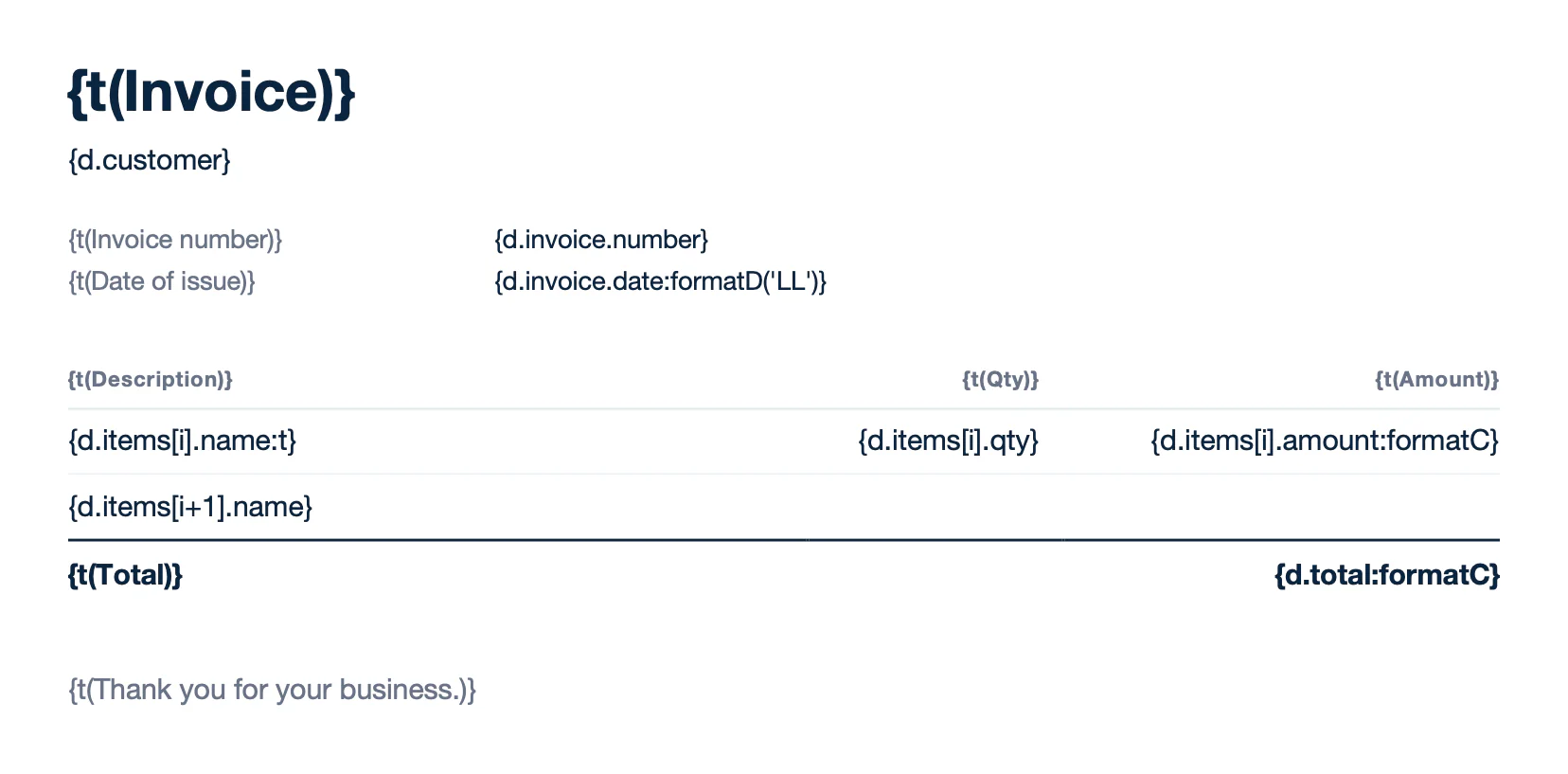
Text of template.docx:
```text
{t(Invoice)}
{d.customer}
{t(Invoice number)}
{d.invoice.number}
{t(Date of issue)}
{d.invoice.date:formatD('LL')}
{t(Description)}
{t(Qty)}
{t(Amount)}
{d.items[i].name:t}
{d.items[i].qty}
{d.items[i].amount:formatC}
{d.items[i+1].name}
{t(Total)}
{d.total:formatC}
{t(Thank you for your business.)}
```
**Result** ([translations-report.docx](/file/docx/translations-report.docx)):
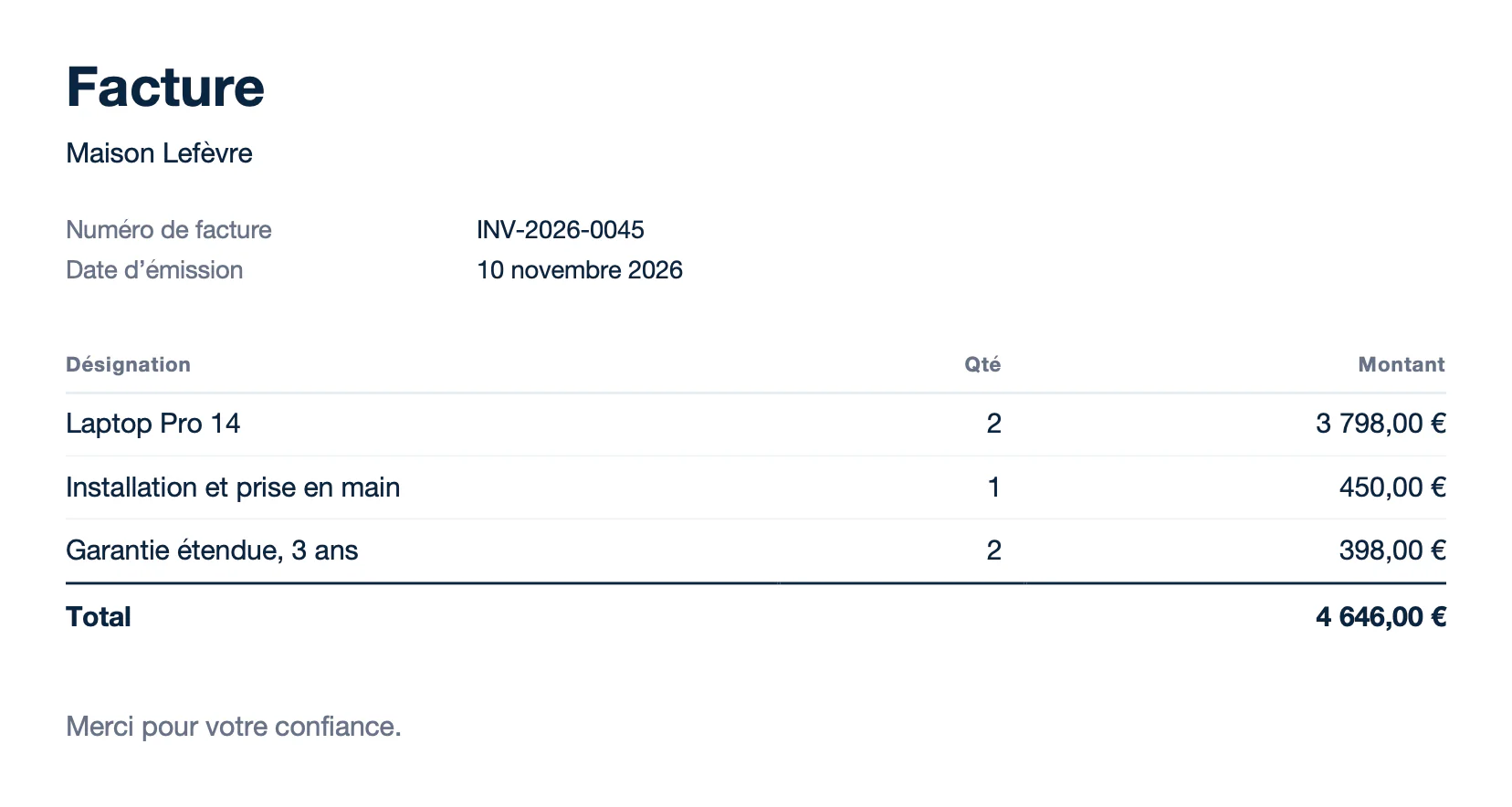
Text of report.docx:
```text
Facture
Maison Lefèvre
Numéro de facture
INV-2026-0045
Date d’émission
10 novembre 2026
Désignation
Qté
Montant
Laptop Pro 14
2
3 798,00 €
Installation et prise en main
1
450,00 €
Garantie étendue, 3 ans
2
398,00 €
Total
4 646,00 €
Merci pour votre confiance.
```
Write the text of a `{t( )}` tag without quotes: `{t(Invoice)}`. Learn more about [translations](/documentation/design/advanced-features/translations-i18n.md).
## Headers and footers
Tags work in headers and footers, like the statement number. Insert page numbers with Word (Insert > Page Number, or the `PAGE` and `NUMPAGES` fields). They are computed on each page of the report. To repeat the first row of a table on each page, check **Repeat as header row at the top of each page** on this row (Table Properties > Row).
**Data** ([header-footer-data.json](/file/docx/header-footer-data.json)):
```json
{
"statement": { "number": "ST-2026-10", "period": "October 2026" },
"customer": "Bluebird Logistics",
"entries": [
{ "date": "2026-10-01", "description": "Payment received, INV-2026-0029", "amount": 6250 },
{ "date": "2026-10-02", "description": "Laptop Pro 14 (x2)", "amount": -3798 },
{ "date": "2026-10-03", "description": "Cloud backup, monthly plan", "amount": -60 },
{ "date": "2026-10-05", "description": "27-inch monitor (x2)", "amount": -698 },
{ "date": "2026-10-06", "description": "USB-C dock (x2)", "amount": -378 },
{ "date": "2026-10-07", "description": "Payment received, INV-2026-0030", "amount": 4380 },
{ "date": "2026-10-08", "description": "Wireless keyboard (x6)", "amount": -474 },
{ "date": "2026-10-09", "description": "Setup and onboarding", "amount": -450 },
{ "date": "2026-10-12", "description": "Noise-cancelling headset (x4)", "amount": -596 },
{ "date": "2026-10-13", "description": "Office license (x10)", "amount": -990 },
{ "date": "2026-10-14", "description": "Payment received, INV-2026-0031", "amount": 2140 },
{ "date": "2026-10-15", "description": "Device management, monthly plan", "amount": -240 },
{ "date": "2026-10-16", "description": "Laptop Pro 14 (x1)", "amount": -1899 },
{ "date": "2026-10-19", "description": "Extended warranty, 3 years (x3)", "amount": -597 },
{ "date": "2026-10-20", "description": "Payment received, INV-2026-0032", "amount": 5100 },
{ "date": "2026-10-21", "description": "27-inch monitor (x4)", "amount": -1396 },
{ "date": "2026-10-22", "description": "Training session", "amount": -300 },
{ "date": "2026-10-23", "description": "USB-C dock (x4)", "amount": -756 },
{ "date": "2026-10-26", "description": "Payment received, INV-2026-0033", "amount": 3200 },
{ "date": "2026-10-27", "description": "Wireless keyboard (x4)", "amount": -316 },
{ "date": "2026-10-27", "description": "Antivirus, annual plan (x10)", "amount": -450 },
{ "date": "2026-10-28", "description": "Laptop Pro 14 (x2)", "amount": -3798 },
{ "date": "2026-10-28", "description": "Payment received, INV-2026-0034", "amount": 2900 },
{ "date": "2026-10-29", "description": "Shipping and handling", "amount": -85 },
{ "date": "2026-10-29", "description": "Noise-cancelling headset (x2)", "amount": -298 },
{ "date": "2026-10-30", "description": "Maintenance", "amount": -120 },
{ "date": "2026-10-30", "description": "Payment received, INV-2026-0035", "amount": 1500 },
{ "date": "2026-10-31", "description": "Cloud backup, storage upgrade", "amount": -45 }
]
}
```
**Template** ([header-footer-template.docx](/file/docx/header-footer-template.docx)):
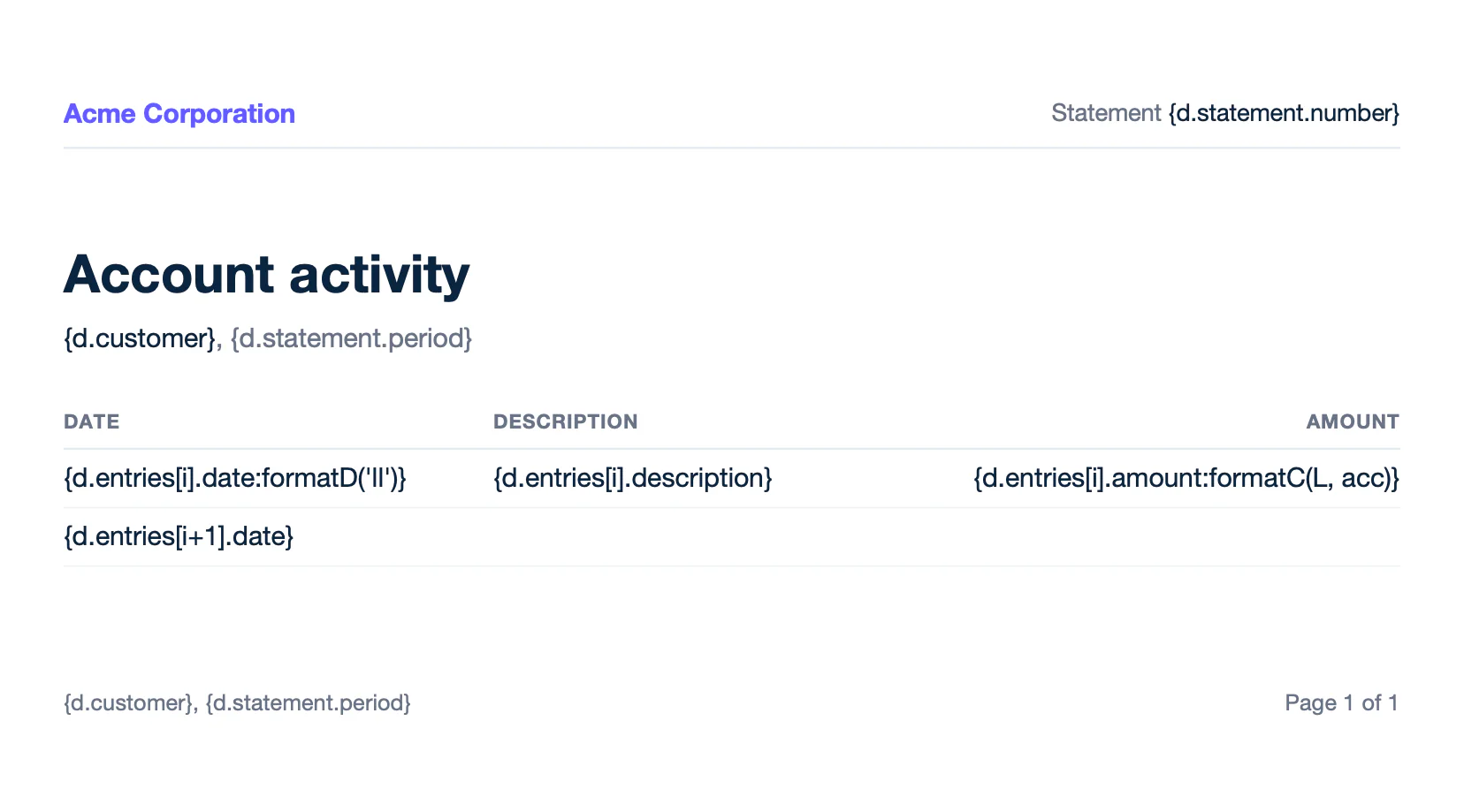
Text of template.docx:
```text
Account activity
{d.customer}, {d.statement.period}
Date
Description
Amount
{d.entries[i].date:formatD('ll')}
{d.entries[i].description}
{d.entries[i].amount:formatC(L, acc)}
{d.entries[i+1].date}
```
**Result** ([header-footer-report.docx](/file/docx/header-footer-report.docx)):
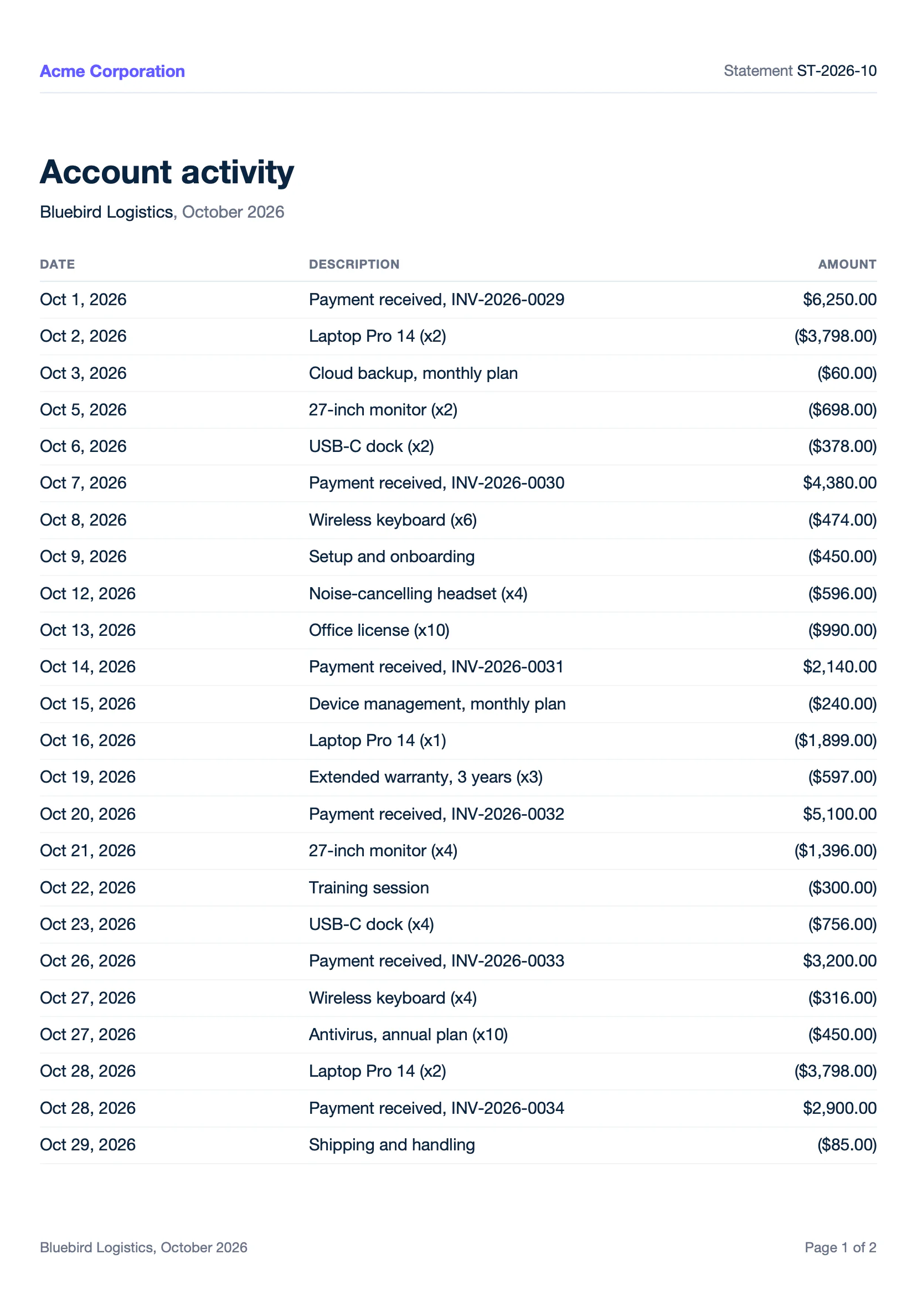
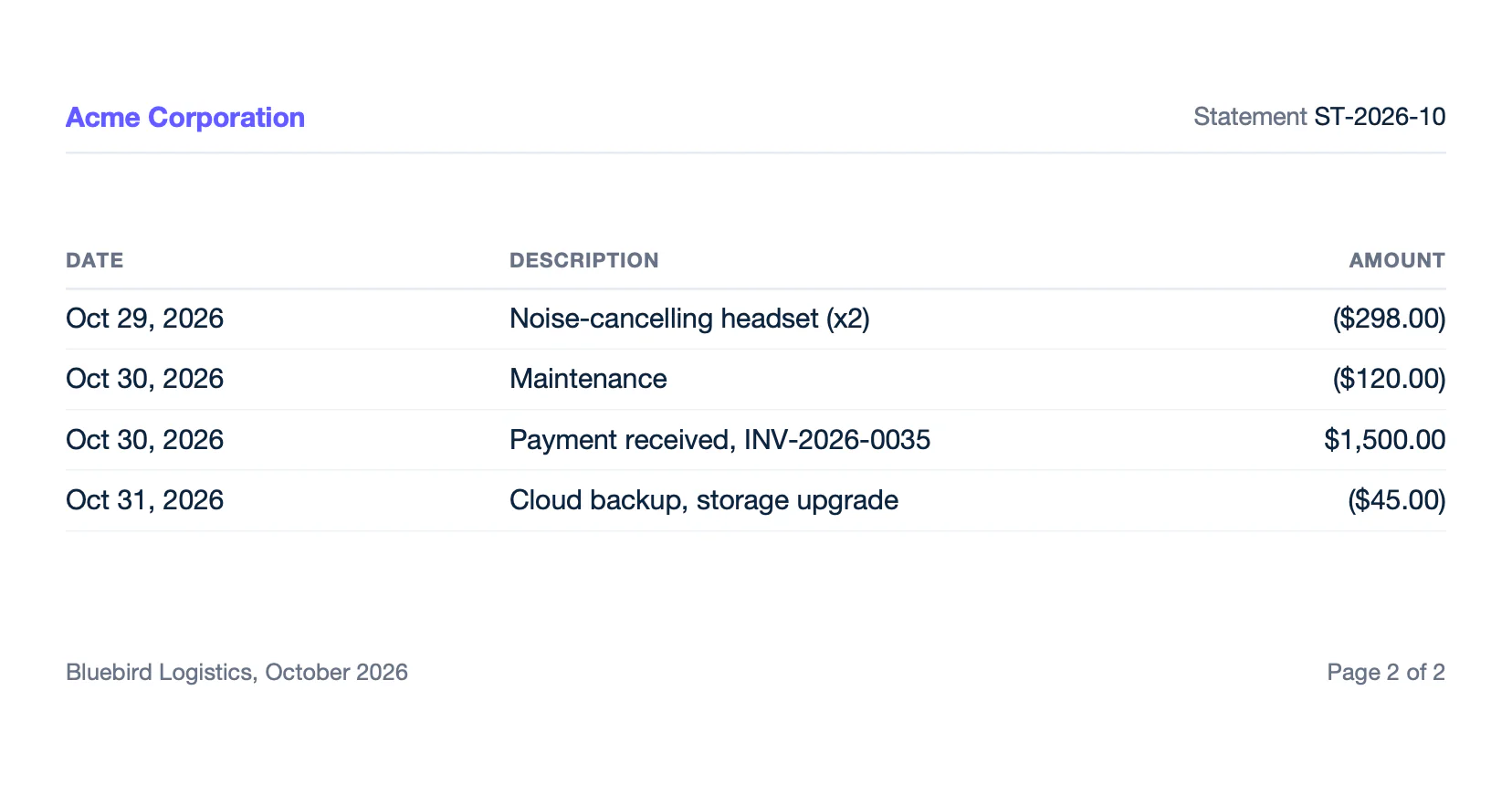
Text of report.docx:
```text
Account activity
Bluebird Logistics, October 2026
Date
Description
Amount
Oct 1, 2026
Payment received, INV-2026-0029
$6,250.00
Oct 2, 2026
Laptop Pro 14 (x2)
($3,798.00)
Oct 3, 2026
Cloud backup, monthly plan
($60.00)
Oct 5, 2026
27-inch monitor (x2)
($698.00)
Oct 6, 2026
USB-C dock (x2)
($378.00)
Oct 7, 2026
Payment received, INV-2026-0030
$4,380.00
Oct 8, 2026
Wireless keyboard (x6)
($474.00)
Oct 9, 2026
Setup and onboarding
($450.00)
Oct 12, 2026
Noise-cancelling headset (x4)
($596.00)
Oct 13, 2026
Office license (x10)
($990.00)
Oct 14, 2026
Payment received, INV-2026-0031
$2,140.00
Oct 15, 2026
Device management, monthly plan
($240.00)
Oct 16, 2026
Laptop Pro 14 (x1)
($1,899.00)
Oct 19, 2026
Extended warranty, 3 years (x3)
($597.00)
Oct 20, 2026
Payment received, INV-2026-0032
$5,100.00
Oct 21, 2026
27-inch monitor (x4)
($1,396.00)
Oct 22, 2026
Training session
($300.00)
Oct 23, 2026
USB-C dock (x4)
($756.00)
Oct 26, 2026
Payment received, INV-2026-0033
$3,200.00
Oct 27, 2026
Wireless keyboard (x4)
($316.00)
Oct 27, 2026
Antivirus, annual plan (x10)
($450.00)
Oct 28, 2026
Laptop Pro 14 (x2)
($3,798.00)
Oct 28, 2026
Payment received, INV-2026-0034
$2,900.00
Oct 29, 2026
Shipping and handling
($85.00)
Oct 29, 2026
Noise-cancelling headset (x2)
($298.00)
Oct 30, 2026
Maintenance
($120.00)
Oct 30, 2026
Payment received, INV-2026-0035
$1,500.00
Oct 31, 2026
Cloud backup, storage upgrade
($45.00)
```
A table of contents (References > Table of Contents) is updated with the generated headings and their page numbers. Learn more about [pagination](/documentation/design/advanced-features/pagination.md).
## Signatures
Write `{d.signer:sign}` where the signature goes, and put the name and email of the signer in the data. When the report is a PDF, the API response gives the position of each signature field, so you can send the document to your e-signature provider. Learn more about [signatures](/documentation/design/advanced-features/signatures.md).
## Convert DOCX to PDF
To generate a PDF from a DOCX template with the Carbone API:
1. **Prepare two files**: a DOCX template with Carbone tags, like `{d.name}`, and the JSON data to populate it. You can use the files of the [Loops](#loops) example.
2. **Generate the PDF** in one of three ways:
- Use an official Carbone integration, like N8N, Make, Zapier, Airtable or Bubble.
- Use a Carbone SDK: Node.js, Go, Python, Java, JavaScript or PHP.
- Send a `POST /render/template` HTTP request to the [Carbone API](/documentation/developer/http-api/introduction.md), like this curl command:
```bash
curl --location --request POST 'https://api.carbone.io/render/template?download=true' \
--header 'carbone-version: 5' \
--header 'Content-Type: application/json' \
--header 'Authorization: Bearer API_TOKEN' \
--data-raw "{
\"data\": $(cat loops-data.json),
\"template\": \"$(base64 -i loops-template.docx)\",
\"lang\": \"en-us\",
\"convertTo\": \"pdf\"
}" \
--output report.pdf
```
> 💡 **Linux users**: replace `base64 -i loops-template.docx` with `base64 -w 0 loops-template.docx`
**Key parameters**
| Parameter | Description |
| --- | --- |
| `template` | Your DOCX template, encoded as a Base64 string. |
| `data` | JSON data used to populate the template. |
| `lang` | Language of the report, used by the formatters and translations: `"en-us"` prints `{d.total:formatC}` as $10,514.00. |
| `convertTo` | `"pdf"`, or another [output format](/documentation/developer/http-api/generate-reports.md#output-file-type): `"docx"` (by default), `"odt"`, `"txt"`... |
| `converter` | Optional: LibreOffice `"L"` (default), Carbone ICE `"I"` (the fastest for DOCX to PDF) or OnlyOffice `"O"`. See [converters](/documentation/developer/http-api/generate-reports.md#converters). |
| `?download=true` | Query parameter to download the document as a stream. |
| `Authorization` | Header required for the Carbone Cloud API. [Get your API key here.](https://account.carbone.io/) |
The fonts of the template must be available to the converter. See [font support](/documentation/design/overview/font-support.md). For more details, refer to the [Carbone API Documentation](/documentation/developer/http-api/introduction.md).
## Related topics
- [XLSX templates](/documentation/design/template-formats/xlsx.md)
- [PPTX templates](/documentation/design/template-formats/pptx.md)
- [PDF templates](/documentation/design/template-formats/pdf.md)
- [Markdown templates](/documentation/design/template-formats/markdown.md)
- [HTML templates](/documentation/design/template-formats/html.md)