---
source: https://carbone.io/examples/cxml-purchase-order/
title: "cXML Purchase Order: OrderRequest XML Generator | Carbone"
description: "Generate cXML purchase orders from your ERP with the Carbone API: an XML template writes the OrderRequest with its credentials, order lines and computed total."
generated_at: "2026-11-17"
---
# cXML purchase order
Purchase orders from your ERP, sent to suppliers as cXML OrderRequest
[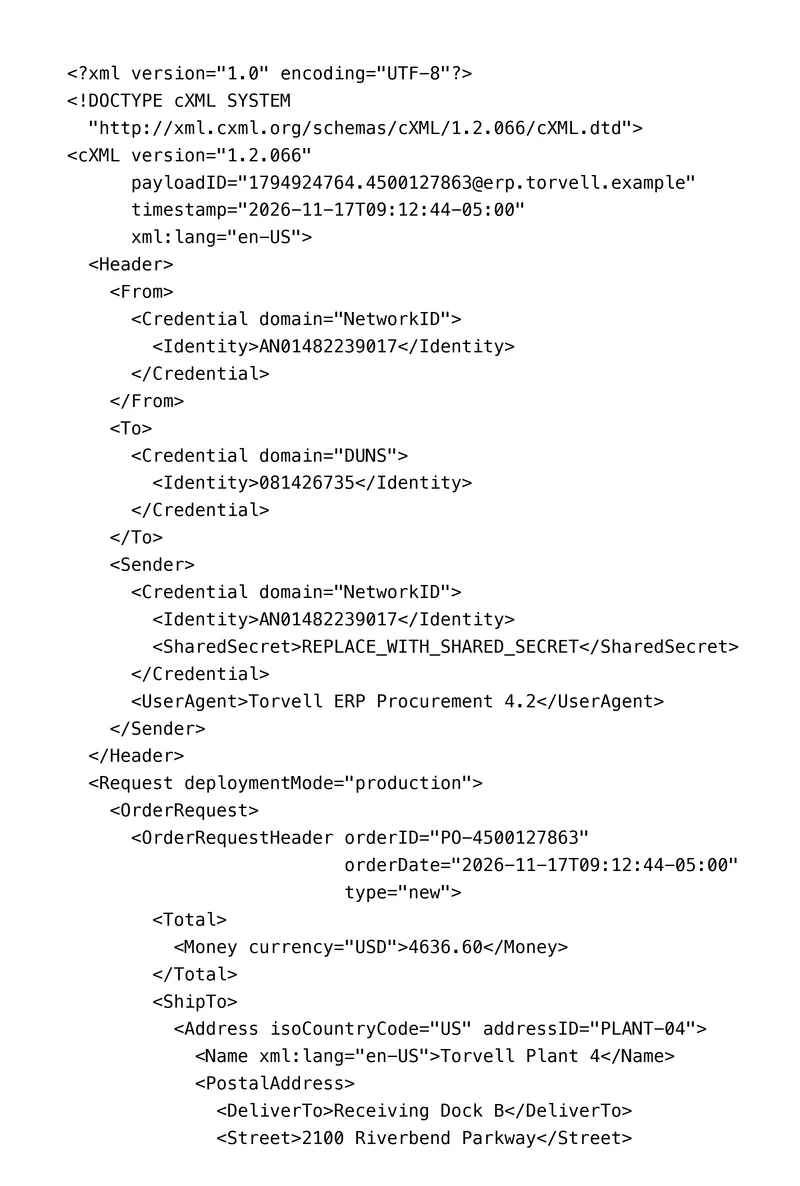](/examples/cxml-purchase-order/result.xml "Download the generated document")
[Download template](/examples/cxml-purchase-order/template.xml)
[Sample data](/examples/cxml-purchase-order/data.json)
[Download the generated XML](/examples/cxml-purchase-order/result.xml)
- **Template:** XML
- **Export as:** XML
- **Carbone:** 5.18+
Features
- [Loop](/documentation/design/repetitions/with-arrays.md)
- [Aggregation](/documentation/design/computation/aggregation.md)
- [Math](/documentation/design/computation/simple-mathematics.md)
- Store
- [Date](/documentation/design/formatters/date.md)
- [Number format](/documentation/design/formatters/number.md)
## Generate cXML purchase orders from your ERP
Procurement teams buy from catalog suppliers through a procure-to-pay platform: a requester fills a cart, often after a [PunchOut](https://cxml.org/) session on the supplier's catalog, an approver validates it, and the ERP sends the purchase order to the supplier as a cXML OrderRequest, through a supplier network or a direct HTTPS connection. ERP purchasing modules, e-procurement platforms and integration middleware send these orders every day, in volumes of hundreds per week for a large buyer.
Your ERP sends the approved order to the Carbone API as JSON and gets back a cXML document that follows the structure of the [cXML 1.2.066 DTD](http://xml.cxml.org/schemas/cXML/1.2.066/cXML.dtd) published by [cXML.org](https://cxml.org/). In this example, Torvell Machinery Inc., a fictional machine builder in Columbus, Ohio, orders 8 maintenance, safety and packaging items from Brindley Industrial Supply, a fictional distributor. The identifiers, the network ID and the DUNS number of the two parties are fictional, and the shared secret is a placeholder.
In this example, you will:
- Repeat the `ItemOut` order lines with a loop
- Compute the order total from the lines with an aggregator, and the sales tax from it
- Write each line charge as quantity times unit price, with two decimals
- Print the order date and time with its time zone, and the delivery dates as `YYYY-MM-DD`
- Fill the cost center and the GL account of each line in `Distribution`
## cXML OrderRequest file structure
| Block | Repeated | Main elements |
| --- | --- | --- |
| `cXML` envelope | Once | `version`, `payloadID` unique message ID, `timestamp` with time zone, `xml:lang` |
| `Header` | Once | `From` the buyer, `To` the supplier, `Sender` with its credential, the `SharedSecret` and the `UserAgent` of the sending system. Each `Credential` has a `domain`, like `NetworkID` or `DUNS`, and an `Identity` |
| `OrderRequestHeader` | Once | `orderID`, `orderDate`, `type` `new`, `Total`, `ShipTo`, `BillTo`, `Shipping`, `Tax`, `PaymentTerm`, `Contact`, `Comments` |
| `ItemOut` order line | Once per line | `quantity`, `lineNumber`, `requestedDeliveryDate`, `ItemID` with the supplier part ID, `ItemDetail` with the unit price, the description, the unit of measure, the UNSPSC `Classification` and the manufacturer, `Distribution` with the cost center and the GL account |
The supplier system accepts the order when the document is valid against the DTD, so the file keeps the order of the elements of the DTD.
## cXML purchase order example
### Template
```xml
{o.lang=en-us}{o.timezone=America/New_York}
{d.lines[].qty:mul(.price):aggSum:round(2):set(c.sub)}{c.sub:mul(d.order.taxRate):div(100):round(2):set(c.tax)}
{c.sub:formatN(2):replace(',', '')}
...
{c.tax:formatN(2):replace(',', '')}
Sales tax
...
...
{d.lines[i]}
{d.lines[i].partId}
{d.lines[i].aux}
{d.lines[i].buyerPart}
{d.lines[i].price:formatN(2):replace(',', '')}
{d.lines[i].description}
{d.lines[i].unit}
{d.lines[i].unspsc}
...
...
{d.lines[i].qty:mul(.price):round(2):formatN(2):replace(',', '')}
{d.lines[i+1]}
```
### JSON data
```json
{
"payloadId": "1794924764.4500127863@erp.torvell.example",
"createdAt": "2026-11-17T14:12:44Z",
"buyer": { "networkId": "AN01482239017", "userAgent": "Torvell ERP Procurement 4.2" },
"supplier": { "duns": "081426735" },
"order": { "id": "PO-4500127863", "currency": "USD", "taxRate": 7.5, "shipping": 185.00, "paymentDays": 45, "...": "..." },
"lines": [
{ "number": 10, "qty": 12, "unit": "BX", "price": 41.80, "delivery": "2026-11-30", "partId": "BIS-CS-M10X40", "aux": "100 pcs", "buyerPart": "100-210045",
"description": "Socket head cap screw M10 x 40, class 12.9, box of 100", "unspsc": "31161501", "mfrPart": "CF-1240-12", "mfr": "Corbel Fasteners",
"costCenter": "4120", "costCenterName": "Plant 4 Maintenance", "gl": "613200", "glName": "Maintenance supplies" },
"... 7 more lines"
]
}
```
### Generated cXML OrderRequest
An excerpt: the total, the tax and the first order line.
```xml
4636.60
...
347.75
Sales tax
...
...
BIS-CS-M10X40
100 pcs
100-210045
41.80
Socket head cap screw M10 x 40, class 12.9, box of 100
BX
31161501
...
...
501.60
```
## How to create a cXML purchase order
### 1\. Fill the envelope and the header
- `{d.payloadId}` prints the message ID, unique for each document the buyer sends. It is the key the supplier uses to detect a duplicate.
- `{d.createdAt:formatD('YYYY-MM-DDTHH:mm:ssZ')}` prints the time stamp with its time zone, as the DTD requires: `{o.timezone=America/New_York}` turns `2026-11-17T14:12:44Z` into `2026-11-17T09:12:44-05:00`. See the [date formatters](/documentation/design/formatters/date.md).
- `{d.buyer.networkId}`, `{d.supplier.duns}` and `{d.buyer.userAgent}` fill the credentials. The `SharedSecret` stays a placeholder in the template: your integration layer adds the real secret of the supplier connection when it sends the file.
### 2\. Repeat the order lines
`{d.lines[i]}` at the end of the `` line and `{d.lines[i+1]}` at the end of the `` line repeat the order line, with its children and its attributes. A loop repeats the text between its `[i]` and `[i+1]` tags, so the file keeps its indentation, without empty lines. See [loops](/documentation/design/repetitions/with-arrays.md) and the [XML loops](/documentation/design/template-formats/xml.md#loops).
`{d.lines[i].qty}` and `{d.lines[i].number}` fill the attributes of `ItemOut`. The codes of the unit of measure follow the UN/CEFACT list: `EA` each, `BX` box, `PR` pair, `RL` roll, `CL` coil. `{d.lines[i].unspsc}` prints the [UNSPSC](https://www.unspsc.org/) code of the item.
### 3\. Compute the total from the lines
The `Total` of an OrderRequest is the cost of the items of the order, without the tax and the shipping, which have their own elements in the header ([cXML User's Guide](https://cxml.org/), `OrderRequestHeader`). The first tag of `OrderRequestHeader` computes it once, at the end of the opening tag, so it prints nothing:
- `{d.lines[].qty:mul(.price):aggSum:round(2):set(c.sub)}` multiplies the quantity by the unit price of each line, adds the amounts and stores the total of the items: `4636.60`.
- `{c.sub:mul(d.order.taxRate):div(100):round(2):set(c.tax)}` computes the sales tax at 7.5 %: `347.75`.
`{c.sub}` prints the `Total`, and the `TaxableAmount` of the tax. `{c.tax}` prints the tax. `{d.order.shipping}` prints the freight of 185.00 in `Shipping`. `{d.lines[i].qty:mul(.price)}` prints the charge of each line in `Distribution`, so the charges add up to the `Total`. See [aggregators](/documentation/design/computation/aggregation.md) and [`:set`](/documentation/design/computation/store-and-transform.md).
### 4\. Write the numbers as the DTD expects
`{o.lang=en-us}` makes `:formatN(2)` write two decimals after a dot, and `:replace(',', '')` removes the thousands separators: `4636.60`. The delivery dates use `{d.lines[i].delivery:formatD('YYYY-MM-DD')}`. See the [XML numbers and dates](/documentation/design/template-formats/xml.md#numbers-and-dates).
### 5\. Send the cost center and the GL account
Each line carries its own `Distribution`: an `Accounting` block with one `AccountingSegment` for the cost center and one for the GL account, and the `Charge` of the line. Here, the maintenance lines go to cost center 4120 and GL account 613200, the safety lines to 4150 and 614100, and the packaging lines to 4310 and 615300.
### 6\. Validate the file before it goes to the supplier
Before going live, validate a few files against the DTD of the version your supplier accepts, with `xmllint --noout --dtdvalid cXML.dtd order.xml`. The file of this example validates against the DTD 1.2.066. The `DOCTYPE` line points to the DTD published on cxml.org, as in the cXML documents of the [User's Guide](https://cxml.org/).
## Related Examples
- [Peppol UBL e-invoice](/examples/peppol-ubl-e-invoice/index.md): XML template to XML.
- [SEPA credit transfer file](/examples/sepa-xml-credit-transfer/index.md): XML template to XML.
- [Factur-X invoice](/examples/factur-x/index.md): DOCX template to PDF.
## Related topics
- [Monthly treasury FX report](/examples/financial-report/index.md)
- [Monthly management report](/examples/monthly-management-report/index.md)
- [Quarterly board pack](/examples/quarterly-board-pack/index.md)
- [Sales commission statement](/examples/sales-commission-statement/index.md)
- [SEPA credit transfer file](/examples/sepa-xml-credit-transfer/index.md)
- [Bank statement with page subtotals](/examples/bank-statement-simple/index.md)