November 2026 - Product Update

This update covers every Carbone release from v5.9.1 to v5.18.0. Here is what changed:
- Smarter XLSX templates: Excel templates where formulas, merged cells and charts follow the rows Carbone inserts.
- Formatter updates:
:toWordspells out numbers in 50 languages,:mergeCellmerges identical cells,accprints negative amounts in accounting format, and:htmlrenders more elements. - New Conversions & security: HTML and SVG exported as images, and a DOCX/ODT to PDF converter built into Carbone thanks to the ICE (Instance Converter Engine).
- For On-premise: A new job balancer that shares work between On-Premise nodes, security hardening, and new configuration for fine tuning.
- Faster rendering: 23% on reports with large loops, 3 to 4 times on number formatters, about 5 times on PDF encryption.
- Discover the Carbone Agent Plugin: One plugin that connects Carbone to your AI assistant, it provide the Carbone MCP and Skill in a single package, easy to install and update.
A few defaults changed along the way. If you run Carbone On-Premise or format currencies, read "Before you upgrade" at the end of this post first.
Every change, with examples, is in the changelog.
Smarter XLSX templates
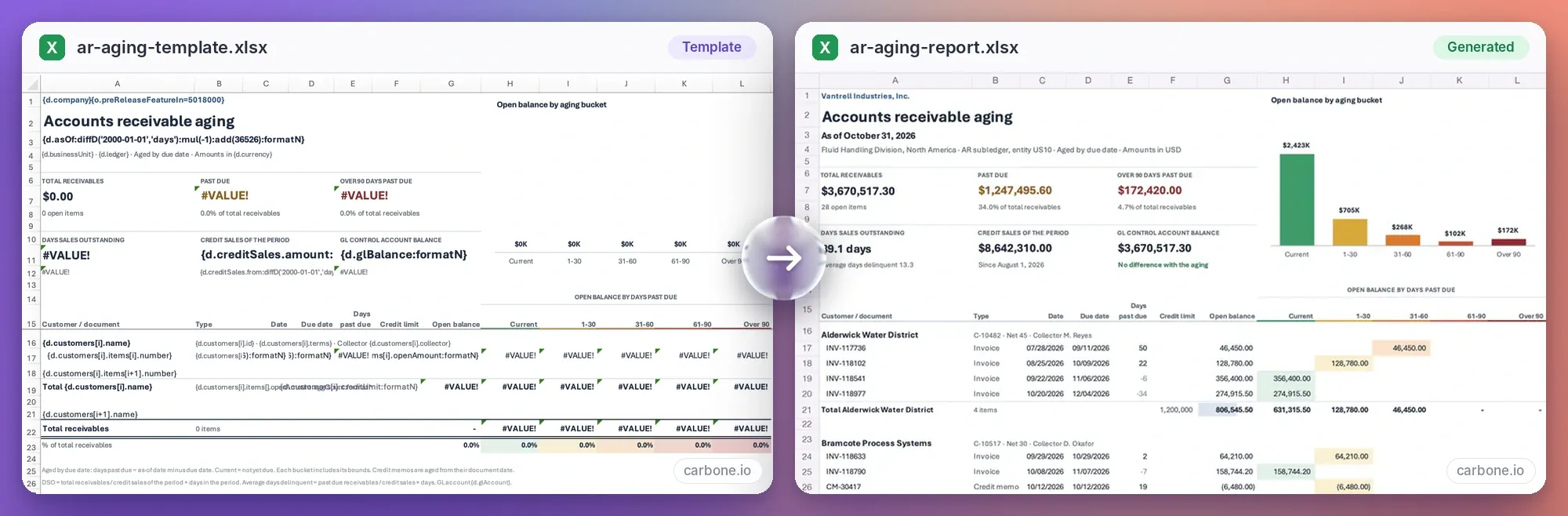
When a loop adds rows to a sheet, everything attached to those rows now moves with them. A formula B11*C11 becomes B12*C12 on the next row, and a total SUM(D11:D12) grows to SUM(D11:D20), the way Excel does it when you insert a row by hand.
The same applies to merged cells, conditional formatting, data validation, filters, hyperlinks, sparklines, tables, charts, images, comments, pivot tables, print areas and named ranges.
Add {o.preReleaseFeatureIn=5018000} to your template to turn it on. Two limits to know: frozen panes do not move, and formulas that contain Carbone tags or INDIRECT are left as they are.
Read the XLSX templates guide →
Formatters Updates
Merge identical cells with the new :mergeCell
{d.rows[i].country:mergeCell} merges consecutive cells that hold the same value. A report grouped by country shows "France" once, in one tall cell, instead of on every row. Use :mergeCell(.parent) to merge only within the same parent group.
It works in XLSX today, without the pre-release tag.
See how to merge identical cells →
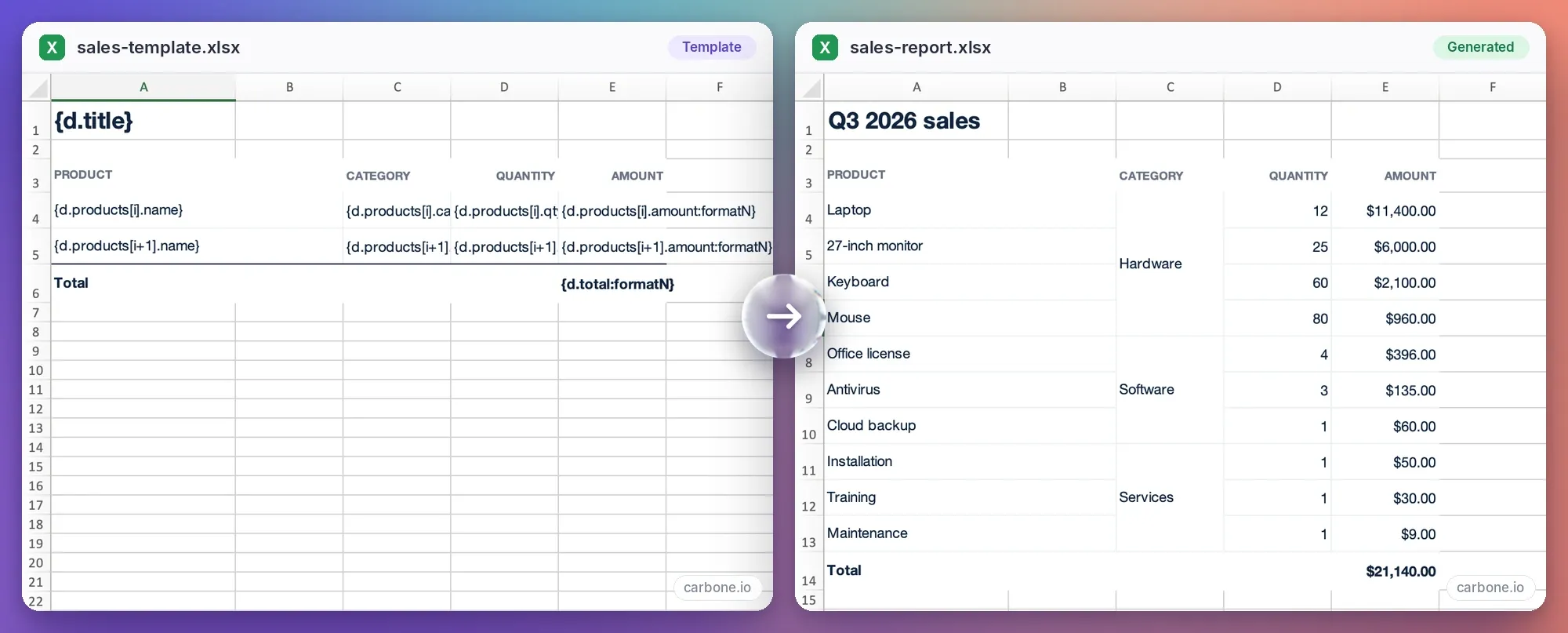
:mergeCell formatter sits in cell C4 of the template, on the category tag of the loop row: {d.products[i].category:mergeCell}. In the generated sheet, consecutive rows with the same category share one merged cell.Accounting format for negative numbers
:formatN and :formatC take a new acc option that prints negative values in parentheses, as in (1 234,50). In XLSX, acc turns the cell into text. To keep a real number, use the Excel format #,##0.00;(#,##0.00) with :formatN.
Spell out numbers with :toWord
:toWord writes a number in words, in 50 languages and 72 regional variants. The language comes from the report's lang option.
{d.value:toWord}with1234in French prints "mille deux cent trente-quatre".{d.rank:toWord(O)}with2prints the ordinal, "deuxième".{d.total:toWord(C)}with1234.5prints a currency amount, "mille deux cent trente-quatre euros et cinquante centimes". Useful for cheques, invoices and contracts.
More HTML in DOCX, ODT and PDF
The :html formatter now renders <sup>, <sub>, <mark>, <code>, <kbd>, <samp>, <pre>, <hr>, <blockquote> and task checkboxes. In DOCX, checkboxes stay clickable in Word. Style quotes with the new quotetheme option, for example {d.content:html(quotetheme:Quote)}.
Add {o.preReleaseFeatureIn=5011000} to your template to turn these on. Without the tag, the content appears without formatting. The same tag makes :html able to read uppercase tags, unquoted attributes, lists and tables left open.
Barcodes and charts in Markdown templates
Markdown templates accept dynamic barcodes with :barcode and charts with :chart. Set the size with the width and height of an <img> tag.
Barcodes in Markdown → · Charts in Markdown →
Eleven new currencies
:formatC, :convCurr and :toWord now know XAF, CDF, STN, SHP, SVC, XCG, MRU, SLE, VES, VED and ZWG.
Line breaks inside cells
:convCRLF now works in XLSX. Turn on "Wrap text" for the cell and multi-line values display as written.
New Conversions & security
Carbone ICE: Convert DOCX and ODT to PDF
Carbone ICE, the Instant Converter Engine, turns DOCX and ODT into PDF inside the Carbone process. It needs no office suite, no external process and no temporary file. It is included in every plan, Community Edition and the free Studio plan included.
Since its launch it has gained an updated table of contents, footnotes, right-to-left languages such as Arabic and Hebrew, PDF encryption and watermarks.
Select it with "converter": "I" in the API, {o.converter=I} in the template, or "Carbone ICE" in Studio. On-Premise, the slim Docker image is enough when all your conversions use ICE.
Meet ICE, the new generation of PDF converter →

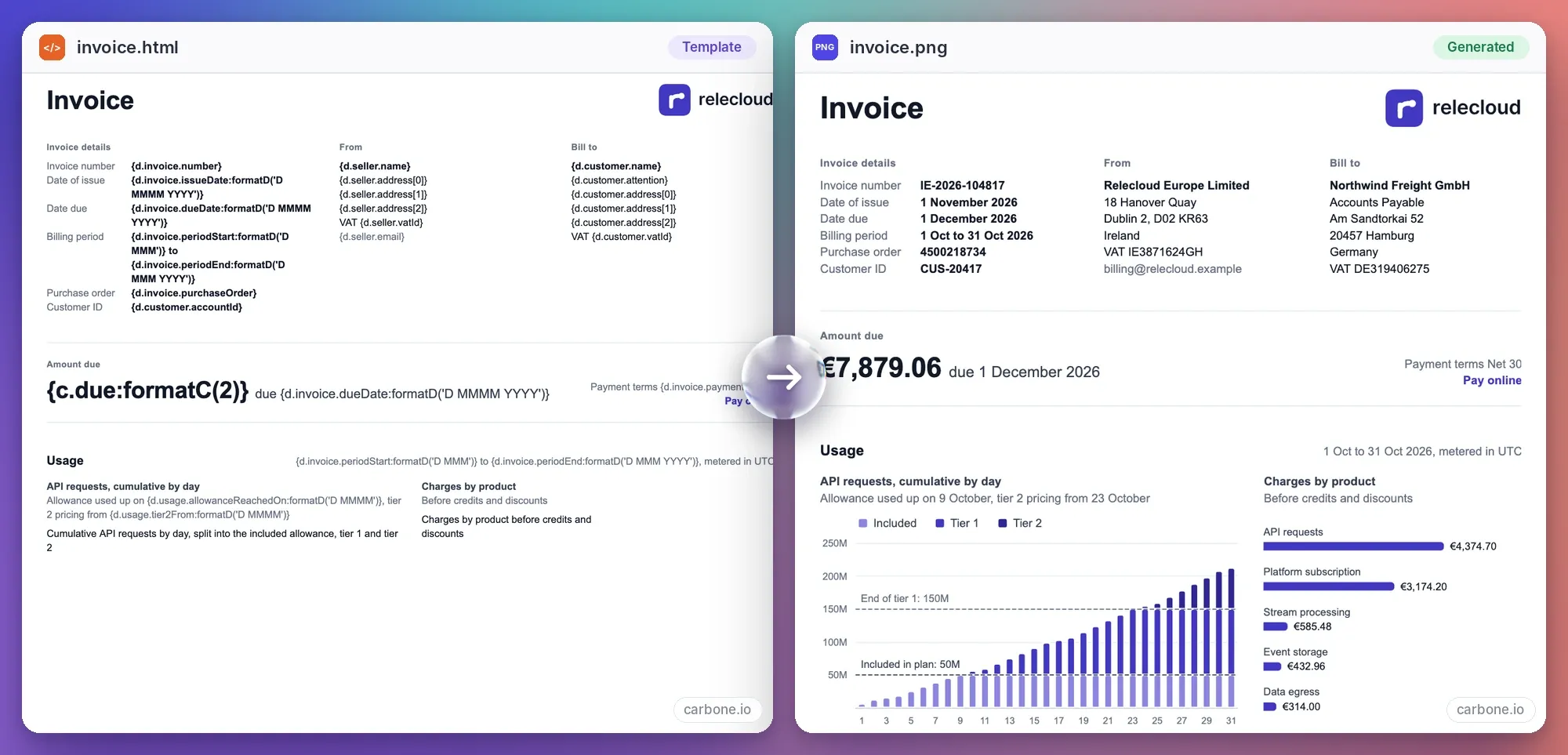
Turn HTML and SVG into images
The Chrome converter ("converter": "C") now exports HTML, XHTML and SVG to PNG, JPG and WebP. SVG can also become a one-page PDF.
Five options control the result: PixelWidth, PixelHeight, FullPage to capture the whole page, Scale from 0.1 to 4 for pixel density, and Quality for JPG and WebP. An image is limited to 16,383 pixels per side and 25 million pixels in total, so use PDF for very long pages. Scripts in the page never run.
Convert HTML to image → · Chromium image options →
Stronger PDF encryption by default
Password-protected PDFs made with Chrome and OnlyOffice now use AES-256 instead of 128-bit encryption. Document properties such as title and author are encrypted too, and encryption runs about 5 times faster. There is nothing to change in your requests.
Stop a report when an image is missing
Add "failOn": ["IMAGE_URL_ERROR"] to POST /render and Carbone returns an error when an image URL cannot be downloaded, instead of producing a document with a broken image. Since v5.16.0 it also applies to HTML to PDF with Chrome.
On-Premise: share the load across nodes
Job balancer
In a cluster, a node with free capacity now pulls pending jobs from the busiest node, runs them and sends the result back. It covers document conversions and asynchronous renders (POST /render with a webhook).
The job balancer is off by default. Set CARBONE_JOB_BALANCER=true on a cluster where peerPort and peerEndpoints are configured.
Read the HA and scaling guide →
Automatic peer reconnection
A supervisor now watches peer connections. It reconnects missing peers and resolves their DNS names again, so nodes that change IP during a Kubernetes rolling update are found without a restart. If a peer drops for a moment while a result is ready, the result is sent again once it reconnects.
Tune the check period with peerCheckInterval (10 seconds by default).
See the peer check interval setting →
Two new metrics
carbone_reports_inflight{stage="conversion"} shows how many conversions wait in the queue. carbone_converter_memory_bytes reports the memory used by LibreOffice, Chrome and Carbone ICE, on Linux.
Batch metrics and statistics
Batch rendering now sends its metrics, batchSize counts every generated document, and a batch that reaches the time limit returns a timeout error. A new type field in afterRender statistics tells sync, async and child renders apart.
Chrome runs in isolation
Carbone now downloads every resource a page asks for and hands it to Chrome. Images, files, Chrome resources and webhooks all go through one controller, and DEBUG=carbone:egress logs each outgoing request.
One plugin for your AI assistant
The Carbone Agent Plugin bundles the Carbone Skill and the Carbone MCP server. The Skill teaches your assistant to write valid Carbone templates. The MCP server lets it render documents, convert files and save templates to your Carbone library.
With both installed, you can ask in one conversation:
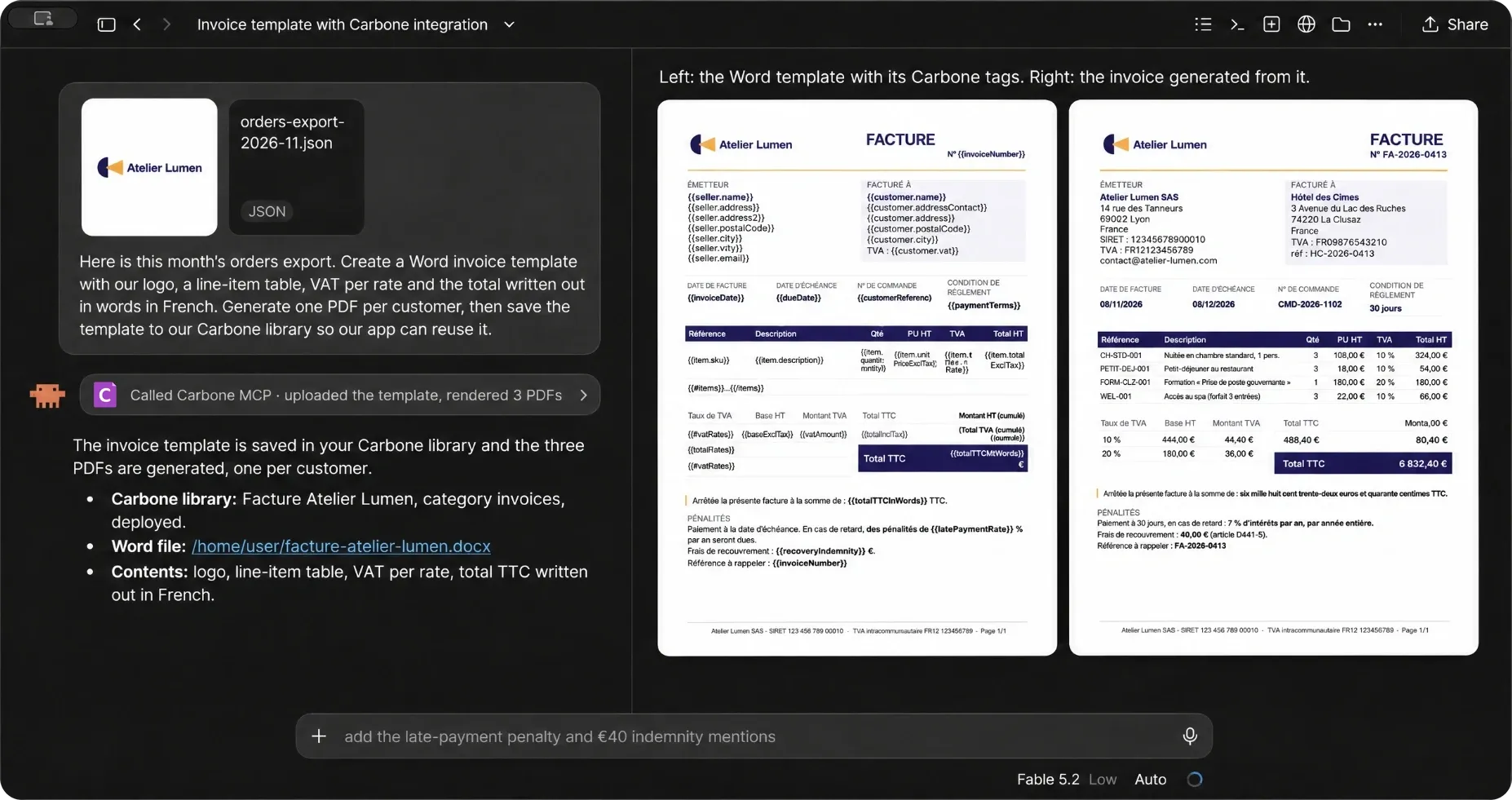
The plugin is available for Claude, Claude Code, ChatGPT, OpenAI Codex, Cursor, GitHub Copilot, Gemini CLI, Antigravity, Devin and Kiro. Documentation to Install the Carbone Agent Plugin.
Faster, in numbers
You get these gains by upgrading. No template or API change is needed.
- 23% faster on reports with large loops (v5.16.4)
- 3 to 4x faster `:round`, `:formatN` and `:formatC` (v5.18.0)
- Up to 10x faster on XLSX sheets with many empty rows (v5.18.0)
- 5x faster PDF encryption (v5.13.0)
- 2x faster PDF merging and watermarks (v5.13.0)
- Much faster `:appendTemplate` on large datasets (v5.15.2)
Before you upgrade
One default changed, and it concerns On-Premise only.
Since v5.16.0, the default securityLevel is 1084 instead of 0. Carbone now blocks outgoing requests to local networks (127.x, 10.x, 172.16-31.x, 192.168.x, localhost). This applies to images, :attachFile, :appendFile, Chrome resources and webhooks.
If your templates load files from internal servers, set the level you need before you upgrade. CARBONE_SECURITY_LEVEL=0 restores the previous behaviour.
Still on a version older than v5.14.4? Upgrade now: that release contains critical security fixes.
See all configuration parameters →
How to access the latest features
- Cloud: send the header
carbone-version: 5with your API requests. You are then on the latest v5 release. - On-Premise: replace the binary with v5.18.0 and restart Carbone.
- Docker: use the image
carbone/carbone-ee:full-5.18.0. - AWS: upgrade from your AWS dashboard.
A question about one of these changes? Write to us on the live chat. We answer.
Great day to everyone, cheers 👋