June 2026 - Product Update


Bonjour 👋 We have kept shipping across Carbone, and it is time to share what is new from the v5.5.1 to the v5.9.0 (latest).
Over the past weeks, we have focused on:
- Shipping more of your most requested features
- Making Carbone a first-class tool to use with your AI
- As always, providing the best support ever from the Carbone team (real humans).
Full details and examples are available in the changelog
New Feature Templating
- Automatic image orientation
:autoOrient(v5.6.0): Photos taken on a phone or camera often carry a rotation flag instead of being physically rotated. The:autoOrientformatter reads that flag and rotates the image correctly in the document. It works in DOCX templates with JPEG images, alongsideimageFit(contain)orimageFit(fillWidth), and the rotation is applied directly in the template with no image reprocessing (documentation). - Conditional colors in PowerPoint
:color(v5.6.0): The:color(scope, type)formatter is now supported in PPTX templates, for every combination oftype(background, text, border) andscope(row, cell, shape). Thebordertype applies to shapes only. Data-driven coloring that already worked in Word and Excel now works in your slides (documentation). - Convert MD to PDF improvements (v5.8.0): Markdown inherits styles from a Word or ODT template. Use the special tag
{o.styleSource = templateOrVersionId},it applies the styles of another DOCX or ODT template to a Markdown template, including headings, tables, headers, and footers. It applies when converting Markdown to DOCX, ODT, or PDF, and the style template can itself contain Carbone tags (documentation). - More forgiving array search (v5.7.0): Equality filters in array search expressions (
lookup, added in v5.2.0) no longer require a strict type match. For example,table[rank=3]now matches bothrank = 3andrank = '3', which aligns with the historical behavior of array filters (documentation).
New Feature API (Cloud / Self-hosted)
- Convert a document without field "data" (v5.9.0): If you call
POST /renderwithout adataobject in the body requst, Carbone now skips the templating step entirely and only converts the file, leaving any raw tags untouched. It is handy when you just need a format conversion, for example DOCX to PDF, with no data to merge (documentation). - Custom authorization header for outbound calls (v5.9.0): If the images (dynamic images) or PDF files (:appendFile) pulls in are not public and require credentials, you can now have Carbone authenticate when it fetches them. The new
carbone-egress-header-authorizationheader set theauthorizationheader Carbone sends on egress traffic: webhooks, external images, and external PDF URLs. For example, sendingcarbone-egress-header-authorization: my-secretaddsauthorization: my-secretwhen Carbone fetches a protected image or calls your webhook. The dedicatedcarbone-webhook-header-authorizationstill takes priority for webhook calls, and the value is limited at 512 characters (documentation). - Full PDF encryption with every converter (v5.6.1, v5.8.0): PDF security is no longer limited to LibreOffice. The Chrome and OnlyOffice converters now support the same options: an open password, a permissions password, restrictions on printing, copying and editing, and accessibility access. Set them through
formatOptionssuch asEncryptFile,DocumentOpenPassword,RestrictPermissions, andPrinting(documentation).
Formatters improvements
:color(v5.6.0): Whitespace placed before the formatter is now accepted .:appendTemplate(v5.5.1): Downloads now respect a configurable timeout, and a safeguard prevents converter starvation when a template appends many files .- PDF forms (v5.6.1): Templates that use annotation tags to fill PDF form fields are now cleanly removed from the final PDF.
Carbone Core improvements (On-Premise, Docker, AWS, Azure)
- Smaller merged PDFs (v5.6.1): When you merge documents into a single PDF with
:appendTemplate,:appendFile, or batch processing, a new post-compression step can reduce the final file size by up to 3x. It is off by default and is enabled on self-hosted instances with thepdfPostCompressionparameterCARBONE_PDF_POST_COMPRESSION=true(documentation). - New configuration parameters (v5.6.1):
maxDownloadFileTimeout(CARBONE_MAX_DOWNLOAD_FILE_TIMEOUT) sets the default timeout for downloading images or files from URLs and forappendTemplate.pdfPostCompression(CARBONE_PDF_POST_COMPRESSION) enables the PDF size reduction above (documentation). - Clearer logs (v5.5.1, v5.6.1): A new
DEBUG=carbone:webserveroption shows sparse logs of the HTTP body and headers during a render, and startup logs now report active options. - More memory for large reports (v5.8.0): The allowed memory allocation was raised to 8 GB to support very large XLSX reports.
Studio updates
- A smoother editing experience (v5.9.0): The "Stop Auto-Upload" button is now the clearer "Finish Editing". Studio shows a subtle animated icon while it watches your file, and tells you how long ago the file changed and when the last sync happened. Long filenames stay readable, a new Docs button gives quick access to the documentation, and the JSON editor gains a real search with Next and Previous buttons, a match counter, and the current position. The Profile button is also fixed on Safari.
- Material Design refresh (v5.7.0): Studio moved to BeerCSS v4.0.21 (Material Design M3), with cleaner category and tag filters, clearer selection in the template list, harmonized margins and buttons, new split buttons, and better table responsiveness.
- Safari fixes (v5.8.0): Fixed the drop-down list and the recent-list behavior in Safari.
⚡️ Carbone and AI
This is the big one. You can now design and generate Carbone documents directly from your favorite AI assistant.
- The Carbone Skill (documentation) teaches an assistant the Carbone templating language, so it writes valid tags, loops, conditions, and formatter chains, and designs templates that actually render. You install it once and it works in ChatGPT, Claude (Desktop and claude.ai), Claude Code, Cursor, VS Code, Gemini, and Codex, as well as inside the Claude for Word, Excel, and PowerPoint add-ins. Examples of prompts you can ask:
- "Here's the JSON my API returns: build a delivery note that matches it and lists every product with quantities."
- "Build an Excel quote where each row is a product and the totals still recalculate after the data is filled in."
- "Only show the discount row when there's actually a discount, and round every amount to two decimals."
- The Carbone MCP (documentation) connects the assistant to your Carbone account or instance so it can act, not just advise: generate documents, convert files, and manage templates. It is available three ways. Use the hosted Cloud server for the fastest setup, run it self-hosted as a Docker container, or run it locally over npm stdio with
npx carbone-mcp. In short, the Skill is the design knowledge and the MCP is the hands that render, convert, and store. Examples of prompts:- "Pull this deal from HubSpot, generate the quote as a PDF, email it to the client, and save a copy to Notion."
- "Generate the monthly business review from our Supabase database, include the latest KPIs, export it to PDF, and save it to Google Drive."
- "Prepare a contract from this opportunity, fill in the approved legal template, render it as a PDF, and send it for signature."
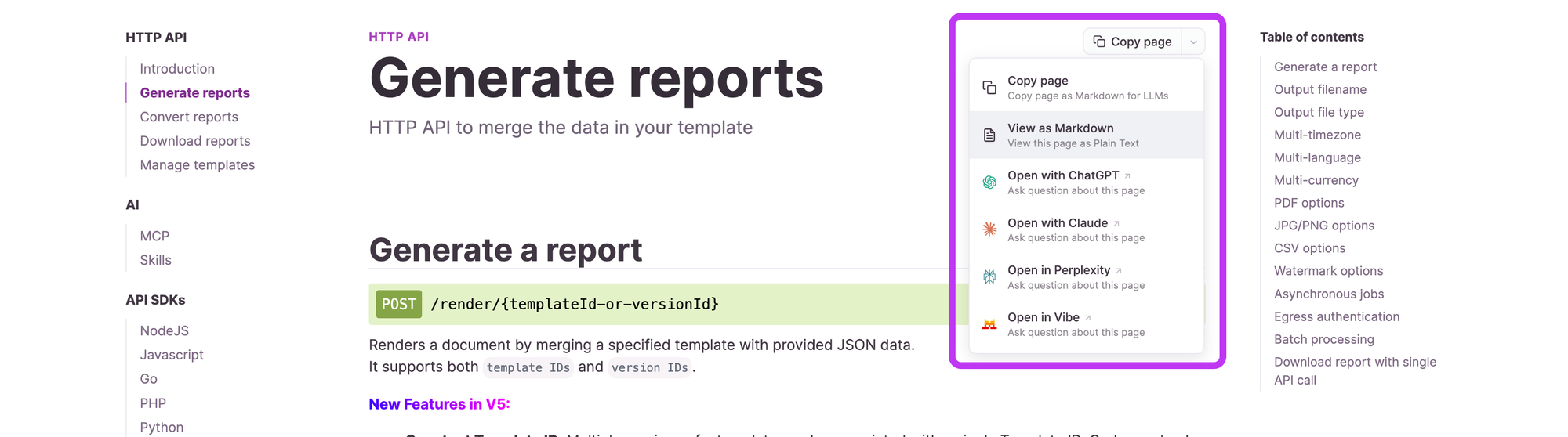
- Open any documentation page in your AI: every page of the documentation now has an action to open it directly in your assistant, so you can load that page as context and ask questions about it.
- Give the whole Carbone context in one fetch: point any AI at carbone.io/llms-full.txt and it receives the entire Carbone documentation in a single file (the llms.txt standard). It is the simplest way to ground an assistant on all of Carbone at once.
👉 How to access the latest features?
- Carbone Cloud API: ensure you request version 5 of Carbone by setting the header
carbone-version:5. - Carbone On-Premise: download the latest binary from the Changelog, replace your existing binary with the new one, and restart the Carbone server. Your templates, config, and template metadata remain intact.
- Carbone Docker: first ensure templates and metadata are stored on persistent volumes. Pull the latest image with
docker pull carbone/carbone-ee:full-5.9.0, then restart your container. - Carbone On-AWS: upgrade to the latest version from your AWS dashboard.
If you have any questions or need a hand, just reach out through the live support chat. We will be happy to help. Have a great day! 🍻