
Quickstart
For Developers
Add document generation into your application
Quick API Integration Guide
Get started with document generation in just a few minutes!
For detailed options, see the full HTTP API documentation.
1. Get Your API Key
- Create a free Carbone Account.
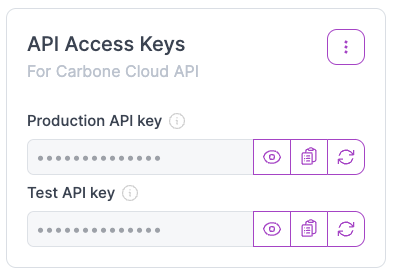
- Go to your dashboard to get your API keys:
- Production API key: For production use. Get 100 free documents/month after adding a payment method.
- Test API key: Always free. For development and testing (adds a Carbone watermark, PDF export only).
- Use your key in all API requests:
"authorization": "Bearer YOUR_API_TOKEN"
2. Get a Template ID
To generate documents, you need a template Id. There are two easy ways to get it:
Copy the ID from Carbone Studio
If you uploaded your template via Carbone Studio, simply open your template and copy its ID from the Studio interface.

Or Upload your template via the API
If you prefer to work programmatically, you can upload your template file using the API. Here’s a curl sample command:
export CARBONE_API_TOKEN="<your_api_key_here>"
export ABSOLUTE_FILE_PATH="/path/to/first-template.docx"
curl --location --request POST 'https://api.carbone.io/template' \
     --header 'carbone-version: 5' \
     --header 'Expect:' \
     --header 'Content-Type: multipart/form-data' \
     --header 'Authorization: Bearer '${CARBONE_API_TOKEN} \
     --form 'versioning=true' \
     --form 'template=@'${ABSOLUTE_FILE_PATH}
Set versioning=true to use the new id/versionId fields from the v5 API:
{
  success: true,
  data: {
    id: "424242424242", // template id
    versionId: "af42af42af42af42af42af42af42af42af42af42af42af42af42af42af42af42", // unique hash
    type: "docx",
    size: 12012,
    createdAt: 21545451,
    // For backward compatibility with v4 API, deprecated fields are still returned:
    // "templateId" (now "versionId" in v5)
    templateId: "af42af42af42af42af42af42af42af42af42af42af42af42af42af42af42af42",
    // "templateExtension" (now "type")
    templateExtension: "docx"
  }
}
With either method, you now have your template id or versionId (both are accepted) ready to use in API calls!
3. Generate Your Document
Replace TEMPLATE_ID_OR_VERSION_ID with your template’s ID.
curl --location --request POST 'https://api.carbone.io/render/TEMPLATE_ID_OR_VERSION_ID?download=true' \
     --header 'carbone-version: 5' \
     --header 'Content-Type: application/json' \
     --header 'Authorization: Bearer '${CARBONE_API_TOKEN} \
     --data-raw '{ "data": { "name": "John" }, "convertTo": "pdf" }' \
     -o 'report.pdf'
Your generated document will be saved as report.pdf.
Prefer SDKs?
Carbone provides ready-to-use SDKs to speed up development:
That’s it! 🚀 Now you’re ready to automate document generation with Carbone.