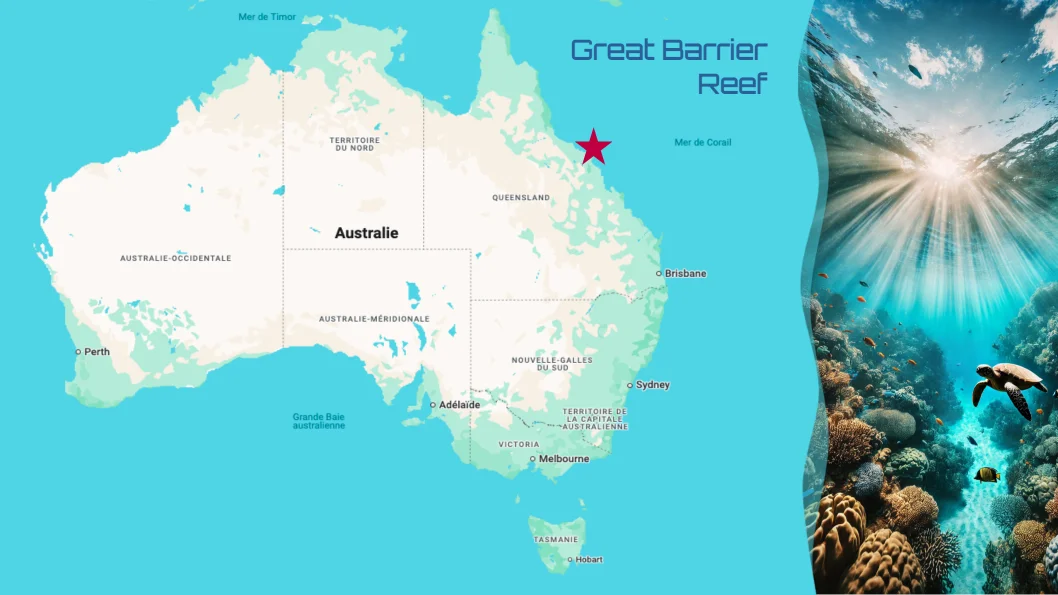
Dynamic pins on a map
Generate a map with dynamic pins with Carbone
- Template type document odp expert
- Carbone min. v5.0.0+
- Features transform set
- Target maps markers longitude latitude
Overview
Learn how to generate a presentation that includes:
- Dynamic pin placement on a map
- Conversion of geographic coordinates (latitude/longitude) into X/Y coordinates on an image
Step-by-Step Guide
This example uses a simplified calculation method for demonstration purposes.
The conversion of geographical coordinates is an approximation and does not follow strict cartographic principles.
Follow these steps to create an ODP template with dynamic map pins:
1. Prepare the Map
Insert your map image into the template.
2. Set Reference Points
Choose two fixed reference points on your map and record their:
- GPS coordinates (latitude and longitude)
- X and Y positions on the map (place a shape and note its position)
Example reference points:
    Name    | PosX  | PosY  | Latitude  | Longitude
    Darwin  | 7.87  | 0.31  | -12.455   | 130.839
    Perth   | 1.58  | 8.77  | -31.953   | 115.863
Calculate the conversion coefficients:
CoeffX = (7.87 - 1.58)/(130.839 - 115.863) = 0.420
CoeffY = (0.31 - 8.77)/(-12.455 - (-31.953)) = 0.4334
3. Configure Dynamic Pin Position
- Place a single shape on the map that will serve as the movable pin
- Right-click the shape and access the Alt text menu
- Add the following formulas to convert coordinates using the :transform formatter:
{d.location[i].longitude:sub(115.863):mul(0.420):sub(7.87):add(1.58):transform(x,cm)}
{d.location[i].latitude:sub(-31.953):mul(-0.4334):add(8.77):transform(y,cm)}
Use a shape element (not an image) to ensure the transform formatter works correctly.
4. Add Title and Image Placeholder
To finalize the template and illustrate the pin position with corresponding title and image:
- Insert a temporary image
- Right-click and open the Alt text menu
- Specify the image path using:
{d.location[i].image} - Insert a textbox and write the Carbone tag
{d.location[i].name} - Choose a clear and attractive font.
That's it! Your template will now display dynamic pins based on geographic coordinates, each accompanied by a clear image.
Related Examples
Trusted by 800+ paid customers in 40+ countries