
Design
Transform
Write a :transform tag in a shape or an image, and Carbone moves it along the X or Y axis by a value from your JSON data.
ENTERPRISE FEATURE
Available for:
Carbone Cloud
Carbone On-premise
Embedded Carbone JS
v4.22.11+
Compatible with ODT, ODP, PPTX, and PDF files.
Overview
In slideshows, presentations and drawings, items are placed at absolute X and Y coordinates, relative to their page, slide or paragraph.
The :transform(axis, unit) formatter moves these items by the value of the tag, along the X or Y axis:
axisisxto move the item horizontally, oryto move it vertically, from its current position. A positive value moves it right or down, and a negative value moves it left or up.unitcan becm,mm,in(orinch) orpt.
Write the tag inside the item to move: in the alt text of a shape or an image, or in the shape itself. The tag prints nothing.
When a loop spans two shapes, the shape with the [i+1] tag must be above the shape with the [i] tag in the layer order.
For complete examples that use :transform, see Dynamic Pins on a Map, Grid Layout and Property advertisement.
PPTX example
Place each initiative on an impact vs effort matrix from its scores. :mul converts the scores to millimeters: 10 mm to the right per person-week of effort, and -8 mm per impact point, because a negative distance moves the shape up.
{
  "initiatives": [
    { "name": "Instant payouts",        "team": "Payments", "color": "#635BFF", "effort": 4,  "impact": 9 },
    { "name": "Smart retries",          "team": "Payments", "color": "#635BFF", "effort": 2,  "impact": 7 },
    { "name": "Checkout redesign",      "team": "Growth",   "color": "#1EA672", "effort": 5,  "impact": 8 },
    { "name": "Multi-currency wallets", "team": "Payments", "color": "#635BFF", "effort": 14, "impact": 9 },
    { "name": "Fraud scoring",          "team": "Data",     "color": "#F5A524", "effort": 12, "impact": 7 },
    { "name": "EU data residency",      "team": "Platform", "color": "#0CB4E8", "effort": 15, "impact": 6 },
    { "name": "Referral program",       "team": "Growth",   "color": "#1EA672", "effort": 6,  "impact": 4 },
    { "name": "Dark mode",              "team": "Growth",   "color": "#1EA672", "effort": 3,  "impact": 2 },
    { "name": "In-house BI",            "team": "Data",     "color": "#F5A524", "effort": 12, "impact": 2 },
    { "name": "Legacy API rewrite",     "team": "Platform", "color": "#0CB4E8", "effort": 15, "impact": 1 }
  ]
}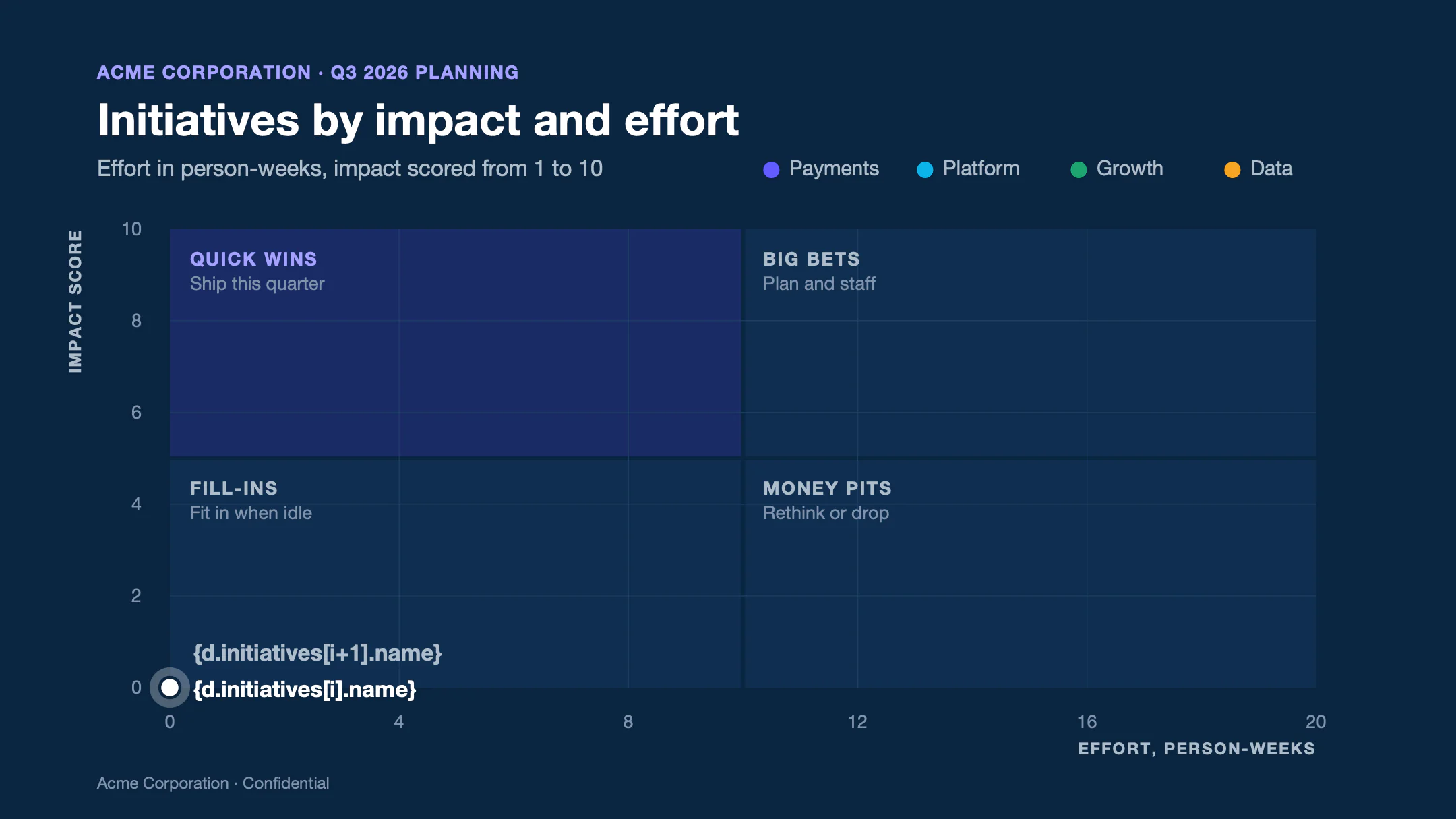
Text of template.pptx
Slide 1
ACME CORPORATION · Q3 2026 PLANNING
Initiatives by impact and effort
Effort in person-weeks, impact scored from 1 to 10
Payments
Platform
Growth
Data
QUICK WINS
Ship this quarter
BIG BETS
Plan and staff
FILL-INS
Fit in when idle
MONEY PITS
Rethink or drop
0
4
8
12
16
20
0
2
4
6
8
10
EFFORT, PERSON-WEEKS
IMPACT SCORE
{d.initiatives[i].name}
{d.initiatives[i+1].name}
Acme Corporation · Confidential
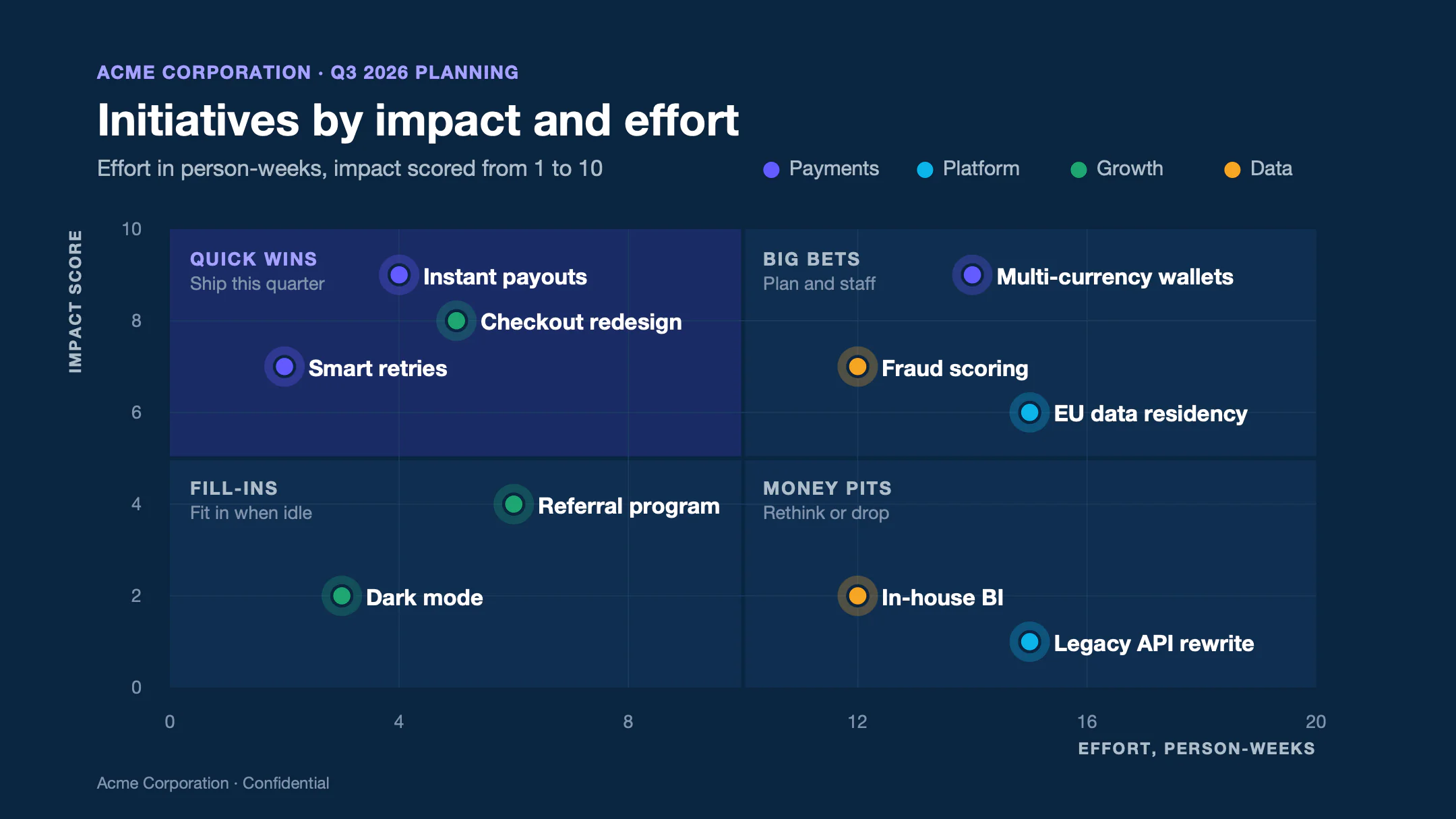
Text of report.pptx
Slide 1
ACME CORPORATION · Q3 2026 PLANNING
Initiatives by impact and effort
Effort in person-weeks, impact scored from 1 to 10
Payments
Platform
Growth
Data
QUICK WINS
Ship this quarter
BIG BETS
Plan and staff
FILL-INS
Fit in when idle
MONEY PITS
Rethink or drop
0
4
8
12
16
20
0
2
4
6
8
10
EFFORT, PERSON-WEEKS
IMPACT SCORE
Instant payouts
Smart retries
Checkout redesign
Multi-currency wallets
Fraud scoring
EU data residency
Referral program
Dark mode
In-house BI
Legacy API rewrite
Acme Corporation · Confidential
- In the template, each initiative is a halo, a dot and a label at the origin of the matrix: 0 person-weeks, 0 points.
- The alt text of the three shapes moves them on both axes:
{d.initiatives[i].effort:mul(10):transform(x, mm)} {d.initiatives[i].impact:mul(-8):transform(y, mm)}. To edit it, right-click the shape > Edit Alt Text (or View Alt Text). - The halo and the dot also have
{d.initiatives[i].color:color(shape, background)}, which fills them with the color of the team. Learn more about colors. - The
{d.initiatives[i+1].name}shape ends the loop. It is in front of the[i]shapes in the layer order: right-click > Bring to Front. - A
:transformtag on a line or a group stops the render with an error. Draw lines as thin rectangles, and ungroup the shapes to move.