
Design
File operations
Append, merge or attach files in the generated document
ENTERPRISE FEATURE
Available for:
Carbone Cloud
Carbone On-premise
Embedded Carbone JS
v4.23.0+
Overview
Available operations:
- appendFile: Append PDF files at the end of the generated document.
- appendTemplate: Append another Carbone template to the generated document. Carbone renders the nested template (as PDF) and appends the result.
- attachFile: Attach an external file inside a PDF (e.g., XML for Factur-X and ZUGFeRD).
Supports files as URL or Data-URI (Base64 encoded)
Compatible with generated PDF files.
For the Cloud API: maxDownloadFileSizeTotal = 50MB and maxDownloadFileCount = 40
Get inspired by one of our real-life examples: Quote With Datasheet
:appendFile(where)
v4.22.0+
Append an external file inside the generated document
Only PDF files can be added at the end of the current generated document.
If the generated file is not a PDF, the command is ignored.
Carbone will return an error and will not generate the report in the following scenarios:
- If the provided URL returns an error (2 retries for Carbone Cloud).
- If the downloaded document is not recognized as a valid PDF.
- If more than
maxDownloadFileCountfiles are to be downloaded - If the total size of all downloaded files exceeds
maxDownloadFileSizeTotalMB.
Carbone will ignore the formatter and proceed to generate the report in the following cases: - If the provided URL is null, undefined, or an empty string.
- If the final report is not in PDF format
| Params | Description | Type |
|---|---|---|
| where | Position to insert the document: "start" (beginning) or "end" (default). | String |
Example 1 : technical sheet
Data
{
  "quoteId" : 4242,
  "products": [
    {
      "name": "PV 500w Half-Cut",
      "datasheet": "https://carbone.io/examples/append-file-1/dualsun-a3-technical-drawing-500w.pdf"
    },
    {
      "name" : "PV 425w Half-Cut",
      "datasheet" : "https://carbone.io/examples/append-file-1/dualsun-a4-technical-drawing-425w.pdf"
    }
  ]
}
Template
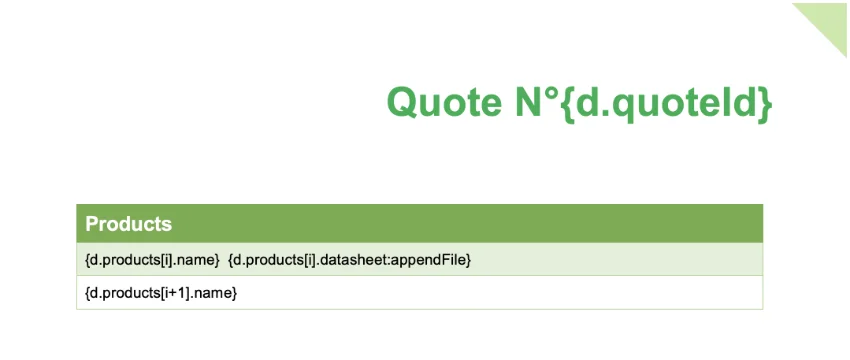
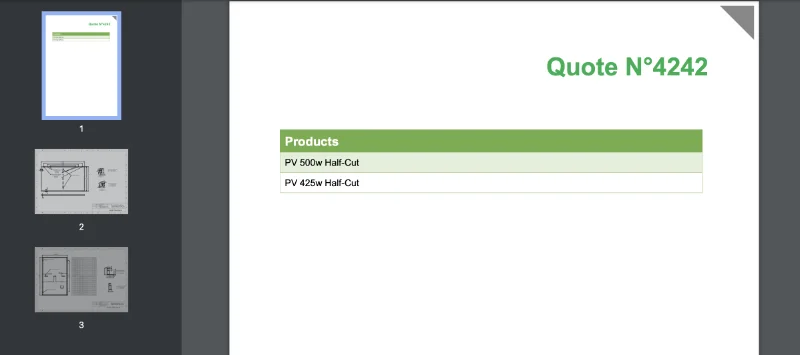
In this example, {d.products[i].datasheet:appendFile} is used to add the technical sheets for each product at the end of the generated PDF.
The appendFile function preserves the original format (A4, A3, etc.) and the orientation (landscape, portrait) of the appended files.
Result
Step-by-step guide to create the template: Quote With Datasheet
:appendTemplate(templateOrVersionId, position)
v5.0.3+
Append an external template inside the generated document.
Sends part of the data to the injected template. Carbone generates the document
(automatically in PDF) and appends it to the current template.
It can be used to append a template in a loop.
The following options are automatically passed to the injected template:
lang, currency, enum, converter, translations, and complement.
Carbone will return an error and will not generate the report in the following cases:
- If the injected template returns an error during generation.
- If more than
maxDownloadFileCountfiles are injected. - If the total size of all injected files exceeds
maxDownloadFileSizeTotalMB.
Carbone will ignore the formatter and generate the report normally in the following cases:
- If the data passed to the formatter is null, undefined, or an empty string.
- If the final report is not in PDF format. Only PDF files can be appended.
Beta feature: This feature is available only for the Carbone On-Premise version.
| Params | Description | Type |
|---|---|---|
| templateOrVersionId | The template ID or version ID to append. | String |
| position | Position where the document is inserted: "start" (beginning) or "end" (default). | String |
Example: append nested templates inside a loop
Use :appendTemplate when each item in your data should produce its own rendered document, and the final PDF is the concatenation of all of them. Carbone renders each nested template in parallel and appends them to the main report in loop order — useful for cover pages, per-recipient deliverables, or PDFs of up to 20,000 pages built from many small parallelized renders.
PDF output only. :appendTemplate works only when the final report is generated as a PDF. If the output format is anything else (DOCX, XLSX, ODT, …), the formatter is silently ignored and the main report is rendered without the appended content.
Data
{
  "orders": [
    { "orderId": "A-1001", "customer": "Acme Corp",     "amount": 2400 },
    { "orderId": "A-1002", "customer": "Globex",        "amount": 980  },
    { "orderId": "A-1003", "customer": "Initech Labs",  "amount": 5120 }
  ]
}
Template
The main template iterates over orders and appends one rendered invoice per order. Pass the nested template's template ID (renders the latest version) or version ID (pins a specific version) — both are returned by the upload-a-template API and visible in Carbone Studio.
The nested template receives each orders[i] object as its own {d.} payload, so inside it you can write {d.orderId}, {d.customer}, {d.amount} directly.
Cover page

{d.orders[i]:appendTemplate(110212)} {d.orders[i+1]}
Each iteration renders order orders[i] through template 110212, produces a per-order PDF, and appends it to the main document. The following options are automatically forwarded from the main render to every nested render: lang, currency, enum, converter, translations, complement.
Position
Pass 'start' as the second argument to prepend the nested document instead of appending it: {d:appendTemplate(110212, 'start')}.
:attachFile(name, type)
v4.23.0+
Attach an external file inside the generated document
File attachment is a special feature of PDFs. It can be used for example to add Factur-X XML information
If the generated file is not a PDF, the command is ignored.
Carbone will return an error and will not generate the report in the following scenarios:
- If the provided URL returns an error (2 retries for Carbone Cloud).
- If the downloaded document is not recognized as a valid PDF.
- If more than
maxDownloadFileCountfiles are to be downloaded - If the total size of all downloaded files exceeds
maxDownloadFileSizeTotalMB
Carbone will ignore the formatter and proceed to generate the report in the following cases: - If the provided URL is null, undefined, or an empty string.
- If the final report is not in PDF format
| Params | Description | Type |
|---|---|---|
| name | file name | String |
| type | attachment type AFRelationship. Can be "Source", "Data" (by default), "Alternative", "Supplement", "Unspecified", "FormData", "Schema". | String |
Example Factur-X and ZUGFeRD
Step-by-step guide to create a real-life template: Factur-X Invoice Automation