
Design
Version lifecycle
Learn how to upgrade and explore the features and versions of Carbone
Versions
Here are the available Carbone versions:
- Carbone v5: Ready for production
- Carbone v4: Ready for production, especially with the latest prerelease features activated.
- Carbone v3: Maintained but not recommended for new projects.
- Carbone v2: Not supported. Please avoid using this version.
We work hard to ensure backward compatibility through 5000+ automated tests of the Carbone templating language. However, even though we are AI-powered humans, bugs can still happen.
Therefore, we strongly recommend thoroughly testing your reports when migrating from one version to another. In most cases, generated PDFs may look slightly different due to improvements in our external document converters (LibreOffice, OnlyOffice), which support more DOCX and ODT features.
If you encounter any regressions, please contact us. We’re here to help 👋.
Pre-release features
Some upcoming features are delivered in advance in the stable version.
Here are the current pre-release tags for Carbone v5:
{o.preReleaseFeatureIn=5011000}: Enable<sup>,<sub>,<mark>,<code>,<kbd>,<samp>,<pre>,<hr>,<blockquote>and<input type="checkbox">support with the:htmlformatter. It includes the tag5002000.{o.preReleaseFeatureIn=5002000}: Enable Table Element, Heading Elements, and Page Break support with the:htmlformatter.{o.preReleaseFeatureIn=5000000}: Enable detection of missing i+1
Here are the current pre-release tags for Carbone v4:
{o.preReleaseFeatureIn=4025011}= "Enable all pre-release features added up to v4.25.11. It includes all other pre-release tags"{o.preReleaseFeatureIn=4024000}{o.preReleaseFeatureIn=4022011}{o.preReleaseFeatureIn=4022008}{o.preReleaseFeatureIn=4015000}{o.preReleaseFeatureIn=4009000}
To activate all upcoming features, add the tag {o.preReleaseFeatureIn=4024000} in the template's comment properties.
These features will be activated by default in the next major release (v5, v6, etc.).
Please take a look at the changelog to see related features.
- In Microsoft Office for Windows: Follow this video
- In LibreOffice on Mac or Windows : File -> Properties
- In Microsoft Office for Mac / Linux : File -> Properties
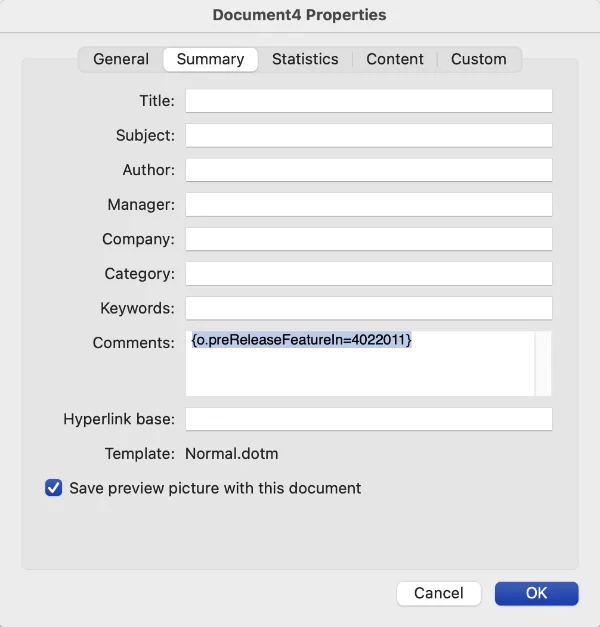
You can also activate it via API or in the configuration.
Force Carbone v5 to behave like v4
The preReleaseFeatureIn tag also works in reverse: it can force Carbone v5 to behave like Carbone v4. This helps you migrate to production without fixing badly designed templates that used to work in v4 even if they contain syntax errors.
Only features and fixes introduced up to the given tag are applied. Anything introduced by a higher tag is disabled.
Example - keep templates that have a missing i+1
Carbone v5 detects missing i+1 loop terminators more strictly. In v4, some of these templates still generated a report. In v5, they return an error until you fix them.
To keep the old behavior, set {o.preReleaseFeatureIn=4999999} (one below the first v5 pre-release tag 5000000) in the template, via the API, or in the Carbone configuration. Carbone v5 then accepts the syntax error and behaves like v4.
If you set this value globally in the server configuration, all pre-release features above that value are disabled by default. You can still override it per request via the API, or per template.
The pre-release tag only affects the template engine, not the document converter (e.g., LibreOffice). If you require identical output in v5 as in v4, you should build your own Docker image using the exact LibreOffice version you used with v4.
Feature delivery lifecycle
We typically follow these steps for each new feature or fix:
- A customer requests a new feature or reports a needed fix through our chat.
- The feature or fix is delivered in the
staging.x.xCloud environment, initially for testing with selected clients. - It then becomes available in version
V.x.x.xfor everyone (cloud, on-premises, public release notes, etc.). - Sometimes, new features are deactivated and must be activated with optional flags in the template or via API. These features will be activated by default in the next major release (v5, v6, etc.). This approach minimizes the risk of impacting other features and reduces time-to-market.
How much time is needed to add a feature (for Advanced subscription)?
- Urgent bugs are usually fixed within 24 hours.
- Simple features are delivered in about 10 days.
- Complex features require more time and may need further analysis.
Our record is 1 hour from the moment the client reports the issue to its deployment in production 💪.