Training Certificate
Generate Professional Training Certificates with Carbone
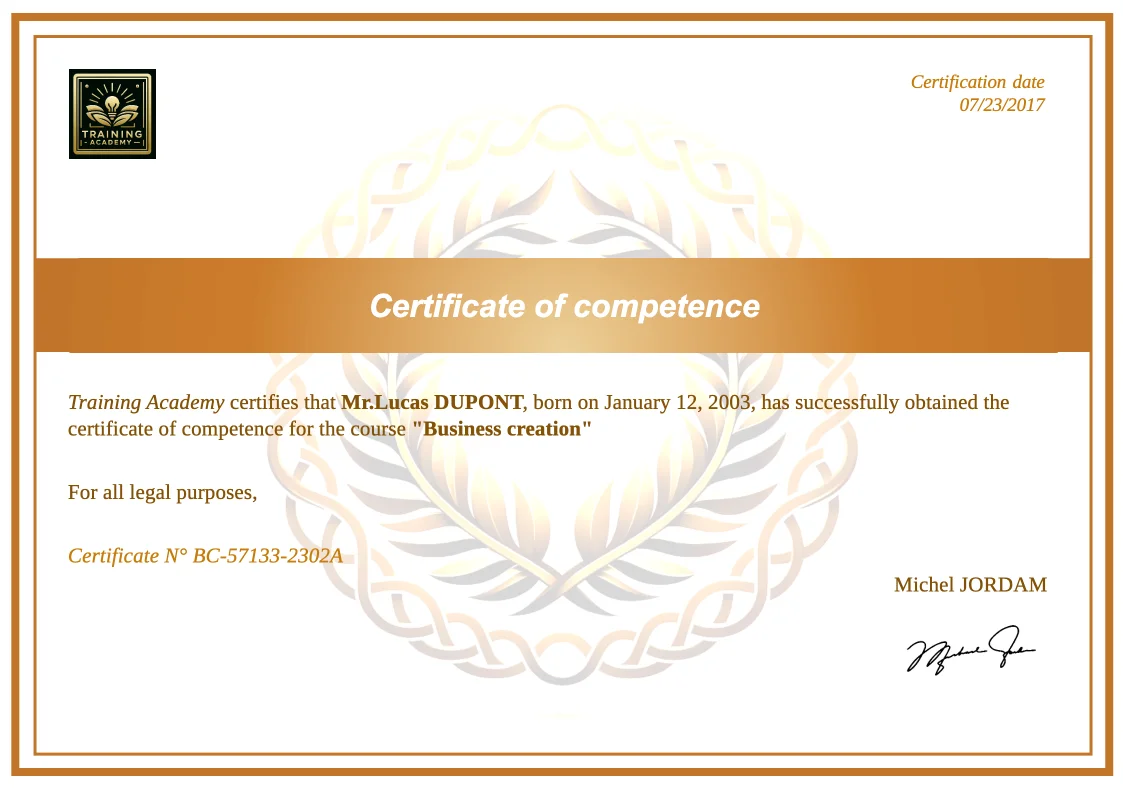
- Template type document odp simple
- Carbone min. v4.0.0+
- Features loop
- Target Certificate Diploma License Attestation
Overview
This example shows how to generate multiple professional training certificates automatically with these key features:
- Create individual certificates for multiple participants using loops
- Include personalized information on each certificate
- Add a digital signature to maintain authenticity
Step-by-Step Solution
Follow these steps to create your certificate template using Carbone:
1. Design the Certificate Layout
- Insert a professional background or border
- Structure the certificate content
2. Add Carbone Tags
- Insert Carbone tags for dynamic content. Examples: Use
{d.reportMain}for general certificate information,{d.students[i].name}for participant details. - Apply the desired font to each Carbone Tag
- Include as many dynamic fields as necessary
3. Configure Page Iteration
- On the second slide, use
{d.students[i+1]}to generate individual certificates - Each iteration creates a new certificate page
- All formatting and styling are preserved across pages
Advanced Tips
Adding a Dynamic Signature
To include a digital signature in your certificates:
- Insert a temporary image as a signature placeholder
- Right-click the image and select Alt Text
- Add the Carbone tag
{d.signature}to display the actual signature. - The signature image URL should be provided in your JSON data
Related Examples
Trusted by 800+ paid customers in 40+ countries
Finance
Healthcare
Insurance
Legal
Public
Retail
Energy
Software
Telecom