Aircraft cabin condition report
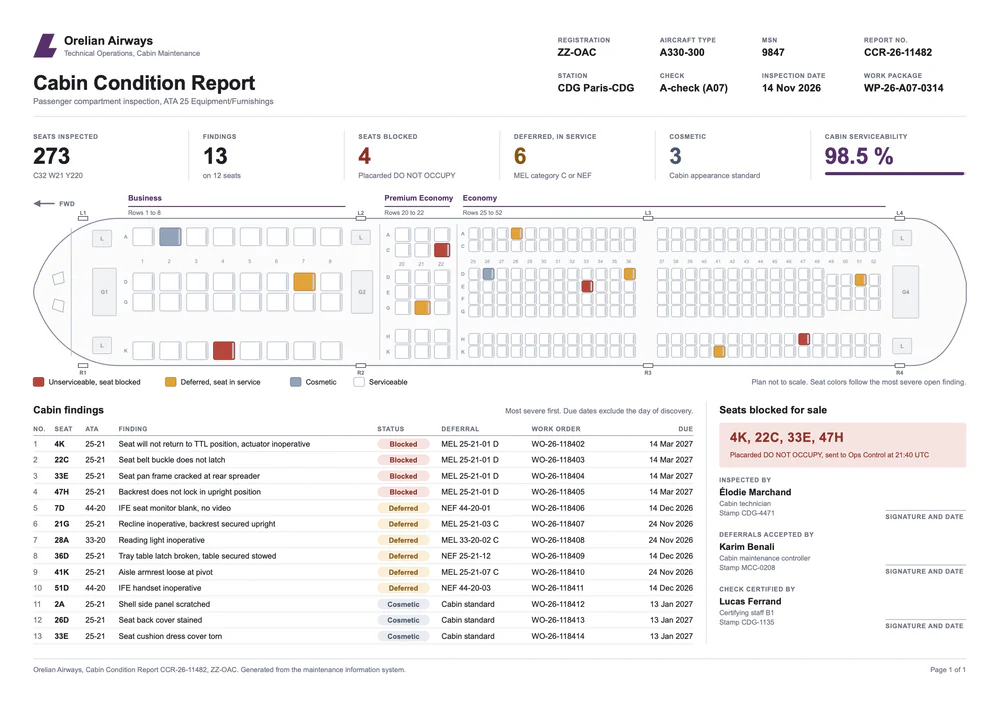
Seat findings from your MRO system on a colored cabin plan

- Template
- SVG
- Export as
- PDF, PNG, SVG, WebP +24 more
- Carbone
- 5.18+
Generate cabin condition reports from your maintenance system
After a line check or an A-check, cabin technicians inspect every passenger seat and record each finding against ATA iSpec 2200 chapter 25, Equipment/Furnishings, or the chapter of the system concerned: 33 for the reading lights, 44 for the in-flight entertainment. The cabin maintenance controller then decides, finding by finding, whether the seat stays in service, is deferred under the operator's MEL or NEF program, or is blocked and placarded DO NOT OCCUPY, as the passenger seat item of the FAA A330 MMEL requires. Seats blocked for sale go to Ops Control the same evening.
Your MRO or aircraft maintenance software holds the findings, work orders and deferral limits: it sends them to the Carbone API as JSON, and gets back a one-page PDF that the hangar, the controller and Ops Control all read the same way. In this example, the fictional Orelian Airways inspects the 273 seats of an A330-300 at Paris-CDG during an A-check: 13 findings, 4 seats blocked, a cabin serviceability of 98.5 %.
In this example, you will:
- Draw an SVG cabin plan where the
idof each seat is its seat number - Color the seats by status with array filters and
:svgSelectiveUpdate - Compute the KPIs with aggregators, and list the findings with a loop
How to create a cabin condition report
1. Draw the cabin plan and name each seat
Draw the cabin in Illustrator or any vector tool: the fuselage, the doors, the galleys and one rounded rectangle per seat. Give each seat rectangle the seat number as its id, exactly as the maintenance system writes it: <rect id="33E" .../>. In Illustrator, name the layer 33E and export with Object IDs: Layer Names, as explained in the SVG guide.
The backrest of each seat is a second shape without an id, so it keeps its gray color when the seat changes color.
2. Color the seats according to their status
Write the color tags in a comment of the SVG. They print nothing:
{d.defects[category=Blocked].seat:svgSelectiveUpdate('fill', '#B5463C', 'id')}
{d.defects[category=Deferred].seat:svgSelectiveUpdate('fill', '#E0A33A', 'id')}
{d.defects[category=Cosmetic].seat:svgSelectiveUpdate('fill', '#93A3B8', 'id')}- The filter
[category=Blocked]keeps the findings whose category is Blocked. :svgSelectiveUpdatefinds the shape whoseidis theseatof each finding, and sets itsfill. The'id'parameter updates only this shape, not the backrest next to it.- A second tag per status sets the
strokewith a darker shade. - When a seat has two findings, the first color set wins: write the most severe status first. Seat 33E has a cracked frame and a torn cover, and stays red.
3. Compute the KPI strip
The six figures come from aggregators, with no total in the data:
- Seats inspected:
{d.zones[].seats:aggSum} - Findings:
{d.defects[].seat:aggCount}, on{d.defects[].seat:aggCountD}distinct seats - Seats blocked:
{d.defects[category=Blocked].seat:aggCountD}
For the cabin serviceability, two tags in the comment store the totals, {d.zones[].seats:aggSum:set(c.seats)} and {d.defects[category=Blocked].seat:aggCountD:set(c.blocked)}. Then {c.seats:sub(c.blocked):div(c.seats):mul(100):formatN(1)} % prints 98.5 %, and the same calculation with :mul(110) in the width attribute draws the bar under it.
The red box lists the seats to block for sale: {d.defects[category=Blocked].seat:aggStrD(', ')} prints 4K, 22C, 33E, 47H.
4. List the findings with a loop
Each row of the table is a group with the tags of one finding, like {d.defects[i].seat}, {d.defects[i].ata} and {d.defects[i].deferral}, followed by a second group with the single tag {d.defects[i+1].seat:print(.i):add(1)}. Carbone repeats the first group for each finding: transform="translate(0 {d.defects[i].seat:print(.i):mul(13.5)})" moves each row 13.5 points below the previous one, and {d.defects[i].seat:print(.i):add(1)} numbers the rows.
- The status badge takes its color from an inline condition in its
fillattribute:{d.defects[i].category:ifEQ(Blocked):show('#F6E4E1'):ifEQ(Deferred):show('#FAEFD9'):elseShow('#E9EDF2')}. {d.defects[i].dueDate:formatD('DD MMM YYYY')}prints the rectification limit as 24 Nov 2026, the date format of most aviation records.
5. Generate the PDF
Send the template and the JSON to the Carbone API with "convertTo": "pdf" and "converter": "C": Chromium draws the SVG like a browser, on an A4 landscape page set by width="297mm" height="210mm" on the svg element.
Related Examples
Trusted by 800+ paid customers in 40+ countries