cXML purchase order
Purchase orders from your ERP, sent to suppliers as cXML OrderRequest
- Template
- XML
- Export as
- XML
- Carbone
- 5.18+
- Loop
- Aggregation
- Math
- Store
- Date
- Number format
Generate cXML purchase orders from your ERP
Procurement teams buy from catalog suppliers through a procure-to-pay platform: a requester fills a cart, often after a PunchOut session on the supplier's catalog, an approver validates it, and the ERP sends the purchase order to the supplier as a cXML OrderRequest, through a supplier network or a direct HTTPS connection. ERP purchasing modules, e-procurement platforms and integration middleware send these orders every day, in volumes of hundreds per week for a large buyer.
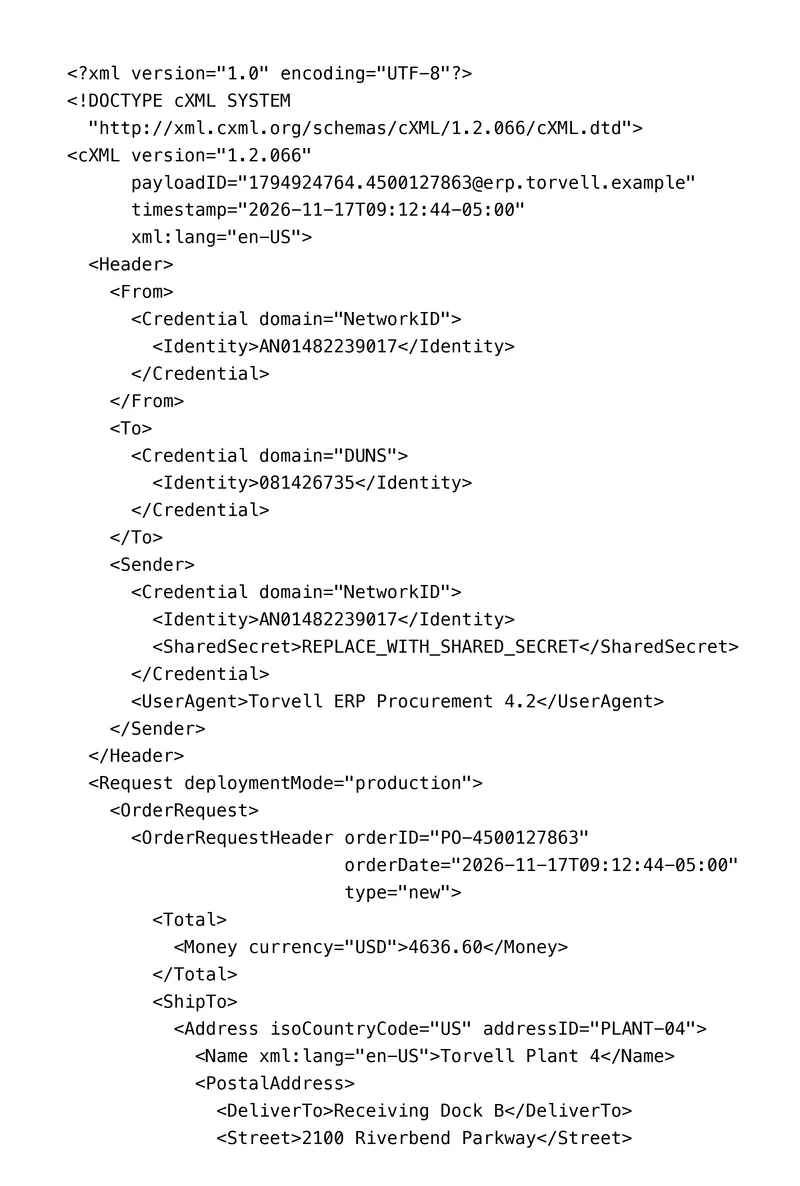
Your ERP sends the approved order to the Carbone API as JSON and gets back a cXML document that follows the structure of the cXML 1.2.066 DTD published by cXML.org. In this example, Torvell Machinery Inc., a fictional machine builder in Columbus, Ohio, orders 8 maintenance, safety and packaging items from Brindley Industrial Supply, a fictional distributor. The identifiers, the network ID and the DUNS number of the two parties are fictional, and the shared secret is a placeholder.
In this example, you will:
- Repeat the
ItemOutorder lines with a loop - Compute the order total from the lines with an aggregator, and the sales tax from it
- Write each line charge as quantity times unit price, with two decimals
- Print the order date and time with its time zone, and the delivery dates as
YYYY-MM-DD - Fill the cost center and the GL account of each line in
Distribution
cXML OrderRequest file structure
| Block | Repeated | Main elements |
|---|---|---|
cXML envelope |
Once | version, payloadID unique message ID, timestamp with time zone, xml:lang |
Header |
Once | From the buyer, To the supplier, Sender with its credential, the SharedSecret and the UserAgent of the sending system. Each Credential has a domain, like NetworkID or DUNS, and an Identity |
OrderRequestHeader |
Once | orderID, orderDate, type new, Total, ShipTo, BillTo, Shipping, Tax, PaymentTerm, Contact, Comments |
ItemOut order line |
Once per line | quantity, lineNumber, requestedDeliveryDate, ItemID with the supplier part ID, ItemDetail with the unit price, the description, the unit of measure, the UNSPSC Classification and the manufacturer, Distribution with the cost center and the GL account |
The supplier system accepts the order when the document is valid against the DTD, so the file keeps the order of the elements of the DTD.
cXML purchase order example
Template
<?xml version="1.0" encoding="UTF-8"?>
<!DOCTYPE cXML SYSTEM
  "http://xml.cxml.org/schemas/cXML/1.2.066/cXML.dtd">
<cXML version="1.2.066"
      payloadID="{d.payloadId}"
      timestamp="{d.createdAt:formatD('YYYY-MM-DDTHH:mm:ssZ')}"
      xml:lang="en-US">{o.lang=en-us}{o.timezone=America/New_York}
  <Header>
    ...
  </Header>
  <Request deploymentMode="production">
    <OrderRequest>
      <OrderRequestHeader orderID="{d.order.id}"
                          orderDate="{d.createdAt:formatD('YYYY-MM-DDTHH:mm:ssZ')}"
                          type="new">{d.lines[].qty:mul(.price):aggSum:round(2):set(c.sub)}{c.sub:mul(d.order.taxRate):div(100):round(2):set(c.tax)}
        <Total>
          <Money currency="{d.order.currency}">{c.sub:formatN(2):replace(',', '')}</Money>
        </Total>
        ...
        <Tax>
          <Money currency="{d.order.currency}">{c.tax:formatN(2):replace(',', '')}</Money>
          <Description xml:lang="en-US">Sales tax</Description>
          <TaxDetail category="sales" percentageRate="{d.order.taxRate}">
            ...
          </TaxDetail>
        </Tax>
        ...
      </OrderRequestHeader>{d.lines[i]}
      <ItemOut quantity="{d.lines[i].qty}"
               lineNumber="{d.lines[i].number}"
               requestedDeliveryDate="{d.lines[i].delivery:formatD('YYYY-MM-DD')}">
        <ItemID>
          <SupplierPartID>{d.lines[i].partId}</SupplierPartID>
          <SupplierPartAuxiliaryID>{d.lines[i].aux}</SupplierPartAuxiliaryID>
          <BuyerPartID>{d.lines[i].buyerPart}</BuyerPartID>
        </ItemID>
        <ItemDetail>
          <UnitPrice>
            <Money currency="{d.order.currency}">{d.lines[i].price:formatN(2):replace(',', '')}</Money>
          </UnitPrice>
          <Description xml:lang="en-US">{d.lines[i].description}</Description>
          <UnitOfMeasure>{d.lines[i].unit}</UnitOfMeasure>
          <Classification domain="UNSPSC">{d.lines[i].unspsc}</Classification>
          ...
        </ItemDetail>
        <Distribution>
          ...
          <Charge>
            <Money currency="{d.order.currency}">{d.lines[i].qty:mul(.price):round(2):formatN(2):replace(',', '')}</Money>
          </Charge>
        </Distribution>
      </ItemOut>{d.lines[i+1]}
    </OrderRequest>
  </Request>
</cXML>
JSON data
{
  "payloadId": "1794924764.4500127863@erp.torvell.example",
  "createdAt": "2026-11-17T14:12:44Z",
  "buyer": { "networkId": "AN01482239017", "userAgent": "Torvell ERP Procurement 4.2" },
  "supplier": { "duns": "081426735" },
  "order": { "id": "PO-4500127863", "currency": "USD", "taxRate": 7.5, "shipping": 185.00, "paymentDays": 45, "...": "..." },
  "lines": [
    { "number": 10, "qty": 12, "unit": "BX", "price": 41.80, "delivery": "2026-11-30", "partId": "BIS-CS-M10X40", "aux": "100 pcs", "buyerPart": "100-210045",
      "description": "Socket head cap screw M10 x 40, class 12.9, box of 100", "unspsc": "31161501", "mfrPart": "CF-1240-12", "mfr": "Corbel Fasteners",
      "costCenter": "4120", "costCenterName": "Plant 4 Maintenance", "gl": "613200", "glName": "Maintenance supplies" },
    "... 7 more lines"
  ]
}
Generated cXML OrderRequest
An excerpt: the total, the tax and the first order line.
<OrderRequestHeader orderID="PO-4500127863"
                    orderDate="2026-11-17T09:12:44-05:00"
                    type="new">
  <Total>
    <Money currency="USD">4636.60</Money>
  </Total>
  ...
  <Tax>
    <Money currency="USD">347.75</Money>
    <Description xml:lang="en-US">Sales tax</Description>
    <TaxDetail category="sales" percentageRate="7.5">
      ...
    </TaxDetail>
  </Tax>
  ...
</OrderRequestHeader>
<ItemOut quantity="12"
         lineNumber="10"
         requestedDeliveryDate="2026-11-30">
  <ItemID>
    <SupplierPartID>BIS-CS-M10X40</SupplierPartID>
    <SupplierPartAuxiliaryID>100 pcs</SupplierPartAuxiliaryID>
    <BuyerPartID>100-210045</BuyerPartID>
  </ItemID>
  <ItemDetail>
    <UnitPrice>
      <Money currency="USD">41.80</Money>
    </UnitPrice>
    <Description xml:lang="en-US">Socket head cap screw M10 x 40, class 12.9, box of 100</Description>
    <UnitOfMeasure>BX</UnitOfMeasure>
    <Classification domain="UNSPSC">31161501</Classification>
    ...
  </ItemDetail>
  <Distribution>
    ...
    <Charge>
      <Money currency="USD">501.60</Money>
    </Charge>
  </Distribution>
</ItemOut>
How to create a cXML purchase order
1. Fill the envelope and the header
{d.payloadId}prints the message ID, unique for each document the buyer sends. It is the key the supplier uses to detect a duplicate.{d.createdAt:formatD('YYYY-MM-DDTHH:mm:ssZ')}prints the time stamp with its time zone, as the DTD requires:{o.timezone=America/New_York}turns2026-11-17T14:12:44Zinto2026-11-17T09:12:44-05:00. See the date formatters.{d.buyer.networkId},{d.supplier.duns}and{d.buyer.userAgent}fill the credentials. TheSharedSecretstays a placeholder in the template: your integration layer adds the real secret of the supplier connection when it sends the file.
2. Repeat the order lines
{d.lines[i]} at the end of the </OrderRequestHeader> line and {d.lines[i+1]} at the end of the </ItemOut> line repeat the order line, with its children and its attributes. A loop repeats the text between its [i] and [i+1] tags, so the file keeps its indentation, without empty lines. See loops and the XML loops.
{d.lines[i].qty} and {d.lines[i].number} fill the attributes of ItemOut. The codes of the unit of measure follow the UN/CEFACT list: EA each, BX box, PR pair, RL roll, CL coil. {d.lines[i].unspsc} prints the UNSPSC code of the item.
3. Compute the total from the lines
The Total of an OrderRequest is the cost of the items of the order, without the tax and the shipping, which have their own elements in the header (cXML User's Guide, OrderRequestHeader). The first tag of OrderRequestHeader computes it once, at the end of the opening tag, so it prints nothing:
{d.lines[].qty:mul(.price):aggSum:round(2):set(c.sub)}multiplies the quantity by the unit price of each line, adds the amounts and stores the total of the items:4636.60.{c.sub:mul(d.order.taxRate):div(100):round(2):set(c.tax)}computes the sales tax at 7.5 %:347.75.
{c.sub} prints the Total, and the TaxableAmount of the tax. {c.tax} prints the tax. {d.order.shipping} prints the freight of 185.00 in Shipping. {d.lines[i].qty:mul(.price)} prints the charge of each line in Distribution, so the charges add up to the Total. See aggregators and :set.
4. Write the numbers as the DTD expects
{o.lang=en-us} makes :formatN(2) write two decimals after a dot, and :replace(',', '') removes the thousands separators: 4636.60. The delivery dates use {d.lines[i].delivery:formatD('YYYY-MM-DD')}. See the XML numbers and dates.
5. Send the cost center and the GL account
Each line carries its own Distribution: an Accounting block with one AccountingSegment for the cost center and one for the GL account, and the Charge of the line. Here, the maintenance lines go to cost center 4120 and GL account 613200, the safety lines to 4150 and 614100, and the packaging lines to 4310 and 615300.
6. Validate the file before it goes to the supplier
Before going live, validate a few files against the DTD of the version your supplier accepts, with xmllint --noout --dtdvalid cXML.dtd order.xml. The file of this example validates against the DTD 1.2.066. The DOCTYPE line points to the DTD published on cxml.org, as in the cXML documents of the User's Guide.
Related Examples
Trusted by 800+ paid customers in 40+ countries