Employee census file
Group benefits census of employees and dependents, ready for carriers and brokers
- Template
- CSV
- Export as
- CSV
- Carbone
- 5.4+
- Loop
- Nested array
- Parent properties
- Date format
- Text formatter
Generate an employee census file from your HR platform
Benefits administrators and HR platforms send a census to insurance carriers and brokers before a quote, at renewal, and when a new group enrolls. It lists every eligible employee and the dependents covered, with the data the carrier uses to rate the group, and many teams still rebuild it by hand in a spreadsheet each time. Your HR or benefits platform sends the enrollment records to the Carbone API as JSON and gets back the CSV census. In this example, a fictional machine shop sends its January 1, 2027 renewal census: 26 employees (one on leave, one on COBRA) and 14 dependents, with medical, dental and vision elections.
The layout follows what carriers and brokers commonly request: one line per person, a relationship code (EE employee, SP spouse, CH child), age, gender, ZIP code, hire date, employment status, hours, salary and job class, then the plan and the coverage tier for each line of coverage. Carriers publish their own census templates and the codes differ from one to the next: for example, the family tier is FAM on one form and FF on another, and some add an employee status C for COBRA participants. Start from the sample file of your carrier and keep its column names and codes.
The file is privacy-minimal: no names, no Social Security numbers and no dates of birth. Each person is identified by the employee ID, the age at the effective date and the ZIP code, which is enough to quote and to match records. Add the identifiers only when the carrier asks for them, at enrollment, over a secure channel.
In this example, you will:
- write one line per employee, followed by one line per covered dependent, with a nested loop;
- repeat the employee ID and ZIP code on the dependent lines with parent properties;
- format dates as
MM/DD/YYYYand write plain numbers; - write the coverage tier and the plan of each line of coverage, and the waiver reason when the employee declines medical coverage.
Employee census file format
| Column | Content |
|---|---|
| Employee ID, Group Number, Effective Date | The employee reference, repeated on the dependent lines, with the group number and the coverage effective date |
| Relationship, Dependent No | EE, SP or CH, and the order of the dependent under the employee |
| Age, Gender, ZIP Code | Age at the effective date, M or F as the carrier requires it for rating, and the home ZIP code |
| Hire Date, Employment Status, Hours per Week | Employee lines only: eligibility data. Status is A active, L leave or C COBRA |
| Annual Salary, Job Class | Employee lines only: annualized pay used for life and disability rates, and Hourly or Salaried |
| Medical, Dental, Vision Plan | The plan code, on the employee line and on each dependent line covered by it |
| Medical, Dental, Vision Tier | Employee lines only: EE, ES (employee and spouse), EC (employee and children), FAM, or W (waived) |
| Waiver Reason | Why the employee waived medical coverage, like Spouse plan or Medicare |
Employee census example
Template
{o.lang=en-us}Employee ID,Group Number,Effective Date,Relationship,Dependent No,Age,Gender,ZIP Code,Hire Date,Employment Status,Hours per Week,Annual Salary,Job Class,Medical Plan,Medical Tier,Dental Plan,Dental Tier,Vision Plan,Vision Tier,Waiver Reason
{d.employees[i].id},{d.group.number},{d.effectiveDate:formatD('MM/DD/YYYY')},EE,,{d.employees[i].age},{d.employees[i].gender},{d.employees[i].zip},{d.employees[i].hireDate:formatD('MM/DD/YYYY')},{d.employees[i].status},{d.employees[i].hours},{d.employees[i].salary},{d.employees[i].jobClass},{d.employees[i].medicalPlan},{d.employees[i].medicalTier},{d.employees[i].dentalPlan},{d.employees[i].dentalTier},{d.employees[i].visionPlan},{d.employees[i].visionTier},"{d.employees[i].waiverReason:replace('"', '""')}"
{d.employees[i].deps[i]..id},{d.group.number},{d.effectiveDate:formatD('MM/DD/YYYY')},{d.employees[i].deps[i].relationship},{d.employees[i].deps[i].seq},{d.employees[i].deps[i].age},{d.employees[i].deps[i].gender},{d.employees[i].deps[i]..zip},,,,,,{d.employees[i].deps[i].medicalPlan},,{d.employees[i].deps[i].dentalPlan},,{d.employees[i].deps[i].visionPlan},,
{d.employees[i].deps[i+1]}{d.employees[i+1]}
JSON data
The data holds 26 employees. The first three are shown here.
{
  "group": {
    "employer": "Ferrowick Machine Works, Inc.",
    "number": "GRP-48213"
  },
  "effectiveDate": "2027-01-01",
  "employees": [
    {
      "id": "E10224",
      "age": 52,
      "gender": "F",
      "zip": "45377",
      "hireDate": "2023-04-06",
      "status": "A",
      "hours": 40,
      "salary": 73500,
      "jobClass": "Hourly",
      "medicalPlan": "MED-PPO-1500",
      "medicalTier": "EE",
      "dentalPlan": "DEN-CORE",
      "dentalTier": "EE",
      "visionPlan": "",
      "visionTier": "W",
      "waiverReason": "",
      "deps": []
    },
    {
      "id": "E10238",
      "age": 35,
      "gender": "M",
      "zip": "45414",
      "hireDate": "2012-09-26",
      "status": "A",
      "hours": 40,
      "salary": 81500,
      "jobClass": "Hourly",
      "medicalPlan": "MED-PPO-1500",
      "medicalTier": "ES",
      "dentalPlan": "DEN-CORE",
      "dentalTier": "ES",
      "visionPlan": "VIS-STD",
      "visionTier": "ES",
      "waiverReason": "",
      "deps": [
        {
          "seq": 1,
          "relationship": "SP",
          "age": 37,
          "gender": "F",
          "medicalPlan": "MED-PPO-1500",
          "dentalPlan": "DEN-CORE",
          "visionPlan": "VIS-STD"
        }
      ]
    },
    {
      "id": "E10251",
      "age": 62,
      "gender": "F",
      "zip": "45402",
      "hireDate": "2011-04-20",
      "status": "A",
      "hours": 30,
      "salary": 90500,
      "jobClass": "Hourly",
      "medicalPlan": "MED-HDHP-3200",
      "medicalTier": "EC",
      "dentalPlan": "DEN-CORE",
      "dentalTier": "EC",
      "visionPlan": "VIS-STD",
      "visionTier": "EE",
      "waiverReason": "",
      "deps": [
        {
          "seq": 1,
          "relationship": "CH",
          "age": 15,
          "gender": "M",
          "medicalPlan": "MED-HDHP-3200",
          "dentalPlan": "DEN-CORE",
          "visionPlan": ""
        },
        {
          "seq": 2,
          "relationship": "CH",
          "age": 1,
          "gender": "M",
          "medicalPlan": "MED-HDHP-3200",
          "dentalPlan": "DEN-CORE",
          "visionPlan": ""
        }
      ]
    }
  ]
}
Generated CSV
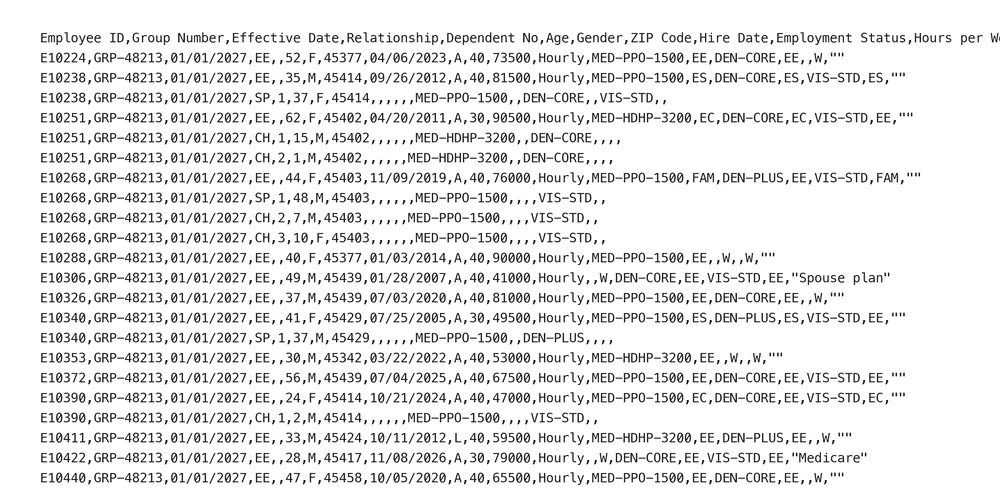
The result holds one header line and 40 lines. The first lines are shown here.
Employee ID,Group Number,Effective Date,Relationship,Dependent No,Age,Gender,ZIP Code,Hire Date,Employment Status,Hours per Week,Annual Salary,Job Class,Medical Plan,Medical Tier,Dental Plan,Dental Tier,Vision Plan,Vision Tier,Waiver Reason
E10224,GRP-48213,01/01/2027,EE,,52,F,45377,04/06/2023,A,40,73500,Hourly,MED-PPO-1500,EE,DEN-CORE,EE,,W,""
E10238,GRP-48213,01/01/2027,EE,,35,M,45414,09/26/2012,A,40,81500,Hourly,MED-PPO-1500,ES,DEN-CORE,ES,VIS-STD,ES,""
E10238,GRP-48213,01/01/2027,SP,1,37,F,45414,,,,,,MED-PPO-1500,,DEN-CORE,,VIS-STD,,
E10251,GRP-48213,01/01/2027,EE,,62,F,45402,04/20/2011,A,30,90500,Hourly,MED-HDHP-3200,EC,DEN-CORE,EC,VIS-STD,EE,""
E10251,GRP-48213,01/01/2027,CH,1,15,M,45402,,,,,,MED-HDHP-3200,,DEN-CORE,,,,
E10251,GRP-48213,01/01/2027,CH,2,1,M,45402,,,,,,MED-HDHP-3200,,DEN-CORE,,,,
E10268,GRP-48213,01/01/2027,EE,,44,F,45403,11/09/2019,A,40,76000,Hourly,MED-PPO-1500,FAM,DEN-PLUS,EE,VIS-STD,FAM,""
How to create an employee census file
1. Write the header line and the employee line
Type the header as the carrier expects it. {o.lang=en-us} at the start of the file fixes the number format. The first body line is repeated for each employee: {d.employees[i].id}, {d.employees[i].age} and the plan and tier tags of the three lines of coverage. The group number and the effective date come from the root of the data, with {d.group.number} and {d.effectiveDate:formatD('MM/DD/YYYY')}.
2. Add the dependent lines with a nested loop
The second line is repeated for each dependent of the employee: {d.employees[i].deps[i].relationship}, {d.employees[i].deps[i].age}. The employee ID and the ZIP code are read from the employee with two dots, {d.employees[i].deps[i]..id}, so every dependent line stays linked to its employee. The last line holds the two end tags, {d.employees[i].deps[i+1]}{d.employees[i+1]}. An employee without dependents writes only the employee line. See nested data and parent properties.
3. Format dates and numbers
{d.employees[i].hireDate:formatD('MM/DD/YYYY')} writes 04/06/2023, the format most carriers accept. Ages, hours and salaries are written as plain numbers, without thousands separator. See the date formatter.
4. Keep the coverage fields consistent
The HR platform sends the tier and the plan of each line of coverage, and the dependents covered by it. Carbone writes them as they are. A carrier checks that the tier matches the dependents listed, so the platform must send consistent data: ES needs one spouse line, EC at least one child line, FAM both, and W no plan and no dependent. Eligible dependent children are listed up to age 26. In this file, the employee E10251 has EC for medical and dental but EE for vision, so the two children have a medical plan and a dental plan and no vision plan.
5. Quote the free text
The waiver reason is the only free text of the file. It is written between quotes, and :replace('"', '""') doubles the quotes inside the value, so a reason with a comma or a quote stays in one field. See Commas and quotes.
6. Send the file to the carrier
The file is UTF-8 without BOM, with Unix line endings. Generate it from the HR platform when the open enrollment closes, and send it to the broker or upload it to the carrier portal. Share it only through the secure channel of the carrier, as it still holds salaries and ZIP codes.
Related Examples
Trusted by 800+ paid customers in 40+ countries