
Design
CSV templates
Write a CSV file in a text editor, add Carbone tags, and generate it from JSON data, ready to import.
COMMUNITY FEATURE
Available for:
Carbone Cloud
Carbone On-premise
Embedded Carbone JS
v5.0+
Any CSV file can be a template. Write Carbone tags in its lines, send your JSON data to the API, and get back a CSV file ready to import into an ERP, an accounting tool, a bank portal or a marketplace. Carbone writes the file as the template describes it: separators, quotes, header and control lines.
Basic
Write the header line as it is, and a tag where each value goes. In {d.name}, d is the root of the JSON data and name is the path to the value. Carbone replaces the tags and keeps the rest of the file: separators, spaces and line breaks.
{
  "code": "SUP-1042",
  "name": "Globex Industrial Supplies",
  "vat": "DE123456789",
  "country": "DE",
  "email": "billing@globex.example",
  "terms": "NET30"
}code,name,vat_number,country,email,payment_terms
{d.code},{d.name},{d.vat},{d.country},{d.email},{d.terms}code,name,vat_number,country,email,payment_terms
SUP-1042,Globex Industrial Supplies,DE123456789,DE,billing@globex.example,NET30Write the template in a text editor, like VS Code or Notepad++, and save it in UTF-8. A spreadsheet application can change the separators, the quotes and the encoding when it saves a CSV file.
Learn more about tags.
Loops
A loop writes one line per item of an array. The template needs two lines:
- The line to repeat, with
[i]in its tags:{d.products[i].sku}. - The end tag
{d.products[i+1]}, at the start of the next line.
Carbone repeats the text from the first [i] tag to the [i+1] tag, line break included, and removes the [i+1] tag.
{
  "products": [
    { "sku": "AC-1001", "title": "Steel water bottle 750 ml", "price": 24.9, "stock": 320 },
    { "sku": "AC-1002", "title": "Insulated lunch box", "price": 34.5, "stock": 85 },
    { "sku": "AC-1003", "title": "Bamboo cutlery set", "price": 12, "stock": 0 },
    { "sku": "AC-1004", "title": "Glass meal prep container", "price": 18.75, "stock": 140 },
    { "sku": "AC-1005", "title": "Travel coffee mug", "price": 21, "stock": 56 }
  ]
}sku,title,price,quantity
{d.products[i].sku},{d.products[i].title},{d.products[i].price},{d.products[i].stock}
{d.products[i+1]}sku,title,price,quantity
AC-1001,Steel water bottle 750 ml,24.9,320
AC-1002,Insulated lunch box,34.5,85
AC-1003,Bamboo cutlery set,12,0
AC-1004,Glass meal prep container,18.75,140
AC-1005,Travel coffee mug,21,56- Text after the
[i+1]tag is kept. End the file right after the tag, as in this example, or write the next line right after it, like the control line of the Totals example. A line break after the tag leaves an empty line in the report. - Start the repeated line with a tag. Text before the first
[i]tag is written once, not on every line.
Learn more about loops.
Sort and filter
Add an attribute before i to sort the lines: {d.items[sku, i].sku} sorts the price list by SKU, and the end tag becomes [sku+1, i+1]. Add a condition to the end tag to filter the lines: status!='discontinued' removes the discontinued products. Learn more about sorting and filtering.
{
  "items": [
    { "sku": "HX-310", "name": "Hex bolt M10", "price": 0.42, "status": "active" },
    { "sku": "HX-108", "name": "Hex bolt M8", "price": 0.31, "status": "active" },
    { "sku": "WS-200", "name": "Flat washer M8", "price": 0.05, "status": "discontinued" },
    { "sku": "NT-108", "name": "Hex nut M8", "price": 0.12, "status": "active" },
    { "sku": "AN-500", "name": "Anchor 8x50", "price": 0.58, "status": "active" }
  ]
}sku,name,unit_price
{d.items[sku, i].sku},{d.items[sku, i].name},{d.items[sku, i].price}
{d.items[sku+1, i+1, status!='discontinued']}sku,name,unit_price
AN-500,Anchor 8x50,0.58
HX-108,Hex bolt M8,0.31
HX-310,Hex bolt M10,0.42
NT-108,Hex nut M8,0.12Nested data
Import files often need one line per order line, with the details of the order on each line. Loop on the nested array, {d.orders[i].items[i].sku}, and read the fields of the order with two dots: {d.orders[i].items[i]..id} prints the id of the order. Close both loops with one tag at the start of the next line: {d.orders[i+1].items[i+1]}.
{
  "orders": [
    {
      "id": "SO-58201",
      "date": "2026-11-09",
      "items": [
        { "sku": "AC-1001", "qty": 2 },
        { "sku": "AC-1004", "qty": 6 }
      ]
    },
    {
      "id": "SO-58202",
      "date": "2026-11-09",
      "items": [
        { "sku": "AC-1002", "qty": 1 }
      ]
    },
    {
      "id": "SO-58203",
      "date": "2026-11-10",
      "items": [
        { "sku": "AC-1005", "qty": 3 },
        { "sku": "AC-1001", "qty": 1 },
        { "sku": "AC-1002", "qty": 2 }
      ]
    }
  ]
}order,date,sku,quantity
{d.orders[i].items[i]..id},{d.orders[i].items[i]..date},{d.orders[i].items[i].sku},{d.orders[i].items[i].qty}
{d.orders[i+1].items[i+1]}order,date,sku,quantity
SO-58201,2026-11-09,AC-1001,2
SO-58201,2026-11-09,AC-1004,6
SO-58202,2026-11-09,AC-1002,1
SO-58203,2026-11-10,AC-1005,3
SO-58203,2026-11-10,AC-1001,1
SO-58203,2026-11-10,AC-1002,2An order without items writes no line. Learn more about parent properties.
Commas and quotes
Carbone writes each value as it is, so the template sets the quoting rules of the file. Quote the columns that can contain a comma, a quote or a line break, and double the quotes inside the value with :replace('"','""').
{
  "customers": [
    {
      "id": "C-2041",
      "company": "Acme Corporation, Inc.",
      "note": "Deliver to \"Dock 4\"\nCall before 4 pm"
    },
    {
      "id": "C-2042",
      "company": "Initech",
      "note": ""
    },
    {
      "id": "C-2043",
      "company": "Umbrella Logistics, LLC",
      "note": "Net 45, invoice by email"
    }
  ]
}id,company,note
{d.customers[i].id},"{d.customers[i].company:replace('"','""')}","{d.customers[i].note:replace('"','""')}"
{d.customers[i+1]}id,company,note
C-2041,"Acme Corporation, Inc.","Deliver to ""Dock 4""
Call before 4 pm"
C-2042,"Initech",""
C-2043,"Umbrella Logistics, LLC","Net 45, invoice by email"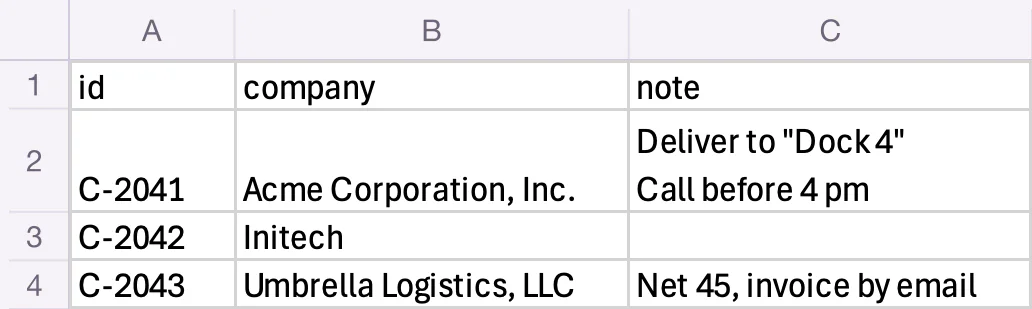
A quoted value can hold line breaks, like the note of Acme Corporation. If the target system rejects them, remove them from your data.
Learn more about :replace.
Numbers and dates
Format numbers and dates in the tags, in the exact format of the target system. This example uses "lang": "en-us":
:formatD('YYYY-MM-DD')writes an ISO date. A date with a time is first converted to thetimezoneof the report (Europe/Paris by default).:formatN(2)writes two decimals with the separators of the language, like 12,480.50.:replace(',', '')removes the thousands separator.- A number without formatter is written as in the JSON data, like
12480.5.
{
  "lines": [
    { "date": "2026-11-03T09:12:00Z", "account": "411000", "label": "INV-4410 Acme", "amount": 12480.5 },
    { "date": "2026-11-03T09:12:00Z", "account": "706000", "label": "INV-4410 Acme", "amount": -10400.42 },
    { "date": "2026-11-03T09:12:00Z", "account": "445710", "label": "INV-4410 VAT", "amount": -2080.08 }
  ]
}date,account,label,amount
{d.lines[i].date:formatD('YYYY-MM-DD')},{d.lines[i].account},{d.lines[i].label},{d.lines[i].amount:formatN(2):replace(',', '')}
{d.lines[i+1]}date,account,label,amount
2026-11-03,411000,INV-4410 Acme,12480.50
2026-11-03,706000,INV-4410 Acme,-10400.42
2026-11-03,445710,INV-4410 VAT,-2080.08For a system that expects decimal commas, use "lang": "de-de" and :formatN(2):replace('.', '') to write 12480,50, and separate the columns with semicolons. Write {o.lang=de-de} at the start of the first line to set the language in the template. See the number and date formatters, and the in-template options.
Conditions
Inline conditions write one value or another, like the status code of an employee: {d.employees[i].active:ifEQ(true):show(A):elseShow(I)}. :ifEM:show(0) writes a default value when the value is empty or missing, like the bonus. Without it, an empty value writes nothing between the separators.
{
  "employees": [
    { "id": "E-0107", "active": true, "hours": 151.67, "bonus": 250 },
    { "id": "E-0112", "active": true, "hours": 120, "bonus": null },
    { "id": "E-0125", "active": false, "hours": 0 }
  ]
}employee_id,status,hours,bonus
{d.employees[i].id},{d.employees[i].active:ifEQ(true):show(A):elseShow(I)},{d.employees[i].hours},{d.employees[i].bonus:ifEM:show(0)}
{d.employees[i+1]}employee_id,status,hours,bonus
E-0107,A,151.67,250
E-0112,A,120,0
E-0125,I,0,0- To skip lines, filter the loop, as in Sort and filter.
:showBeginand:showEndwrite a block of lines only when a condition is true. Write the begin tag at the start of the first line of the block, and the end tag at the start of the line after the block.
Learn more about inline conditions and conditional blocks.
Totals
Bank and accounting files often end with a control line: the number of lines and the total amount. Aggregators compute them: {d.payments[].amount:aggCount} counts the payments and {d.payments[].amount:aggSum} sums the amounts. :cumCount numbers the lines. Write the control line right after the end tag of the loop.
{
  "batch": "PAY-2026-11-07",
  "date": "2026-11-07",
  "payments": [
    { "name": "Globex Industrial Supplies", "iban": "DE89370400440532013000", "amount": 1250.4 },
    { "name": "Initech Software", "iban": "FR7630006000011234567890189", "amount": 980 },
    { "name": "Umbrella Logistics", "iban": "NL91ABNA0417164300", "amount": 4310.25 }
  ]
}HEADER,{d.batch},{d.date:formatD('YYYY-MM-DD')}
{d.payments[i].amount:cumCount},{d.payments[i].name},{d.payments[i].iban},{d.payments[i].amount:formatN(2):replace(',', '')}
{d.payments[i+1]}TRAILER,{d.payments[].amount:aggCount},{d.payments[].amount:aggSum:formatN(2):replace(',', '')}HEADER,PAY-2026-11-07,2026-11-07
1,Globex Industrial Supplies,DE89370400440532013000,1250.40
2,Initech Software,FR7630006000011234567890189,980.00
3,Umbrella Logistics,NL91ABNA0417164300,4310.25
TRAILER,3,6540.65Learn more about aggregators.
Translations
Write static text in {t( )} tags, and add the :t formatter to translate values from the data. Carbone uses the translations for the lang of the report. This example uses "lang": "fr-fr" and the dictionary in the Translations tab. :formatN(2) writes decimal commas in French, so the columns are separated by semicolons.
{
  "products": [
    { "sku": "AC-1001", "price": 24.9, "availability": "in_stock" },
    { "sku": "AC-1002", "price": 349.5, "availability": "backorder" },
    { "sku": "AC-1003", "price": 12, "availability": "out_of_stock" }
  ]
}{
"fr-fr": {
"SKU": "Référence",
"Price": "Prix HT",
"Availability": "Disponibilité",
"in_stock": "En stock",
"backorder": "Sur commande",
"out_of_stock": "Épuisé"
}
}{t(SKU)};{t(Price)};{t(Availability)}
{d.products[i].sku};{d.products[i].price:formatN(2)};{d.products[i].availability:t}
{d.products[i+1]}Référence;Prix HT;Disponibilité
AC-1001;24,90;En stock
AC-1002;349,50;Sur commande
AC-1003;12,00;ÉpuiséLearn more about translations.
Encoding
Save the template in UTF-8. Carbone writes the report in UTF-8, with the line endings of the template.
- For Excel, save the template as UTF-8 with BOM (Save with Encoding in VS Code). Without it, Excel shows
ZoëasZoë. - For another encoding, like Windows-1252, use an XLSX template converted to CSV.
Best practices
- Follow the sample file of the target system: same columns, in the same order, with the same header names.
- Write ISO dates with
:formatD('YYYY-MM-DD'). When the data has times, set the timezone, like{o.timezone=UTC}. - Write plain numbers: raw JSON numbers, or
:formatN(2):replace(',', '')with{o.lang=en-us}at the start of the template, so the decimal separator does not depend on thelangof the API call. Avoid:formatC: it adds the currency symbol. - Quote the text columns that can contain a comma or a quote, as in Commas and quotes.
CSV or XLSX template
An XLSX or ODS template converted to CSV is the other way to generate a CSV file. Carbone generates the spreadsheet, then LibreOffice writes the CSV with the CSV options of the API:
"convertTo": {
  "formatName": "csv",
  "formatOptions": {
    "fieldSeparator": ";",
    "textDelimiter": "\"",
    "characterSet": "76"
  }
}
"76" is UTF-8 (by default) and "1" is Windows-1252. See the XLSX templates to design the spreadsheet.
| CSV template | XLSX or ODS template | |
|---|---|---|
| Quotes and escaping | Written in the template | Automatic |
| Separator and text delimiter | Written in the template | fieldSeparator and textDelimiter options |
| Character set | UTF-8 | characterSet option |
| Numbers | Formatted by the tags | Written as displayed by the cell format, like $950.50 |
| Conversion | None | LibreOffice |
Use a CSV template to control every character of the file. Use an XLSX template to get the quotes written for you, or another character set.
Automate a CSV file
To generate a CSV file from a CSV template with the Carbone API:
- Prepare two files: a CSV template with Carbone tags, like
{d.name}, and the JSON data to populate it. You can use the files of the Loops example. - Generate the CSV in one of three ways:
- Use an official Carbone integration, like N8N, Make, Zapier, Airtable or Bubble.
- Use a Carbone SDK: Node.js, Go, Python, Java, JavaScript or PHP.
- Send a
POST /render/templateHTTP request to the Carbone API, like this curl command:
curl --location --request POST 'https://api.carbone.io/render/template?download=true' \
  --header 'carbone-version: 5' \
  --header 'Content-Type: application/json' \
  --header 'Authorization: Bearer API_TOKEN' \
  --data-raw "{
    \"data\": $(cat loops-data.json),
    \"template\": \"$(base64 -i loops-template.csv)\",
    \"lang\": \"en-us\"
  }" \
  --output report.csv
💡 Linux users: replacebase64 -i loops-template.csvwithbase64 -w 0 loops-template.csv
Key parameters
| Parameter | Description |
|---|---|
template |
Your CSV template, encoded as a Base64 string. |
data |
JSON data used to populate the template. |
lang |
Language of the report, used by the formatters and translations: "en-us" prints {d.total:formatN(2)} as 12,480.50. |
convertTo |
Leave it out, and save the report with the .csv extension, like --output report.csv. |
?download=true |
Query parameter to download the document as a stream. |
Authorization |
Header required for the Carbone Cloud API. Get your API key here. |
For more details, refer to the Carbone API Documentation.