
Design
IDML templates
Design a document in Adobe InDesign, add Carbone tags, and generate it from JSON data as an IDML file.
COMMUNITY FEATURE
Available for:
Carbone Cloud
Carbone On-premise
Embedded Carbone JS
v3.0+
Any IDML file can be a template. Design the document in Adobe InDesign, write Carbone tags in its text frames, tables and parent pages, and export it as InDesign Markup (File > Export > InDesign Markup (IDML)). Send your JSON data to the API: you get back an IDML file with the layout, styles and colors of the template, ready to open in InDesign and export to PDF.
Basic
Write a tag in a text frame to insert a value from the JSON data. In {d.name}, d is the root of the data and name is the path to the value. The value takes the formatting of its tag: paragraph style, character style, size and color, like the product name in 50 pt.
{
  "category": "Wireless speaker",
  "name": "Tessera One",
  "tagline": "Room-filling sound from a speaker the size of a book.",
  "price": 349,
  "monthly": 29.08,
  "release": "2026-10-15",
  "battery": 24,
  "weight": 1.8,
  "range": 30,
  "dealer": {
    "name": "Northwind Audio",
    "city": "Seattle",
    "website": "northwind.example",
    "url": "https://northwind.example/tessera-one"
  }
}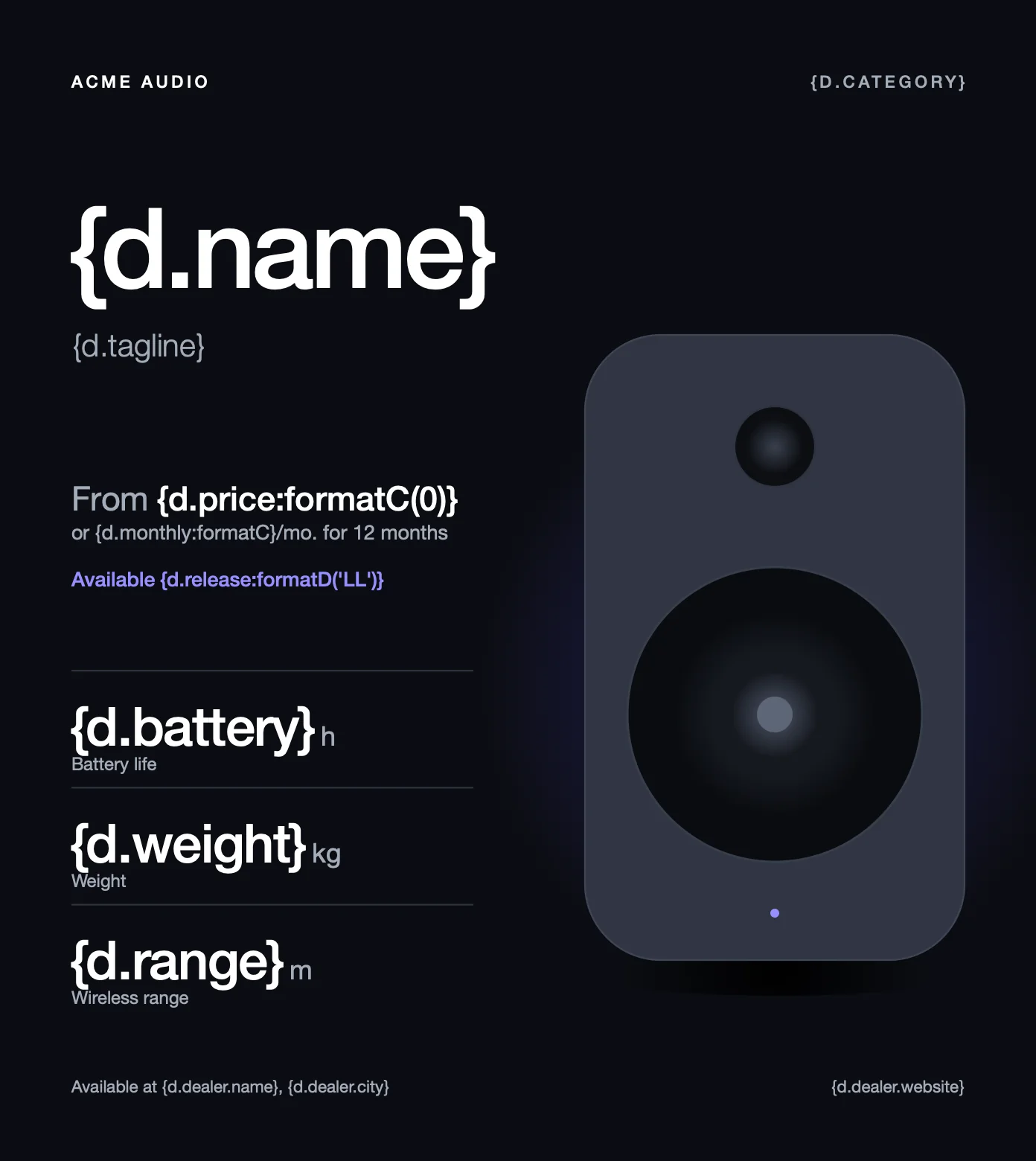
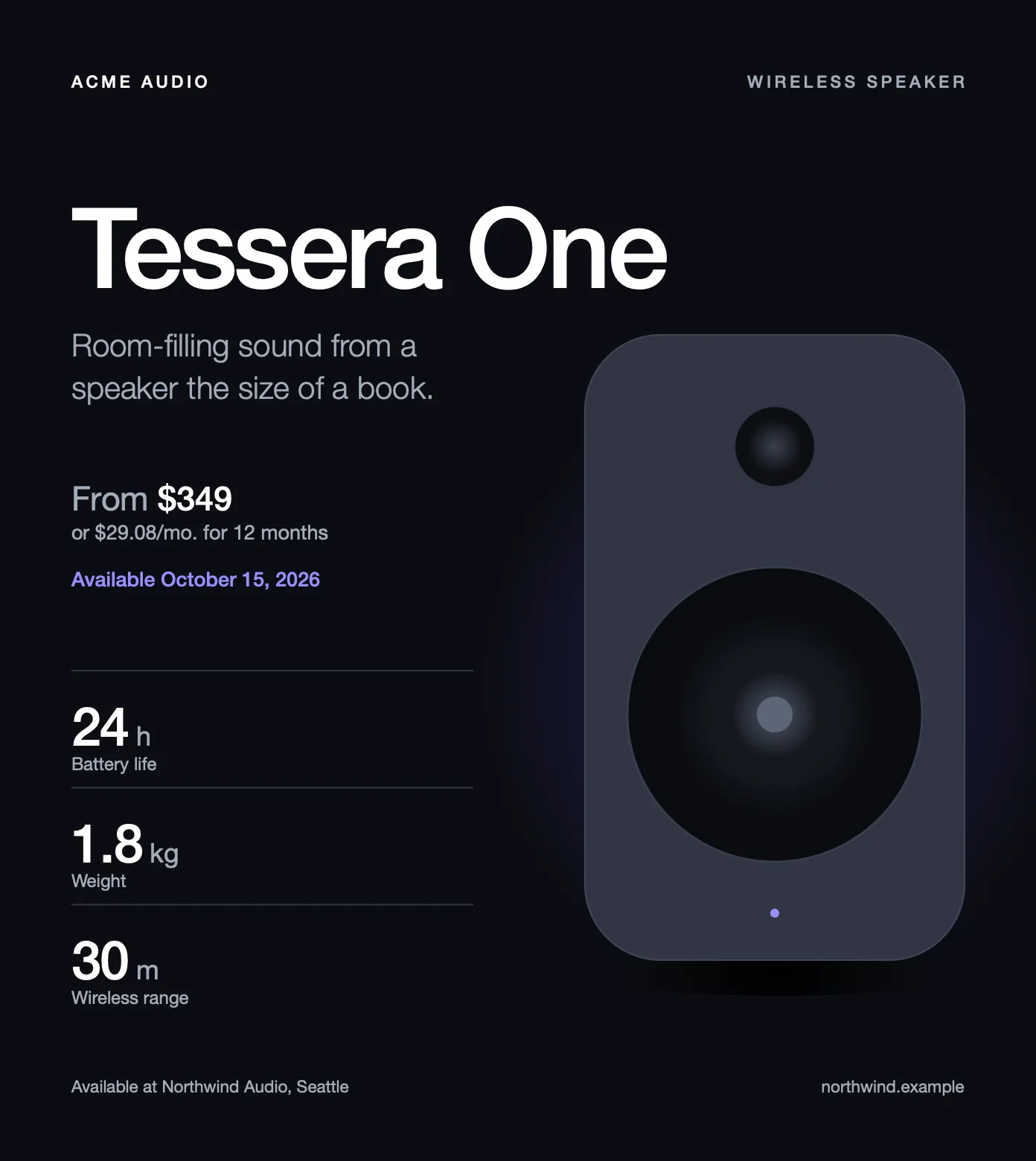
- Tags work in table cells, like the battery life, and on parent pages, like the dealer in the footer.
- A tag can be the URL of a hyperlink (Window > Interactive > Hyperlinks > New Hyperlink), like
{d.dealer.url}on the website of the dealer. - A line break in a value, like
"12 Main St\nSpringfield", starts a new line in the same paragraph. - Turn off typographer's quotes (Preferences > Type > Use Typographer's Quotes). Formatters need straight quotes, like
:formatD('LL'). - All Caps is safe: InDesign displays
{D.CATEGORY}in the header, but the file keeps the tag as typed,{d.category}.
Learn more about tags.
Loops
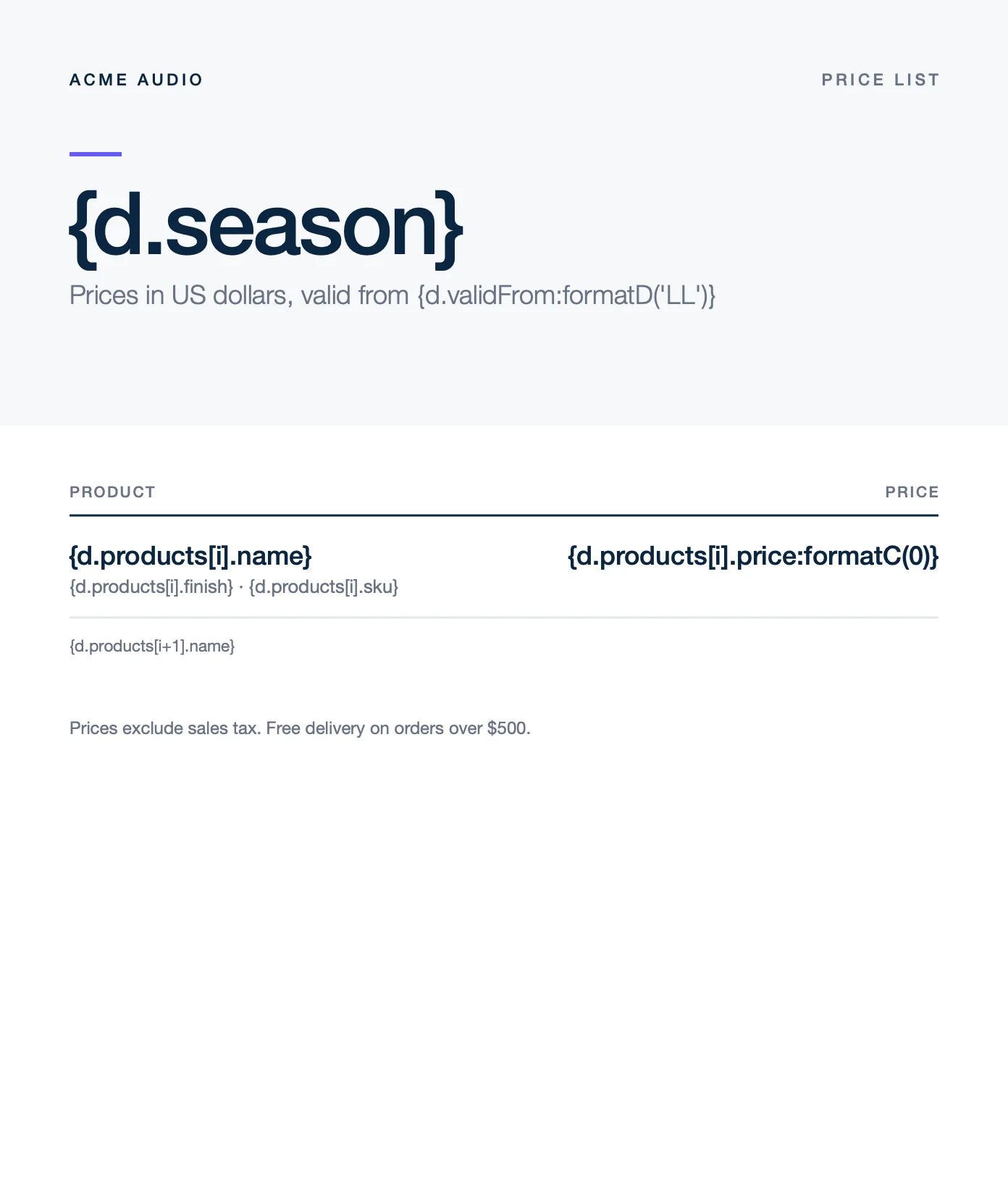
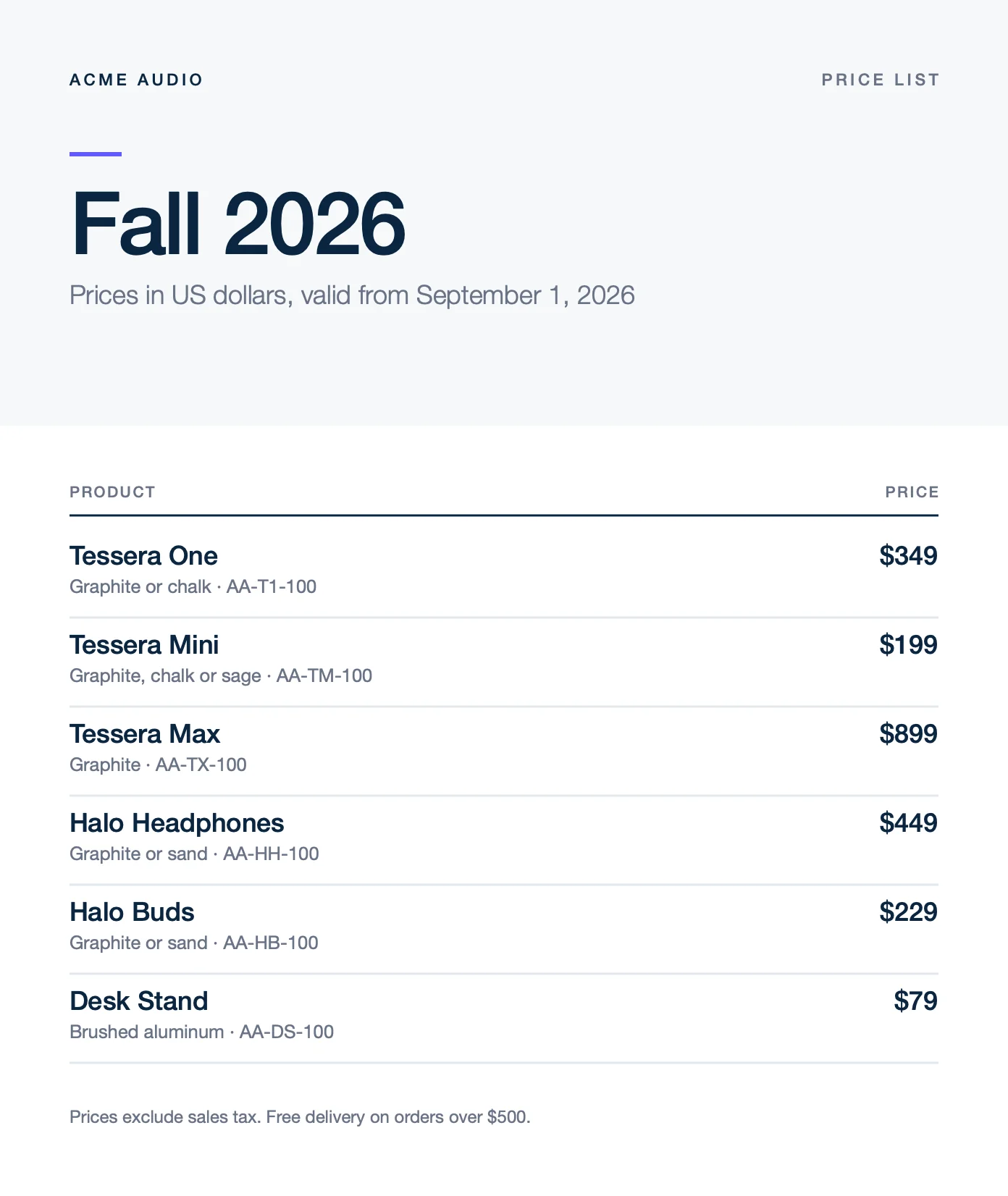
A loop repeats paragraphs for each item of an array. Write the [i] tags in the paragraphs to repeat, like {d.products[i].name}, and an [i+1] tag in the paragraph after them: {d.products[i+1].name}. Carbone repeats the paragraphs with their styles and removes the [i+1] paragraph.
{
  "season": "Fall 2026",
  "validFrom": "2026-09-01",
  "products": [
    {
      "name": "Tessera One",
      "finish": "Graphite or chalk",
      "sku": "AA-T1-100",
      "price": 349
    },
    {
      "name": "Tessera Mini",
      "finish": "Graphite, chalk or sage",
      "sku": "AA-TM-100",
      "price": 199
    },
    {
      "name": "Tessera Max",
      "finish": "Graphite",
      "sku": "AA-TX-100",
      "price": 899
    },
    {
      "name": "Halo Headphones",
      "finish": "Graphite or sand",
      "sku": "AA-HH-100",
      "price": 449
    },
    {
      "name": "Halo Buds",
      "finish": "Graphite or sand",
      "sku": "AA-HB-100",
      "price": 229
    },
    {
      "name": "Desk Stand",
      "finish": "Brushed aluminum",
      "sku": "AA-DS-100",
      "price": 79
    }
  ]
}
- Give the
[i+1]paragraph its own paragraph style, used by no paragraph around it, like Loop end. Otherwise an empty paragraph stays under the last item. - The paragraph above the loop needs another style than the first repeated paragraph, like Columns here. Otherwise it is repeated too.
- Loops on table rows are not supported: InDesign ignores the copied rows. Align the columns with tab stops, like the prices.
Learn more about loops.
Nested loops
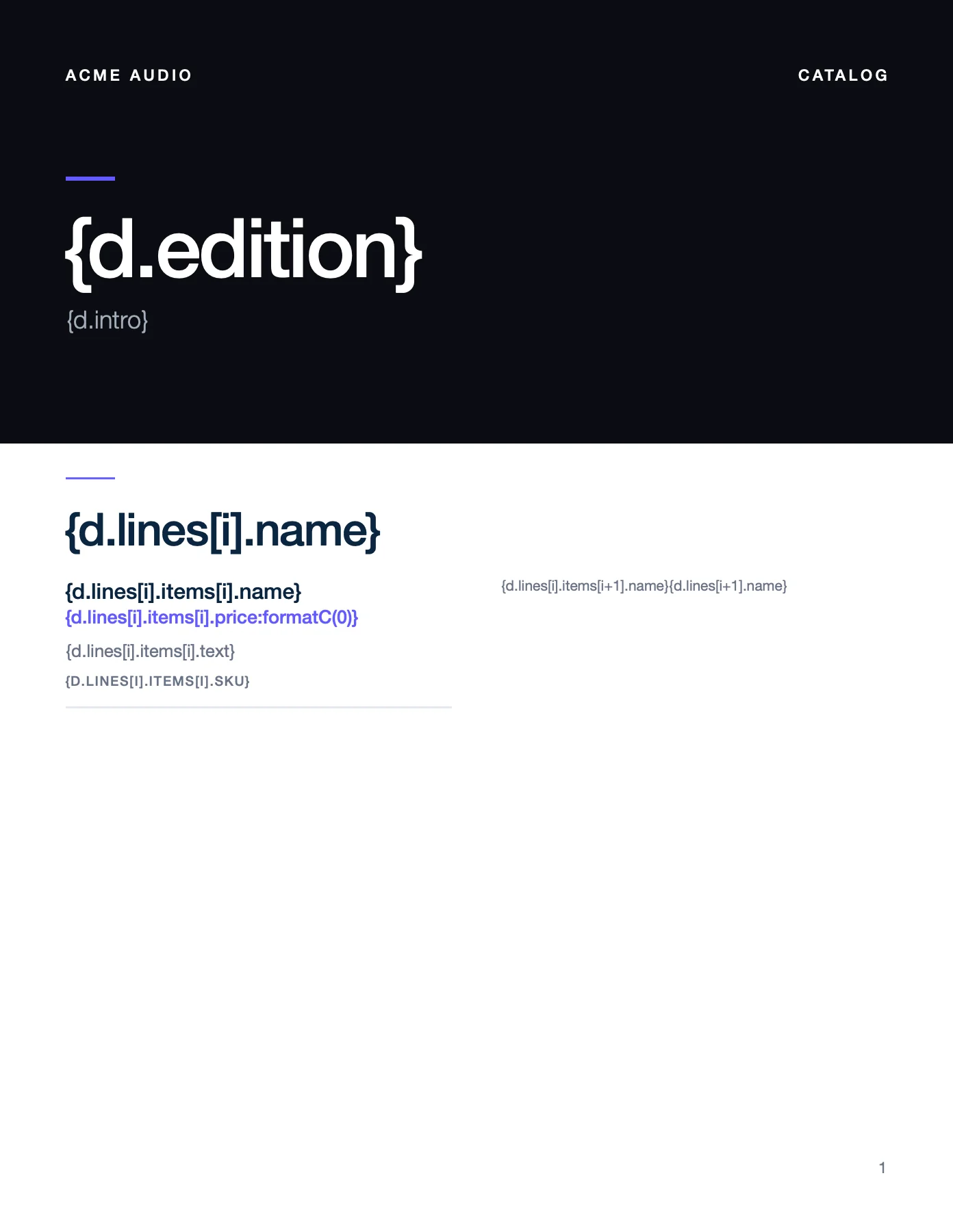
A loop can contain another loop. In this catalog, {d.lines[i].name} repeats the product lines, and {d.lines[i].items[i].name} repeats the products of each line. Write the two [i+1] tags in the same Loop end paragraph: {d.lines[i].items[i+1].name}{d.lines[i+1].name}.
{
  "edition": "Fall 2026",
  "intro": "Speakers, headphones and accessories, designed to work together.",
  "lines": [
    {
      "name": "Speakers",
      "items": [
        { "name": "Tessera One", "sku": "AA-T1-100", "price": 349, "text": "Room-filling sound from a speaker the size of a book. 24 hours of battery." },
        { "name": "Tessera Mini", "sku": "AA-TM-100", "price": 199, "text": "The pocket version of Tessera One, with the same tuning and 16 hours of battery." },
        { "name": "Tessera Max", "sku": "AA-TX-100", "price": 899, "text": "Seven drivers and a 6.5-inch woofer for large rooms and outdoor parties." },
        { "name": "Tessera Sub", "sku": "AA-TS-100", "price": 699, "text": "A compact subwoofer that pairs with any Tessera speaker in one tap." }
      ]
    },
    {
      "name": "Headphones",
      "items": [
        { "name": "Halo Headphones", "sku": "AA-HH-100", "price": 449, "text": "Over-ear, with adaptive noise cancellation and 40 hours of battery." },
        { "name": "Halo Buds", "sku": "AA-HB-100", "price": 229, "text": "In-ear, with a charging case that adds 24 hours of listening." },
        { "name": "Halo Sport", "sku": "AA-HS-100", "price": 179, "text": "Sweat-resistant buds with ear hooks that stay in place." }
      ]
    },
    {
      "name": "Accessories",
      "items": [
        { "name": "Desk Stand", "sku": "AA-DS-100", "price": 79, "text": "Brushed aluminum stand that tilts Tessera One towards you." },
        { "name": "Wall Mount", "sku": "AA-WM-100", "price": 49, "text": "Black steel mount for Tessera One and Tessera Mini." },
        { "name": "Travel Case", "sku": "AA-TC-100", "price": 59, "text": "Padded case with room for a speaker and its cable." },
        { "name": "Charging Dock", "sku": "AA-CD-100", "price": 89, "text": "Charges a speaker and a pair of buds at the same time." }
      ]
    }
  ]
}
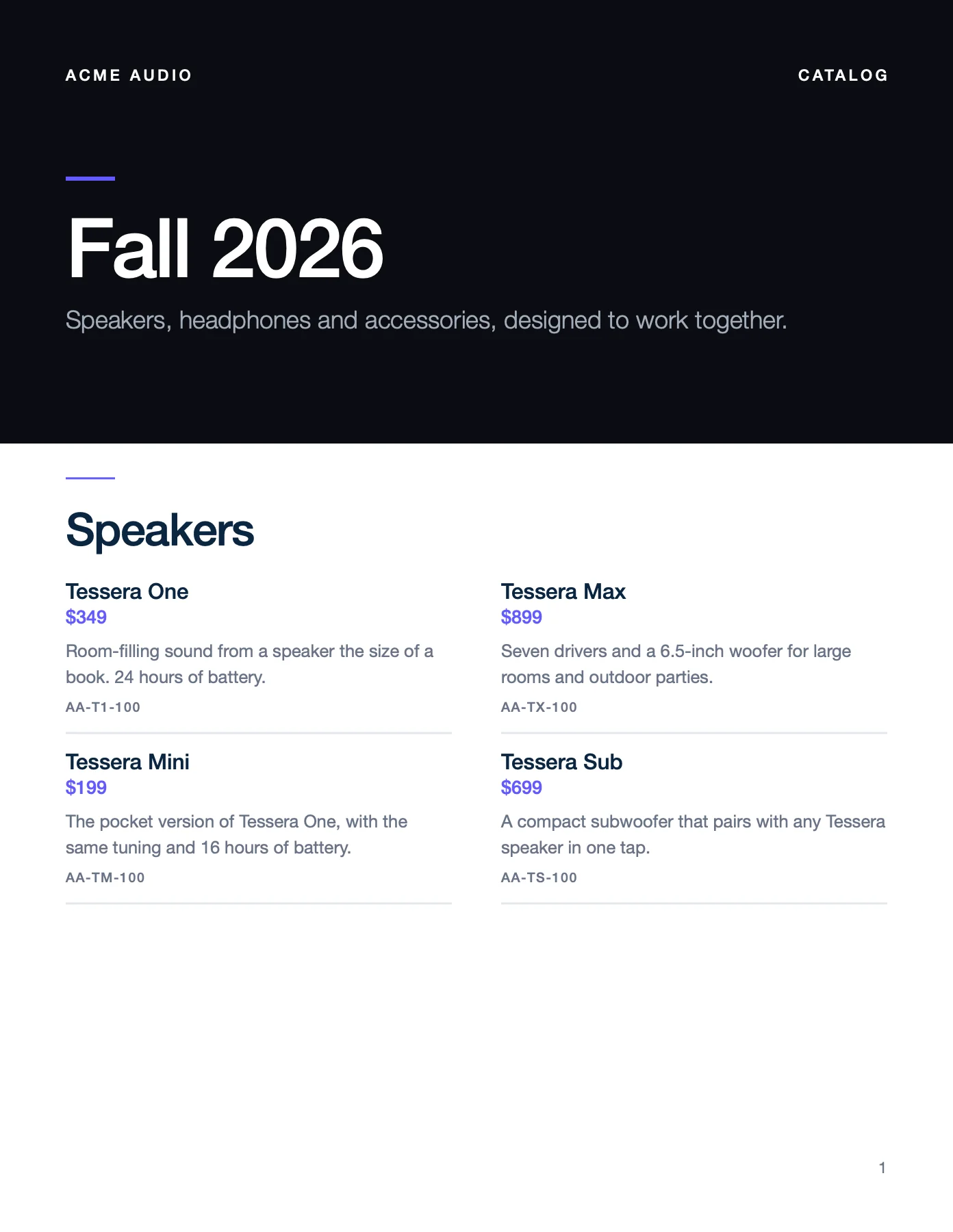
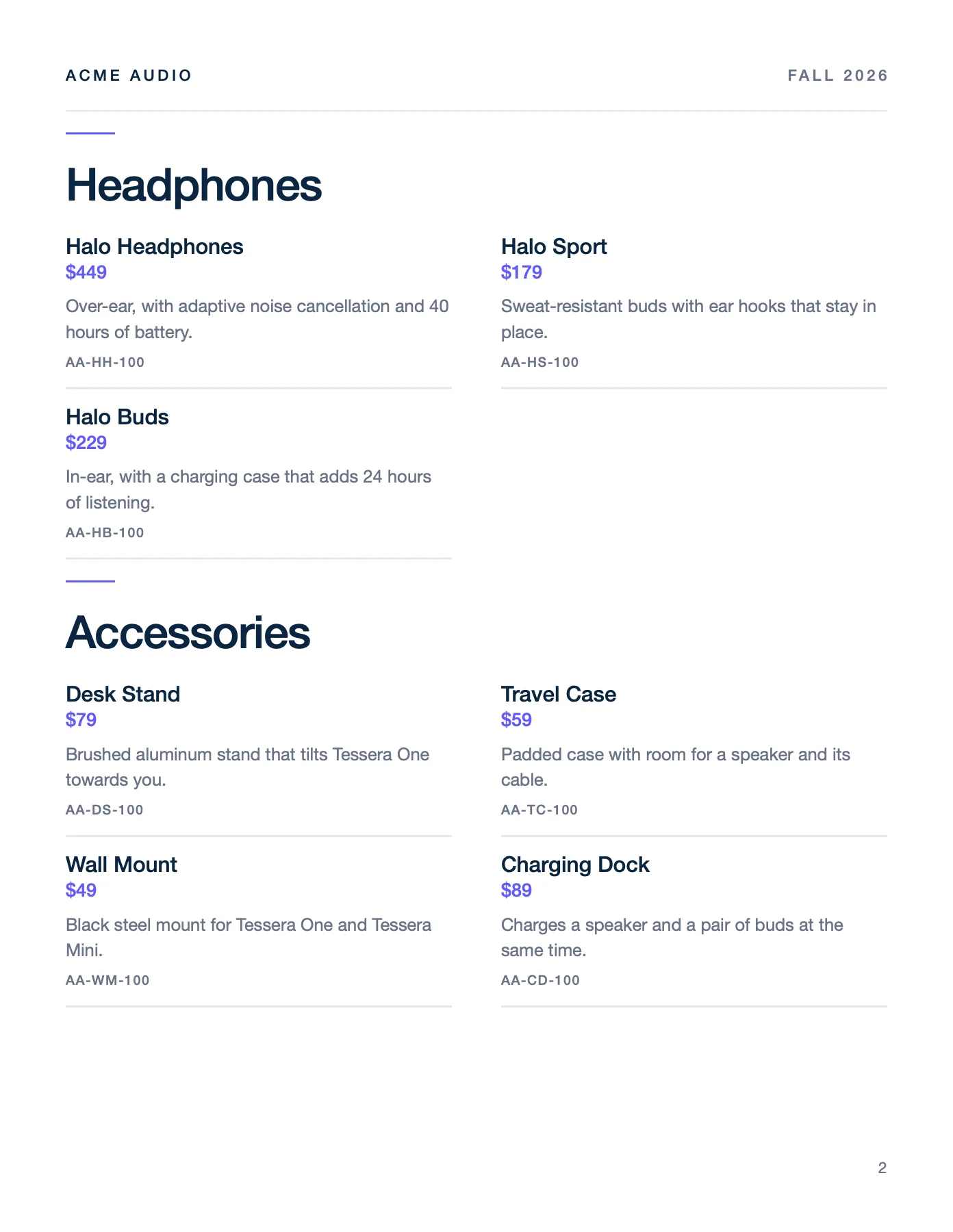
The template has one page and the report has two: InDesign adds the pages, see Text flow.
Text flow
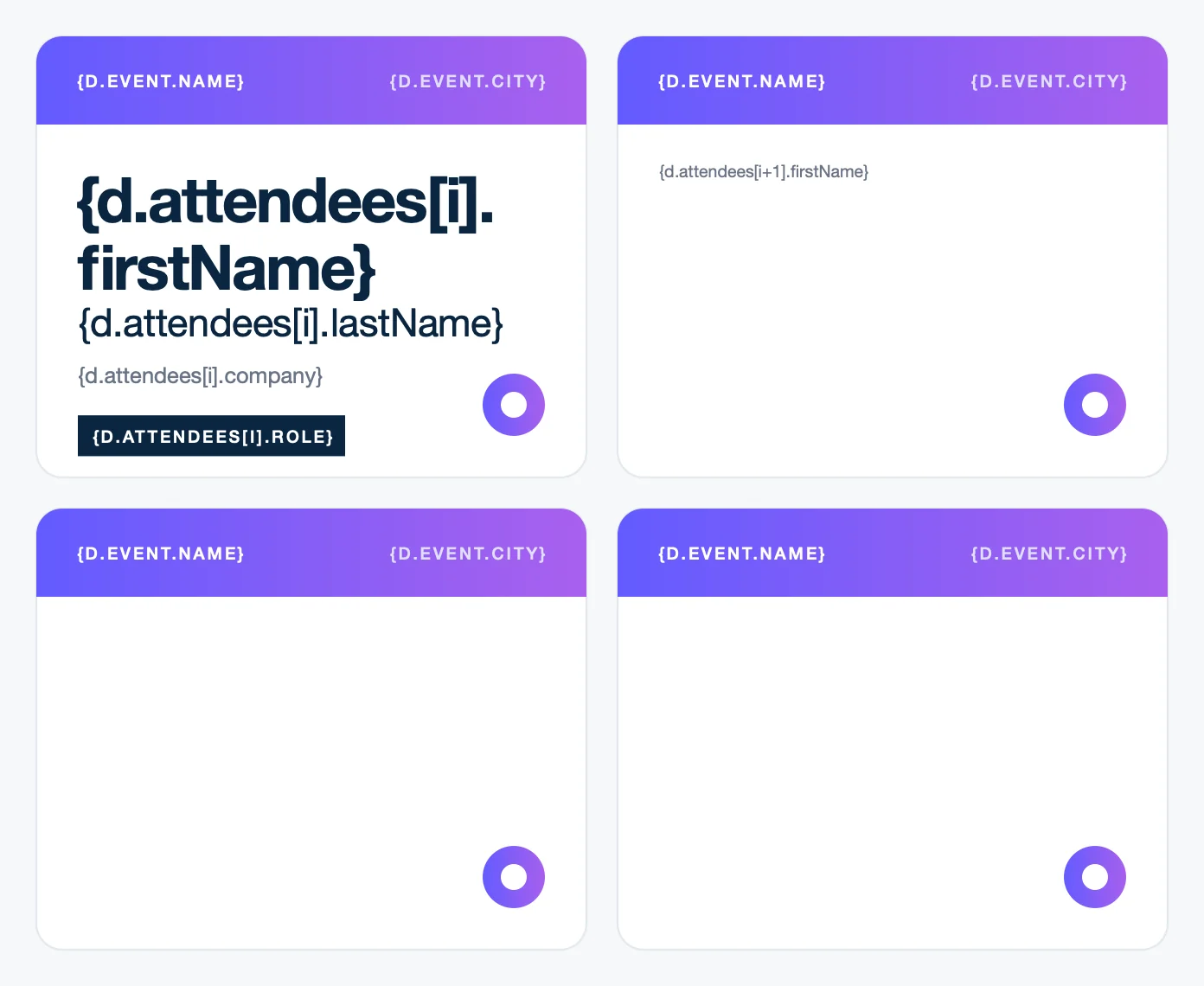
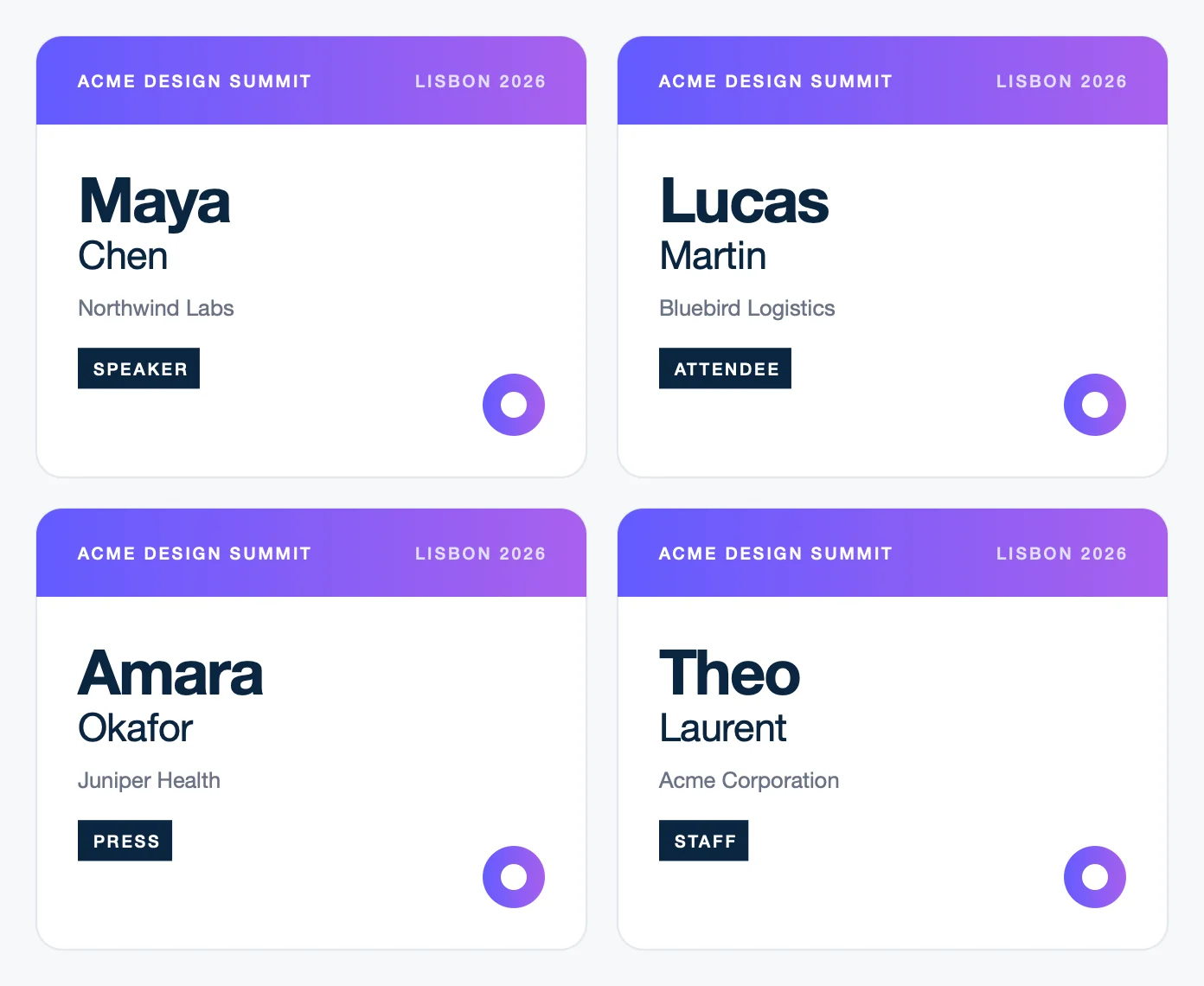
InDesign opens the report with the pages and frames of the template, and flows the text like in any document. Here, one story runs through the four badges, in threaded text frames. The first paragraph of each attendee starts in the next frame (Paragraph panel menu > Keep Options > Start Paragraph: In Next Frame), so each attendee gets a badge.
{
  "event": { "name": "Acme Design Summit", "city": "Lisbon 2026" },
  "attendees": [
    { "firstName": "Maya", "lastName": "Chen", "company": "Northwind Labs", "role": "Speaker" },
    { "firstName": "Lucas", "lastName": "Martin", "company": "Bluebird Logistics", "role": "Attendee" },
    { "firstName": "Amara", "lastName": "Okafor", "company": "Juniper Health", "role": "Press" },
    { "firstName": "Theo", "lastName": "Laurent", "company": "Acme Corporation", "role": "Staff" }
  ]
}
- New pages: turn on Smart Text Reflow (Preferences > Type) and put the text in a primary text frame. InDesign adds the pages when it opens the report in a window, like page 2 of the catalog.
- Frames that grow: a text frame with auto-sizing (Object > Text Frame Options > Auto-Sizing > Height Only) grows with its text.
- Overset text: text that does not fit stays hidden.
Conditions
Conditions print a value or remove paragraphs, depending on the data:
- Inline conditions print one value or another:
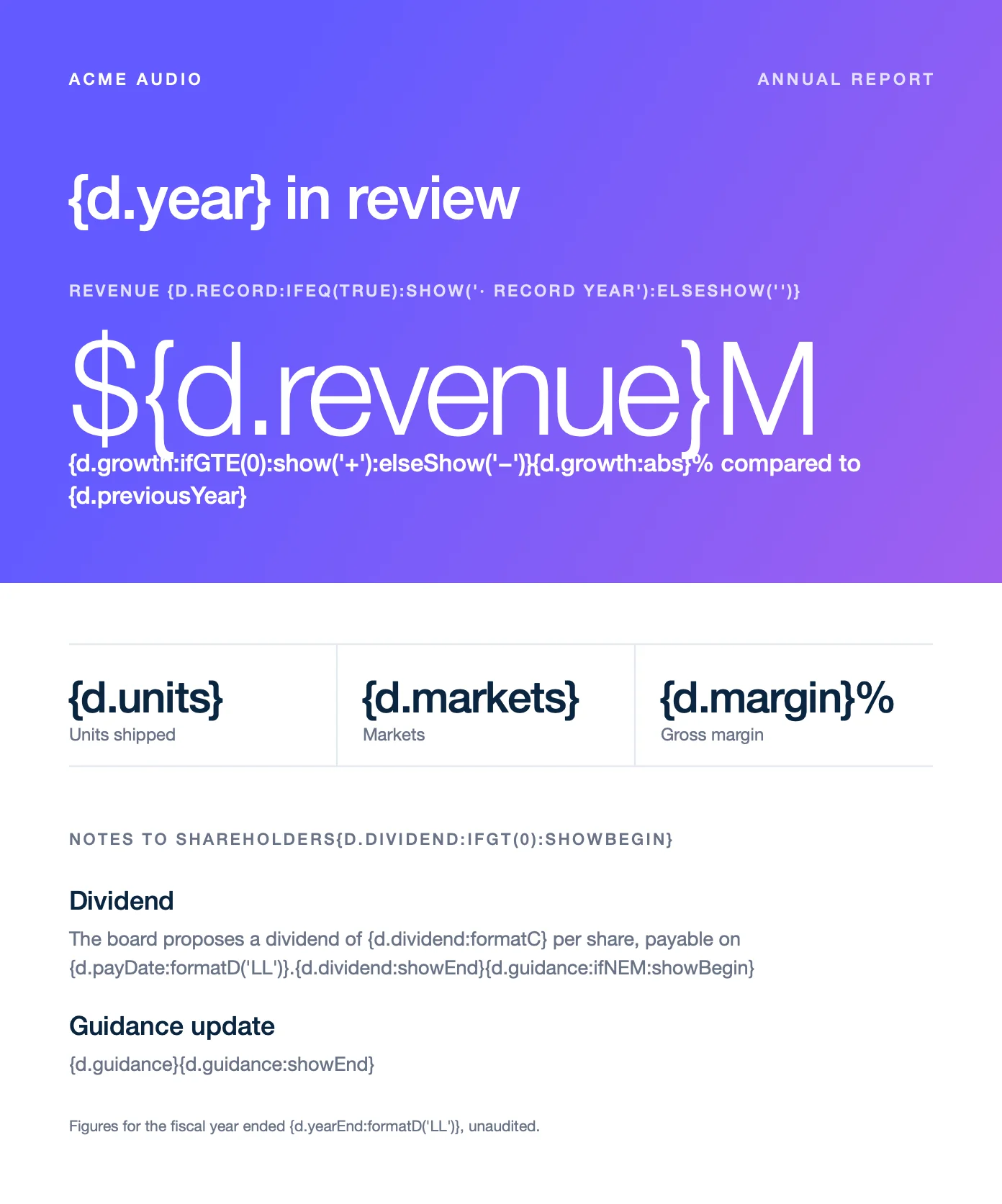
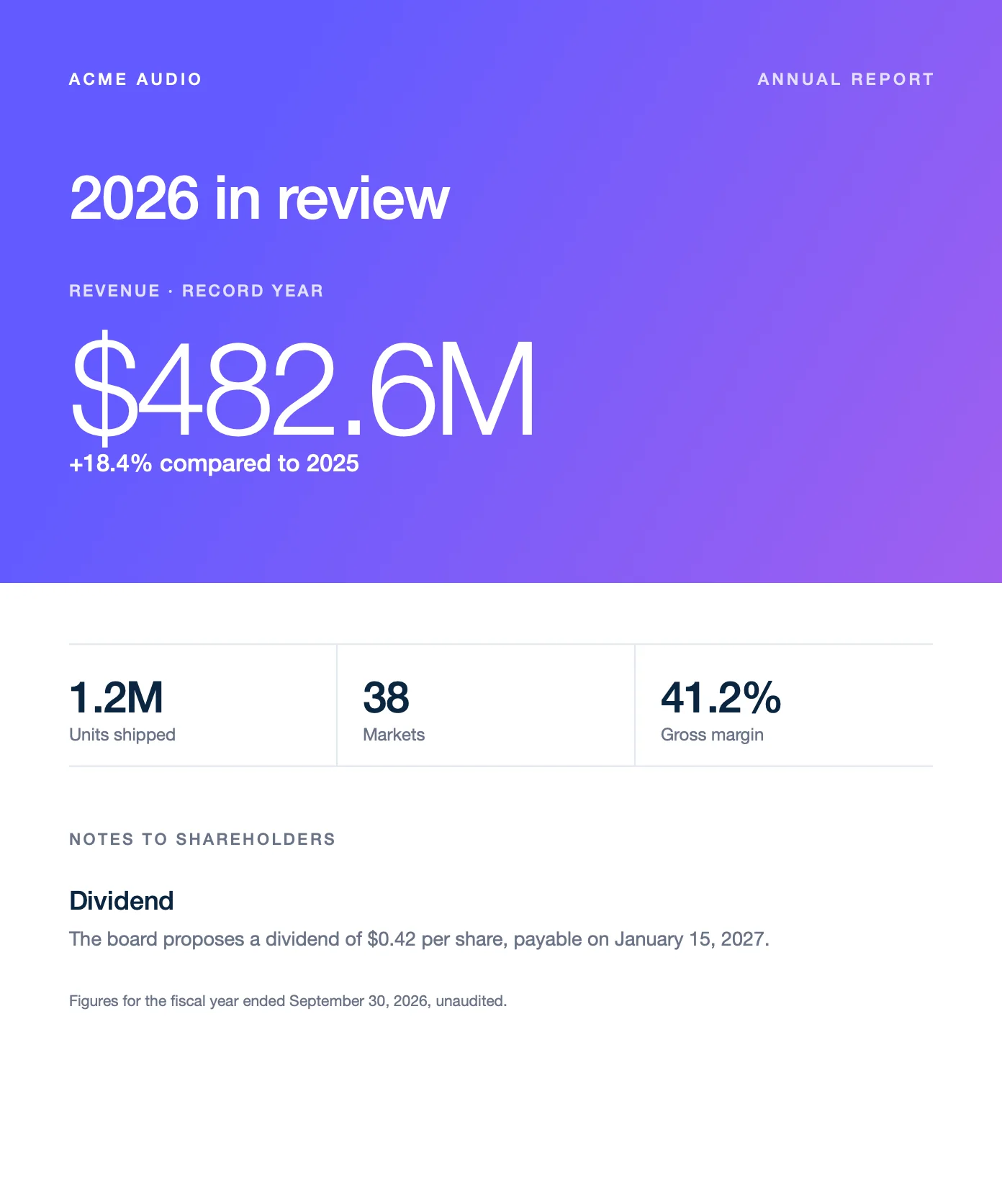
{d.growth:ifGTE(0):show('+'):elseShow('−')}prints the sign of the growth, and{d.record:ifEQ(true):show('· Record year'):elseShow('')}labels a record year. - Conditional blocks keep the paragraphs between
:showBeginand:showEndonly when the condition is true. Write the begin tag at the end of the paragraph above the block, and the end tag at the end of its last paragraph.guidanceis empty, so the Guidance update block is removed.
{
  "year": 2026,
  "previousYear": 2025,
  "yearEnd": "2026-09-30",
  "record": true,
  "revenue": 482.6,
  "growth": 18.4,
  "units": "1.2M",
  "markets": 38,
  "margin": 41.2,
  "dividend": 0.42,
  "payDate": "2027-01-15",
  "guidance": ""
}
:hideBegin and :hideEnd remove a block when the condition is true. Learn more about inline conditions and conditional blocks.
Translations
Write static text in {t( )} tags, and add :t to translate values from the data, like the session types. Carbone uses the translations of the lang of the report. This example uses "lang": "fr-fr" and the dictionary of the Translations tab. Dates and amounts follow the language: :formatD('dddd D MMMM YYYY') prints jeudi 15 octobre 2026, and :formatC prints 290,00 €.
{
  "event": "Acme Design Summit",
  "city": "Lisbonne",
  "date": "2026-10-15",
  "venue": "Centre des congrès",
  "fee": 290,
  "sessions": [
    { "time": "09:00", "title": "Accueil et café", "type": "Break", "room": "Atrium" },
    { "time": "09:30", "title": "Le design au service du son", "type": "Keynote", "room": "A" },
    { "time": "11:00", "title": "Prototyper un objet connecté en une semaine", "type": "Workshop", "room": "B" },
    { "time": "14:00", "title": "Matériaux durables et production locale", "type": "Panel", "room": "A" },
    { "time": "16:00", "title": "Du croquis à la boutique", "type": "Talk", "room": "C" }
  ]
}{
"fr-fr": {
"Program": "Programme",
"Room": "Salle",
"Registration": "Inscription",
"Includes lunch and the evening reception": "Déjeuner et soirée inclus",
"Break": "Pause",
"Keynote": "Conférence plénière",
"Workshop": "Atelier",
"Panel": "Table ronde",
"Talk": "Conférence"
}
}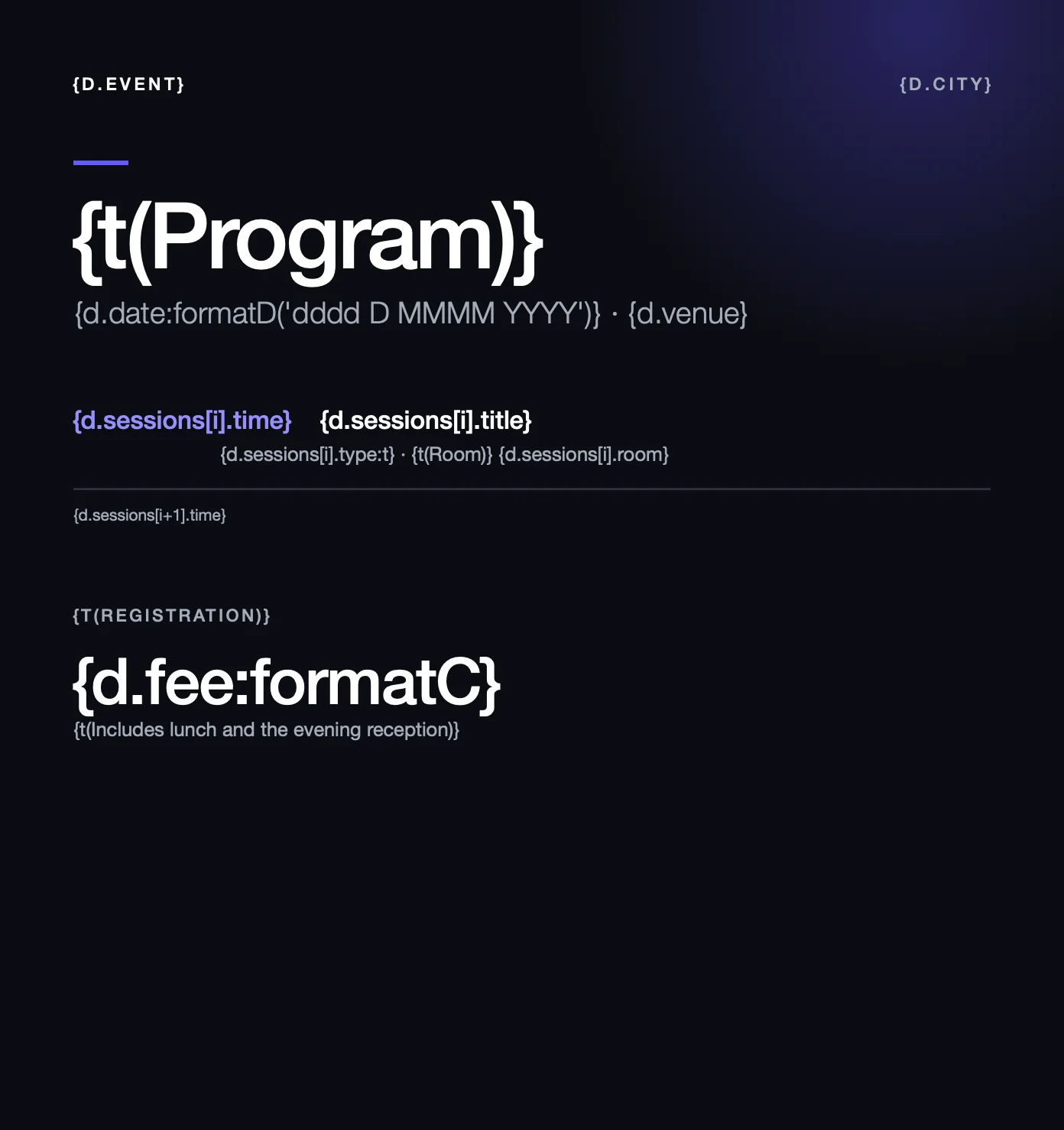
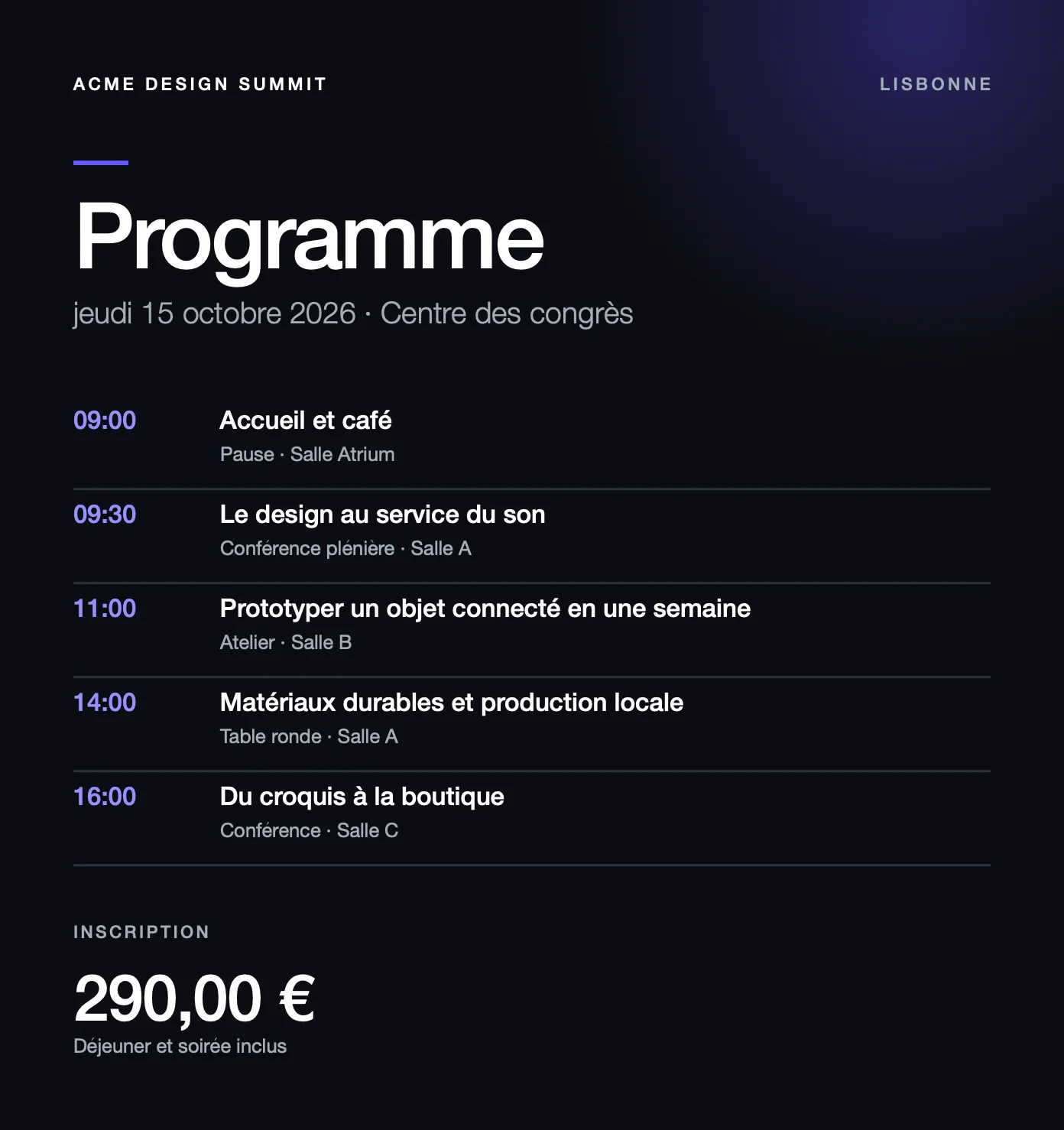
A translation can be longer than the original text: leave room in the frames, or let them grow with auto-sizing. Learn more about translations.
Best practices
- Use paragraph and character styles. A value takes the style of its tag, and loops find the paragraphs to repeat by their styles.
- Keep each tag in one style. Select the whole tag, braces included, before you change its font or color: a tag with two styles prints nothing.
- Anchor what must repeat. An icon or a rule placed inline in the repeated paragraphs, after the first
[i]tag, repeats with them. A floating frame stays in place. - Install the fonts where the report opens. An IDML file does not contain its fonts.
Automate an IDML file
To generate an IDML file from an IDML template with the Carbone API:
- Prepare two files: an IDML template with Carbone tags, like
{d.name}, and the JSON data to populate it. You can use the files of the Loops example. - Generate the IDML file in one of three ways:
- Use an official Carbone integration, like N8N, Make, Zapier, Airtable or Bubble.
- Use a Carbone SDK: Node.js, Go, Python, Java, JavaScript or PHP.
- Send a
POST /render/templateHTTP request to the Carbone API, like this curl command:
curl --location --request POST 'https://api.carbone.io/render/template?download=true' \
  --header 'carbone-version: 5' \
  --header 'Content-Type: application/json' \
  --header 'Authorization: Bearer API_TOKEN' \
  --data-raw "{
    \"data\": $(cat loops-data.json),
    \"template\": \"$(base64 -i loops-template.idml)\",
    \"lang\": \"en-us\"
  }" \
  --output report.idml
💡 Linux users: replacebase64 -i loops-template.idmlwithbase64 -w 0 loops-template.idml
Key parameters
| Parameter | Description |
|---|---|
template |
Your IDML template, encoded as a Base64 string. |
data |
JSON data used to populate the template. |
lang |
Language of the report, used by the formatters and translations: "en-us" prints {d.price:formatC(0)} as $349. |
convertTo |
Omit it: an IDML template generates an IDML file. |
?download=true |
Query parameter to download the document as a stream. |
Authorization |
Header required for the Carbone Cloud API. Get your API key here. |
For more details, refer to the Carbone API Documentation.