
Design
Markdown templates
Learn how to use Markdown as a template format in Carbone to generate PDF, DOCX, ODT, PNG, and JPG files with dynamic data injection, loops, and conditional content.
COMMUNITY FEATURE
Available for:
Carbone Cloud
Carbone On-premise
Embedded Carbone JS
v5.0+
Carbone supports Markdown as both an input template and an output format, enabling you to generate PDFs, DOCX, ODT, PNG, JPG, and other formats directly from Markdown templates. Since large language models like ChatGPT, Claude, and DeepSeek natively output Markdown, Carbone is the ideal bridge between AI-generated content and professional documents, turning raw LLM output into polished, data-injected deliverables in a single API call.
Markdown templates support a wide range of features, including substitutions, repetitions, formatters, translations, conditions, and all enterprise features, making them a lightweight and versatile choice for automated document generation.
Basic
Carbone needs 2 elements to generate a document:
- A JSON data: coming from your application / database / API (e.g. the following JSON)
- A Markdown Template: made from any text editor or code editor. The following template includes Carbone tags:
{d.user.firstName},{d.user.lastName},{d.user.email}, and{d.membershipLevel}. These tags will be replaced with the corresponding values from the JSON data.
The d in {d.user.firstName} refers to the root of your JSON data. The path after d (e.g., user.firstName) must match the structure of your JSON. You can use any valid Markdown structure; Carbone will only replace the tags with the corresponding data.
{
  "user": {
    "firstName": "John",
    "lastName": "Doe",
    "email": "john.doe@carbone.io"
  },
  "membershipLevel": "Premium"
}# Welcome, {d.user.firstName} {d.user.lastName}!Thank you for registering with us.Your email address is: {d.user.email}Your membership level: {d.membershipLevel}
# Welcome, John Doe!Thank you for registering with us.Your email address is: john.doe@carbone.ioYour membership level: PremiumStyle
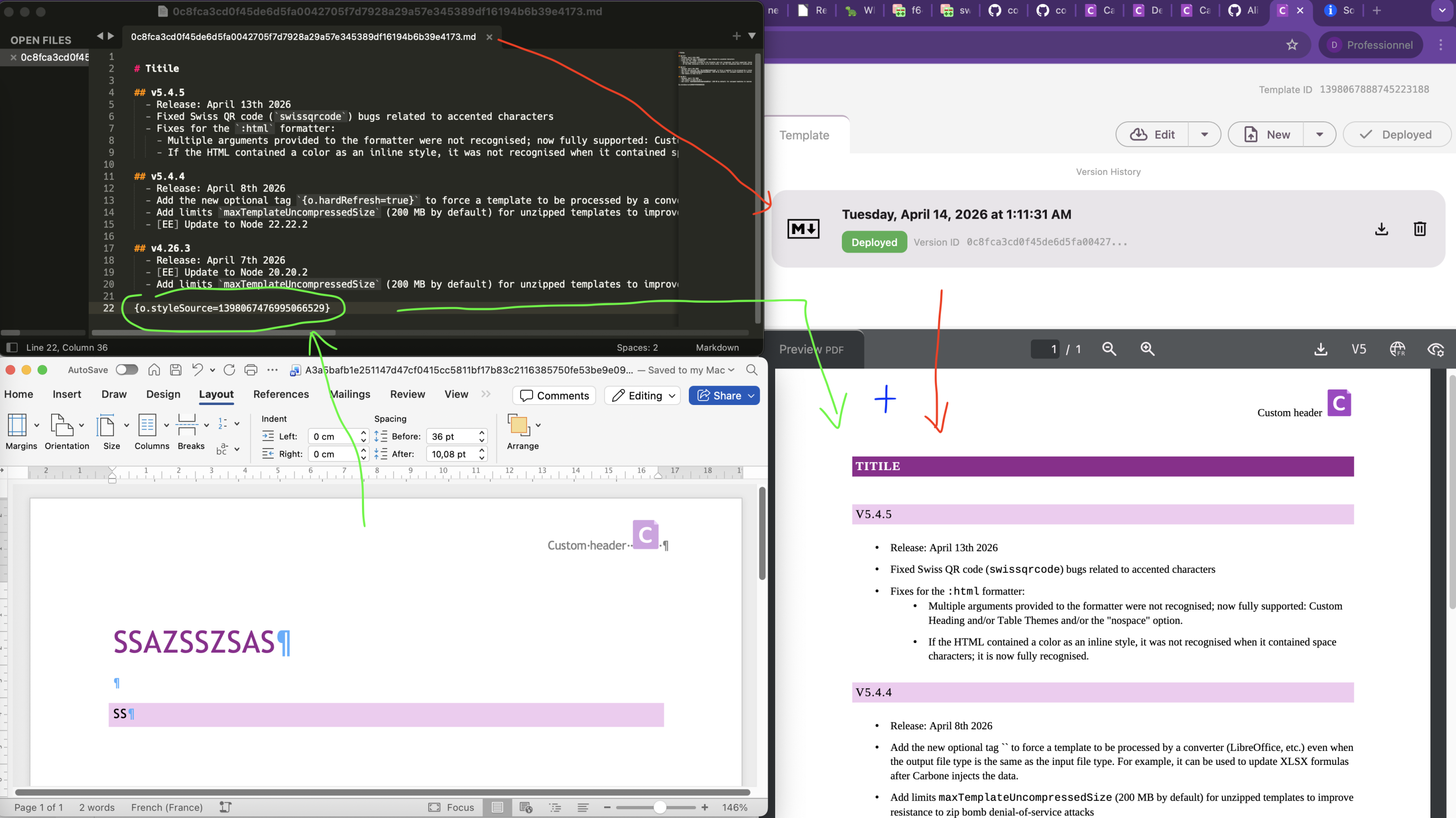
Since Carbone v5.8.0 (On-Premise only), another DOCX or ODT template can be used as a style reference for Markdown documents. This allows you to control headers, footers, heading styles, and table styles using a reference document.
Upload a template to Studio and retrieve its ID (versionId or templateId). Then, place the special tag {o.styleSource=templateId} anywhere in the Markdown document to apply the style.
The style source is a template that may contain Carbone tags.
The style is applied only when the Markdown document is converted to DOCX, ODT, or PDF.
Loops
Loops in Carbone allow you to repeat a section of your template for each item in an array from your JSON data. In Markdown templates, loops are supported inside tables. Insert the loop tags inside table cells, and place the end iterator tag in the following row.
A loop in Carbone requires two tags:
- Start Tag: Marks the beginning of the repeated block (e.g.,
{d.users[i].id}). The i is the loop iterator (automatically managed by Carbone). - End Tag: Marks the end of the repeated block (e.g.,
{d.users[i+1]}). The end tag i+1 does not refer to an actual array item but signals the end of the pattern. This row is removed from the final output.
All content (text, Carbone tags, and styles) between the start and end rows is repeated.
{
  "users": [
    { "id": 1, "name": "Alice", "role": "Admin" },
    { "id": 2, "name": "Bob", "role": "Editor" },
    { "id": 3, "name": "Charlie", "role": "Viewer" }
  ]
}# User List| ID | Name | Role |
| -- | ---- | ---- |
| {d.users[i].id} | {d.users[i].name} | {d.users[i].role} |
| {d.users[i+1]} | | |# User List| ID | Name | Role |
| -- | ---- | ---- |
| 1 | Alice | Admin |
| 2 | Bob | Editor |
| 3 | Charlie | Viewer |Unlike traditional programming, Carbone loops do not require keywords like "for" or "foreach". The loop is defined implicitly by the tags.
Conditions
Three methods are available to conditionally show, hide, or style elements in your Markdown templates. Each method is suited to different use cases, depending on the complexity of your conditions and the structure of your content:
- Inline Conditions: Use Carbone's conditional formatters to show or hide inline content based on a data field.
- Conditional Blocks: Use
:showBegin/showEndor:hideBegin/hideEndfor showing or hiding large sections of content, including multiple paragraphs, tables, or headings. - HTML Blocks in Markdown: Support for
:drop(),:keep(), and CSS injection via embedded HTML elements is coming soon.
Inline Conditions
Carbone supports inline conditional logic directly within Markdown content. Use the :ifEQ, :show, and :elseShow formatters to render different values based on your data.
{
  "status": "active",
  "score": 95,
  "isUrgent": true
}Status: {d.status:ifEQ('active'):show('✅ Active'):elseShow('❌ Inactive')}Score: {d.score:ifGT(90):show('Excellent'):elseShow('Good')}Priority: {d.isUrgent:ifEQ(true):show('**HIGH**'):elseShow('Normal')}Status: ✅ ActiveScore: ExcellentPriority: **HIGH**Conditional Sections
The pair of :showBegin/:showEnd and :hideBegin/:hideEnd formatters allow you to conditionally display a section of content in your Markdown templates. These formatters are useful when you want to show or hide whole groups of paragraphs, tables, or headings based on data conditions. Syntax:
:showBeginor:hideBegin: Marks the start of a block to show/hide if the condition is true.:showEndor:hideEnd: Marks the end of the block.
showBegin / showEnd Example
The details section containing a list is hidden using the showBegin/showEnd formatters, only if the showDetails field is true.
{
  "showDetails": false,
  "product": "Carbone Pro"
}Product: {d.product}{d.showDetails:ifEQ(true):showBegin}
## Details- Feature 1
- Feature 2{d.showDetails:ifEQ(true):showEnd}Thank you for using Carbone!Product: Carbone ProThank you for using Carbone!hideBegin / hideEnd Example
The greetings section is deleted when the field name is undefined/null/empty.
{
  "name": null
}## Dashboard{d.name:ifEM:hideBegin}
Welcome, **{d.name}**!
{d.name:ifEM:hideEnd}## DashboardDrop / Keep via HTML Blocks
Pictures
Dynamic pictures allow you to inject images into your documents using data from your JSON input. In Markdown templates, use the standard Markdown image syntax with a Carbone tag as the src:
Carbone supports the following image sources:
- Absolute URLs (e.g.,
https://carbone.io/img/carbone-logo.svg). Carbone does not support relative paths (e.g.,/images/logo.pngor../assets/photo.jpg). - Data-URIs (Base64 encoded, e.g.,
data:image/jpeg;base64,/9j/4AAQSkZJRgABAQEASABIAAD...).
{
  "userProfile": {
    "name": "John Doe",
    "profilePictureUrl": "https://carbone.io/images/john-doe.jpg",
    "profilePictureBase64": "data:image/jpeg;base64,/9j/4AAQSkZJRgABAQEASABIAAD..."
  }
}# Welcome, {d.userProfile.name}!# Welcome, John Doe!To control image dimensions, use an HTML <img> tag directly in your Markdown template (Markdown supports inline HTML):
<img src="{d.userProfile.profilePictureUrl}" width="200" height="auto" alt="Profile Picture">Charts
Dynamic charts are generated with the :chart formatter. Chain it to a tag holding an ECharts configuration object, and use it as the image source. The tag is replaced with an SVG image of the chart.
Use an HTML <img> tag rather than the Markdown image syntax, so you can set the width and height of the chart in the converted PDF, DOCX or ODT:
<img src="{d.chartOptions:chart}" width="600" height="400" alt="Sales Overview"/>The Markdown image syntax  also works, but it provides no way to set the dimensions, and the chart is injected as a very small image.
The top-level width and height properties of the ECharts configuration object define the size of the generated image itself, not the size it takes in the document: use the width and height attributes of the <img> tag for that.
Learn more: Charts documentation.
Colors
You can dynamically set text colors and styles in your Markdown templates using Carbone tags combined with inline HTML. Since Markdown itself has limited native styling, use HTML <span> or <div> elements for color control.
{
  "theme": "dark",
  "textColor": "#ffffff",
  "bgColor": "#1a1a1a",
  "alertColor": "#ff4444",
  "isUrgent": true
}## Status Report<span style="color: {d.alertColor};">{d.isUrgent:ifEQ(true):show('⚠️ Urgent Alert'):elseShow('All Clear')}</span><div style="color: {d.textColor}; background-color: {d.bgColor}; padding: 10px;">
This section uses colors from the dataset.
</div>Theme: {d.theme:ifEQ('dark'):show('🌙 Dark Mode'):elseShow('☀️ Light Mode')}## Status Report<span style="color: #ff4444;">⚠️ Urgent Alert</span><div style="color: #ffffff; background-color: #1a1a1a; padding: 10px;">
This section uses colors from the dataset.
</div>Theme: 🌙 Dark ModeFormatters
Carbone provides built-in formatters to transform data values directly inside your Markdown templates. Formatters are chained to a Carbone tag using the : operator (e.g. {d.value:formatterName(args)}). The sections below cover the most commonly used formatters for dates, numbers, and currencies. For the full list of available formatters, see the Formatters documentation.
Date Formatting
Use the :formatD() formatter to display dates in any format. The pattern follows Day.js tokens (e.g. YYYY, MM, DD, dddd).
{
  "orderDate": "2025-03-15T14:30:00Z",
  "deliveryDate": "2025-04-01T00:00:00Z"
}## Order SummaryOrder date: {d.orderDate:formatD('DD/MM/YYYY')}
Delivery date: {d.deliveryDate:formatD('dddd DD MMMM YYYY')}## Order SummaryOrder date: 15/03/2025
Delivery date: Tuesday 01 April 2025For the full list of supported date patterns and options, see the Date formatter documentation.
Number Formatting
Use the :formatN() formatter to control decimal precision and thousands separators. The output format automatically adapts to the lang option passed at render time.
{
  "quantity": 1234567.891,
  "rating": 4.5
}Quantity: {d.quantity:formatN(2)}
Rating: {d.rating:formatN(1)}Quantity: 1,234,567.89
Rating: 4.5For the full list of options, see the Number formatter documentation.
Currency Formatting
Use the :formatC() formatter to display monetary values with the correct currency symbol, decimal precision, and locale-aware formatting.
{
  "price": 4999.99,
  "discount": 250
}Price: {d.price:formatC(2, 'EUR')}
Discount: {d.discount:formatC(2, 'USD')}Price: €4,999.99
Discount: $250.00For the full list of supported currencies and options, see the Currency formatter documentation.
Barcodes
Dynamic barcodes are generated with the :barcode(type) formatter, where type is the barcode symbology, such as qrcode, ean13 or code128.
Use an HTML <img> tag rather than the Markdown image syntax, so you can set the width and height of the barcode in the converted PDF, DOCX or ODT:
<img src="{d.productCode:barcode(qrcode)}" width="150" height="150" alt="Product QR code"/>The Markdown image syntax }) also works, but it provides no way to set the dimensions, and the barcode is injected as a very small image.
The barcode options are passed as additional arguments, e.g. {d.productCode:barcode(qrcode, includetext:false)}. Their width and height options define the size of the generated barcode itself, not the size it takes in the document: use the width and height attributes of the <img> tag for that.
Learn more: Barcodes documentation.
Hyperlinks
You can dynamically set the URL in Markdown links using Carbone tags. This is useful for generating personalized or data-driven links.
{
    "documentationUrl": "https://carbone.io/documentation/",
    "isLoggedIn": true,
    "profileUrl": "https://account.carbone.io/",
    "defaultUrl": "https://account.carbone.io/login",
    "product": {
        "name": "Carbone Cloud",
        "url": "https://carbone.io/pricing.html"
    }
}<!-- Directly inject a URL -->
[Read the Docs]({d.documentationUrl})<!-- Conditionally set a URL -->
[{d.isLoggedIn:ifEQ(true):show('Your Profile'):elseShow('Login')}]({d.isLoggedIn:ifEQ(true):show(d.profileUrl):elseShow(d.defaultUrl)})<!-- Inject a URL from a nested object -->
[Learn about {d.product.name}]({d.product.url})<!-- Combine static and dynamic paths -->
[Documentation](/docs/{d.product.name:lowerCase():replace(' ', '-')})[Read the Docs](https://carbone.io/documentation/)[Your Profile](https://account.carbone.io/)[Learn about Carbone Cloud](https://carbone.io/pricing.html)[Documentation](/docs/carbone-cloud)Inject HTML in Markdown
Use the :html formatter to inject rich HTML content stored in your dataset. By default, the < and > characters of a tag such as {d.richText} are encoded, so the HTML is displayed as literal text. Add the :html formatter to render the content natively in the converted document.
{
  "richText": "<p>The engine is <u>powered</u> by <i>cryogenic liquid methane</i> and <b>liquid oxygen</b> (LOX).</p>"
}### Engine{d.richText:html}### Engine<p>The engine is <u>powered</u> by <i>cryogenic liquid methane</i> and <b>liquid oxygen</b> (LOX).</p>Learn more: :html formatter documentation.
Page Breaks
Table of Content
Convert Markdown to PDF
Using Carbone with AI-generated content: LLMs like ChatGPT, Gemini and Le Chat (Mistral) natively output Markdown. A typical workflow is: prompt your LLM to generate a structured document → inject dynamic fields with Carbone tags (e.g. {d.clientName}, {d.date}) → call the Carbone API with your JSON data to render the final PDF or DOCX. This is particularly effective for automated reports, personalised proposals, AI-drafted contracts, and weekly summaries.
To generate a PDF from a Markdown template using the Carbone API, follow this workflow:
- Prepare Two Files: Create a Markdown Template (with Carbone tags e.g.
{d.name}) and a JSON dataset to populate the template. - Generate a PDF. You have three options:
- Use the official Carbone integrations for platforms like N8N, Make, Zapier, Airtable, or Bubble.
- Or, Use one of the Carbone SDKs (Node.js, Go, Python, Java, JavaScript, or PHP).
- Or, Send a
POST /render/templateHTTP request to the Carbone API. Here's an example using curl:
curl --location --request POST 'https://api.carbone.io/render/template?download=true' \
  --header 'carbone-version: 5' \
  --header 'Content-Type: application/json' \
  --header 'Authorization: Bearer API_TOKEN' \
  --data-raw "{
    \"data\": {},
    \"template\": \"$(base64 -i document.md)\",
    \"convertTo\": \"pdf\",
    \"converter\": \"L\"
  }" \
  --output result.pdf
💡 Linux users: replacebase64 -i document.mdwithbase64 -w 0 document.md
Key Parameters
| Parameter | Description |
|---|---|
template |
Your Markdown template, encoded as a Base64 string. |
data |
JSON dataset used to populate the template. |
convertTo |
The desired output format: pdf, docx, odt, jpg, png, or md. |
?download=true |
Query parameter to download the document as a stream. |
Authorization |
Header required for the Carbone Cloud API. Get your API key here. |
For more details, refer to the Carbone API Documentation.
Unlike HTML templates, Markdown templates do not support PDF conversion options (paper size, margins, headers, footers, etc.). For advanced PDF layout control, use an HTML template instead.
Translations and i18n
Carbone can generate documents in any language from a single Markdown template. Instead of maintaining one template per language, you define a localization dictionary and pass a lang option at render time — Carbone automatically substitutes all translated strings.
Two mechanisms are available:
{t( )}for static text in the template (labels, headings, fixed strings).:tformatter for dynamic text values coming from your JSON dataset (translated via a dictionary key).
Locale-aware formatters such as :formatD(), :formatN(), and :formatC() automatically adapt their output to the target language as well.
{
  "data"         : { "tool": "key1", "protection": "key2" },
  "convertTo"    : "pdf",
  "lang"         : "en-us",
  "translations" : {
    "fr-fr" : {
      "Invoice"    : "Facture",
      "Date"       : "Date",
      "key1"       : "Tournevis",
      "key2"       : "Gants"
    },
    "en-us" : {
      "Invoice"    : "Invoice",
      "Date"       : "Date",
      "key1"       : "Screwdrivers",
      "key2"       : "Gloves"
    }
  }
}# {t(Invoice)}{t(Date)}: {d.date:formatD('DD/MM/YYYY')}| Item | Quantity |
| ---- | -------- |
| {d.tool:t} | 1 |
| {d.protection:t} | 2 |# InvoiceDate: 15/03/2025| Item | Quantity |
| ---- | -------- |
| Screwdrivers | 1 |
| Gloves | 2 |The localization dictionary can be passed directly in the API request body (translations field). For the complete reference including CLI tools and dictionary generation, see the Translations i18n documentation.
Comments
Carbone processes all text in your Markdown template, including HTML comments (<!-- -->). If you include Carbone tags (e.g., {d.user.name}) inside comments, they will be evaluated and replaced with data before the Markdown is rendered.
Best Practices for Notes: If you must include Carbone tags in comments for taking notes, you can "escape" them by breaking the syntax so Carbone won't interpret them: <!-- Note: Use d.user.name (escaped) for the username -->.
{
  "showComment": true,
  "user": {
    "name": "John"
  }
}# User Profile<!-- Printing Carbone Tags within Comments: -->
<!-- {d.user.name} --># User Profile<!-- Printing Carbone Tags within Comments: -->
<!-- John -->