
Design
PPTX templates
Design a presentation in PowerPoint, add Carbone tags, and generate it from JSON data as a PowerPoint file or a PDF.
COMMUNITY FEATURE
Available for:
Carbone Cloud
Carbone On-premise
Embedded Carbone JS
v2.0+
Any PPTX file can be a template. Write Carbone tags in its text boxes, tables and speaker notes, and send your JSON data to the API. You get back a PowerPoint presentation or a PDF that keeps the design of the template.
Basic
Write a tag in a text box to insert a value from the JSON data. In {d.client}, d is the root of the data. The value takes the formatting of its tag: font, size and color, like the name of the client.
{
  "client": "Globex Corporation",
  "period": "July to September 2026",
  "contact": "Maria Chen",
  "role": "Head of IT",
  "manager": "Jane Smith",
  "managerEmail": "jane.smith@acme.example",
  "date": "October 14, 2026",
  "location": "Globex HQ, Chicago"
}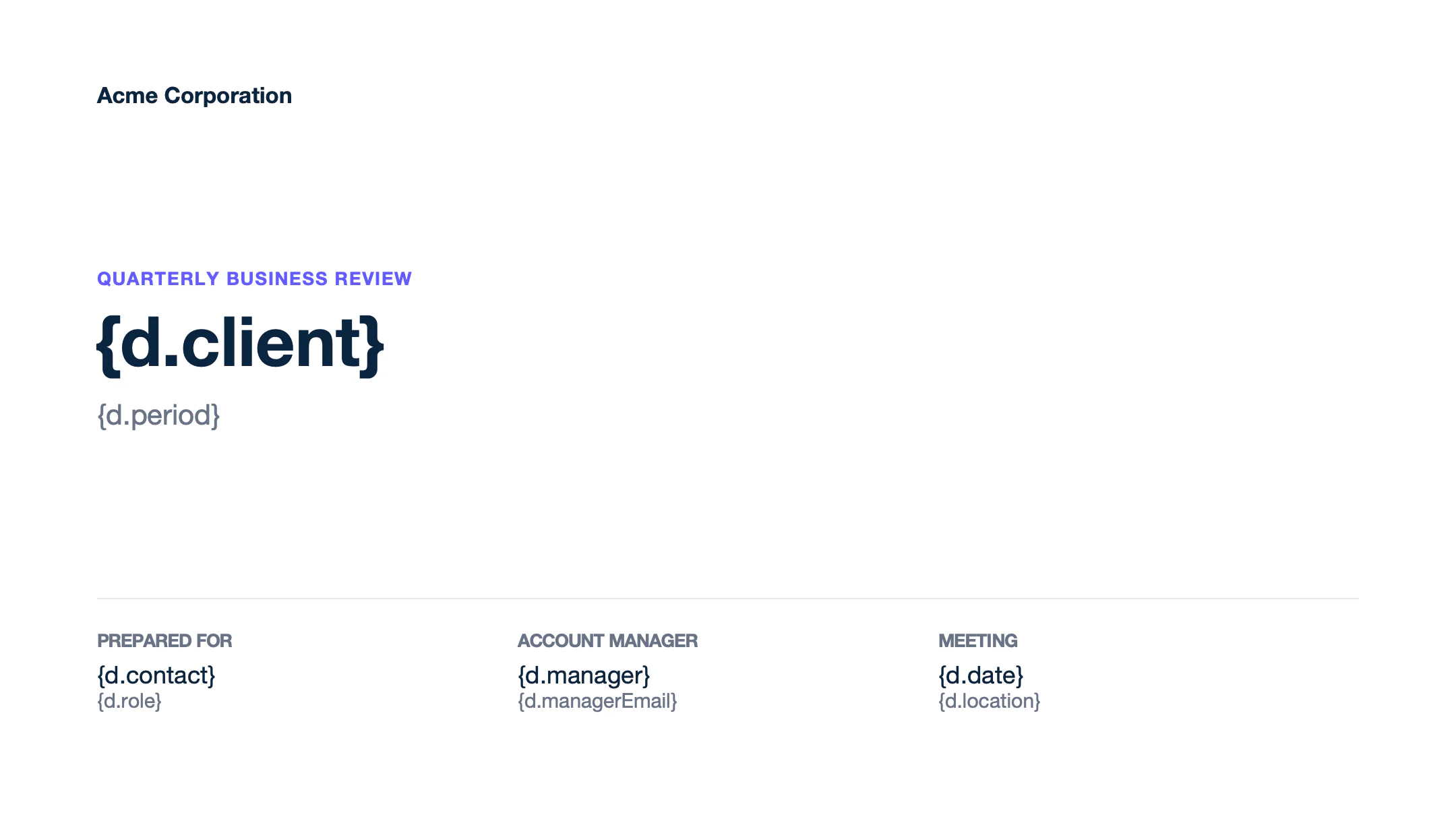
Text of template.pptx
Slide 1
Acme Corporation
QUARTERLY BUSINESS REVIEW
{d.client}
{d.period}
PREPARED FOR
{d.contact}
{d.role}
ACCOUNT MANAGER
{d.manager}
{d.managerEmail}
MEETING
{d.date}
{d.location}
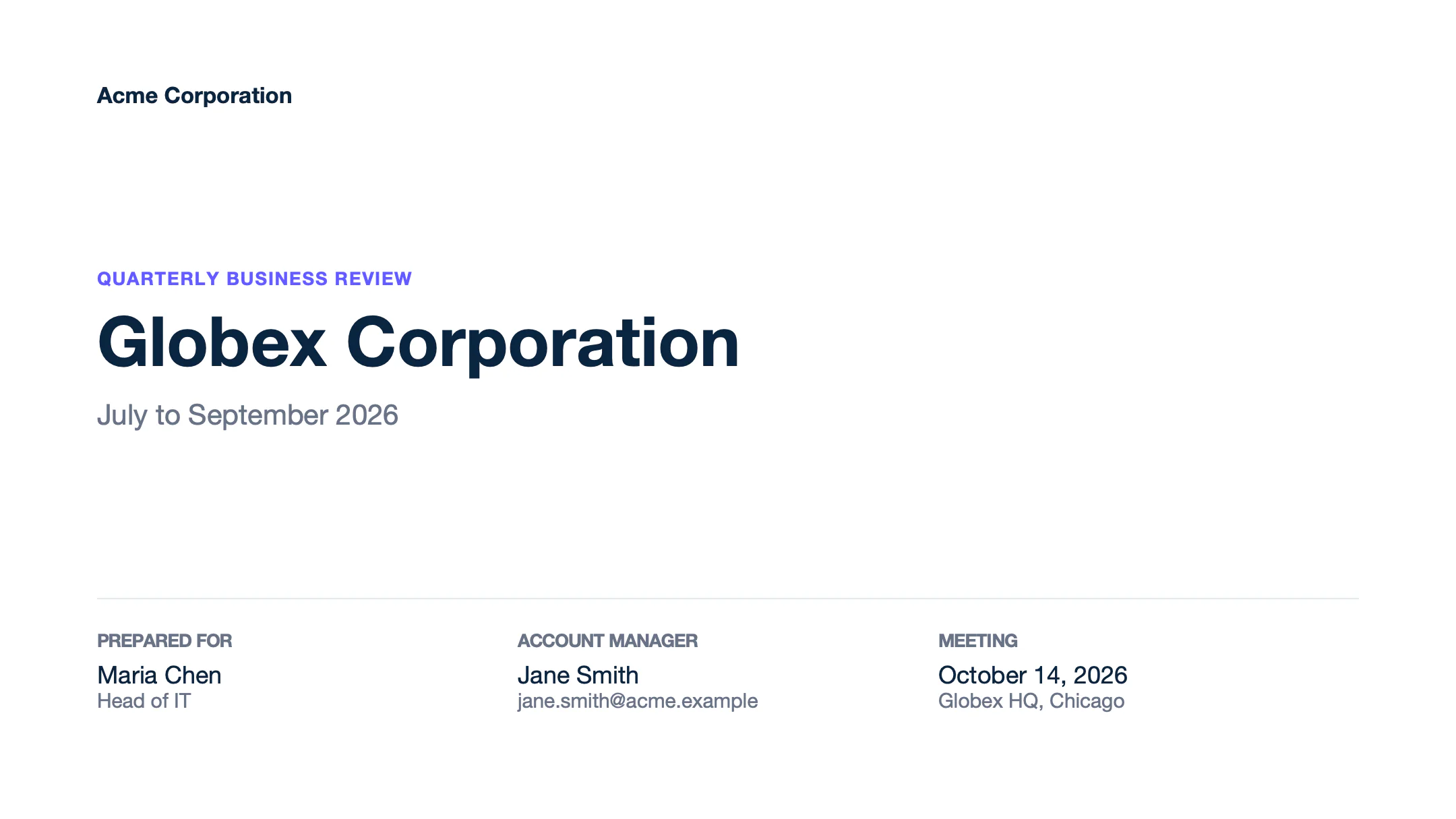
Text of report.pptx
Slide 1
Acme Corporation
QUARTERLY BUSINESS REVIEW
Globex Corporation
July to September 2026
PREPARED FOR
Maria Chen
Head of IT
ACCOUNT MANAGER
Jane Smith
jane.smith@acme.example
MEETING
October 14, 2026
Globex HQ, Chicago
- Tags work in tables, in speaker notes and on the slide master, like a footer on every slide.
- Turn off smart quotes in PowerPoint (AutoCorrect > AutoFormat As You Type). Formatters need straight quotes, like
:formatD('LL'). Learn more
Learn more about tags.
Loops
A loop repeats a table row for each item of an array. The template needs two rows:
- The row to repeat, with
[i]in its tags:{d.products[i].name}. - The next row, with
[i+1]in one cell:{d.products[i+1].name}. It marks the end of the loop and is removed from the report.
Carbone copies the row with its height and formatting. The table grows down, and its total row moves with it.
{
  "client": "Globex",
  "total": 41243,
  "products": [
    { "name": "Laptop Pro 14",   "category": "Hardware", "qty": 12, "price": 1499, "amount": 17988 },
    { "name": "27-inch monitor", "category": "Hardware", "qty": 25, "price": 349,  "amount": 8725 },
    { "name": "USB-C dock",      "category": "Hardware", "qty": 30, "price": 189,  "amount": 5670 },
    { "name": "Office license",  "category": "Software", "qty": 40, "price": 99,   "amount": 3960 },
    { "name": "Cloud backup",    "category": "Software", "qty": 40, "price": 60,   "amount": 2400 },
    { "name": "Installation",    "category": "Services", "qty": 1,  "price": 1200, "amount": 1200 },
    { "name": "Training",        "category": "Services", "qty": 2,  "price": 650,  "amount": 1300 }
  ]
}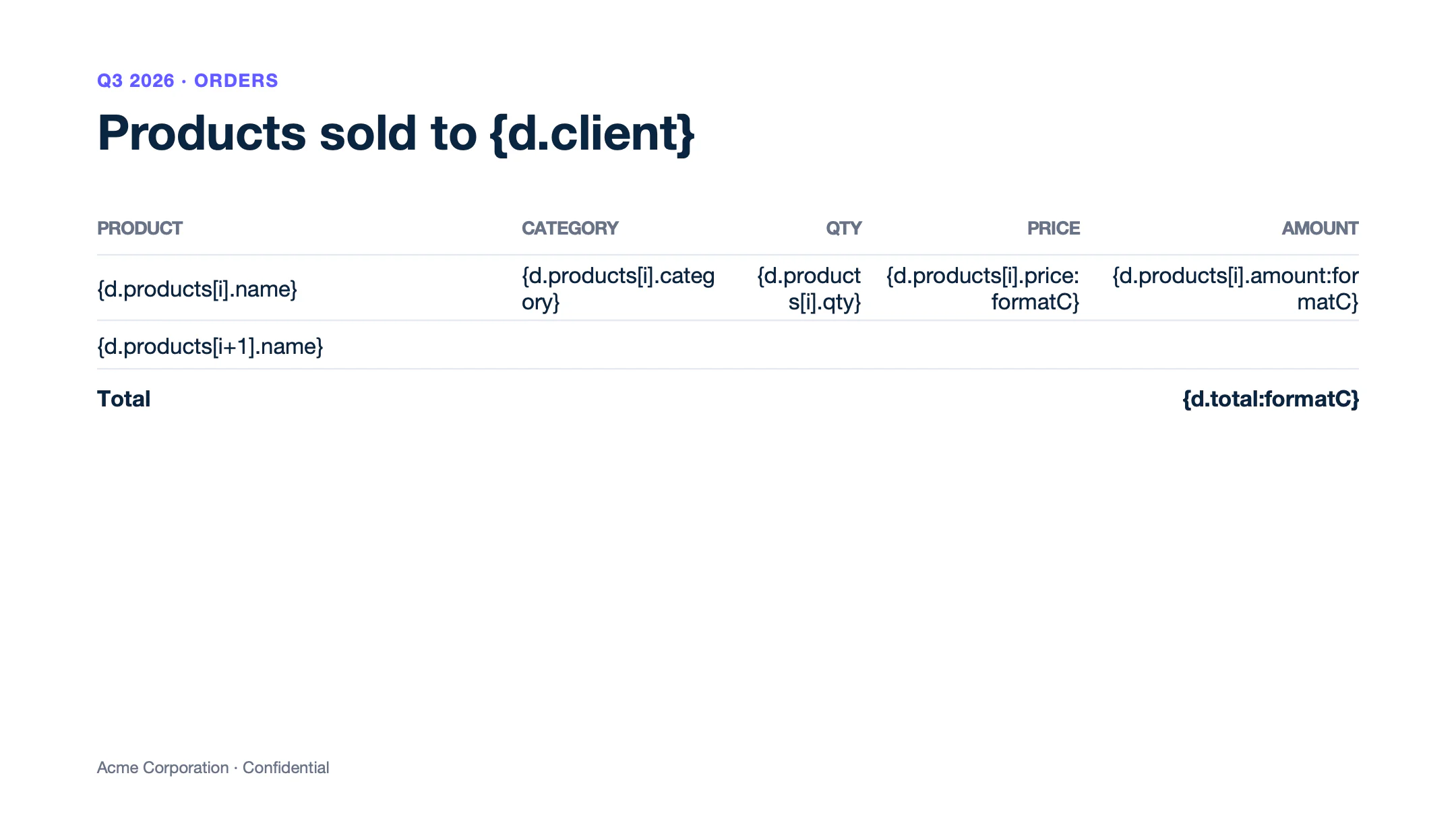
Text of template.pptx
Slide 1
Q3 2026 · ORDERS
Products sold to {d.client}
PRODUCT
CATEGORY
QTY
PRICE
AMOUNT
{d.products[i].name}
{d.products[i].category}
{d.products[i].qty}
{d.products[i].price:formatC}
{d.products[i].amount:formatC}
{d.products[i+1].name}
Total
{d.total:formatC}
Acme Corporation · Confidential
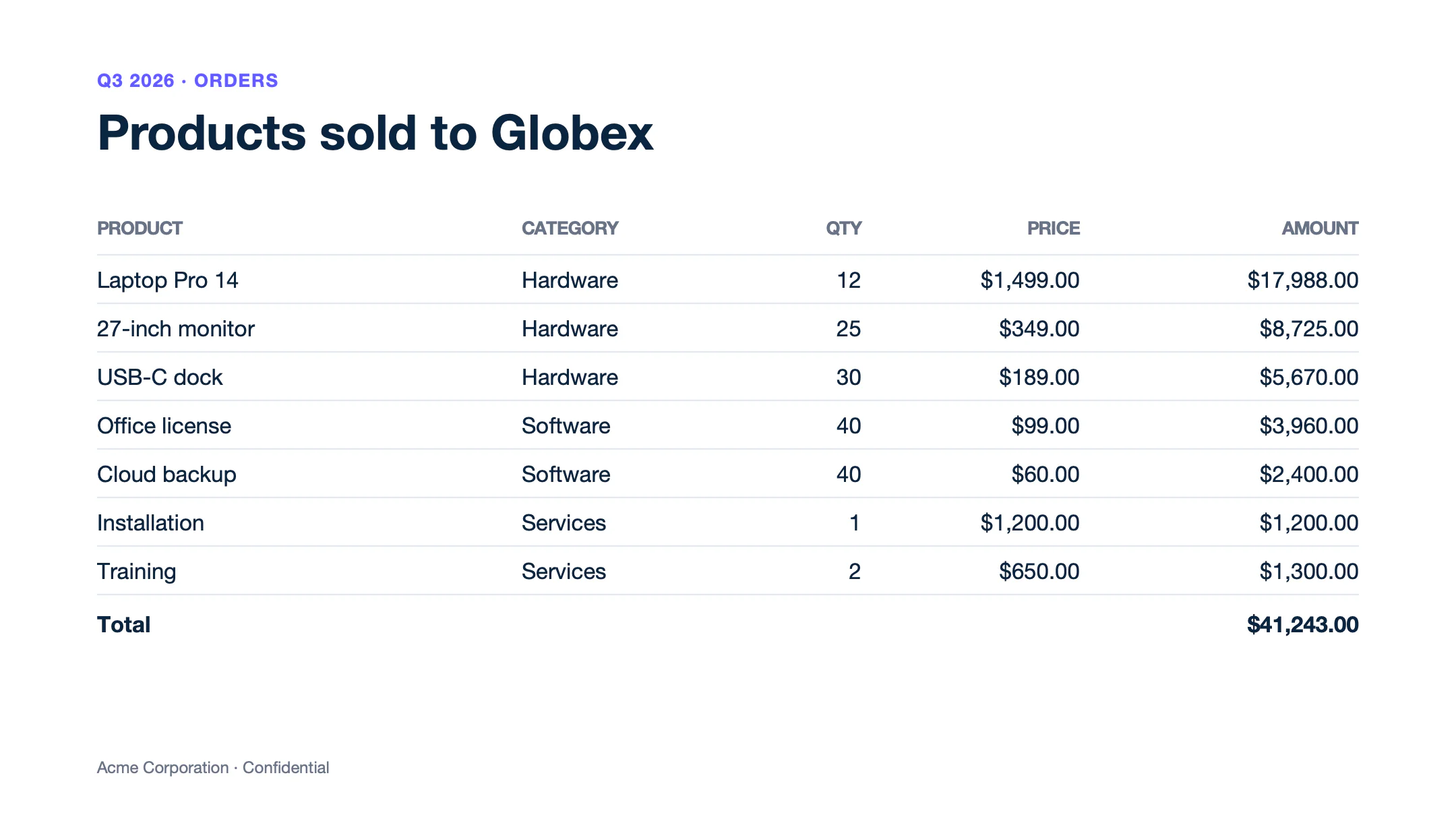
Text of report.pptx
Slide 1
Q3 2026 · ORDERS
Products sold to Globex
PRODUCT
CATEGORY
QTY
PRICE
AMOUNT
Laptop Pro 14
Hardware
12
$1,499.00
$17,988.00
27-inch monitor
Hardware
25
$349.00
$8,725.00
USB-C dock
Hardware
30
$189.00
$5,670.00
Office license
Software
40
$99.00
$3,960.00
Cloud backup
Software
40
$60.00
$2,400.00
Installation
Services
1
$1,200.00
$1,200.00
Training
Services
2
$650.00
$1,300.00
Total
$41,243.00
Acme Corporation · Confidential
Shapes below the table do not move. Keep the total in the table, and leave room on the slide for the longest list. Loops on table columns are not supported in PPTX yet.
Sort and filter
Add an attribute before i to sort the rows: {d.accounts[renewal, i].name} sorts the accounts by renewal date, and the end tag becomes [renewal+1, i+1]. Add a condition to the [i+1] tag to filter them: status!='Churned' removes the churned accounts. Learn more about sorting and filtering.
{
  "accounts": [
    { "name": "Globex",        "plan": "Enterprise", "arr": 240000, "renewal": "2026-12-15", "status": "Active" },
    { "name": "Initech",       "plan": "Business",   "arr": 36000,  "renewal": "2026-11-20", "status": "Active" },
    { "name": "Umbrella",      "plan": "Business",   "arr": 48000,  "renewal": "2026-11-28", "status": "Churned" },
    { "name": "Stark Systems", "plan": "Enterprise", "arr": 180000, "renewal": "2027-01-10", "status": "Active" },
    { "name": "Hooli",         "plan": "Starter",    "arr": 9600,   "renewal": "2026-11-30", "status": "Active" },
    { "name": "Vandelay",      "plan": "Business",   "arr": 42000,  "renewal": "2026-12-01", "status": "Active" }
  ]
}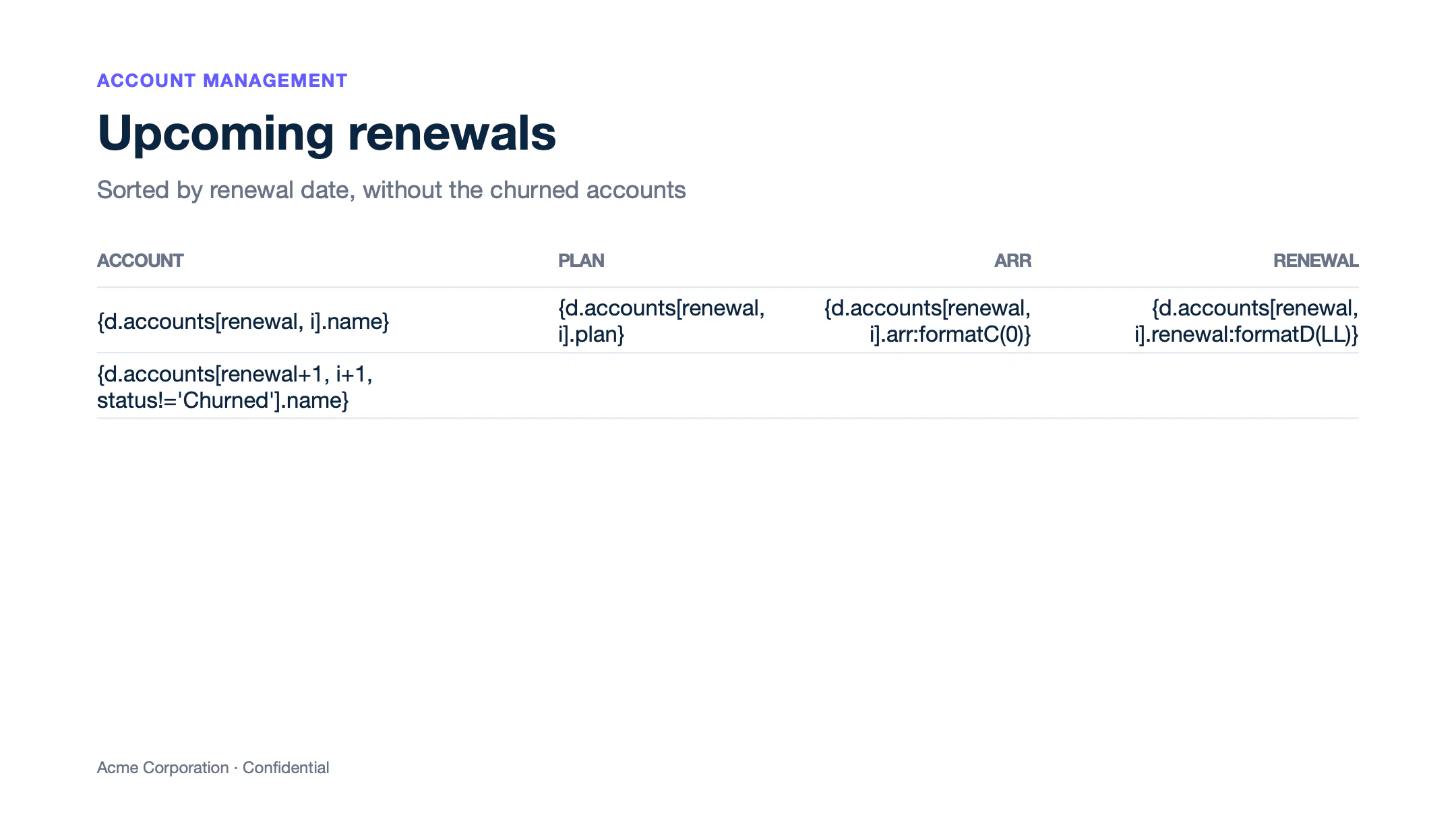
Text of template.pptx
Slide 1
ACCOUNT MANAGEMENT
Upcoming renewals
Sorted by renewal date, without the churned accounts
ACCOUNT
PLAN
ARR
RENEWAL
{d.accounts[renewal, i].name}
{d.accounts[renewal, i].plan}
{d.accounts[renewal, i].arr:formatC(0)}
{d.accounts[renewal, i].renewal:formatD(LL)}
{d.accounts[renewal+1, i+1, status!='Churned'].name}
Acme Corporation · Confidential
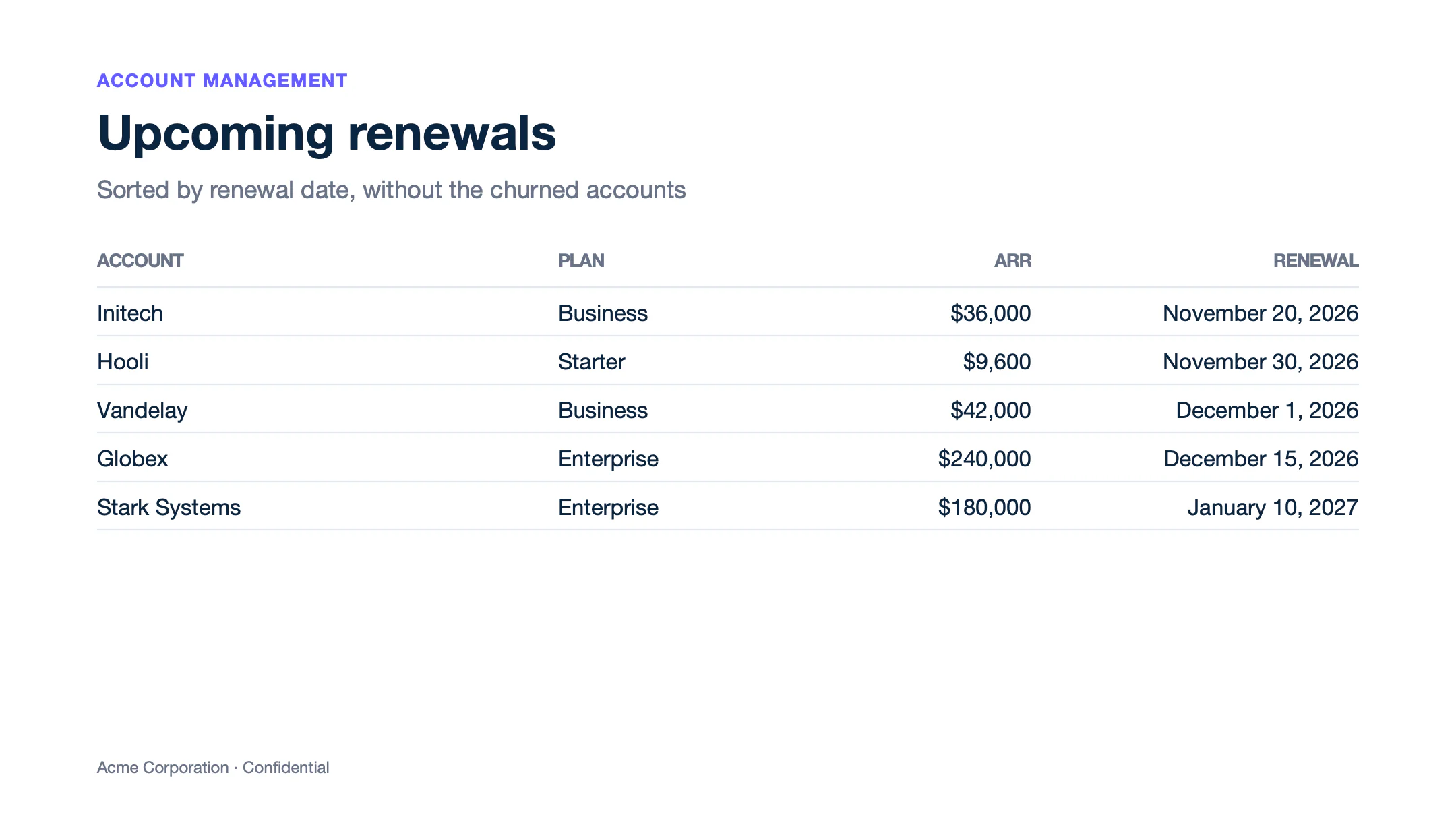
Text of report.pptx
Slide 1
ACCOUNT MANAGEMENT
Upcoming renewals
Sorted by renewal date, without the churned accounts
ACCOUNT
PLAN
ARR
RENEWAL
Initech
Business
$36,000
November 20, 2026
Hooli
Starter
$9,600
November 30, 2026
Vandelay
Business
$42,000
December 1, 2026
Globex
Enterprise
$240,000
December 15, 2026
Stark Systems
Enterprise
$180,000
January 10, 2027
Acme Corporation · Confidential
Nested loops
A loop can contain another loop to group rows. {d.quarters[i].name} repeats the quarters, and {d.quarters[i].features[i].name} repeats the features of each quarter. The [i+1] row of the quarters closes the outer loop.
{
  "quarters": [
    {
      "name": "Q4 2026",
      "features": [
        { "name": "Single sign-on with Okta", "team": "Platform",  "status": "In progress" },
        { "name": "Audit logs",               "team": "Security",  "status": "In progress" },
        { "name": "Usage dashboard",          "team": "Analytics", "status": "Planned" }
      ]
    },
    {
      "name": "Q1 2027",
      "features": [
        { "name": "EU data region",     "team": "Infrastructure", "status": "Planned" },
        { "name": "Approval workflows", "team": "Platform",       "status": "Planned" }
      ]
    }
  ]
}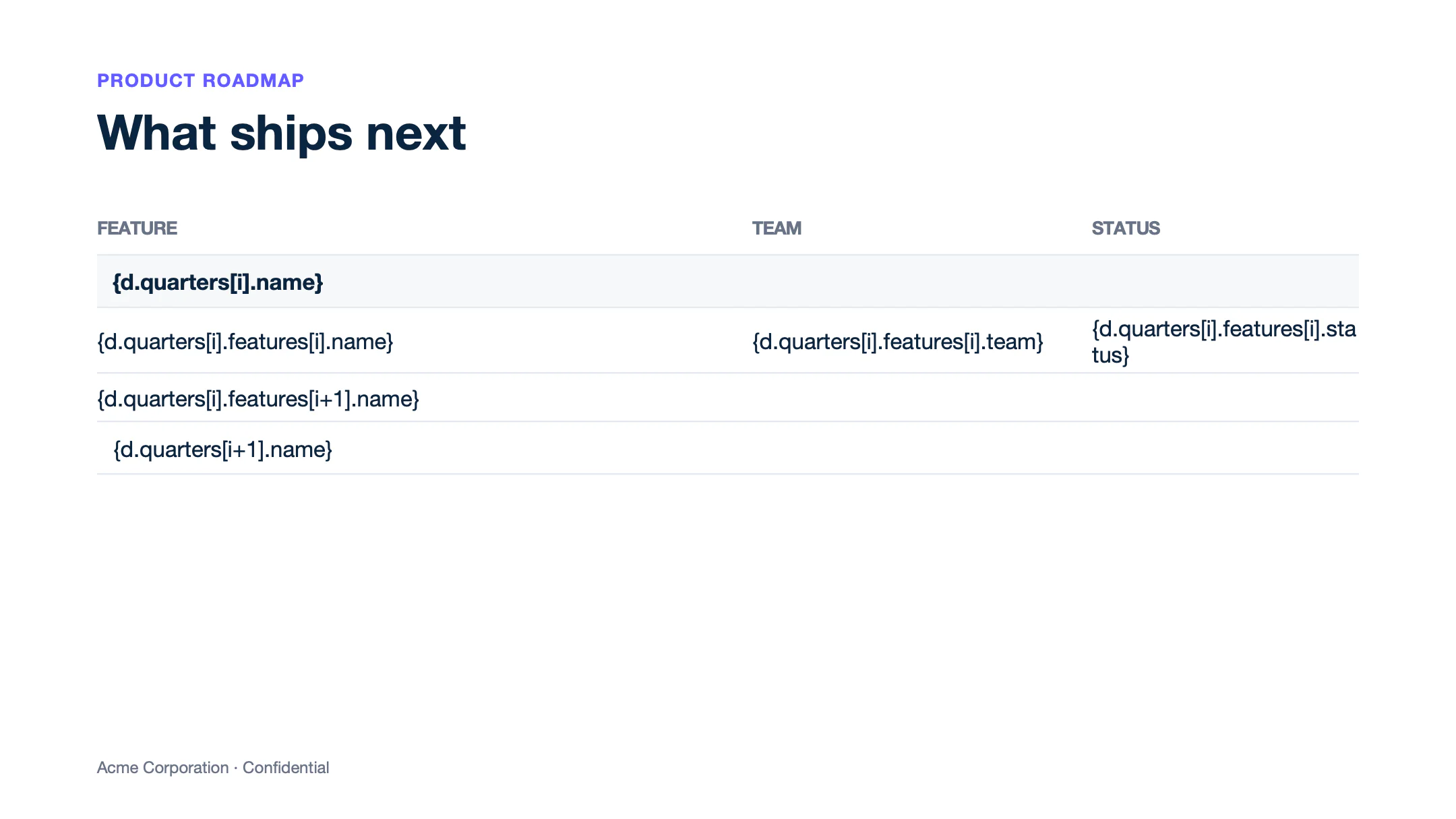
Text of template.pptx
Slide 1
PRODUCT ROADMAP
What ships next
FEATURE
TEAM
STATUS
{d.quarters[i].name}
{d.quarters[i].features[i].name}
{d.quarters[i].features[i].team}
{d.quarters[i].features[i].status}
{d.quarters[i].features[i+1].name}
{d.quarters[i+1].name}
Acme Corporation · Confidential
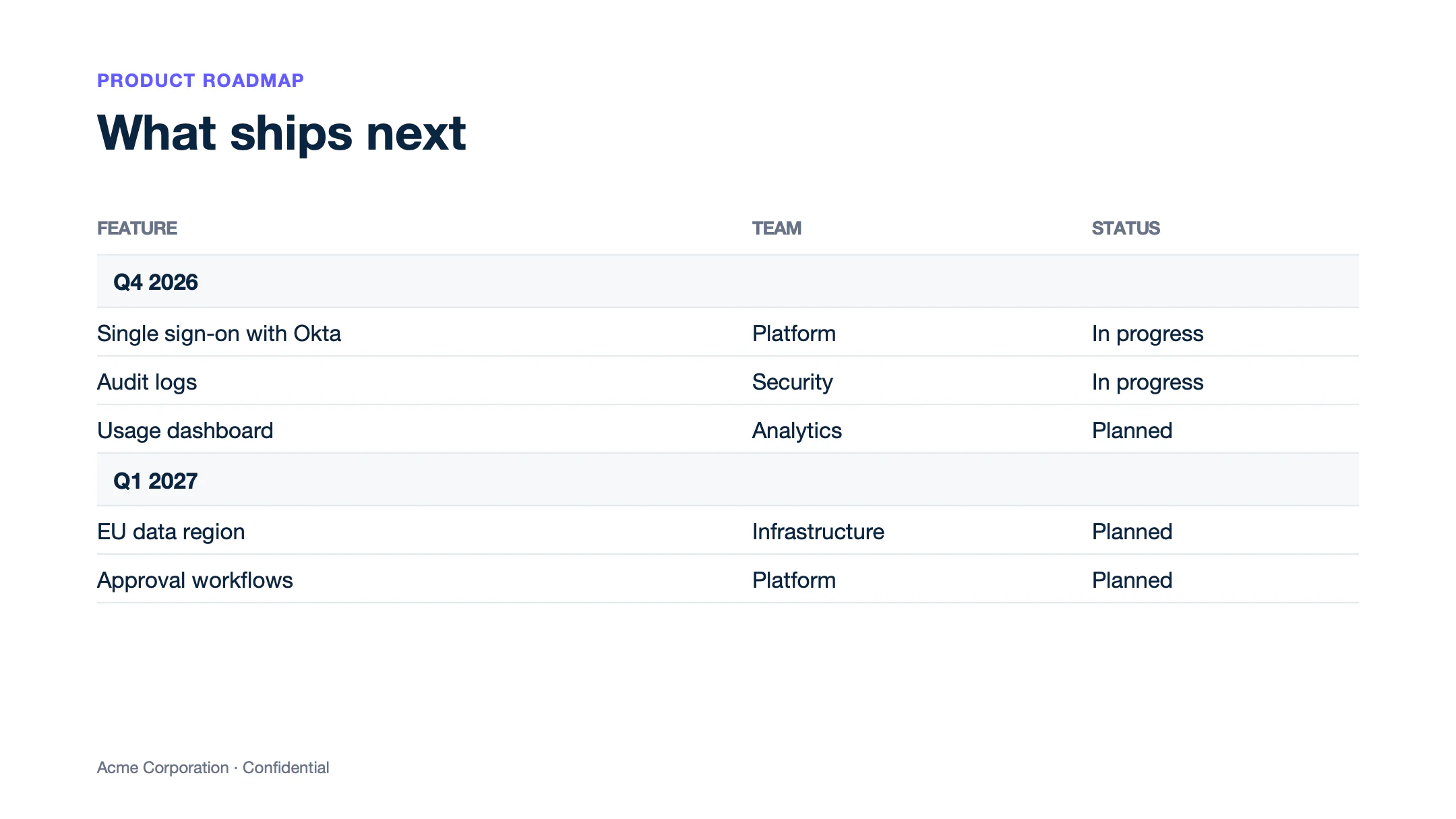
Text of report.pptx
Slide 1
PRODUCT ROADMAP
What ships next
FEATURE
TEAM
STATUS
Q4 2026
Single sign-on with Okta
Platform
In progress
Audit logs
Security
In progress
Usage dashboard
Analytics
Planned
Q1 2027
EU data region
Infrastructure
Planned
Approval workflows
Platform
Planned
Acme Corporation · Confidential
Lists
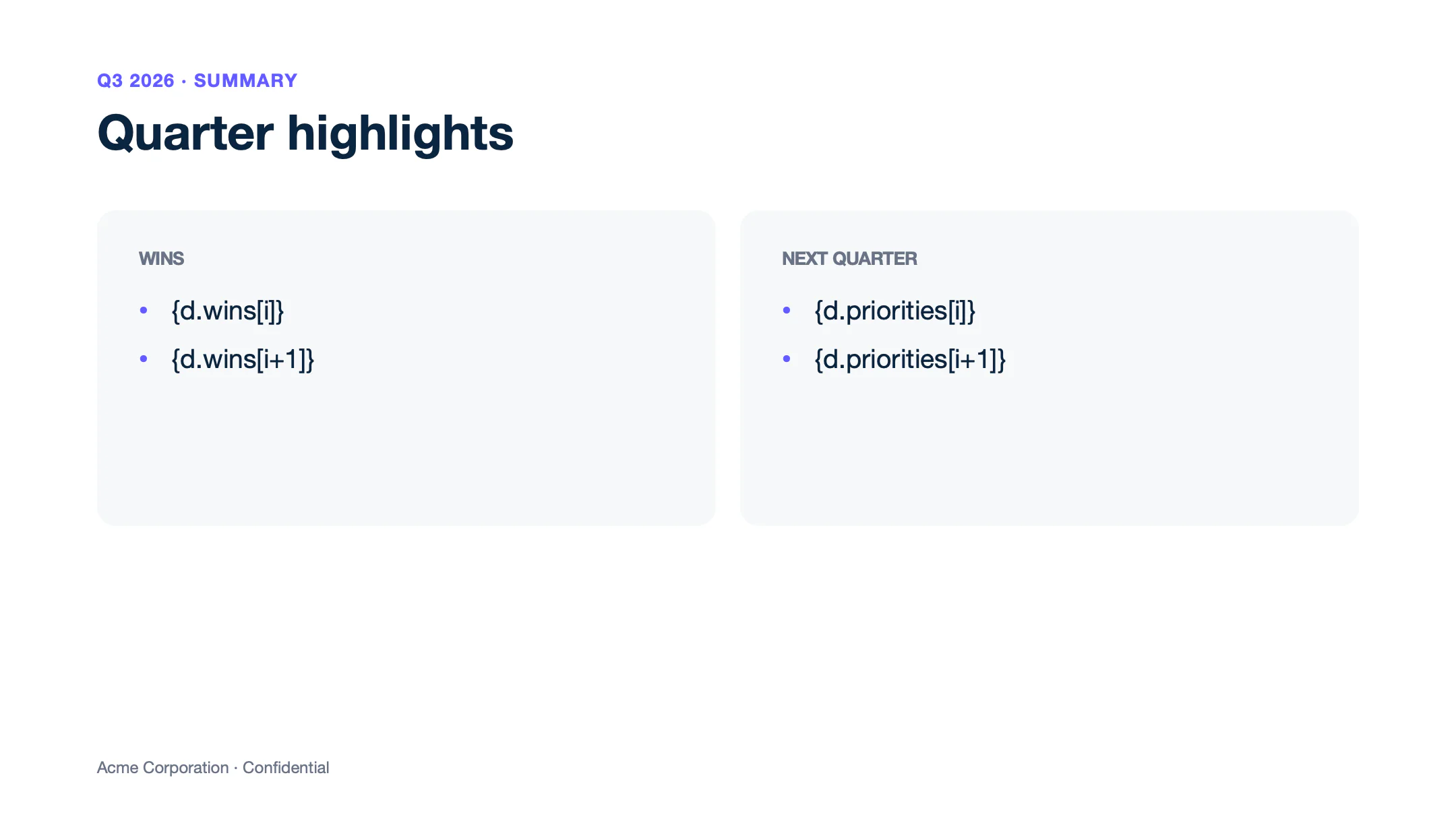
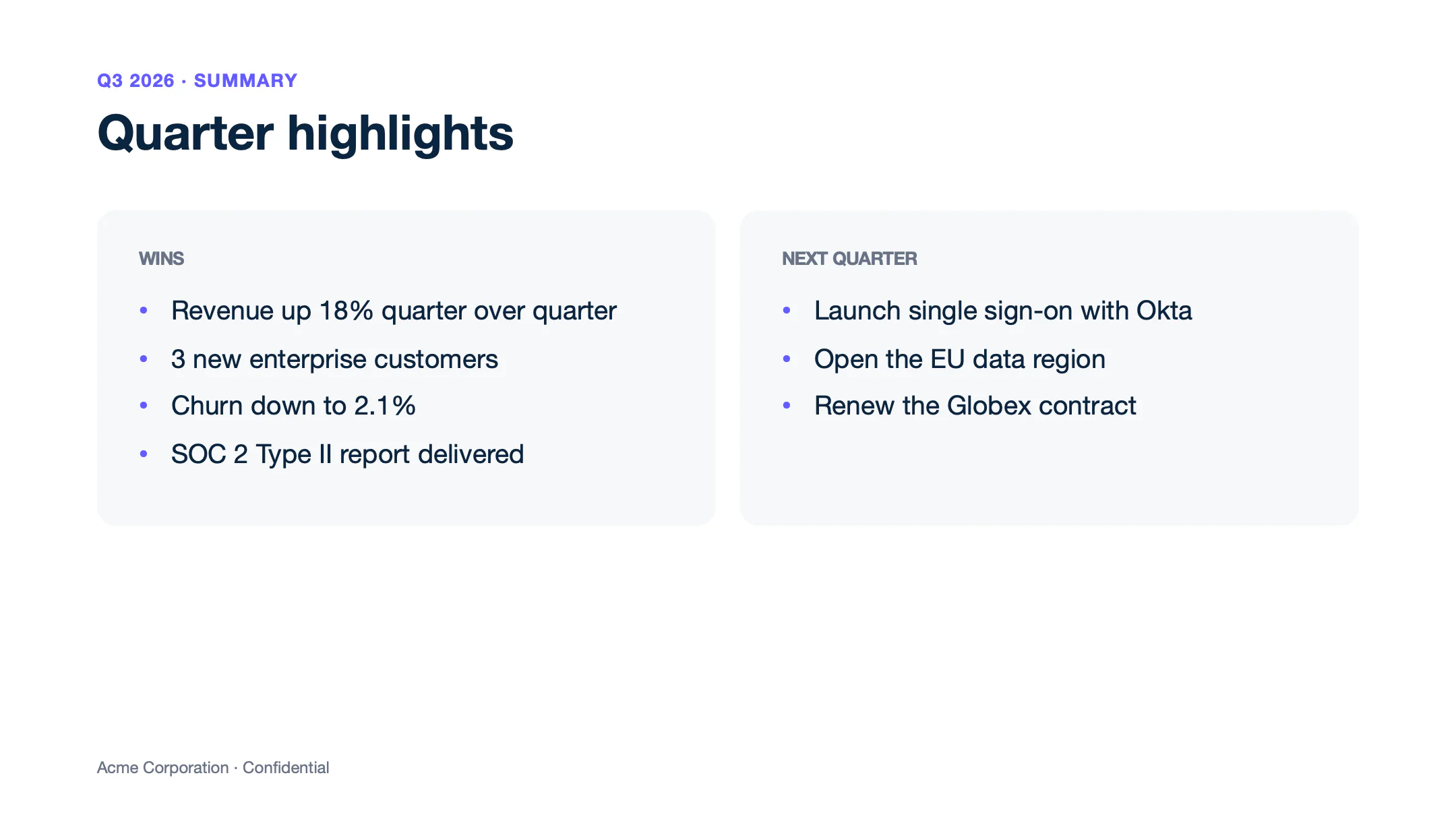
Loops repeat paragraphs too. Write {d.wins[i]} and {d.wins[i+1]} in two consecutive bullets of a text box to get one bullet per win. wins is an array of strings, so the tags have no attribute.
{
  "wins": ["Revenue up 18% quarter over quarter", "3 new enterprise customers", "Churn down to 2.1%", "SOC 2 Type II report delivered"],
  "priorities": ["Launch single sign-on with Okta", "Open the EU data region", "Renew the Globex contract"]
}
Text of template.pptx
Slide 1
Q3 2026 · SUMMARY
Quarter highlights
WINS
{d.wins[i]}
{d.wins[i+1]}
NEXT QUARTER
{d.priorities[i]}
{d.priorities[i+1]}
Acme Corporation · Confidential
Text of report.pptx
Slide 1
Q3 2026 · SUMMARY
Quarter highlights
WINS
Revenue up 18% quarter over quarter
3 new enterprise customers
Churn down to 2.1%
SOC 2 Type II report delivered
NEXT QUARTER
Launch single sign-on with Okta
Open the EU data region
Renew the Globex contract
Acme Corporation · Confidential
Shapes below the text box do not move. Draw the text box large enough for the longest list.
Slides
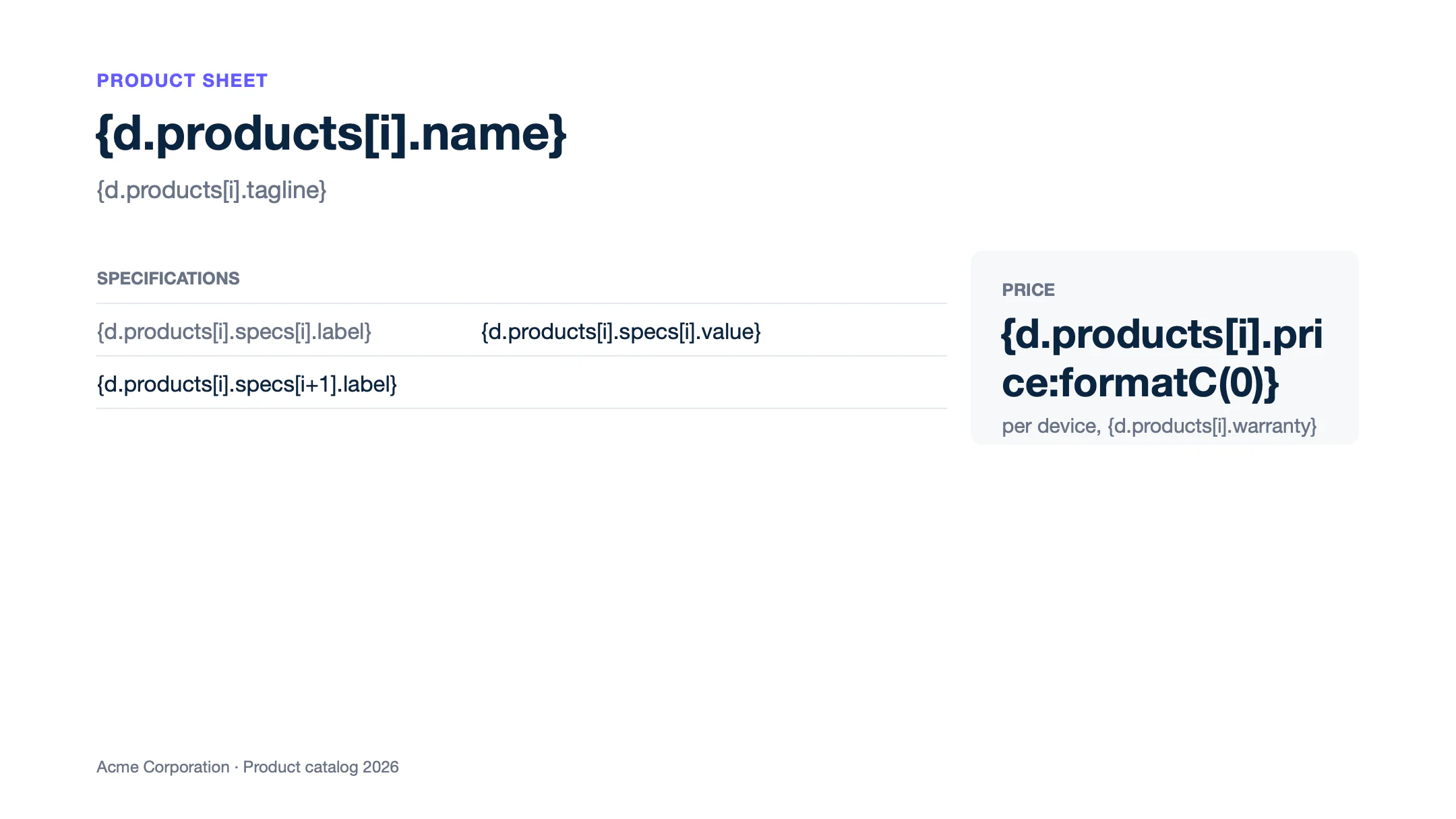
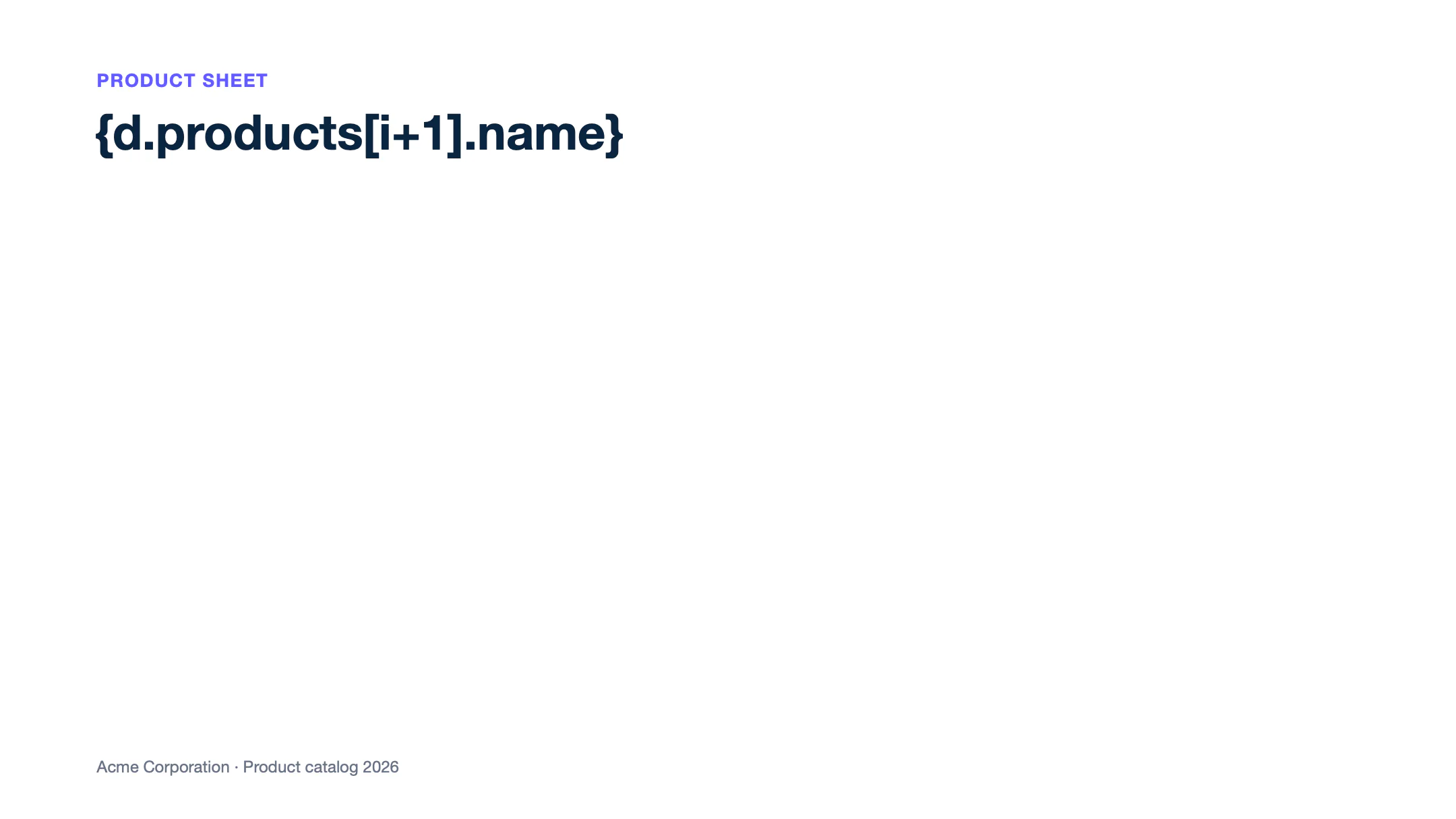
One slide per item is not supported in PPTX yet. Use an ODP template instead, and convert the report to PPTX. Open the presentation in LibreOffice Impress and save it as ODP. Write the [i] tags on the slide to repeat, and an [i+1] tag on the next slide. Carbone repeats the slide for each product.
{
  "products": [
    {
      "name": "Laptop Pro 14",
      "tagline": "For engineers and designers",
      "price": 1499,
      "warranty": "3-year warranty",
      "specs": [
        { "label": "Chip",    "value": "M-series, 12 cores" },
        { "label": "Memory",  "value": "32 GB" },
        { "label": "Storage", "value": "1 TB SSD" },
        { "label": "Battery", "value": "Up to 18 hours" }
      ]
    },
    {
      "name": "27-inch monitor",
      "tagline": "Sharp 4K display for every desk",
      "price": 349,
      "warranty": "2-year warranty",
      "specs": [
        { "label": "Resolution", "value": "3840 × 2160" },
        { "label": "Ports",      "value": "USB-C 96 W, HDMI" },
        { "label": "Stand",      "value": "Height adjustable" }
      ]
    },
    {
      "name": "USB-C dock",
      "tagline": "One cable to the desk",
      "price": 189,
      "warranty": "2-year warranty",
      "specs": [
        { "label": "Displays", "value": "Up to 2 in 4K" },
        { "label": "Charging", "value": "96 W" },
        { "label": "Ports",    "value": "4 USB, Ethernet, audio" }
      ]
    }
  ]
}
Text of template.odp
Slide 1
PRODUCT SHEET
{d.products[i].name}
{d.products[i].tagline}
SPECIFICATIONS
{d.products[i].specs[i].label}
{d.products[i].specs[i].value}
{d.products[i].specs[i+1].label}
[Picture]
PRICE
{d.products[i].price:formatC(0)}
per device, {d.products[i].warranty}
Acme Corporation · Product catalog 2026
Slide 2
PRODUCT SHEET
{d.products[i+1].name}
Acme Corporation · Product catalog 2026
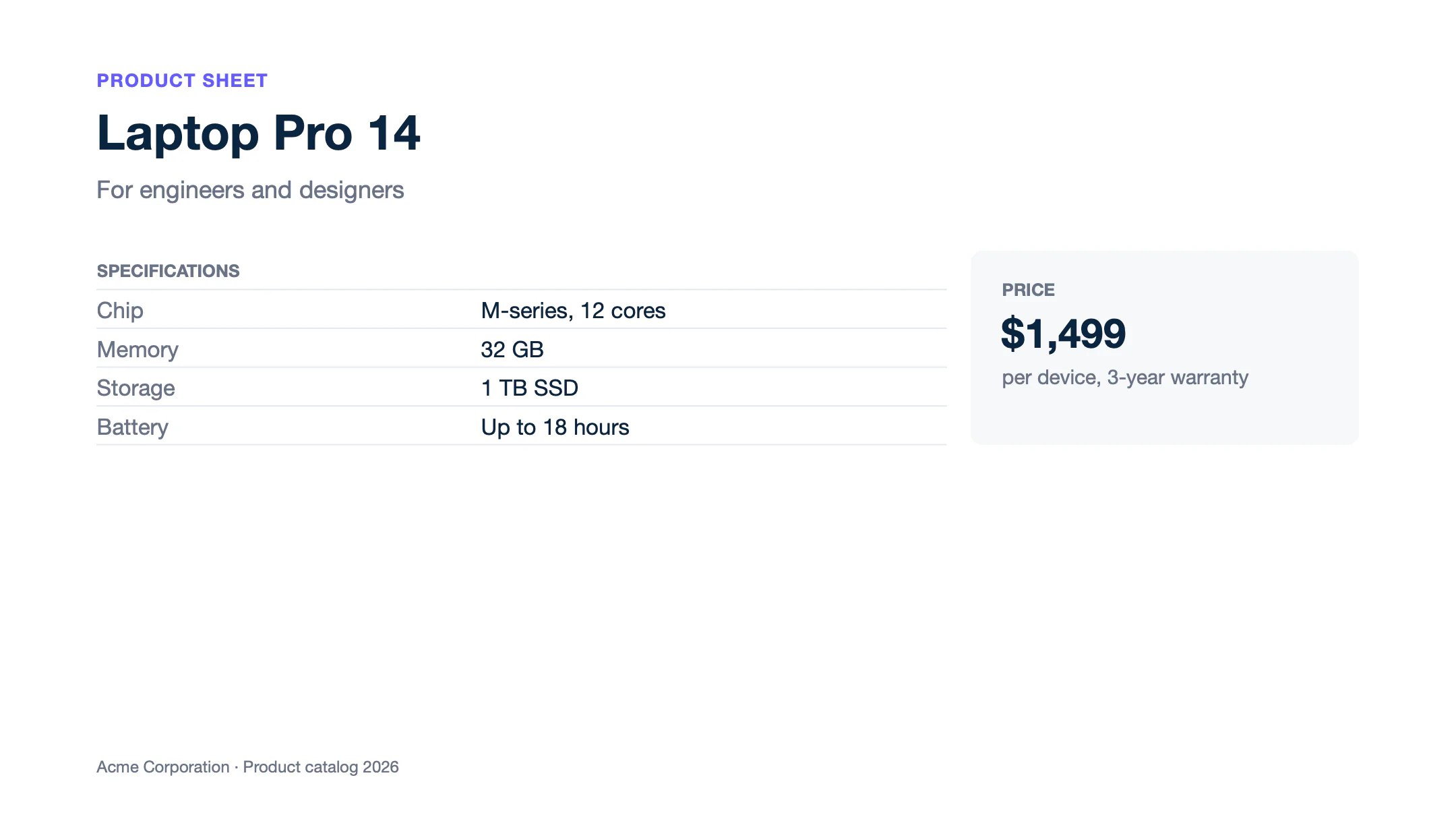
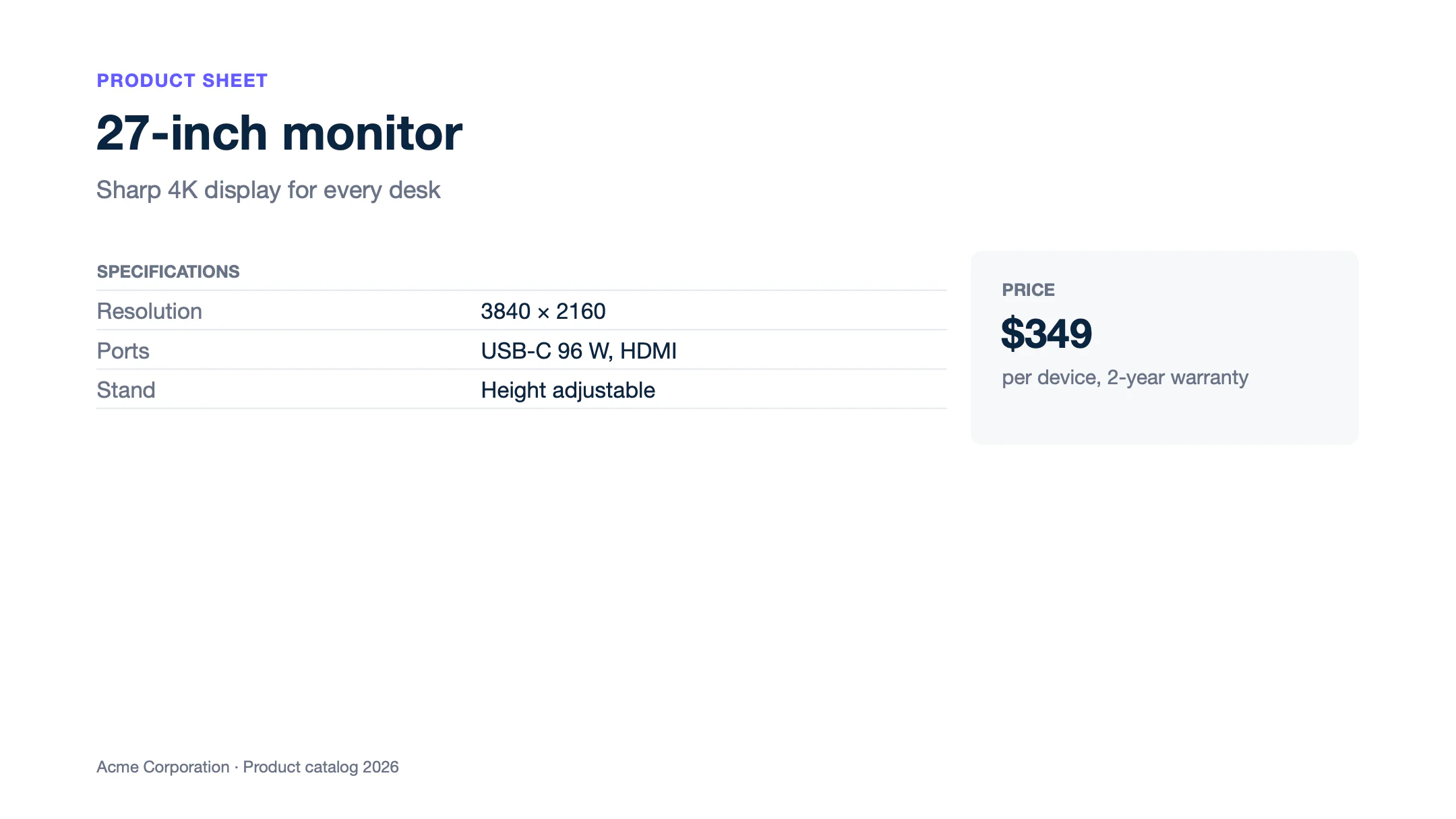
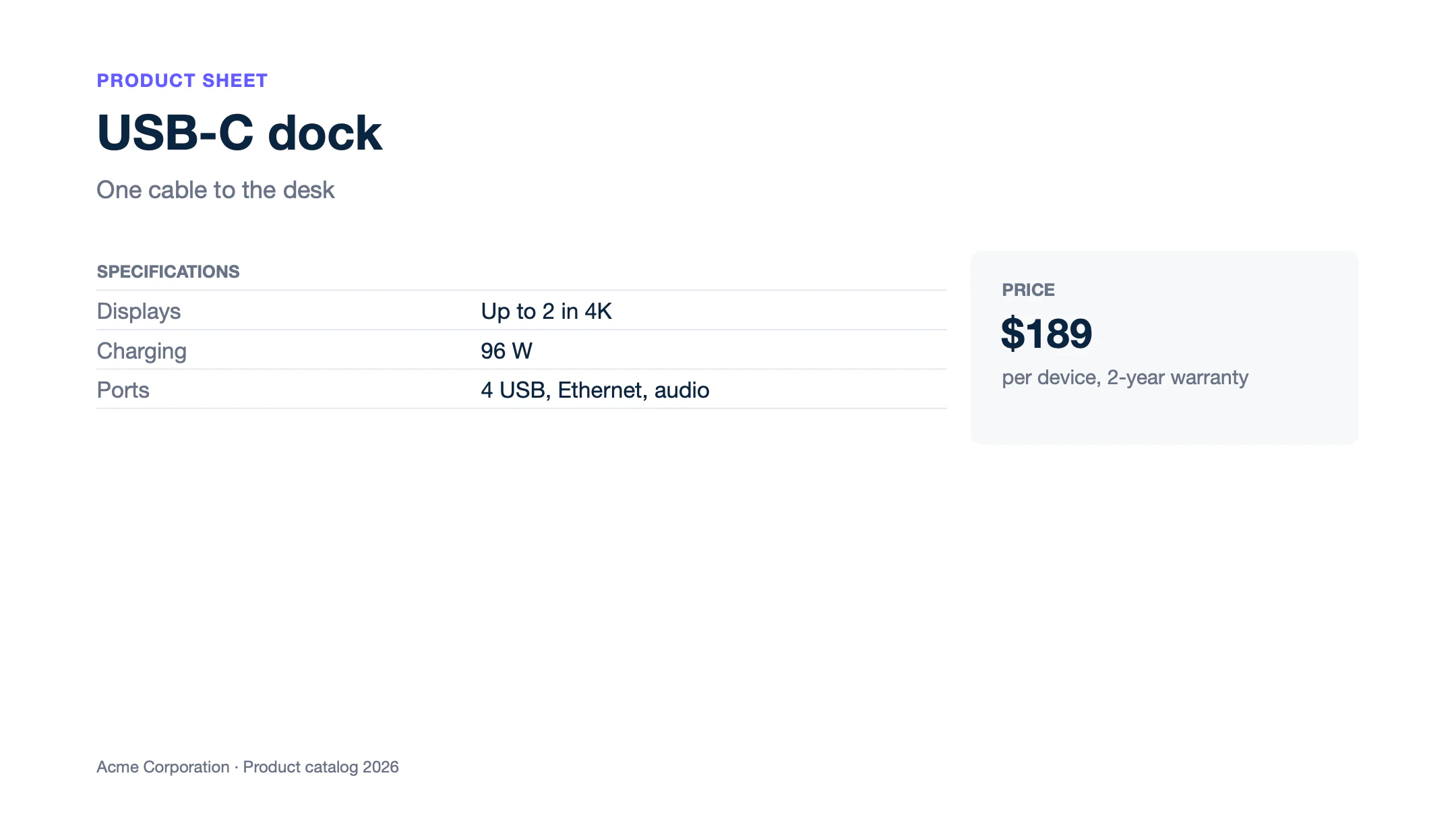
Text of report.odp
Slide 1
PRODUCT SHEET
Laptop Pro 14
For engineers and designers
SPECIFICATIONS
Chip
M-series, 12 cores
Memory
32 GB
Storage
1 TB SSD
Battery
Up to 18 hours
[Picture]
PRICE
$1,499
per device, 3-year warranty
Acme Corporation · Product catalog 2026
Slide 2
PRODUCT SHEET
27-inch monitor
Sharp 4K display for every desk
SPECIFICATIONS
Resolution
3840 × 2160
Ports
USB-C 96 W, HDMI
Stand
Height adjustable
[Picture]
PRICE
$349
per device, 2-year warranty
Acme Corporation · Product catalog 2026
Slide 3
PRODUCT SHEET
USB-C dock
One cable to the desk
SPECIFICATIONS
Displays
Up to 2 in 4K
Charging
96 W
Ports
4 USB, Ethernet, audio
[Picture]
PRICE
$189
per device, 2-year warranty
Acme Corporation · Product catalog 2026
Add "convertTo": "pptx" to the request to get a PowerPoint file. In an ODP template, {d.discontinued:ifEQ(true):drop(slide)} in a text box removes the slide that contains it.
Shapes
Shapes, pictures and text boxes keep their position on the slide. A loop on a shape repeats it at the same place. To move each copy, write :transform in its alt text, like {d.products[i].name:print(.i):mul(212):transform(x, pt)} for one card every 212 pt. Learn more about :transform.
Numbers and dates
Formatters print numbers, amounts and dates in the language of the report, en-us here:
:formatCfor amounts:{d.revenue:formatC(0)}prints $2,450,000.:formatNfor numbers:{d.growth:formatN(1)}prints 18.4.:formatDfor dates:{d.closedAt:formatD(LL)}prints September 30, 2026.
{
  "closedAt": "2026-09-30",
  "revenue": 2450000,
  "revenuePrev": 2070000,
  "growth": 18.357,
  "customers": 1284,
  "newCustomers": 96,
  "averageDeal": 1908.25,
  "boardMeeting": "2026-10-21"
}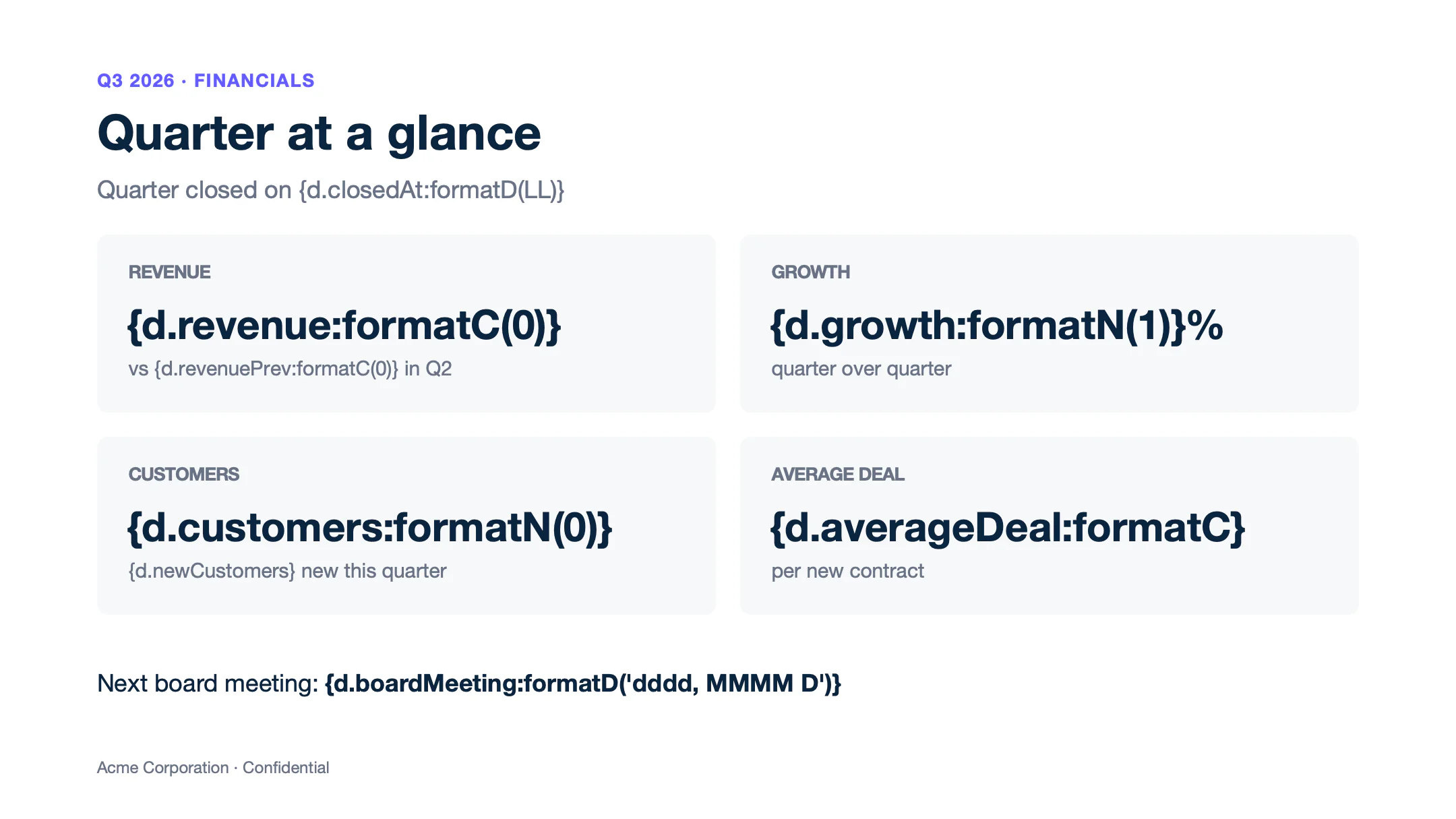
Text of template.pptx
Slide 1
Q3 2026 · FINANCIALS
Quarter at a glance
Quarter closed on {d.closedAt:formatD(LL)}
REVENUE
{d.revenue:formatC(0)}
vs {d.revenuePrev:formatC(0)} in Q2
GROWTH
{d.growth:formatN(1)}%
quarter over quarter
CUSTOMERS
{d.customers:formatN(0)}
{d.newCustomers} new this quarter
AVERAGE DEAL
{d.averageDeal:formatC}
per new contract
Next board meeting: {d.boardMeeting:formatD('dddd, MMMM D')}
Acme Corporation · Confidential
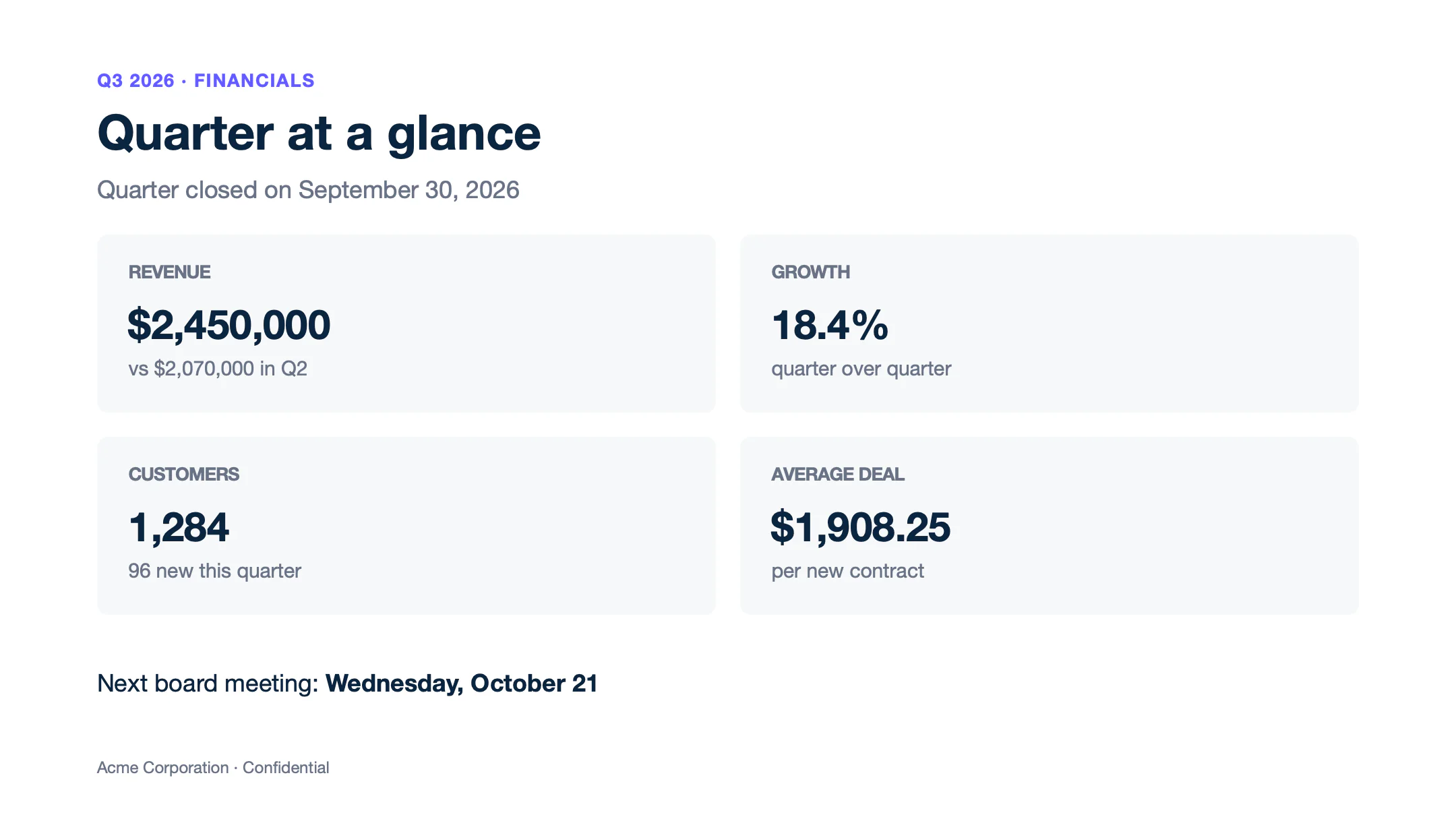
Text of report.pptx
Slide 1
Q3 2026 · FINANCIALS
Quarter at a glance
Quarter closed on September 30, 2026
REVENUE
$2,450,000
vs $2,070,000 in Q2
GROWTH
18.4%
quarter over quarter
CUSTOMERS
1,284
96 new this quarter
AVERAGE DEAL
$1,908.25
per new contract
Next board meeting: Wednesday, October 21
Acme Corporation · Confidential
See the number, currency and date formatters.
Conditions
Conditions print a value or remove an element, depending on the data:
- Inline conditions print one value or another:
{d.projects[i].progress:ifEQ(100):show('Done'):elseShow('In progress')}. - Smart conditions remove the element that contains the tag:
{d.projects[i].cancelled:ifEQ(true):drop(row)}removes the cancelled project, and{d.blocker:ifEM:drop(shape)}removes the callout when there is no blocker.
{
  "blocker": "Waiting for the SSO metadata from the Globex IT team",
  "projects": [
    { "name": "Data migration",    "owner": "Jane Smith",   "progress": 100, "cancelled": false },
    { "name": "Single sign-on",    "owner": "Omar Haddad",  "progress": 60,  "cancelled": false },
    { "name": "Legacy API bridge", "owner": "Lena Fischer", "progress": 20,  "cancelled": true },
    { "name": "Admin training",    "owner": "Jane Smith",   "progress": 100, "cancelled": false },
    { "name": "Usage reporting",   "owner": "Ken Watanabe", "progress": 35,  "cancelled": false }
  ]
}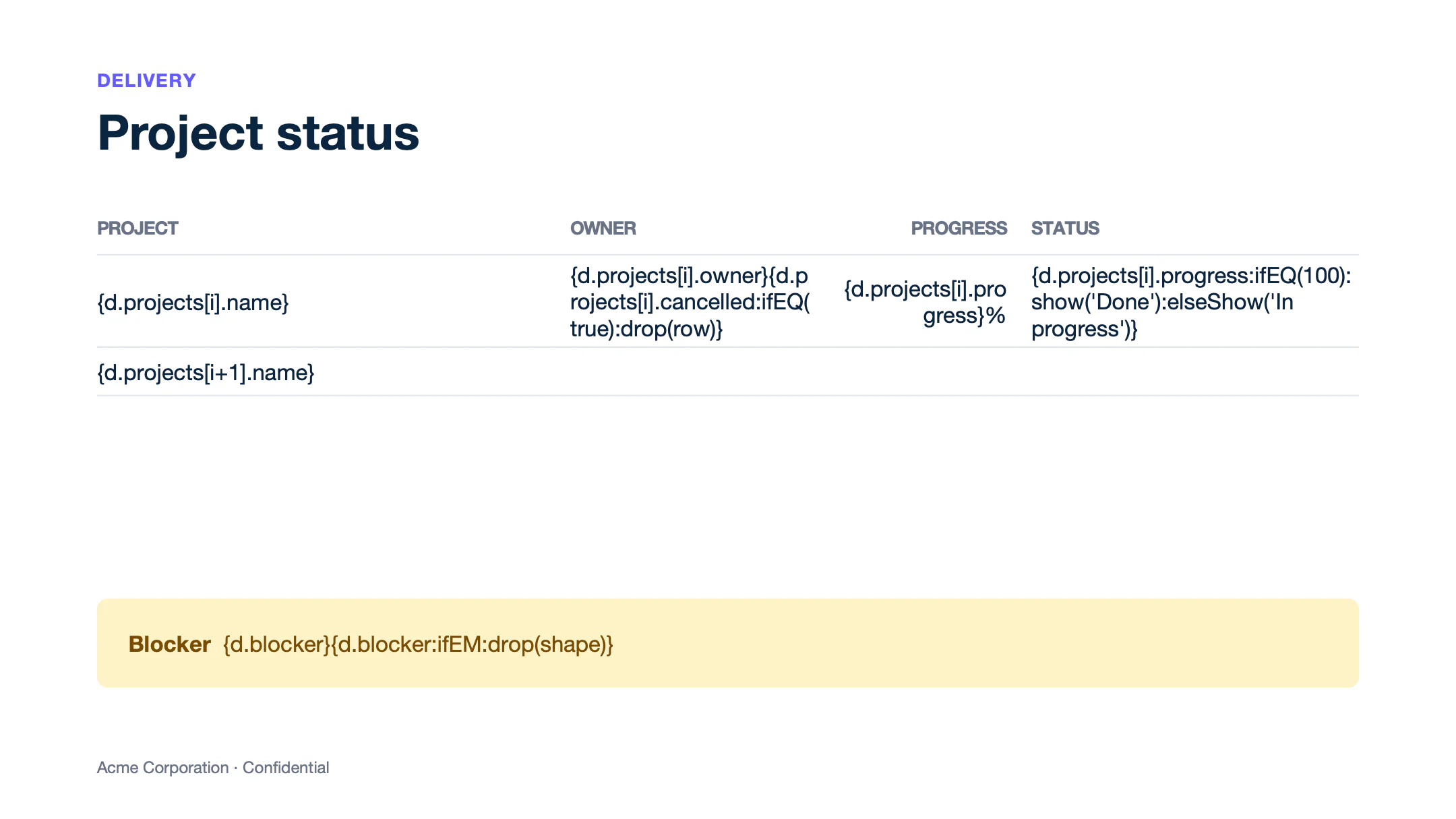
Text of template.pptx
Slide 1
DELIVERY
Project status
PROJECT
OWNER
PROGRESS
STATUS
{d.projects[i].name}
{d.projects[i].owner}{d.projects[i].cancelled:ifEQ(true):drop(row)}
{d.projects[i].progress}%
{d.projects[i].progress:ifEQ(100):show('Done'):elseShow('In progress')}
{d.projects[i+1].name}
Blocker {d.blocker}{d.blocker:ifEM:drop(shape)}
Acme Corporation · Confidential
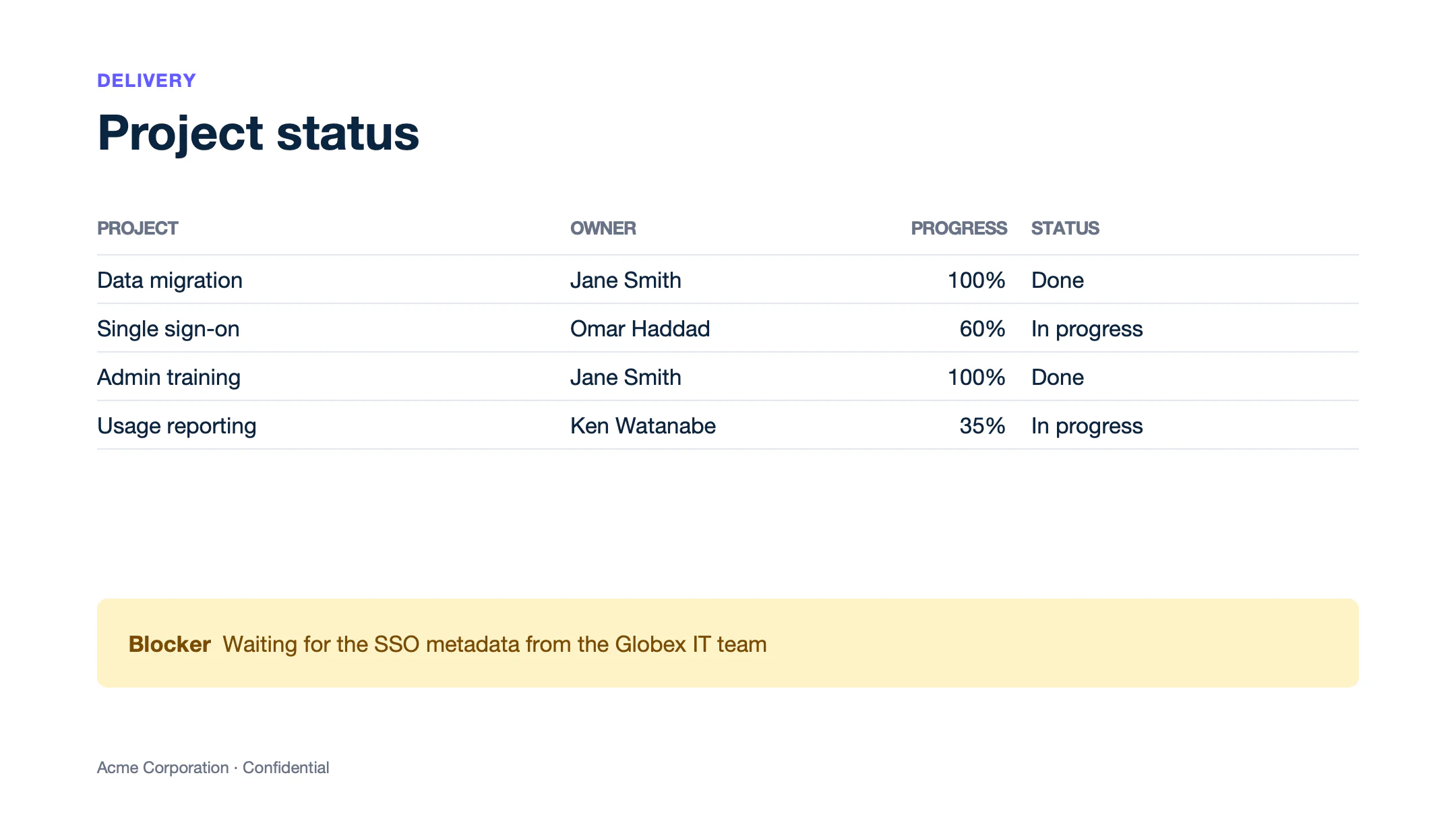
Text of report.pptx
Slide 1
DELIVERY
Project status
PROJECT
OWNER
PROGRESS
STATUS
Data migration
Jane Smith
100%
Done
Single sign-on
Omar Haddad
60%
In progress
Admin training
Jane Smith
100%
Done
Usage reporting
Ken Watanabe
35%
In progress
Blocker Waiting for the SSO metadata from the Globex IT team
Acme Corporation · Confidential
In PPTX, :drop removes a row, a col, a p (paragraph), a shape, an img, a chart or a table. Write the tag in the text of the element, or in the alt text of a shape, a picture or a chart. To remove a slide, use an ODP template (see Slides). Learn more about inline conditions and smart conditions.
Totals
Aggregators compute totals from the data. :aggSum sums the amounts and :aggCount counts the deals. Formatters placed before the aggregator apply to each item: {d.deals[].amount:mul(.probability):div(100):aggSum} sums the weighted amounts.
{
  "deals": [
    { "account": "Globex",        "stage": "Negotiation", "amount": 240000, "probability": 75 },
    { "account": "Stark Systems", "stage": "Proposal",    "amount": 180000, "probability": 50 },
    { "account": "Initech",       "stage": "Discovery",   "amount": 36000,  "probability": 25 },
    { "account": "Vandelay",      "stage": "Negotiation", "amount": 42000,  "probability": 75 },
    { "account": "Hooli",         "stage": "Closed won",  "amount": 9600,   "probability": 100 }
  ]
}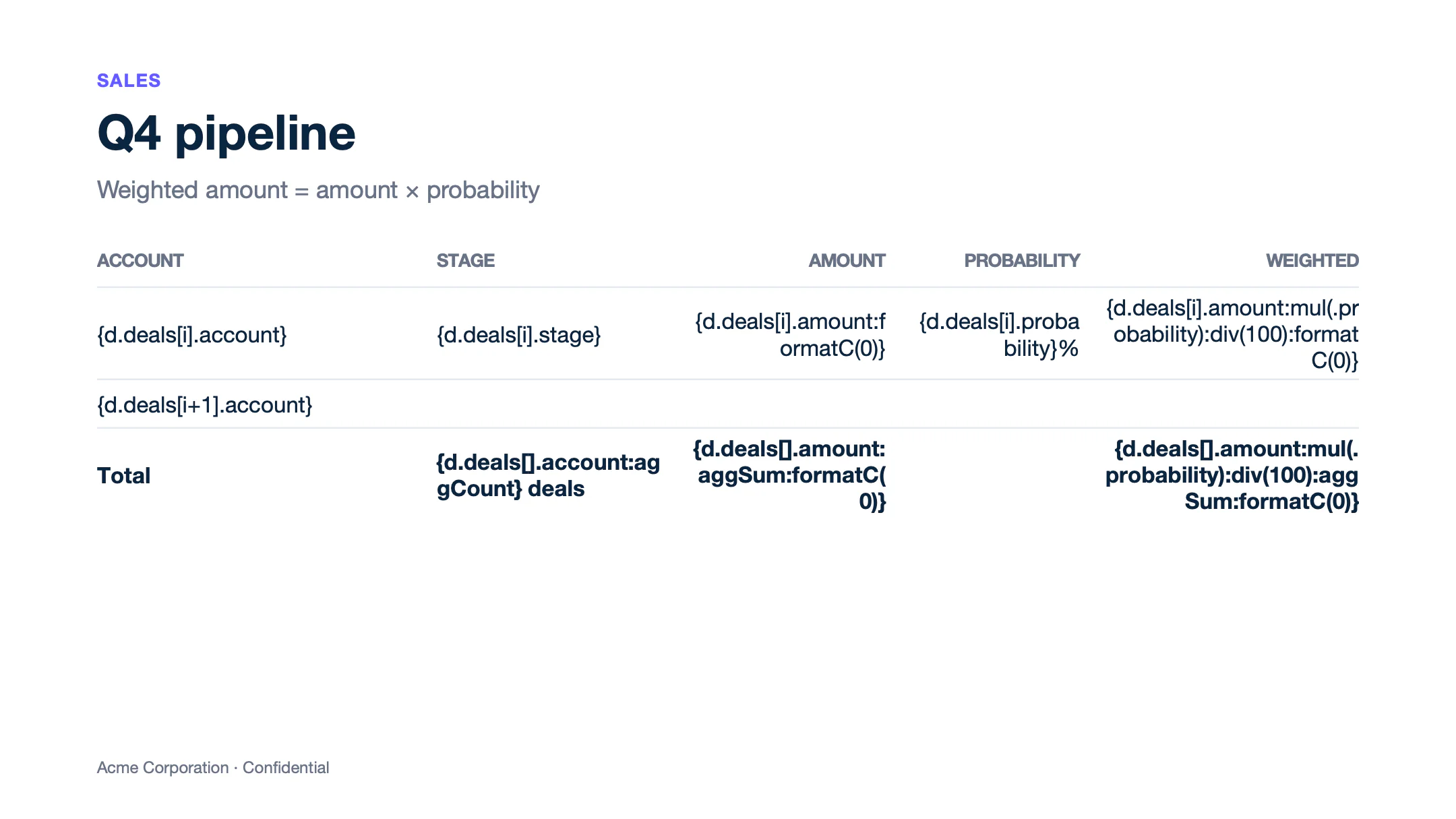
Text of template.pptx
Slide 1
SALES
Q4 pipeline
Weighted amount = amount × probability
ACCOUNT
STAGE
AMOUNT
PROBABILITY
WEIGHTED
{d.deals[i].account}
{d.deals[i].stage}
{d.deals[i].amount:formatC(0)}
{d.deals[i].probability}%
{d.deals[i].amount:mul(.probability):div(100):formatC(0)}
{d.deals[i+1].account}
Total
{d.deals[].account:aggCount} deals
{d.deals[].amount:aggSum:formatC(0)}
{d.deals[].amount:mul(.probability):div(100):aggSum:formatC(0)}
Acme Corporation · Confidential
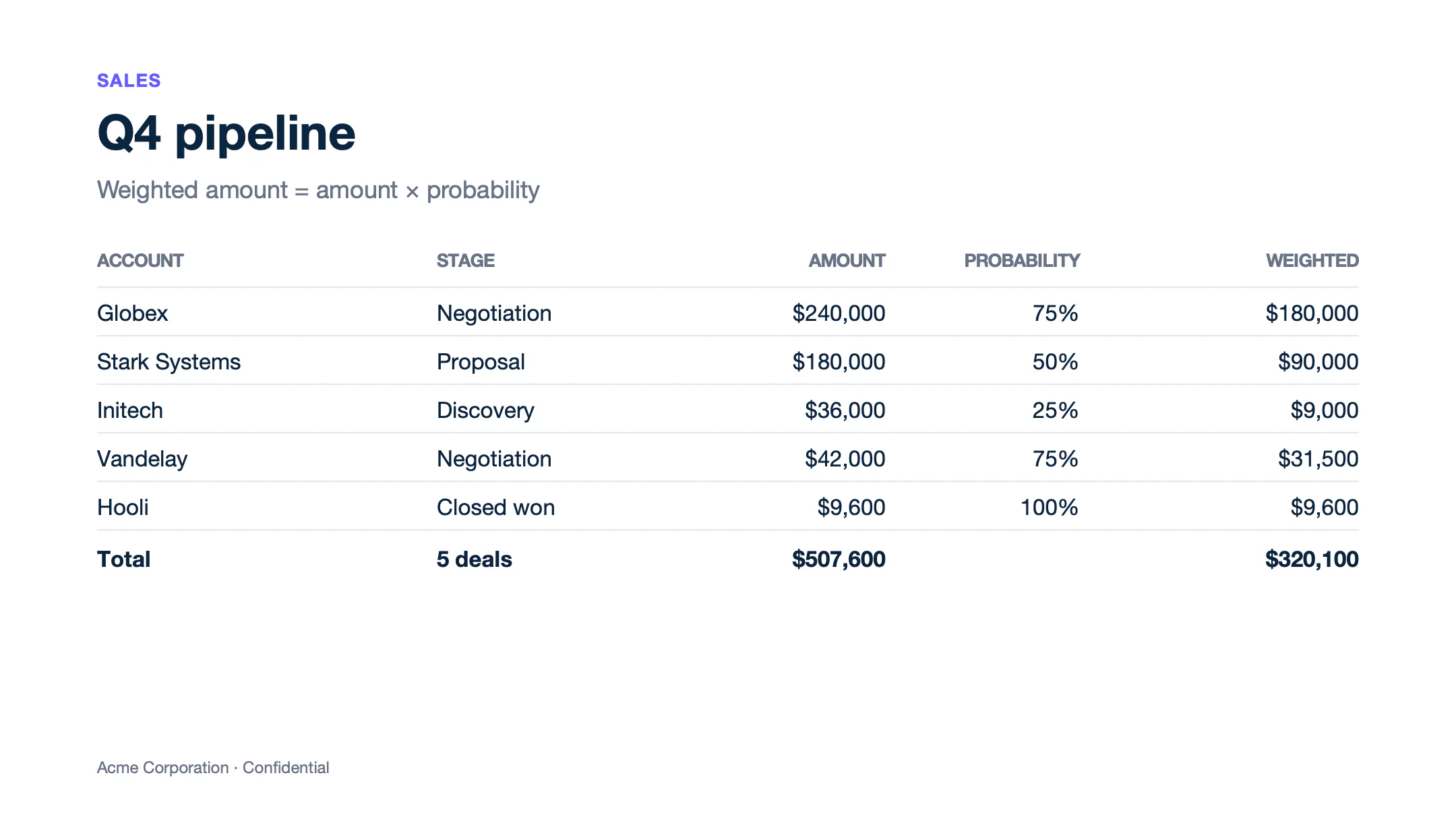
Text of report.pptx
Slide 1
SALES
Q4 pipeline
Weighted amount = amount × probability
ACCOUNT
STAGE
AMOUNT
PROBABILITY
WEIGHTED
Globex
Negotiation
$240,000
75%
$180,000
Stark Systems
Proposal
$180,000
50%
$90,000
Initech
Discovery
$36,000
25%
$9,000
Vandelay
Negotiation
$42,000
75%
$31,500
Hooli
Closed won
$9,600
100%
$9,600
Total
5 deals
$507,600
$320,100
Acme Corporation · Confidential
Aggregators are an Enterprise feature. Learn more about aggregators.
Colors
:color applies a color from the data or from a condition. In the status column, :color(cell, text) colors each status. In the alt text of the status pill, {d.overall:ifEQ('Operational'):show('DCFCE7'):elseShow('FEF3C7'):color(shape, background)} sets its fill.
{
  "overall": "Degraded",
  "services": [
    { "name": "REST API",      "uptime": 99.98, "status": "Operational" },
    { "name": "Dashboard",     "uptime": 99.95, "status": "Operational" },
    { "name": "Webhooks",      "uptime": 99.41, "status": "Degraded" },
    { "name": "PDF rendering", "uptime": 99.97, "status": "Operational" },
    { "name": "File storage",  "uptime": 98.7,  "status": "Outage" }
  ]
}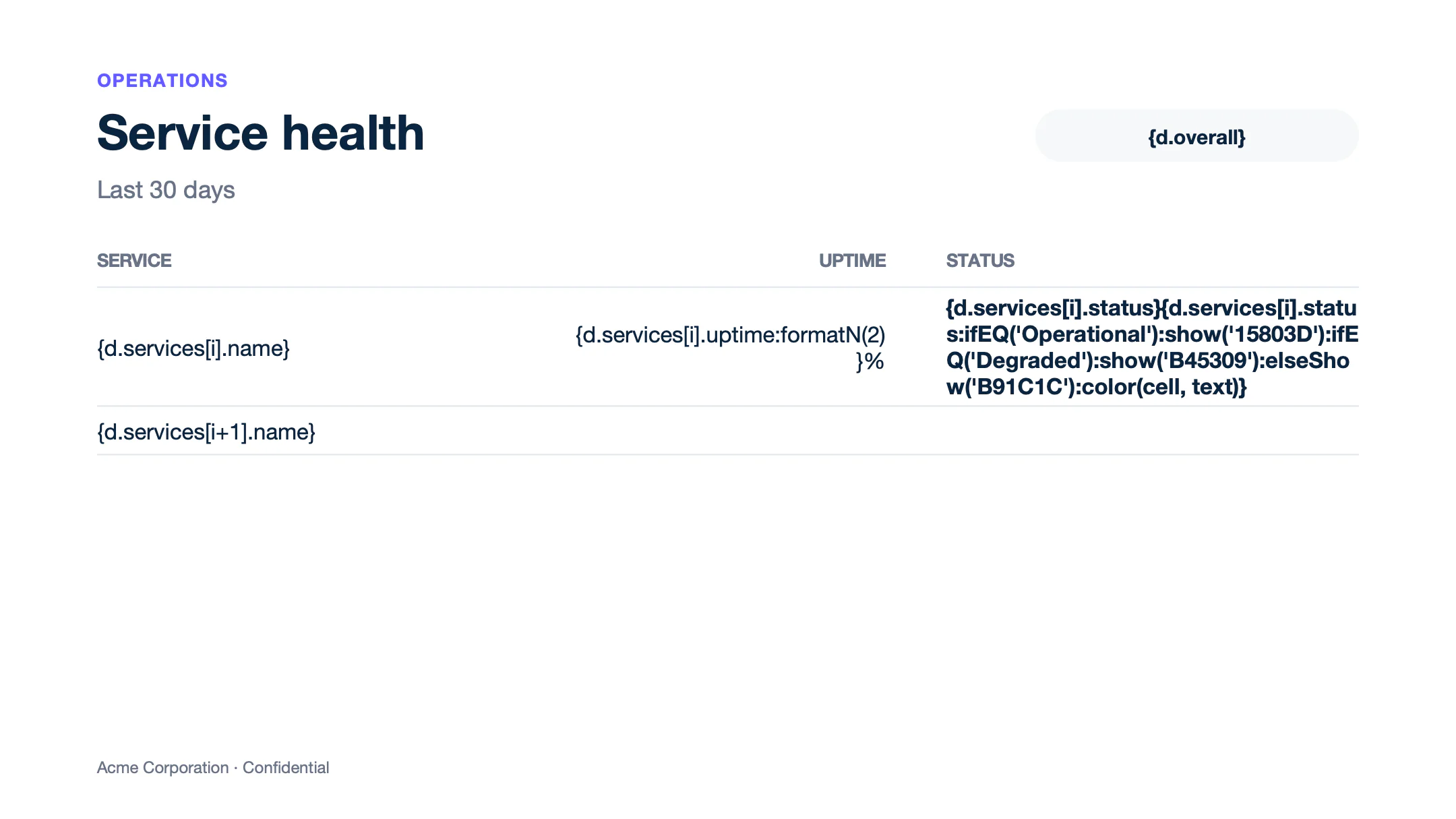
Text of template.pptx
Slide 1
OPERATIONS
Service health
Last 30 days
{d.overall}
SERVICE
UPTIME
STATUS
{d.services[i].name}
{d.services[i].uptime:formatN(2)}%
{d.services[i].status}{d.services[i].status:ifEQ('Operational'):show('15803D'):ifEQ('Degraded'):show('B45309'):elseShow('B91C1C'):color(cell, text)}
{d.services[i+1].name}
Acme Corporation · Confidential
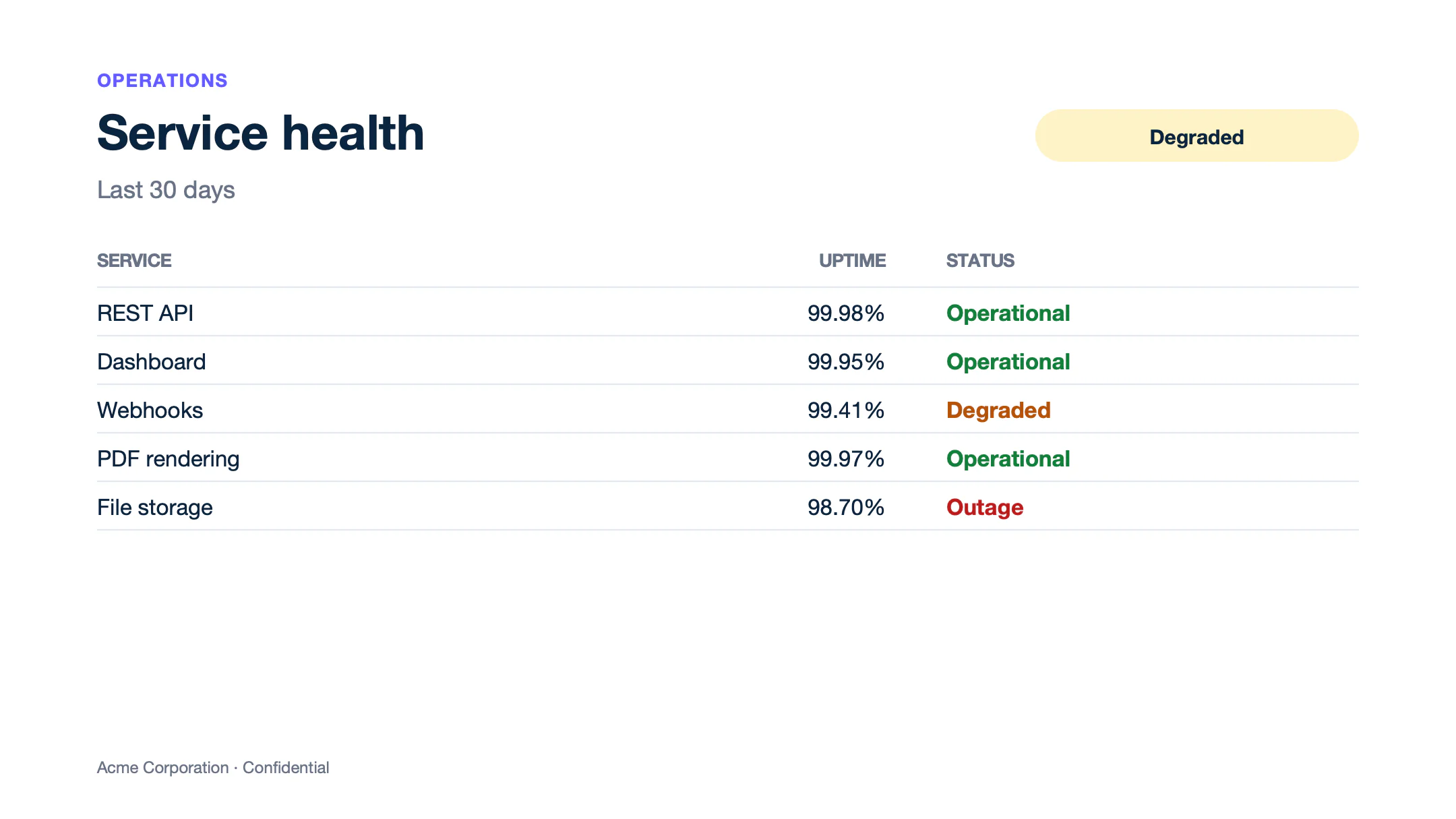
Text of report.pptx
Slide 1
OPERATIONS
Service health
Last 30 days
Degraded
SERVICE
UPTIME
STATUS
REST API
99.98%
Operational
Dashboard
99.95%
Operational
Webhooks
99.41%
Degraded
PDF rendering
99.97%
Operational
File storage
98.70%
Outage
Acme Corporation · Confidential
- PPTX supports the
cell,rowandshapescopes. Thepscope is not supported in PPTX yet. Color the text of the cell or the shape instead. - In PPTX tables,
backgroundworks only on cells without borders for now. On a cell with borders, it changes the color of a border. Use an ODP template, or color the text.
Learn more about colors.
Charts
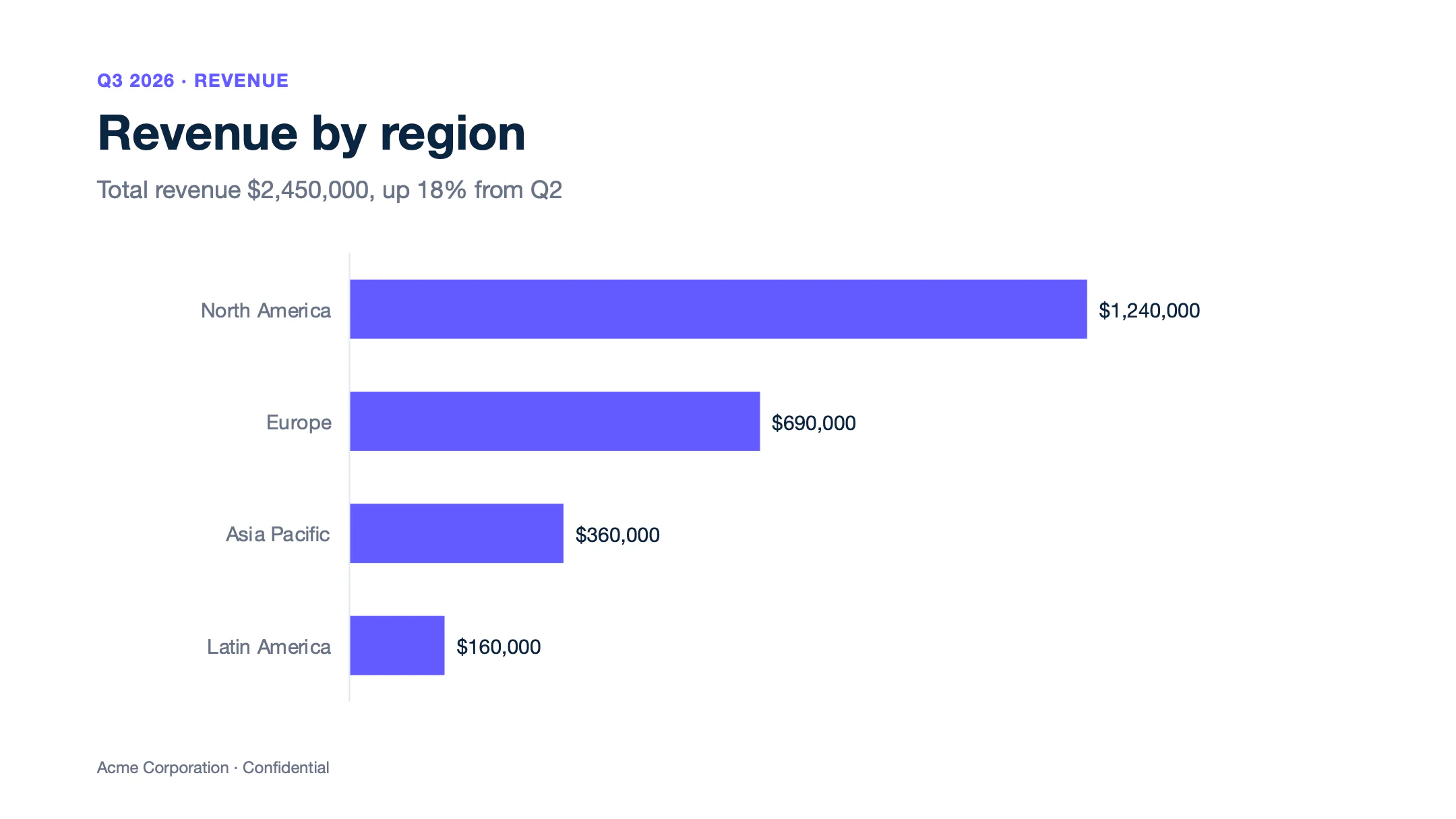
Insert a chart (Insert > Chart), open its data sheet (right-click > Edit Data) and write the loop in the sheet. Put {d.regions[i].name} and {d.regions[i].revenue} on row 2, and {d.regions[i+1].name} and {d.regions[i+1].revenue} on row 3. The chart keeps the colors, labels and axes of the template.
{
  "total": 2450000,
  "growth": 18,
  "regions": [
    { "name": "North America", "revenue": 1240000 },
    { "name": "Europe",        "revenue": 690000 },
    { "name": "Asia Pacific",  "revenue": 360000 },
    { "name": "Latin America", "revenue": 160000 }
  ]
}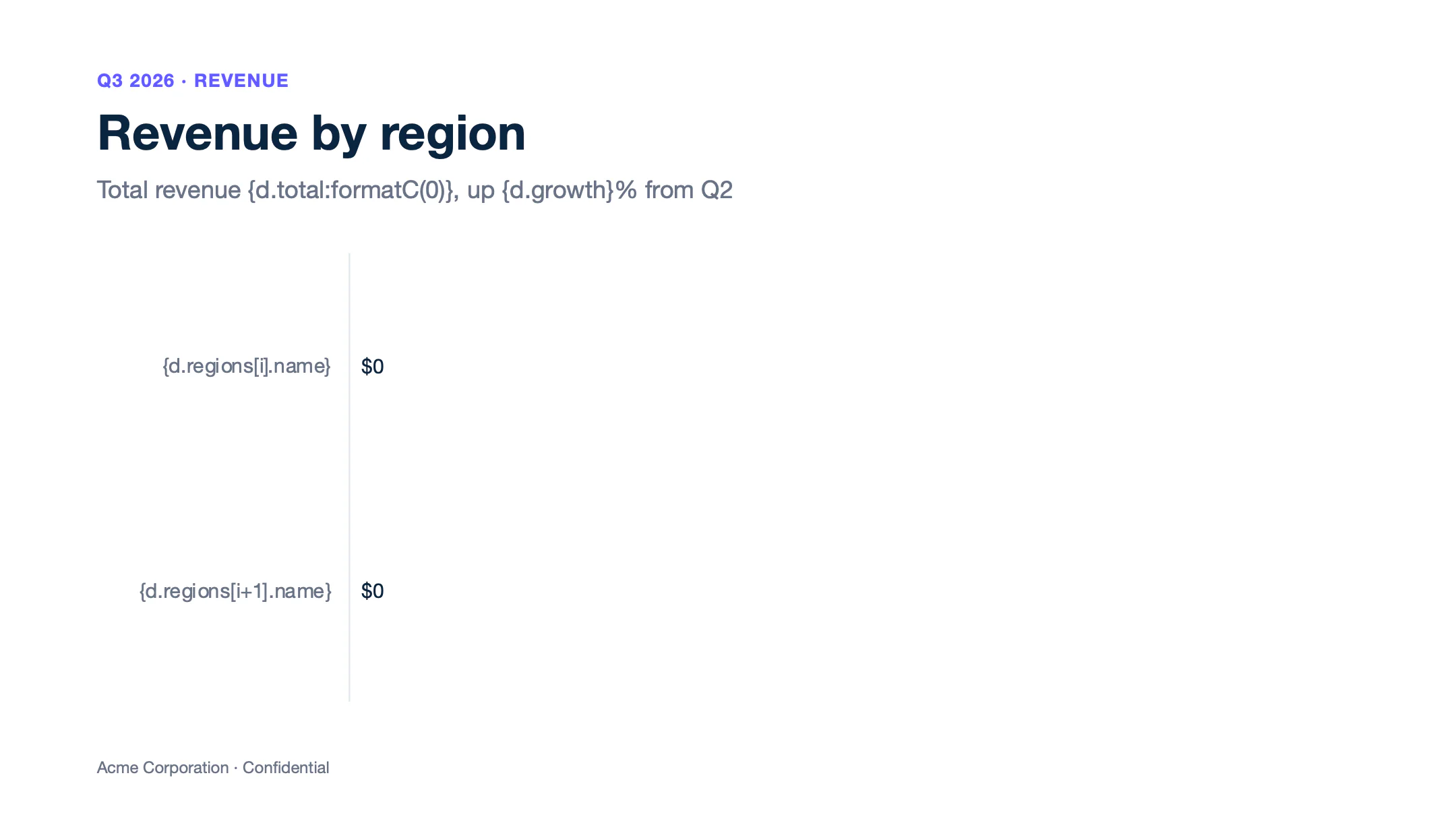
Text of template.pptx
Slide 1
Q3 2026 · REVENUE
Revenue by region
Total revenue {d.total:formatC(0)}, up {d.growth}% from Q2
Acme Corporation · Confidential
Text of report.pptx
Slide 1
Q3 2026 · REVENUE
Revenue by region
Total revenue $2,450,000, up 18% from Q2
Acme Corporation · Confidential
Each [i] tag needs its [i+1] tag on the next row of the sheet. To remove the chart when there is no data, write {d.regions:ifEM:drop(chart)} in its alt text. To draw a chart image from the data instead, use the :chart formatter.
Pictures
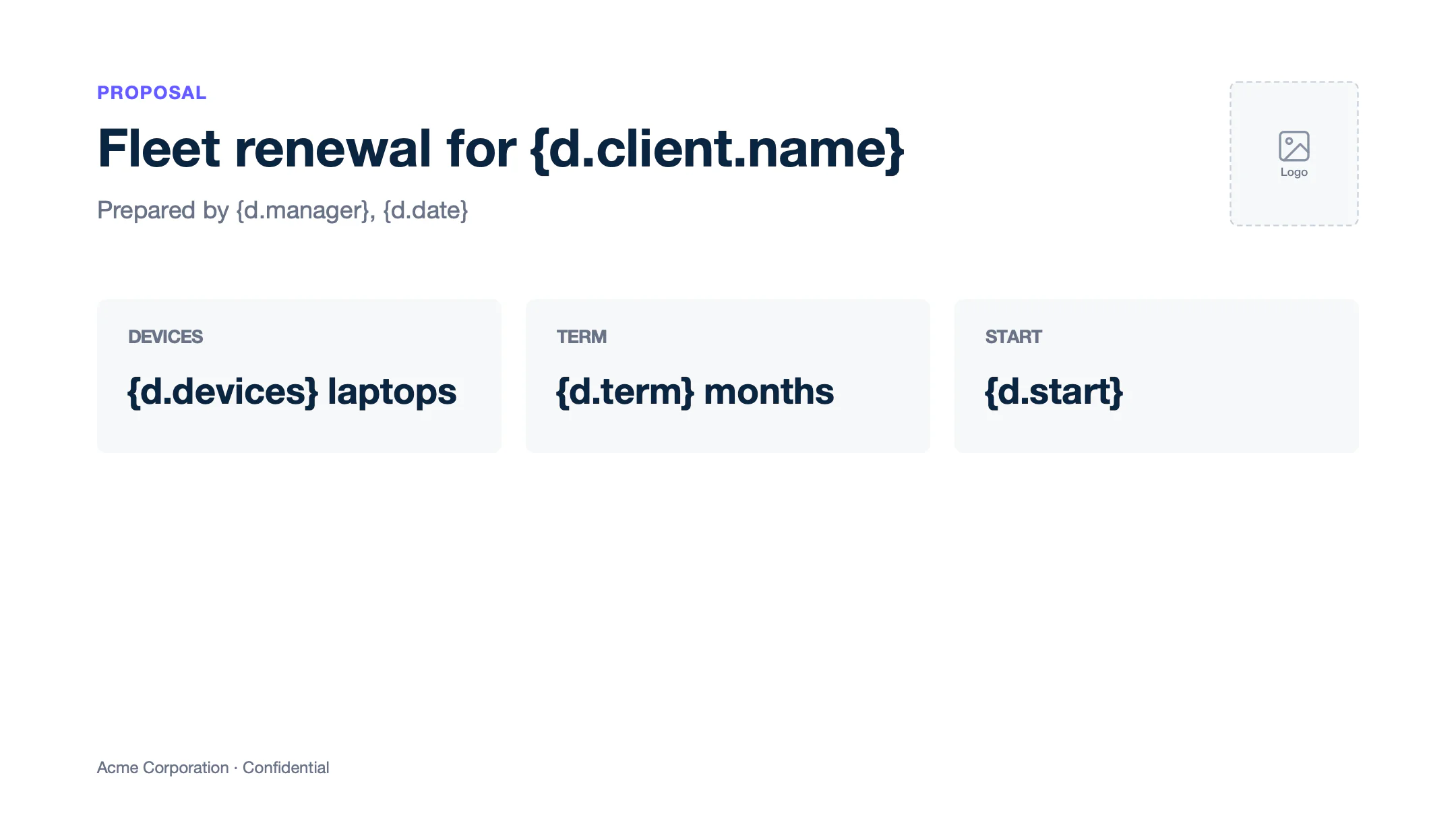
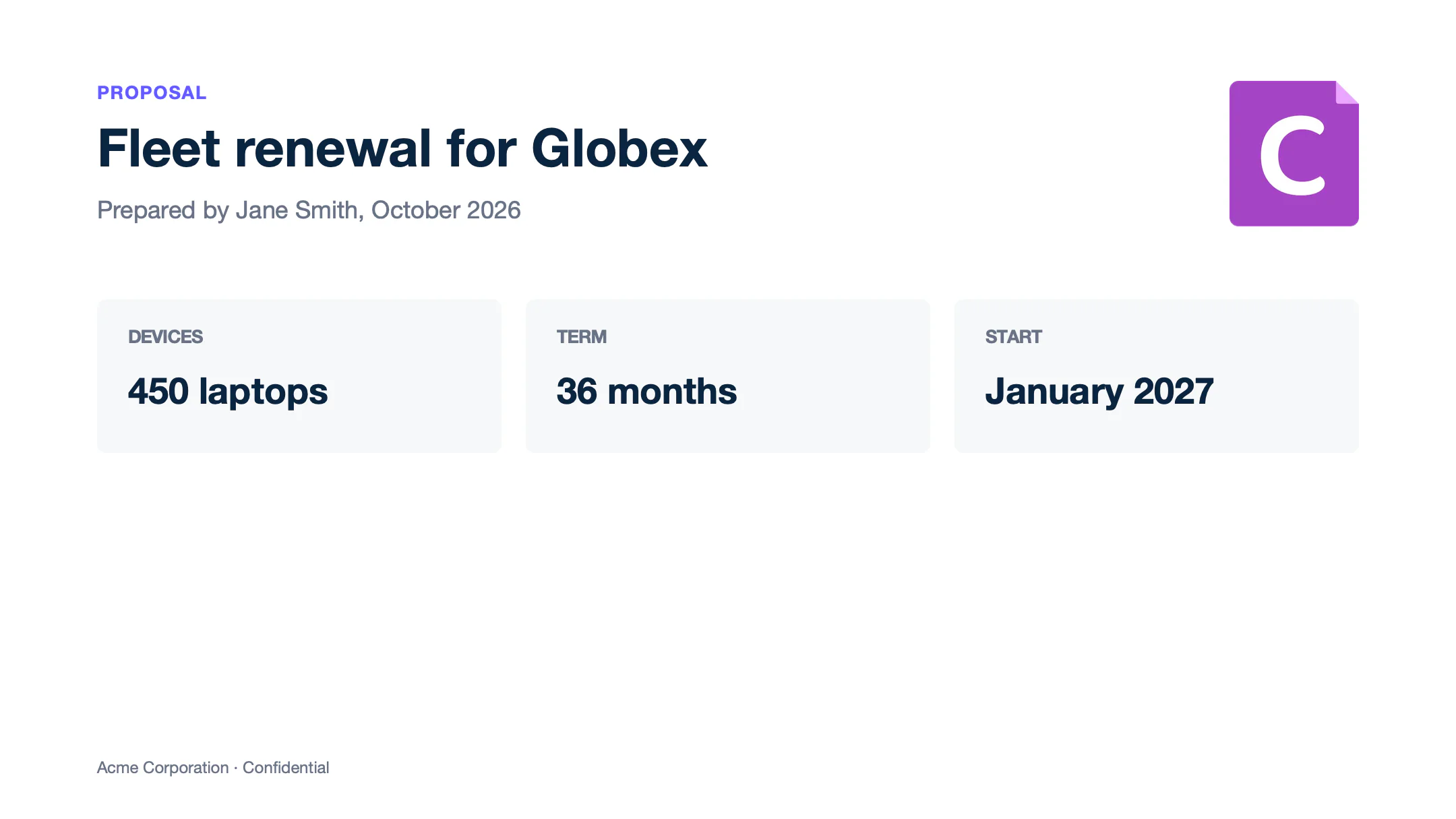
Insert a temporary picture and write the tag in its alt text (right-click > View Alt Text), like {d.client.logo}. Carbone replaces it with the image from the data: a public URL or a Base64 data URI. The image takes the width of the temporary picture and keeps its proportions.
{
  "client": { "name": "Globex", "logo": "https://carbone.io/img/carbone_icon_v3_github.png" },
  "manager": "Jane Smith",
  "date": "October 2026",
  "devices": 450,
  "term": 36,
  "start": "January 2027"
}
Text of template.pptx
Slide 1
[Picture: {d.client.logo}]
PROPOSAL
Fleet renewal for {d.client.name}
Prepared by {d.manager}, {d.date}
DEVICES
{d.devices} laptops
TERM
{d.term} months
START
{d.start}
Acme Corporation · Confidential
Text of report.pptx
Slide 1
[Picture]
PROPOSAL
Fleet renewal for Globex
Prepared by Jane Smith, October 2026
DEVICES
450 laptops
TERM
36 months
START
January 2027
Acme Corporation · Confidential
- Add
:imageFit(contain)to fit the image inside the temporary picture, or:imageFit(fill)to stretch it to its size. - An empty value shows a grey crossed square. To remove the picture instead, write
{d.client.logo:ifEM:drop(img)}in its alt text. - A loop repeats the picture at the same place. Move each copy with :transform.
Learn more about pictures.
Barcodes
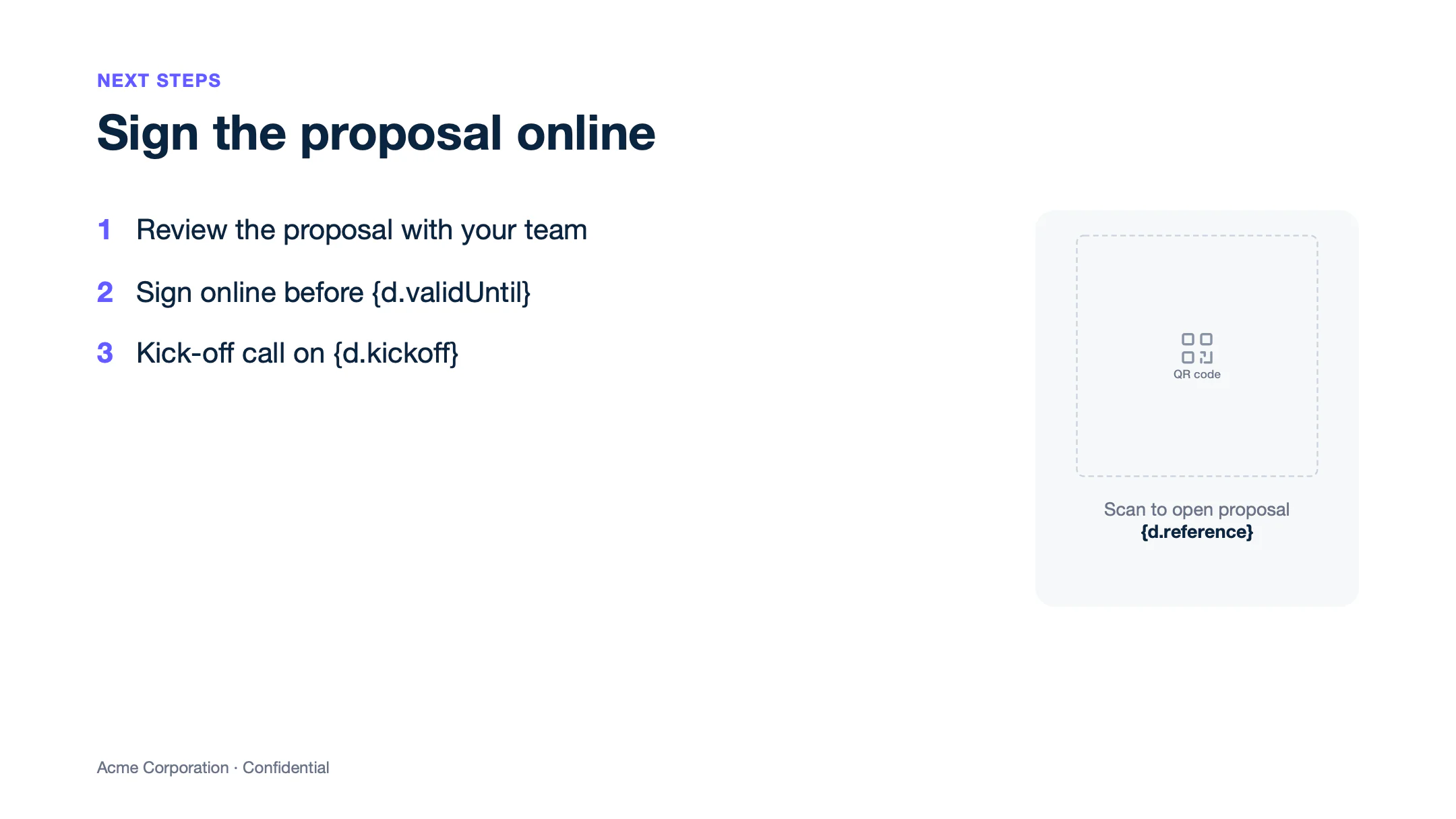
Barcodes are pictures too: write the :barcode formatter in the alt text of a temporary picture. {d.proposalUrl:barcode(qrcode, scale:6)} draws a QR code that links to the proposal.
{
  "validUntil": "November 30, 2026",
  "kickoff": "December 7, 2026",
  "reference": "Q-2026-0412",
  "proposalUrl": "https://carbone.io/documentation/design/template-formats/pptx.html"
}
Text of template.pptx
Slide 1
NEXT STEPS
Sign the proposal online
1 Review the proposal with your team
2 Sign online before {d.validUntil}
3 Kick-off call on {d.kickoff}
[Picture: {d.proposalUrl:barcode(qrcode, scale:6)}]
Scan to open proposal
{d.reference}
Acme Corporation · Confidential
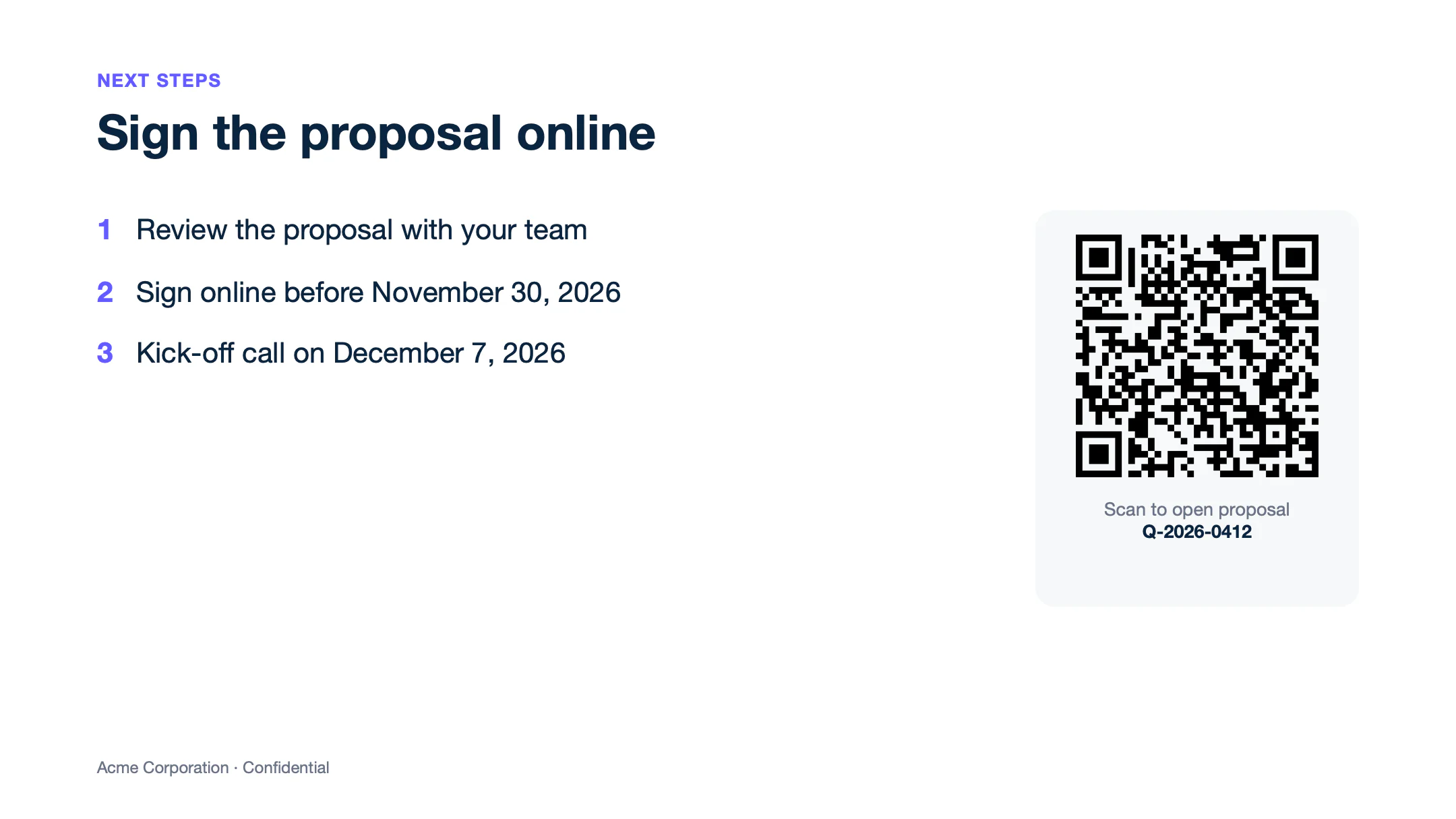
Text of report.pptx
Slide 1
NEXT STEPS
Sign the proposal online
1 Review the proposal with your team
2 Sign online before November 30, 2026
3 Kick-off call on December 7, 2026
[Picture]
Scan to open proposal
Q-2026-0412
Acme Corporation · Confidential
The barcode takes the width of the temporary picture, so draw a square for a QR code. scale sets the resolution, from 1 to 10 (3 by default). Learn more about the barcode types and options.
Hyperlinks
Select some text, insert a link (Insert > Link) and write a tag as its address, like {d.resources[i].url}. Carbone replaces it with the address from the data. In a loop, each item gets its own address.
{
  "resources": [
    { "title": "Documentation",     "description": "Design templates and generate documents",  "url": "https://carbone.io/documentation/design/overview/getting-started.html" },
    { "title": "API reference",     "description": "Render and convert from your application", "url": "https://carbone.io/documentation/developer/http-api/introduction.html" },
    { "title": "Pricing",           "description": "Plans for every volume",                   "url": "https://carbone.io/pricing.html" },
    { "title": "Templates gallery", "description": "Real examples to start from",              "url": "https://carbone.io/examples/" }
  ]
}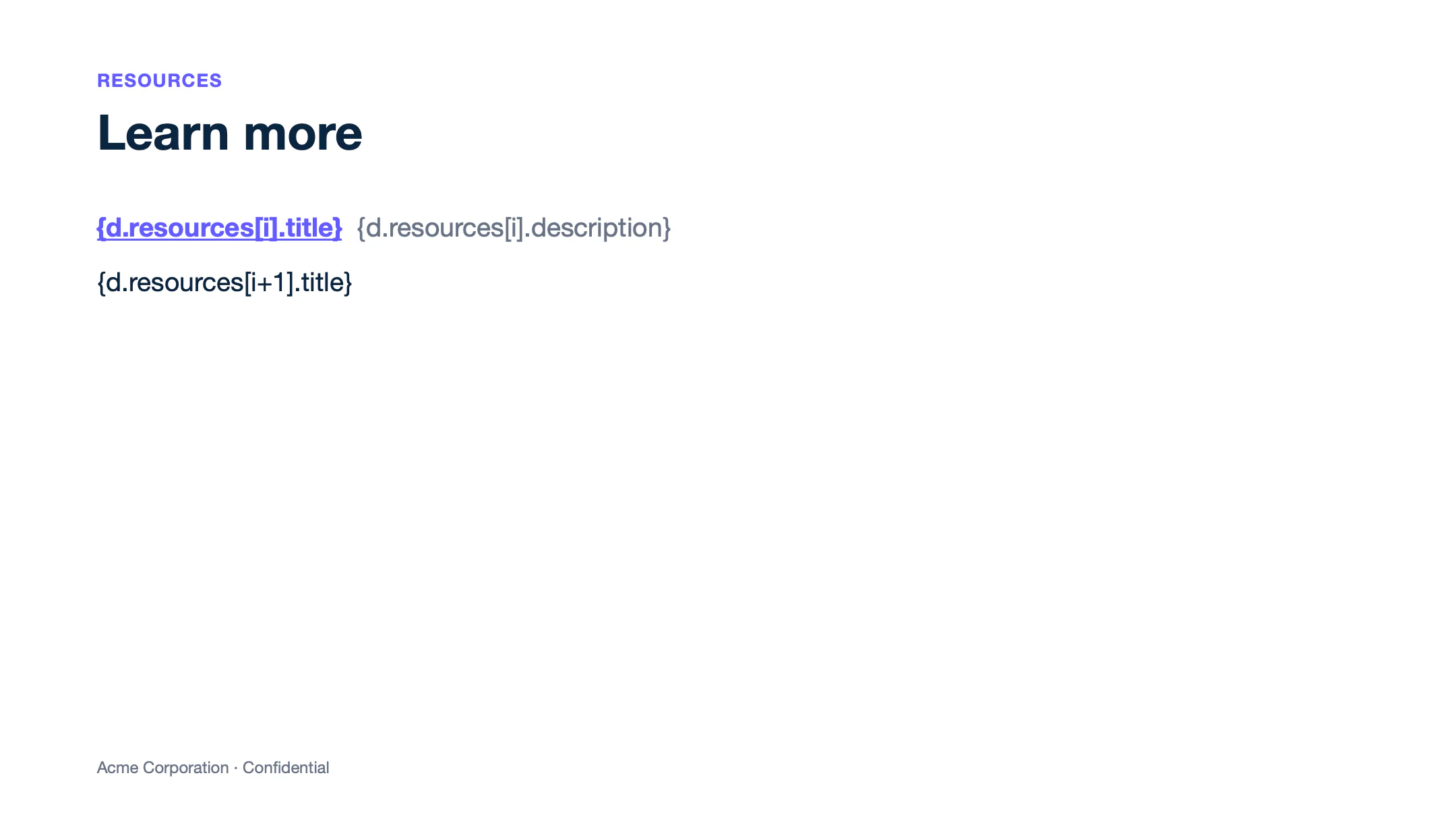
Text of template.pptx
Slide 1
RESOURCES
Learn more
{d.resources[i].title} {d.resources[i].description}
{d.resources[i+1].title}
Acme Corporation · Confidential
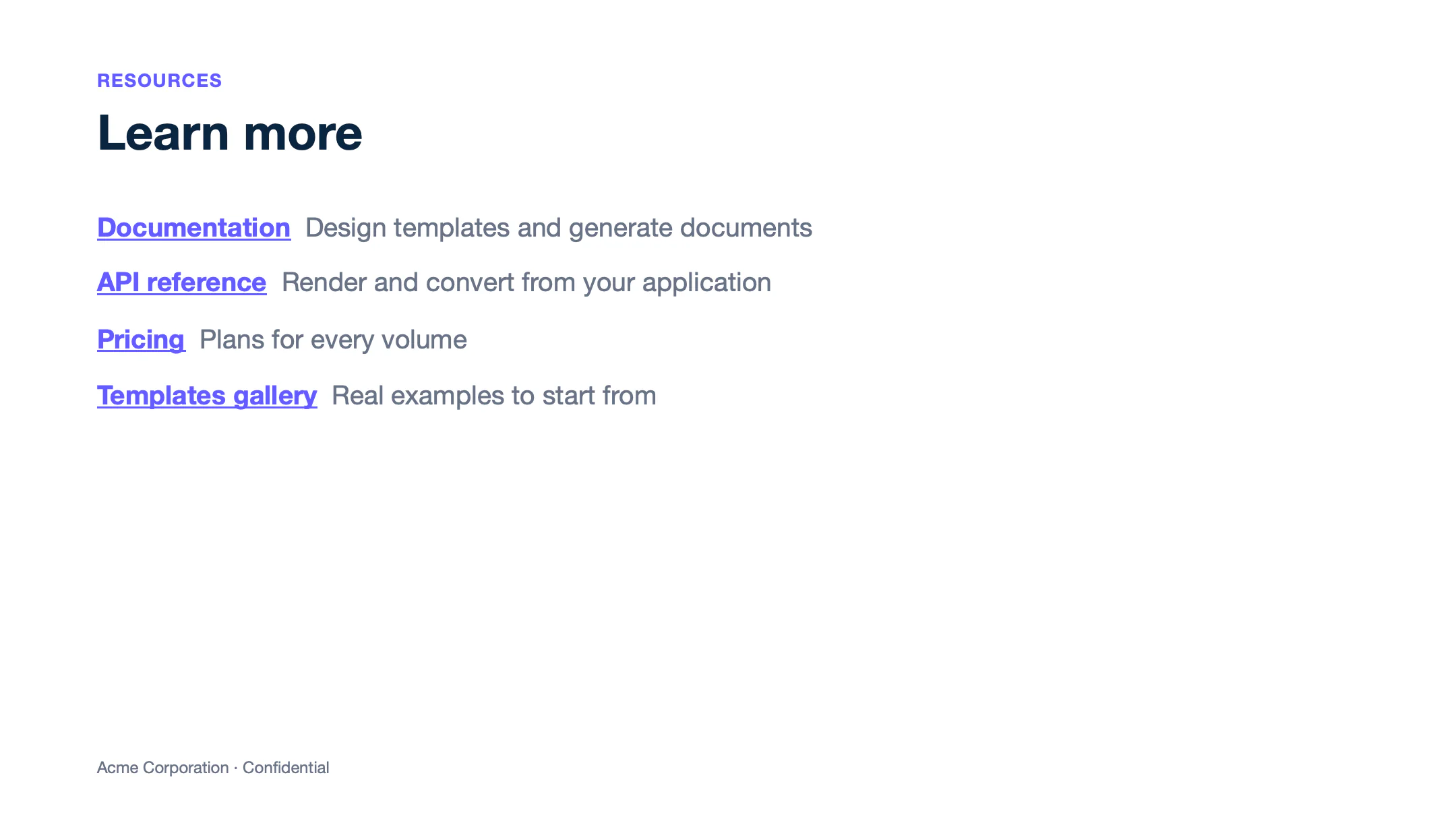
Text of report.pptx
Slide 1
RESOURCES
Learn more
Documentation Design templates and generate documents
API reference Render and convert from your application
Pricing Plans for every volume
Templates gallery Real examples to start from
Acme Corporation · Confidential
Learn more about dynamic hyperlinks.
Translations
Write static text in {t( )} tags, and add the :t formatter to translate values from the data. Carbone uses the translations for the lang of the report. This example uses "lang": "fr-fr" and the dictionary in the Translations tab. Dates follow the language too: :formatD(LL) prints 15 septembre 2026.
{
  "projects": [
    { "name": "Data migration",  "owner": "Jane Smith",   "due": "2026-09-15", "status": "Done" },
    { "name": "Single sign-on",  "owner": "Omar Haddad",  "due": "2026-11-30", "status": "In progress" },
    { "name": "Admin training",  "owner": "Jane Smith",   "due": "2026-10-20", "status": "Done" },
    { "name": "Usage reporting", "owner": "Ken Watanabe", "due": "2027-01-15", "status": "Planned" }
  ]
}{
"fr-fr": {
"QUARTERLY BUSINESS REVIEW": "REVUE TRIMESTRIELLE",
"Project status": "État des projets",
"PROJECT": "PROJET",
"OWNER": "RESPONSABLE",
"DUE DATE": "ÉCHÉANCE",
"STATUS": "STATUT",
"Confidential": "Confidentiel",
"Data migration": "Migration des données",
"Single sign-on": "Authentification unique",
"Admin training": "Formation des administrateurs",
"Usage reporting": "Rapports d’utilisation",
"Done": "Terminé",
"In progress": "En cours",
"Planned": "Prévu"
}
}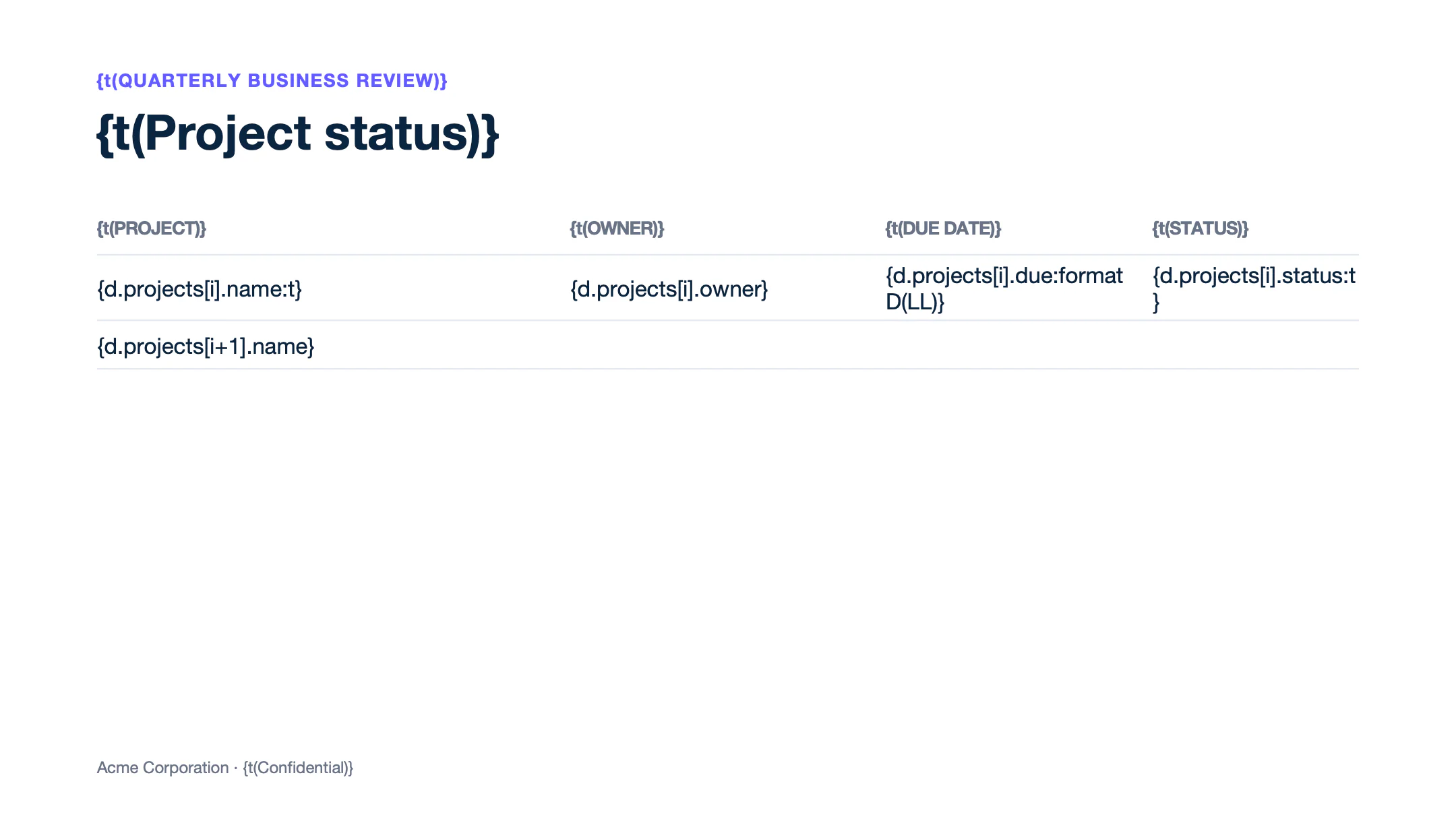
Text of template.pptx
Slide 1
{t(QUARTERLY BUSINESS REVIEW)}
{t(Project status)}
{t(PROJECT)}
{t(OWNER)}
{t(DUE DATE)}
{t(STATUS)}
{d.projects[i].name:t}
{d.projects[i].owner}
{d.projects[i].due:formatD(LL)}
{d.projects[i].status:t}
{d.projects[i+1].name}
Acme Corporation · {t(Confidential)}
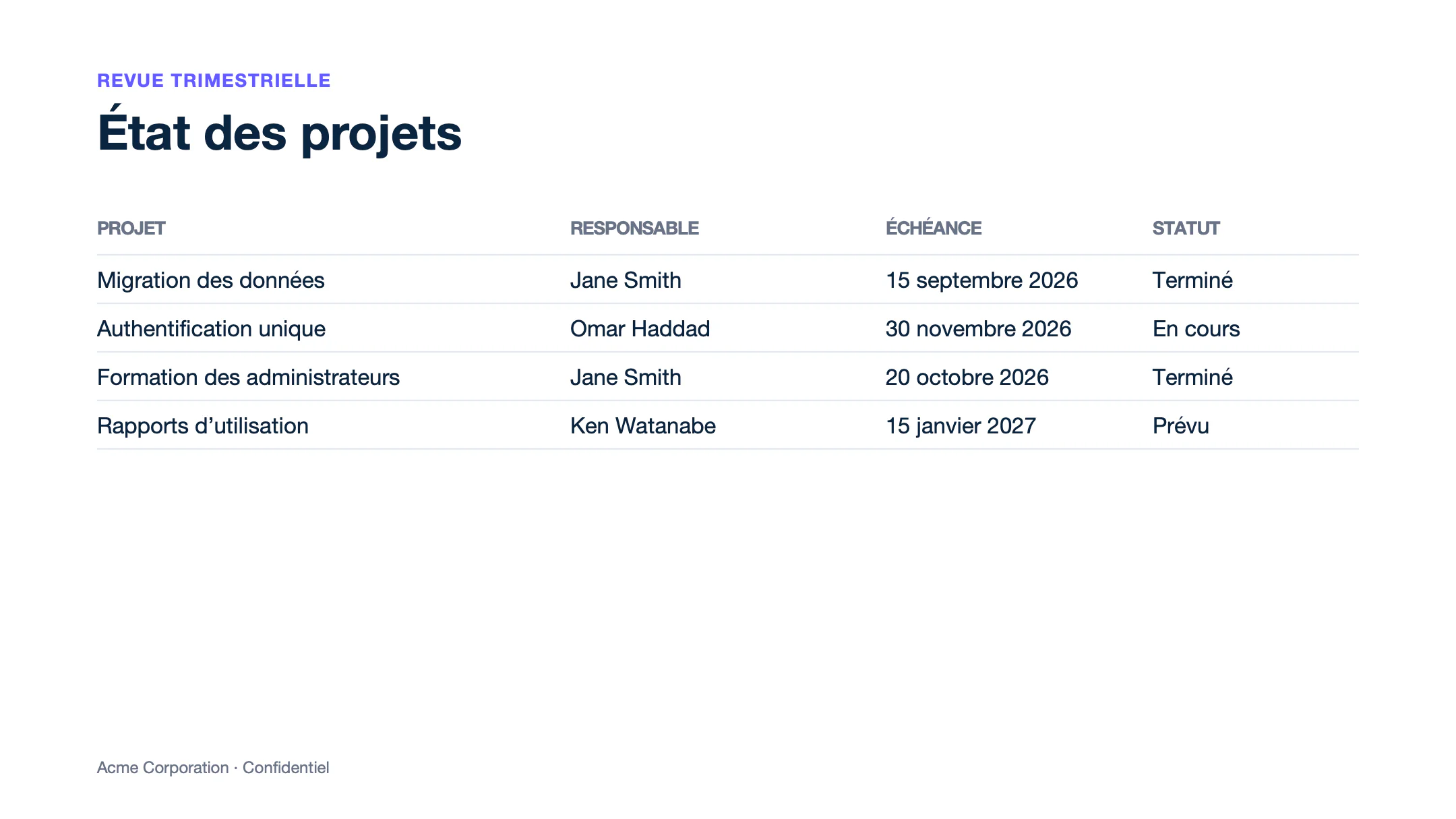
Text of report.pptx
Slide 1
REVUE TRIMESTRIELLE
État des projets
PROJET
RESPONSABLE
ÉCHÉANCE
STATUT
Migration des données
Jane Smith
15 septembre 2026
Terminé
Authentification unique
Omar Haddad
30 novembre 2026
En cours
Formation des administrateurs
Jane Smith
20 octobre 2026
Terminé
Rapports d’utilisation
Ken Watanabe
15 janvier 2027
Prévu
Acme Corporation · Confidentiel
Learn more about translations.
Convert PPTX to PDF
To generate a PDF from a PPTX template with the Carbone API:
- Prepare two files: a PPTX template with Carbone tags, like
{d.name}, and the JSON data to populate it. You can use the files of the Loops example. - Generate the PDF in one of three ways:
- Use an official Carbone integration, like N8N, Make, Zapier, Airtable or Bubble.
- Use a Carbone SDK: Node.js, Go, Python, Java, JavaScript or PHP.
- Send a
POST /render/templateHTTP request to the Carbone API, like this curl command:
curl --location --request POST 'https://api.carbone.io/render/template?download=true' \
  --header 'carbone-version: 5' \
  --header 'Content-Type: application/json' \
  --header 'Authorization: Bearer API_TOKEN' \
  --data-raw "{
    \"data\": $(cat loops-data.json),
    \"template\": \"$(base64 -i loops-template.pptx)\",
    \"convertTo\": \"pdf\"
  }" \
  --output report.pdf
💡 Linux users: replacebase64 -i loops-template.pptxwithbase64 -w 0 loops-template.pptx
Key parameters
| Parameter | Description |
|---|---|
template |
Your PPTX template, encoded as a Base64 string. |
data |
JSON data used to populate the template. |
convertTo |
"pdf", or another output format: "pptx" (by default), "odp", "png"... |
converter |
Optional: LibreOffice "L" (default) or OnlyOffice "O". See converters. |
?download=true |
Query parameter to download the document as a stream. |
Authorization |
Header required for the Carbone Cloud API. Get your API key here. |
Each slide becomes a page of the PDF. The PDF uses the fonts installed on the server. See font support. For more details, refer to the Carbone API Documentation.