HTML invoice to PDF
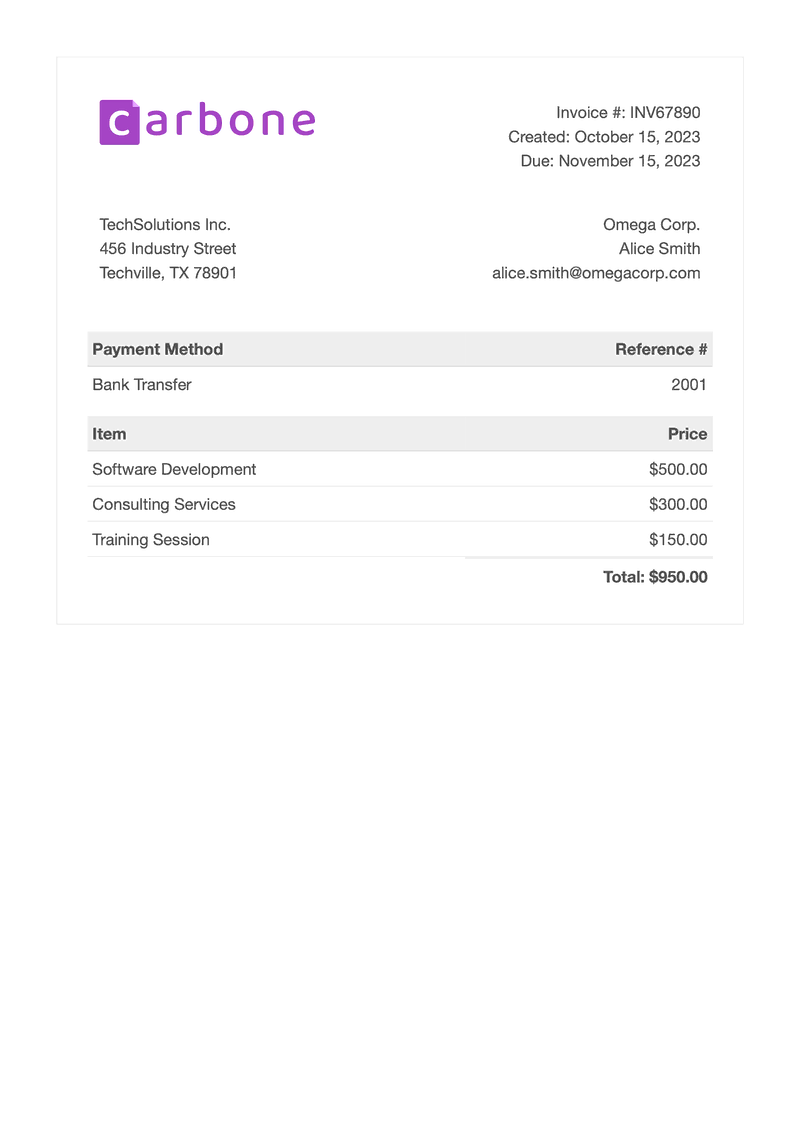
A web page design filled with order data, rendered by Chromium
- Template
- HTML
- Export as
- PDF, HTML, PNG, WebP +7 more
- Carbone
- 5.4+
Generate PDFs from your HTML templates
Web apps, billing systems and e-commerce platforms often already have their documents in HTML and CSS, from a web page or an email design. Your application sends the data to the Carbone API as JSON, the HTML template is filled in, and Chromium converts it to a PDF that looks exactly like the page in a browser. Here, an invoice designed in HTML and CSS is filled with JSON data, then converted to PDF.
In this example, you will:
- Insert Carbone tags in an HTML template styled with CSS
- Repeat a table row for each item and compute the total
- Force the Chromium converter from the template
How to turn an HTML template into a PDF
Follow these steps to turn an HTML page into a PDF document with Carbone:
1. Lay Out the Invoice in HTML and CSS
In a code editor, create a standard HTML document with <html>, <head> and <body> tags. Define the layout and typography in a <style> block of the <head>, then build the invoice with HTML tables: header with the logo and the invoice details, addresses, payment method and items.
2. Insert the Data
Insert Carbone tags wherever your data should appear, for example {d.invoiceNumber} for the invoice number. Tags also work inside HTML attributes, for example <img src="{d.companyLogo}"> for the logo.
3. Repeat a Row per Item
In the items table, display each item in a loop: the first row contains the tags of the item, the second row marks the end of the loop and does not appear in the generated document.
<tr class="item">
    <td>{d.items[i].name}</td>
    <td>{d.items[i].price:formatC}</td>
</tr>
<tr class="item">
    <td>{d.items[i+1]}</td>
</tr>
Below the items, compute the total with the :aggSum formatter: {d.items[].price:aggSum:formatC}.
Note: the formatC formatter displays the amounts in the currency of the report language, for example $500.00 in en-us.
4. Convert the HTML to PDF
To get a PDF that looks exactly like the page in a browser, convert the HTML with Chromium. Add the in-template option {o.converter=C} anywhere in the <body>: Carbone then always uses Chromium for this template, and removes the tag from the result.
Save the HTML template, connect it to your JSON data, and let Carbone turn your web page into a PDF automatically.
Related Examples
Check out these similar templates to learn more:
Trusted by 800+ paid customers in 40+ countries