Branded service invoice
Billed work, totals and payment details in your agency's style
- Template
- DOCX
- Export as
- PDF, DOCX, ODT, HTML, PNG +25 more
- Carbone
- 5.18+
Generate branded invoices from your billing system
Agencies, consultancies and service companies send their billing data to the Carbone API and get back invoices in their own branding.
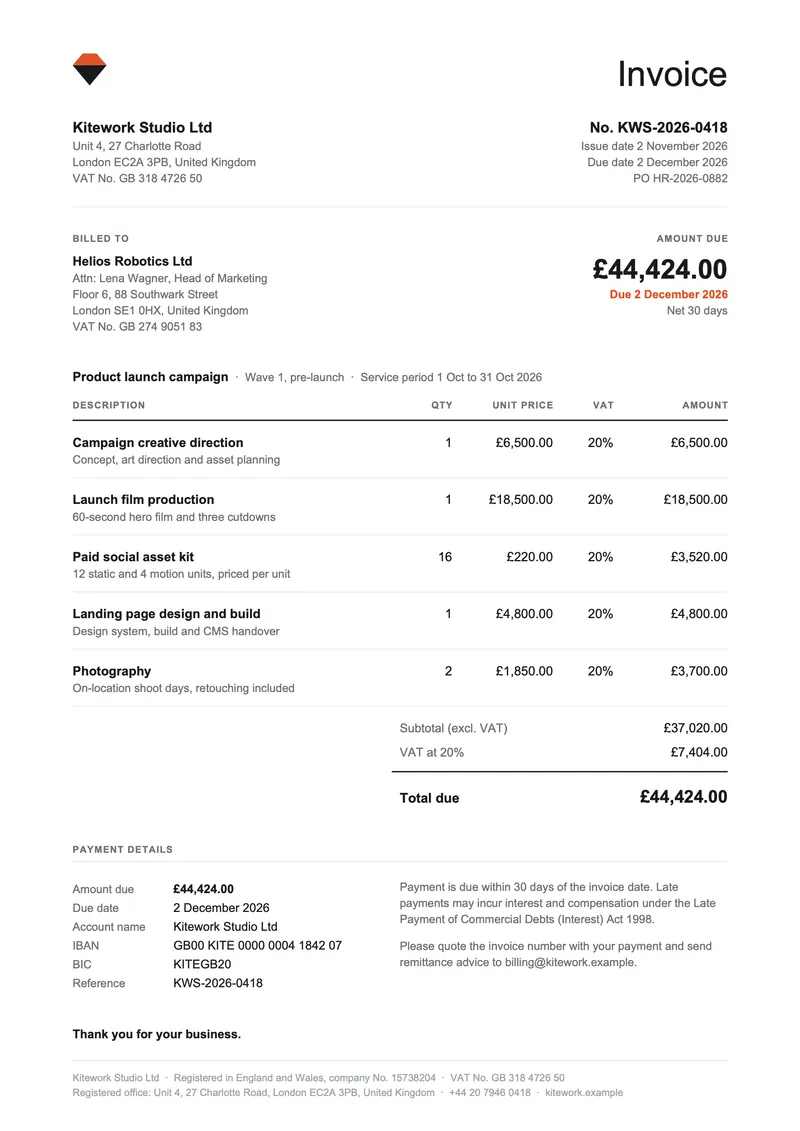
Here, a London creative studio bills a client for a month of campaign work: the DOCX template lists the services with their VAT rate, then shows the totals, the amount due and the bank transfer details. It follows the structure of a UK VAT invoice described in HMRC VAT Notice 700.
In this example, you will:
- Format dates, amounts and text
- List the services in a table that repeats its header on each page
- Display the totals and the payment details
How to build a branded invoice template
Follow these steps to create your invoice template:
1. Display the Company, Client and Project Details
- Display the company, client and project information with Carbone tags.
Examples:
{d.company.vatNumber}or{d.customer.name} - Format the dates with :formatD.
Examples:
{d.invoice.dueDate:formatD('D MMMM YYYY')}or{d.project.periodEnd:formatD('D MMM YYYY')}
2. Create the Services Table
- Insert a table and write the column titles in the first row.
- In the second row, display the services in a loop:
{d.items[i].title}, and{d.items[i+1].title}in the third row. - Format the amounts with :formatC and show the VAT rate of each line.
Examples:{d.items[i].rate:formatC}or{d.items[i].vatRate}% - In the table properties, set the first row as a repeating header row and uncheck Allow row to break across pages.
3. Add the Totals and Payment Details
- Below the loop rows, add the subtotal, VAT and total rows to the same table, so the amounts share one right edge.
Example:VAT at {d.totals.taxRate}%{d.totals.tax:formatC} - Insert a second table for the payment details: amount due, due date and bank transfer details.
Example:{d.bank.iban} - Put the company registration details in the page footer.
Example:{d.company.registrationNumber}
Tip: :formatD and :formatC follow the options of the render request: lang sets the date and number format, and currencySource / currencyTarget set the currency (here en-gb and GBP).
Save the DOCX template, connect it to your JSON data, and let Carbone generate your invoice automatically.
Related Examples
Check out these similar templates to learn more:
Trusted by 800+ paid customers in 40+ countries