Usage-based SaaS invoice
Metered usage and tiered pricing as a PDF invoice with charts
- Template
- HTML
- Export as
- PDF, HTML, PNG, WebP +7 more
- Carbone
- 5.18+
- HTML
- Nested loop
- Aggregation
- Subtotal
- Set
- Condition
- Currency
- Chart
- Header and footer
Generate usage-based invoices from your billing system
SaaS, cloud and API companies charge part of their price on metered usage: requests, compute hours, storage, data transfer. At the end of each billing period, the billing system rates the usage of every customer: it deducts the allowance included in the plan, prices the overage by tier, prorates the plan changes and applies the credits. It then sends each invoice to the Carbone API as JSON and gets back the PDF for the invoice email and the customer portal.
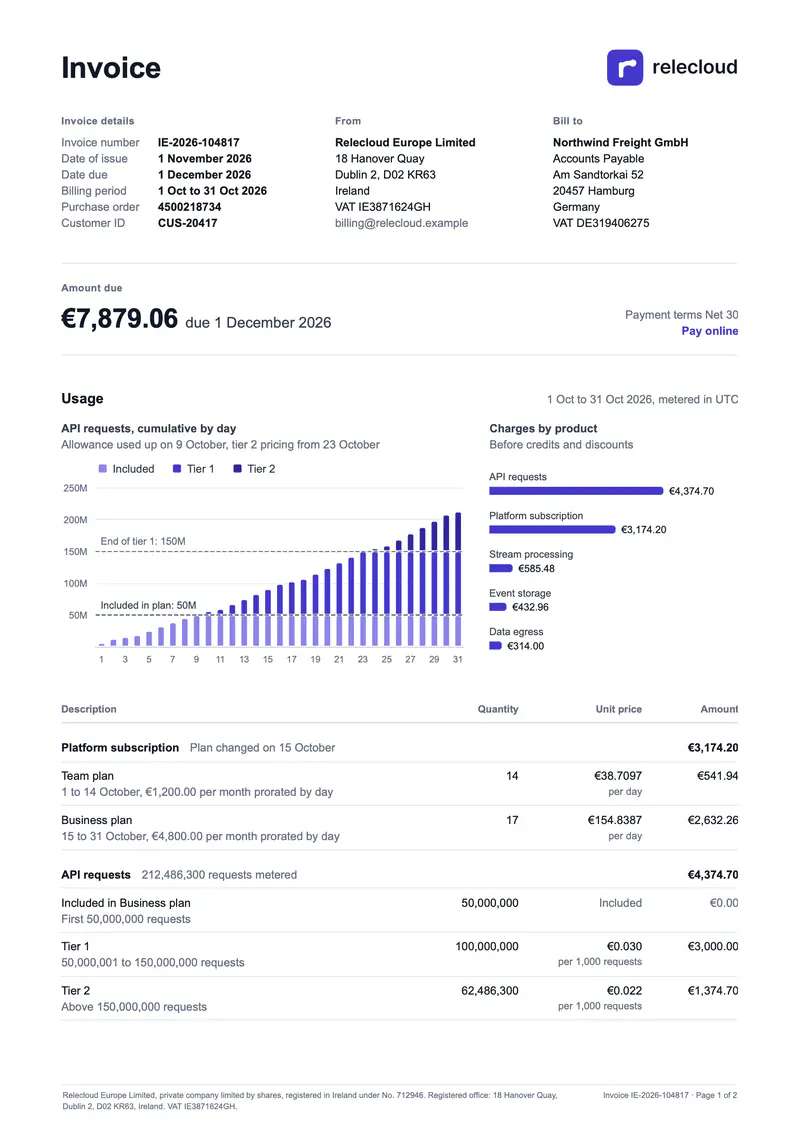
In this example, Relecloud Europe Limited, the Irish entity of a fictional cloud platform, invoices Northwind Freight GmbH, in Hamburg, for October 2026. The customer upgraded from the Team plan to the Business plan on 15 October and used 212 million API requests, more than four times its allowance. A business customer in another EU country accounts for the VAT on these services itself (VAT Directive, article 196), so the invoice charges no VAT, states "Reverse charge" and shows the VAT numbers of both parties (article 226 and Irish Revenue). Article 222 sets the deadline: the 15th day of the month after the supply. When the data sends taxed lines instead, the same template prints one tax line per jurisdiction with its rate.
In this example, you will:
- Group the line items by product with a nested loop
- Compute the subtotal of each product and the invoice totals with aggregators
- Print "Included", the minus signs and the reverse charge mention with conditions
- Draw the usage charts with ECharts
- Paginate the PDF with a repeated table header and a legal footer
The invoice, section by section
| Section | Content | What Carbone does |
|---|---|---|
| Header | Invoice number, dates of issue and due, billing period, purchase order, customer ID | Formats the dates with :formatD |
| Parties | Legal names, addresses and VAT numbers of the supplier and the customer | Prints the fields of the data |
| Amount due | Amount left to pay, due date, payment terms, payment link | Prints the amount computed from the line items |
| Usage | Cumulative API requests by day against the allowance and the tier limit, charges by product | Draws two ECharts charts |
| Line items | Prorated subscription, included allowance, overage tiers, credits and discounts | One group per product, with its subtotal |
| Totals | Subtotal, tax per jurisdiction, total, amount paid, amount due | Sums the lines with :aggSum |
| Legal mentions | Reverse charge statement, company registration, page X of Y | Keeps the statement for reverse charge only, repeats the footer on every page |
How to build a usage-based invoice in HTML
1. Set Up the PDF Options and the Footer
Write the invoice as an HTML page with its CSS in a <style> block, in a font installed everywhere, like Arial. Set the A4 page and its margins with the PDF options, and the legal mentions and page numbers in the footer. An empty header replaces the default header of Chromium:
<carbone-pdf-options paper-size="A4" print-background="true" display-header-footer="true" margin-top="0.5" margin-bottom="0.75" margin-left="0.65" margin-right="0.65"/>

<carbone-pdf-header><div></div></carbone-pdf-header>
<carbone-pdf-footer>
  <div>{d.seller.name}, {d.seller.legalForm}, registered in {d.seller.registeredIn} under No. {d.seller.companyNumber}. VAT {d.seller.vatId}.</div>
  <div>Invoice {d.invoice.number} · Page <span class="pageNumber"></span> of <span class="totalPages"></span></div>
</carbone-pdf-footer>
2. Repeat the Line Items by Product
The data holds one group per product, each with its lines. Repeat the groups and their lines with a nested loop: each group is a <tbody>, and each line a row. The group row prints the subtotal of its lines with :aggSum:
<tbody>
  <tr class="group">
    <td colspan="3">{d.groups[i].name}<span>{d.groups[i].meta}</span></td>
    <td>{d.groups[i].lines[].amount:aggSum:abs:formatC(2)}</td>
  </tr>
  <tr class="line">
    <td>{d.groups[i].lines[i].description}</td>
    <td>{d.groups[i].lines[i].quantity:formatN(0)}</td>
    <td>{d.groups[i].lines[i].unitPrice:abs:formatC(.priceDecimals)}<small>{d.groups[i].lines[i].priceUnit}</small></td>
    <td>{d.groups[i].lines[i].amount:abs:formatC(2)}</td>
  </tr>
  <tr style="display:none;"><td>{d.groups[i].lines[i+1].description}</td></tr>
</tbody>
<tbody style="display:none;"><tr><td>{d.groups[i+1].name}</td></tr></tbody>
:formatC(.priceDecimals) reads the number of decimals from each line: 4 for a price per day, 3 for a price per 1,000 requests. In the CSS, thead { display: table-header-group; } repeats the column headers on every page, and tbody { break-inside: avoid; } keeps the lines of a product together when the table continues on the next page.
3. Compute the Totals
Four tags in the <title> element of the page compute the totals once, with :set. They print nothing:
<title>Invoice {d.invoice.number}{d.groups[].lines[].amount:aggSum:set(c.subtotal)}{d.tax.lines[].amount:aggSum:set(c.tax)}{c.subtotal:add(c.tax):set(c.total)}{c.total:sub(d.amountPaid):set(c.due)}</title>The amount due block and the totals table print {c.subtotal:formatC(2)}, {c.total:formatC(2)} and {c.due:formatC(2)}. The credits are negative amounts: a condition prints the minus sign before the absolute value, as in {d.groups[i].lines[i].amount:ifLT(0):show('−'):elseShow('')}{d.groups[i].lines[i].amount:abs:formatC(2)}.
4. Switch Between Reverse Charge and Tax Lines
The totals table repeats one row per tax jurisdiction. In each row, :drop(span) keeps either the reverse charge note or the rate:
<span>Reverse charge on {d.tax.lines[i].taxable:formatC(2)}{d.tax.lines[i].reverseCharge:ifNE(true):drop(span)}</span>
<span>{d.tax.lines[i].rate}% on {d.tax.lines[i].taxable:formatC(2)}{d.tax.lines[i].reverseCharge:ifEQ(true):drop(span)}</span>
The reverse charge statement prints only when the invoice is under reverse charge, between showBegin and showEnd:
{d.tax.reverseCharge:ifEQ(true):showBegin}
<div class="notice">Reverse charge. VAT to be accounted for by the recipient under Article 196 of Council Directive 2006/112/EC.</div>
{d.tax.reverseCharge:showEnd}
The lines of the included allowance print "Included" instead of a unit price with the same :drop(span) pattern.
5. Draw the Usage Charts
The data holds an ECharts configuration for each chart. The first one stacks the cumulative API requests of each day into the included allowance, tier 1 and tier 2, with a dashed line at the 50 million requests of the plan. The second one shows the charges by product. Insert each chart in an <img> element with the :chart formatter:
<img src="{d.usage.chart:chart}" width="404" height="210" alt="Cumulative API requests by day">
<img src="{d.usage.productChart:chart}" width="236" height="210" alt="Charges by product">
6. Convert the HTML to PDF
When you generate the invoice, select Chromium as the Document Converter, or set "converter": "C" and "convertTo": "pdf" in the API request. The PDF matches the layout displayed in Chrome.
Tip: the result is generated with the options lang en-gb, and currencySource and currencyTarget EUR. Without these currency options, :formatC uses the currency of the lang option.
Related Examples
Check out these similar templates to learn more:
Trusted by 800+ paid customers in 40+ countries