CMR consignment note
International road waybill from your TMS, in three original copies
- Template
- DOCX
- Export as
- PDF, DOCX, ODT, HTML, PNG +25 more
- Carbone
- 5.18+
Generate CMR consignment notes from your TMS
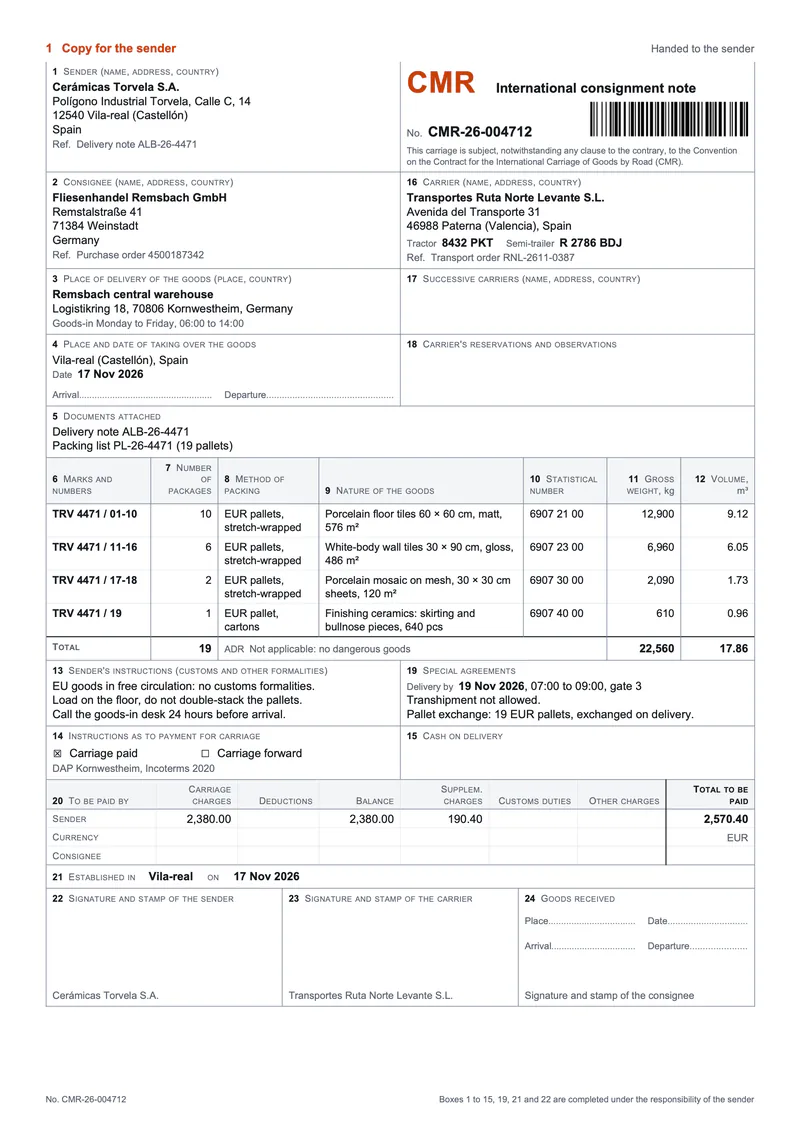
The CMR Convention (Geneva, 1956) governs the carriage of goods by road for reward when the place of taking over and the place of delivery are in two countries, at least one of them a party to it, and the consignment note confirms the contract of carriage. The shipper's transport team, or the forwarder, prints it at dispatch from the transport management system (TMS) or the warehouse management system (WMS), which already holds the parties, the vehicle, the pallets and the agreed charges. Your TMS sends the shipment to the Carbone API as JSON, and a DOCX template returns the note as a PDF, ready to print, sign and hand to the driver. In this example, Cerámicas Torvela ships 19 pallets of ceramic tiles from Vila-real, Spain, to a wholesaler's warehouse in Kornwestheim, Germany, with the carrier Transportes Ruta Norte Levante.
In this example, you will:
- Print the three original copies of the note, one page each, in one PDF
- List the goods and total the packages, the gross weight and the volume
- Fill the optional boxes only when they apply: cash on delivery, successive carriers
- Compute the charges of box 20 for the sender and the consignee
- Print the consignment note number as a Code 128 barcode
The boxes of the consignment note
The CMR Convention does not impose a form. Articles 5 to 7 set the copies, the particulars that the note must contain and who answers for them. The template follows the box numbering of the 1976 IRU model, in its own clean layout.
| Boxes | Content | CMR Convention | What Carbone does |
|---|---|---|---|
| 1, 2, 16 | Sender, consignee and carrier, with the tractor and semi-trailer plates | Article 6(1)(b), (c), (e) | Prints the names, the addresses and the references of the TMS |
| 3, 4 | Place of delivery, place and date of taking over | Article 6(1)(d) | Formats the date, leaves the arrival and departure times to the driver |
| 5 | Documents attached | Article 6(2)(g) | One line per document |
| 6 to 12 | Marks and numbers, packages, packing, nature of the goods, statistical number, gross weight, volume | Article 6(1)(f), (g), (h) | One row per goods line, then the totals |
| 13 | Sender's instructions for customs and other formalities | Article 6(1)(j) | One line per instruction |
| 14, 15 | Payment for carriage, cash on delivery | Article 6(2)(b), (c) | Checks the payment term, prints the cash on delivery amount only when there is one |
| 17, 18 | Successive carriers, carrier's reservations | Articles 8 and 34 | Lists the successive carriers, keeps box 18 blank for the driver |
| 19 | Special agreements: delivery date, transhipment, pallet exchange | Article 6(2)(a), (f) | Formats the agreed delivery date |
| 20 | Charges to be paid by the sender and the consignee | Article 6(1)(i) | Computes the balance and the total of each party |
| 21 to 24 | Place and date of issue, signatures of the sender, the carrier and the consignee | Articles 5 and 6(1)(a) | Prints the date of issue and the names under the signature boxes |
The statement that the carriage is subject to the Convention, required by Article 6(1)(k), sits under the title. Article 5 requires three original copies signed by the sender and the carrier: the first one for the sender, the second one travels with the goods, the third one stays with the carrier. Pre-printed IRU sets give each copy its own color; a printout on plain paper names the copy at the top of each page instead. The template prints the three copies in one PDF, and a fourth copy for administrative use is one more item in the data.
The PDF is a paper consignment note, printed and signed by hand. An electronic consignment note follows the e-CMR Additional Protocol of 20 February 2008, in force since 5 June 2011 between the countries that ratified it. In the EU, the eFTI Regulation (EU) 2020/1056 requires authorities to accept freight information made available on certified eFTI platforms from 9 July 2027, and it does not require carriers to stop using paper.
CMR consignment note example
Template
The DOCX template is a Word document with Carbone tags. The key tags:
| Where | Tag |
|---|---|
| First line of the page, opens the loop on the copies | {d.copies[i].number} {d.copies[i].name} {d.copies[i].role} |
| Box 1, sender | {d.sender.name} {d.sender.postcode} {d.sender.city} |
| Box 4, date of taking over | {d.takingOver.date:formatD('D MMM YYYY')} |
| Goods row | {d.goods[i].marks} {d.goods[i].statisticalNumber} {d.goods[i].grossWeight:formatN(0)} |
| Totals of boxes 7, 11 and 12 | {d.goods[].packages:aggSum} {d.goods[].grossWeight:aggSum:formatN(0)} {d.goods[].volume:aggSum:formatN(2)} |
| Box 15, cash on delivery | {d.cashOnDelivery.amount:formatN(2)} {d.cashOnDelivery.currency}{d.cashOnDelivery:ifEM:drop(p)} |
| Box 20, total of the sender | {$total(sender)} |
| Alt text of the barcode | {d.consignment.number:barcode(code128, includetext:false, height:12, scale:4)} |
| Last paragraph, closes the loop | {d.copies[i+1].number} |
JSON data
An excerpt; the data sample has every field of the note.
{
  "consignment": { "number": "CMR-26-004712", "establishedPlace": "Vila-real", "establishedDate": "2026-11-17" },
  "copies": [
    { "number": 1, "name": "Copy for the sender", "role": "Handed to the sender" },
    { "number": 2, "name": "Copy for the consignee", "role": "Accompanies the goods" },
    { "number": 3, "name": "Copy for the carrier", "role": "Retained by the carrier" }
  ],
  "carrier": { "name": "Transportes Ruta Norte Levante S.L.", "tractor": "8432 PKT", "trailer": "R 2786 BDJ" },
  "goods": [
    { "marks": "TRV 4471 / 01-10", "packages": 10, "packing": "EUR pallets, stretch-wrapped",
      "nature": "Porcelain floor tiles 60 × 60 cm, matt, 576 m²", "statisticalNumber": "6907 21 00",
      "grossWeight": 12900, "volume": 9.12 }
  ],
  "payment": { "terms": "paid", "incoterms": "DAP Kornwestheim, Incoterms 2020" },
  "cashOnDelivery": null,
  "successiveCarriers": [],
  "charges": {
    "currency": "EUR",
    "sender": { "carriage": 2380, "deductions": 0, "supplementary": 190.4, "customs": 0, "other": 0 },
    "consignee": { "carriage": 0, "deductions": 0, "supplementary": 0, "customs": 0, "other": 0 }
  }
}
How to create a CMR consignment note
1. Print one page per original copy
The whole form sits between {d.copies[i].number}, in the first paragraph of the page, and {d.copies[i+1].number}, in the last one. The first paragraph has Page break before, so Carbone prints one page per copy: the sender, the consignee and the carrier get the same note, and the copy line at the top names each copy and its role under Article 5. To print a fourth copy, add it to copies.
2. List the goods and total them
The goods table repeats its row with a loop on d.goods. It sits inside the loop on the copies, and Carbone repeats it on each page. The total row uses aggregators: {d.goods[].packages:aggSum} prints 19 packages, {d.goods[].grossWeight:aggSum:formatN(0)} prints 22,560 kg, and {d.goods[].volume:aggSum:formatN(2)} prints 17.86 m³. Boxes 5, 13 and 19 loop on arrays of strings, like {d.documents[i]}.
3. Fill the optional boxes only when they apply
- Box 15 ends with
{d.cashOnDelivery:ifEM:drop(p)}: whencashOnDeliveryis null, the smart condition removes the amount line and the box stays blank. - Box 17 loops on
d.successiveCarriers. The array is empty here, so the box is blank. With one carrier in the array, Carbone prints its name and address. - Box 14 checks the payment term with an inline condition:
{d.payment.terms:ifEQ(paid):show('☒'):elseShow('☐')}prints ☒ before Carriage paid, and the same tag withforwardprints ☐ before Carriage forward. - Box 18 has no tag: the driver writes the reservations on taking over the goods.
4. Compute the charges of box 20
Box 20 has one row for the sender and one for the consignee. Three parametrized aliases, written at the end of box 21, keep its cells short:
{#money($v) = d.charges.$v:ifGT(0):formatN(2):elseShow('')}
{#balance($p) = d.charges.$p.carriage:sub(.deductions):ifGT(0):formatN(2):elseShow('')}
{#total($p) = d.charges.$p.carriage:sub(.deductions):add(.supplementary):add(.customs):add(.other):ifGT(0):formatN(2):elseShow('')}
{$money(sender.carriage)} prints 2,380.00, {$total(sender)} adds the supplementary charges and prints 2,570.40, and a zero amount stays blank, like the whole consignee row here.
5. Print the number as a barcode and format the dates
The temporary picture in the title block has {d.consignment.number:barcode(code128, includetext:false, height:12, scale:4)} in its alt text. Carbone draws a Code 128 barcode that scanners read at loading and at delivery. Dates use :formatD('D MMM YYYY'), which prints 17 Nov 2026 with the en-gb language of this example.
Related Examples
Trusted by 800+ paid customers in 40+ countries