EU tyre label
Tyre labels with computed fuel, wet grip and noise classes
- Template
- SVG
- Export as
- PDF, PNG, SVG, WebP +24 more
- Carbone
- 5.18+
Generate EU tyre labels from your PIM
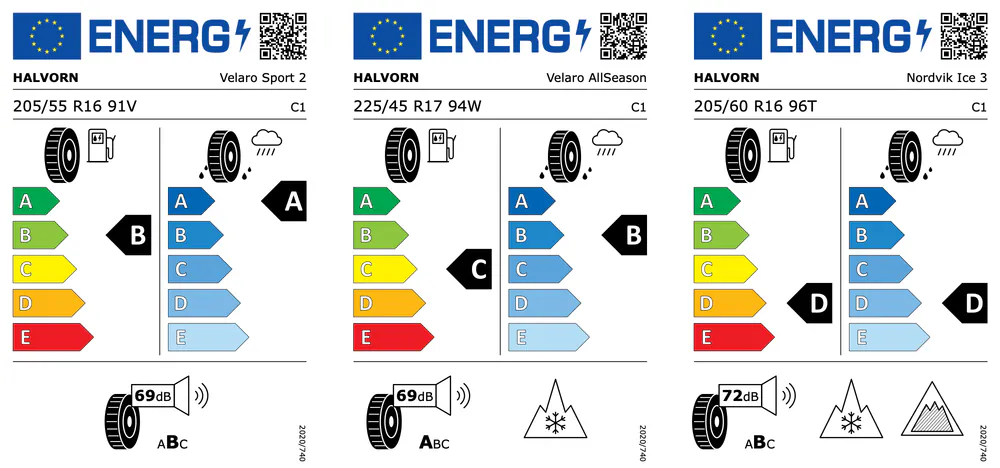
Tyre manufacturers and importers deliver every C1, C2 and C3 tyre sold in the EU with a label, as a sticker on the tread or as a printed label for each batch, under Regulation (EU) 2020/740. The same label goes to dealers as an electronic file, and the values behind it are registered in EPREL. Product teams keep the test results of each tyre type in their PIM or PLM: rolling resistance coefficient, wet grip index, external rolling noise, and the snow and ice grip results. Your software sends them to the Carbone API, and the SVG template returns one 75 x 110 mm label per tyre type, with the classes computed from the measured values. In this example, Halvorn, a fictional tyre maker, labels a summer tyre, an all-season tyre with the snow grip pictogram, and a Nordic winter tyre with the snow and ice grip pictograms.
In this example, you will:
- Compute the fuel efficiency and wet grip classes from the measured values, with the thresholds of the tyre class
- Compute the noise class from the noise value and its limit value
- Move each class arrow to its class
- Show the snow grip and ice grip pictograms only when the tyre qualifies, and rearrange the bottom of the label
- Print the EPREL QR code and the size designation of each tyre type
Label content
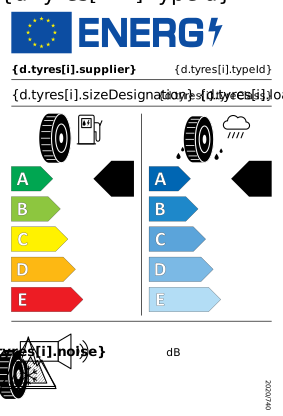
The label follows Annex II of the regulation, as corrected in October 2021: the content in point 1, the drawing and dimensions in point 2.1, the colors, typefaces and line weights in point 2.2.
| Part | Content | Rule |
|---|---|---|
| Header | EU flag, ENERG logo, QR code | Flag 16 x 11 mm, QR code 11 mm wide, 3 mm margins |
| Tyre | Supplier, tyre type identifier | Verdana Bold 8 pt and Verdana 8 pt, on one line |
| Size | Size designation, load index and speed symbol, tyre class | Verdana 10 pt, then C1, C2 or C3 in Verdana 8 pt, aligned to the right |
| Fuel efficiency | Classes A to E, from green to red | Arrows 6.5 mm high, 11 to 19 mm long, letters in Calibri Bold 15 pt |
| Wet grip | Classes A to E, in five blues | Same arrows as fuel efficiency |
| Classes | Black class arrows | 9.5 mm high, letter in Calibri Bold 20 pt, tip aligned with the tip of its class |
| Noise | External rolling noise in dB and classes A to C | dB value in Verdana Bold 10 pt, the class of the tyre in Verdana Bold 12 pt |
| Grip | Snow grip (3PMSF) and ice grip pictograms | Only for tyres that meet the minimum snow or ice grip index |
| Regulation | 2020/740 | Verdana 5 pt, vertical |
The classes come from Annex I. For a C1 tyre, the fuel efficiency class is A up to a rolling resistance coefficient of 6.5 N/kN, then B up to 7.7, C up to 9.0, D up to 10.5, and E above. The wet grip class is A from a wet grip index of 1.55, B from 1.40, C from 1.25, D from 1.10, and E below. C2 and C3 tyres have their own thresholds.
How to generate EU tyre labels from JSON
Follow these steps to build the tyre label template with Carbone:
1. Draw the label on a 75 x 110 mm artboard
- The
svgelement sets the size of the label:width="75mm" height="110mm" viewBox="0 0 212.598 311.811". One unit of the view box is one point, so the font sizes and line weights of Annex II are written as they are:font-size="8"for the supplier,stroke-width="0.5"for the dividers,0.8for the pictograms. - The flag, the ENERG logo, the scales and the pictograms never change: draw them once in your design tool. The Calibri letters of the scales and of the class arrows are paths, so the label prints the same on every server.
- The text uses Verdana, set once on the
svgelement. Verdana is available on Carbone Cloud. On premise, install it on the server.
2. Repeat the label for each tyre type
The whole label sits in a group that moves one label width to the right for each tyre type, with the loop index:
<g id="label" transform="translate({d.tyres[i].typeId:print(.i):mul(212.598)} 0)">A group with {d.tyres[i+1].typeId} after it closes the SVG loop. Step 7 prints each tyre type on its own page.
3. Compute the classes with the thresholds of the tyre class
Your PIM sends the measured values of each tyre type: rollingResistance in N/kN, wetGripIndex, noise in dB(A), noiseLimit, snowGrip and iceGrip, with its tyreClass. A comment at the top of the template stores the four thresholds of Annex I for the tyre class with :set, then computes the classes:
{d.tyres[].tyreClass:ifEQ('C1'):show(6.5):ifEQ('C2'):show(5.5):elseShow(4.0):set(.rrcA)}
...
{d.tyres[].rollingResistance:ifLTE(.rrcA):show('A'):ifLTE(.rrcB):show('B'):ifLTE(.rrcC):show('C'):ifLTE(.rrcD):show('D'):elseShow('E'):set(.fuelClass)}
{d.tyres[].wetGripIndex:ifGTE(.wetA):show('A'):ifGTE(.wetB):show('B'):ifGTE(.wetC):show('C'):ifGTE(.wetD):show('D'):elseShow('E'):set(.wetClass)}- The conditions compare each value with a threshold stored on the same tyre:
.rrcAis a dynamic parameter, read from the current item of the loop. A C1 tyre with a coefficient of 8.6 N/kN gets class C. - The wet grip thresholds work the same way, with
ifGTE, because a higher index is better.
4. Compute the noise class
The noise class compares the noise value with the limit value (LV) of the tyre, set by its size and category in UN Regulation No 117: A up to LV minus 3 dB, B up to LV, C above. The PIM keeps the limit value of each tyre type in noiseLimit:
{d.tyres[].noise:sub(.noiseLimit):ifLTE(-3):show('A'):ifLTE(0):show('B'):elseShow('C'):set(.noiseClass)}The class of the tyre prints in bold and larger than the other two: font-size="{d.tyres[i].noiseClass:ifEQ('B'):show(12):elseShow(8)}", and the same condition sets font-weight.
5. Move the class arrows
Each class arrow is drawn on the line of class A, and moves down 8 mm, 22.677 points, per class, so its tip stays on the tip of its class in the scale:
transform="translate(0 {d.tyres[i].fuelClass:ifEQ('A'):show(0):ifEQ('B'):show(22.677):ifEQ('C'):show(45.354):ifEQ('D'):show(68.031):elseShow(90.709)})"The defs element holds the Calibri letters fuel-A to fuel-E and wet-A to wet-E, and the arrow uses the letter of its class: <use xlink:href="#fuel-{d.tyres[i].fuelClass}"/>.
6. Show the snow and ice grip pictograms
display="{d.tyres[i].snowGrip:ifEQ(true):show('inline'):elseShow('none')}"shows the 3PMSF pictogram only for a tyre that meets the minimum snow grip index of UN Regulation No 117. The ice grip pictogram works the same way withiceGrip.- The bottom of the label has three layouts: the noise pictogram alone and centered, with one grip pictogram, or with both. The template counts the grip pictograms with
{d.tyres[].snowCount:add(.iceCount):set(.extraPictograms)}, and each pictogram moves withtransform="translate({d.tyres[i].extraPictograms:ifEQ(0):show(72.283):ifEQ(1):show(19.843):elseShow(9.921)} 0)".
7. Add the QR code and print every label
- The QR code links to the public EPREL page of the tyre type,
https://eprel.ec.europa.eu/qr/followed by its registration number. Your software sends it as an SVG data URI inqrCode, displayed by an image:<image x="172.913" y="8.504" width="31.181" height="31.181" xlink:href="{d.tyres[i].qrCode}"/>. The QR codes of this example encode links on the reservedeprel.exampledomain. - Send all the tyre types in one request with the batch options,
"batchSplitBy": "d.tyres"and"batchOutput": "pdf", with"convertTo": "pdf"and"converter": "C". Carbone returns one PDF with one label per page, at 75 x 110 mm, ready for the label printer. - For the electronic label of a dealer's online shop, send one tyre type and ask for a PNG. See Convert SVG to PNG or PDF.
SVG templates require Carbone v5. The conversion of an SVG to PDF with Chrome requires Carbone v5.17.0 or later.
Related Examples
Trusted by 800+ paid customers in 40+ countries