Fill an existing PDF form
Visa applications or tax returns, with every field completed
- Template
- Export as
- Carbone
- 5.0+
Fill PDF forms from your software
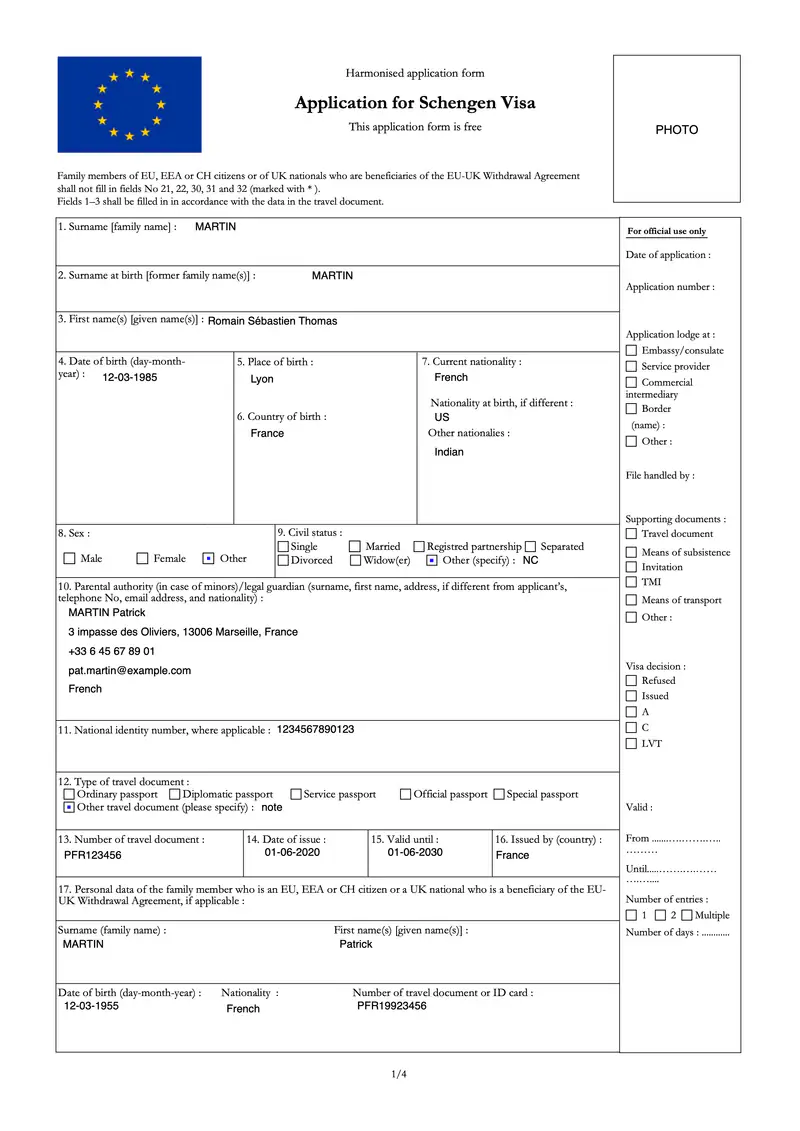
Government, insurance and HR forms, such as visa applications or tax returns, are often published as fillable PDFs (AcroForms) whose layout must not change. Your application sends the data to the Carbone API as JSON, with the PDF as the template, and gets back the same PDF with its text fields filled and its checkboxes ticked, still fillable. Here, the harmonised Schengen visa application form is used as-is as a PDF template.
| Your form | Example to follow |
|---|---|
| A PDF with form fields (AcroForm) | This page |
| A flat PDF, without form fields | Fill a flat PDF form |
| A new form that you design | Prefilled PDF form |
In this example, you will:
- Use an existing fillable PDF as a template
- Fill text fields with Carbone tags
- Tick checkboxes with comments and conditions
How to fill an existing PDF form programmatically
Follow these steps to fill an existing PDF form with Carbone:
1. Open the Form in a PDF Editor
Open the PDF form in Adobe Acrobat, or in another editor that supports form fields. There is no layout to create: the form already contains its text fields and checkboxes.
2. Type Tags in the Text Fields
Insert a Carbone tag in each text field: open the field Properties, and in the Options tab, type the tag in Default Value, for example {d.lastName}.
A field can combine several tags, for example {d.guardian.surname} {d.guardian.firstName}.
The "Other (specify)" fields are filled only when the matching option is selected, with the :ifEQ formatter:
{d.civilStatus:ifEQ(other):show(.otherCivilStatus):elseShow('')}3. Tick the Checkboxes with Comments
Add a Sticky Note comment on top of each checkbox, and type a Carbone tag ending with the :check formatter. The box is ticked when the condition is true, and Carbone removes the comment from the result:
- For a single value:
{d.sex:ifEQ(M):check} - For a value in a list, with the :ifIN formatter:
{d.appSupportMeans:ifIN('cash'):check}ticks the box whenappSupportMeanscontainscash - For several values, with the :or formatter:
{d.journeyPurpose:ifIN(family):or:ifIN(friend):check}
Tip: the comment must overlap the checkbox, otherwise Carbone returns an error. To place the tag anywhere in the PDF, target the field by its name with :checkField.
PDF templates require Carbone v5. To see the filled fields in Studio, turn off the embedded PDF viewer in Preview options.
Save the PDF template, connect it to your JSON data, and let Carbone fill your PDF forms automatically.
Related Examples
Check out these similar templates to learn more:
Trusted by 800+ paid customers in 40+ countries