13-week cash flow forecast
Weekly receipts, disbursements and liquidity in a live Excel grid
- Template
- XLSX
- Export as
- XLSX, PDF, ODS, CSV, HTML +19 more
- Carbone
- 5.18+
Generate 13-week cash flow forecasts from your ERP and treasury system
Corporate treasury rebuilds the 13-week cash flow forecast every week. The receipts come from the AR aging of the ERP, the disbursements from the AP payment runs, the payroll calendar and the debt schedule, and the bank balance and revolver availability from the treasury management system. The CFO uses it to plan liquidity, and lenders often ask for it every week under a credit agreement. It stays in Excel because analysts and lenders rework the numbers.
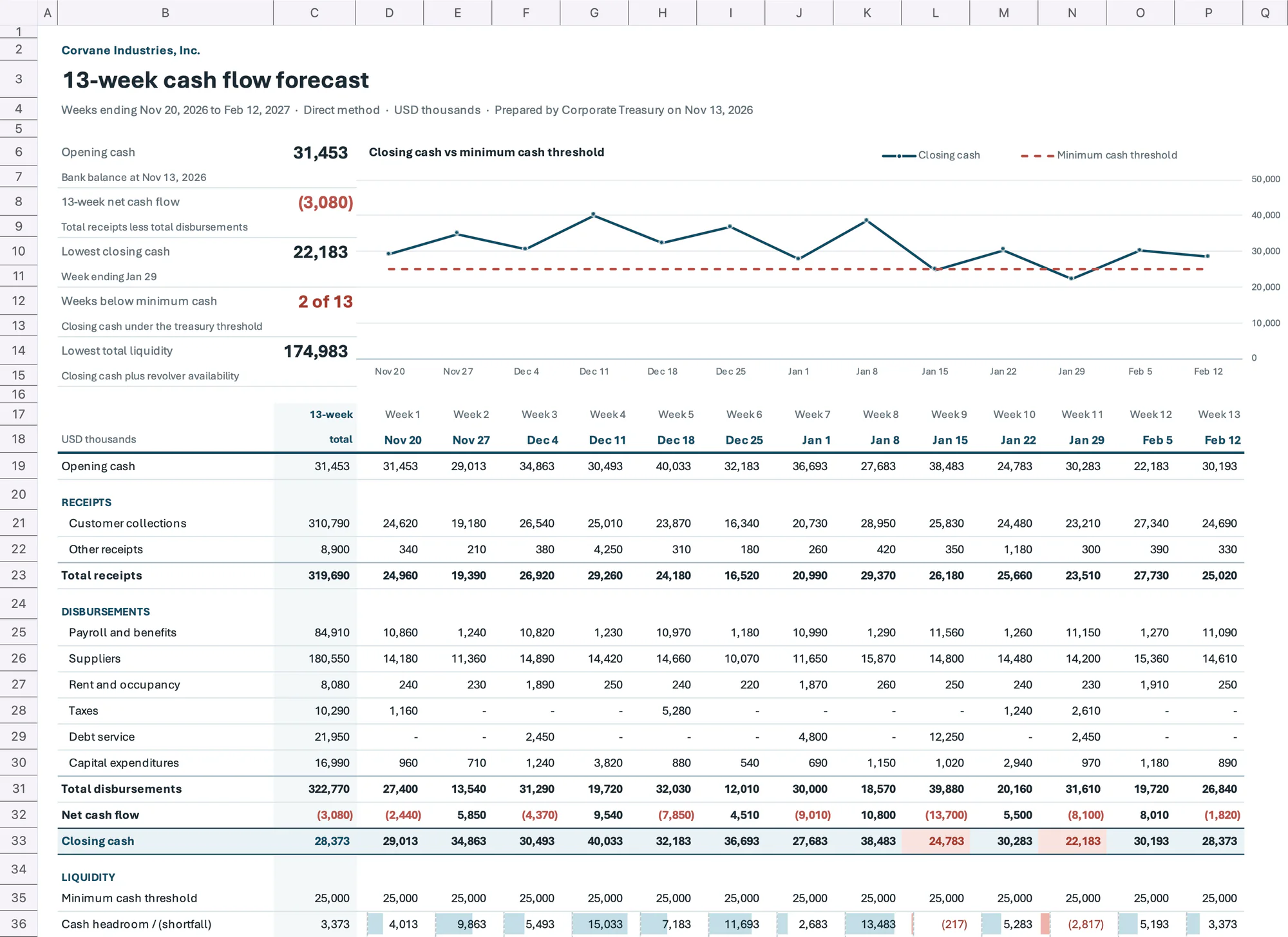
Your system sends the forecast to the Carbone API as JSON and gets back a live workbook: the totals, the cash roll-forward and the liquidity lines are Excel formulas. In this example, Corvane Industries, a fictional manufacturer, forecasts the 13 weeks ending February 12, 2027, in USD thousands.
In this example, you will:
- Create one column per week with a horizontal loop
- Fill the receipt and disbursement lines with bi-directional loops
- Roll the closing cash of each week into the opening cash of the next with Excel formulas
- Flag the weeks under the minimum cash threshold with conditional formatting
- Test the total liquidity against the minimum liquidity covenant
- Chart the closing cash against the threshold with a native Excel chart
- Compare last week's actuals with the forecast on a second sheet
How to build a 13-week cash flow forecast in Excel
1. Create one column per week
The forecast follows the direct method: cash receipts and disbursements, week by week, with weeks ending on Friday. The week columns come from a horizontal loop on d.weeks:
D17: {d.weeks[i].number:formatN}                      E17: {d.weeks[i+1]}
D18: {d.weeks[i].weekEnding:formatD('MMM D')}         E18: {d.weeks[i+1]}
Carbone writes the 13 weeks in columns D to P. The number format "Week "0 prints Week 1, and :formatD prints Nov 20. Each row of a horizontal loop needs its own [i+1] tag.
The title cell B3 ends with {o.preReleaseFeatureIn=5018000}. The tag prints nothing, and it makes the formulas, the conditional formatting and the chart follow the rows added by the loops.
2. Fill the receipts and the disbursements
Each line is a bi-directional loop: one row per line, one cell per week.
B21: {d.receipts[i].category}
C21: =SUM(D21:P21)
D21: {d.receipts[i].weeks[i].amount:formatN}
E21: {d.receipts[i].weeks[i+1].amount:formatN}
B22: {d.receipts[i+1].category}
Rows 25 and 26 do the same with d.disbursements: payroll and benefits, suppliers, rent and occupancy, taxes, debt service and capital expenditures. Disbursements are positive amounts, deducted from the receipts.
:formatNwrites native numbers. The JSON carries US dollars, and the cell format#,##0,_);(#,##0,);"-"_)shows them in thousands: the comma after the last zero divides by 1,000.- The 13-week total is in column C, before the weeks: the cells at the right of a horizontal loop move right when Carbone adds the week columns.
3. Roll the cash forward with Excel formulas
A 13-week forecast always has 13 columns, so the computed rows are typed once in columns D to P:
| Row | Week 1 (column D) | Next weeks |
|---|---|---|
| Opening cash | {d.openingCash:formatN} |
=D29 (closing cash of the previous week) |
| Total receipts | =SUM(D21:D22) |
same formula per column |
| Total disbursements | =SUM(D25:D26) |
same formula per column |
| Net cash flow | =D23-D27 |
same formula per column |
| Closing cash | =D19+D28 |
same formula per column |
| Cash headroom / (shortfall) | =D29-D31 |
same formula per column |
| Total liquidity | =D29+D33 |
same formula per column |
| Covenant headroom / (shortfall) | =D34-D35 |
same formula per column |
The minimum cash threshold, the revolver availability and the minimum liquidity covenant are horizontal loops on d.weeks, like {d.weeks[i].revolverAvailability:formatN}.
Carbone updates the formulas to the rows of the report: with six disbursement lines, =SUM(D25:D26) becomes =SUM(D25:D30) and the closing cash moves to row 33. Change an amount in Excel and every closing balance updates.
4. Flag the weeks under the threshold
The conditional formatting rules cover the 13 week columns:
- Closing cash, D29:P29: the formula
=D29<D31fills the weeks under the minimum cash threshold in red. - Net cash flow, C28:P28: negative flows in muted red.
- Cash headroom, D32:P32: data bars, red under zero.
The key figures at the top are formulas too: =MIN(D29:P29) for the lowest closing cash, =IFERROR("Week ending "&INDEX(D18:P18,MATCH(C10,D29:P29,0)),"") for its week, and =COUNTIF(D32:P32,"<0") with the format 0" of 13" for the weeks below the minimum.
5. Chart the closing cash against the threshold
The native line chart has two series, the closing cash D29:P29 and the minimum cash threshold D31:P31, with the week endings D18:P18 as categories. It sits in rows 6 to 15, above the loops. Its plot area spans columns D to P and the value axis is on the right, over column Q, so each point stands above its week. Carbone points the series to the rows of the report.
6. Compare last week's actuals with the forecast
The Variance sheet lists the same lines with vertical loops, like {d.disbursements[i].priorWeek.forecast:formatN} and {d.disbursements[i].priorWeek.actual:formatN}. A positive variance means more cash than forecast: =D9-C9 for the receipts, =C13-D13 for the disbursements. The last row checks that the actual closing cash of last week equals the opening cash of the forecast: =ROUND(D17-Forecast!D19,2) returns 0.
7. Set up the lender package
The Forecast sheet freezes the panes at D19, so the labels, the 13-week total and the week headers stay visible. It prints in landscape on one page wide, with rows 17 and 18 repeated, {d.company} in the header and "Page &P of &N" in the footer.
Save the XLSX template, send your JSON data, and let Carbone generate the 13-week cash flow forecast every week.
Related Examples
Trusted by 800+ paid customers in 40+ countries