Bank statement (expert)
Generate a complete bank statement with Carbone
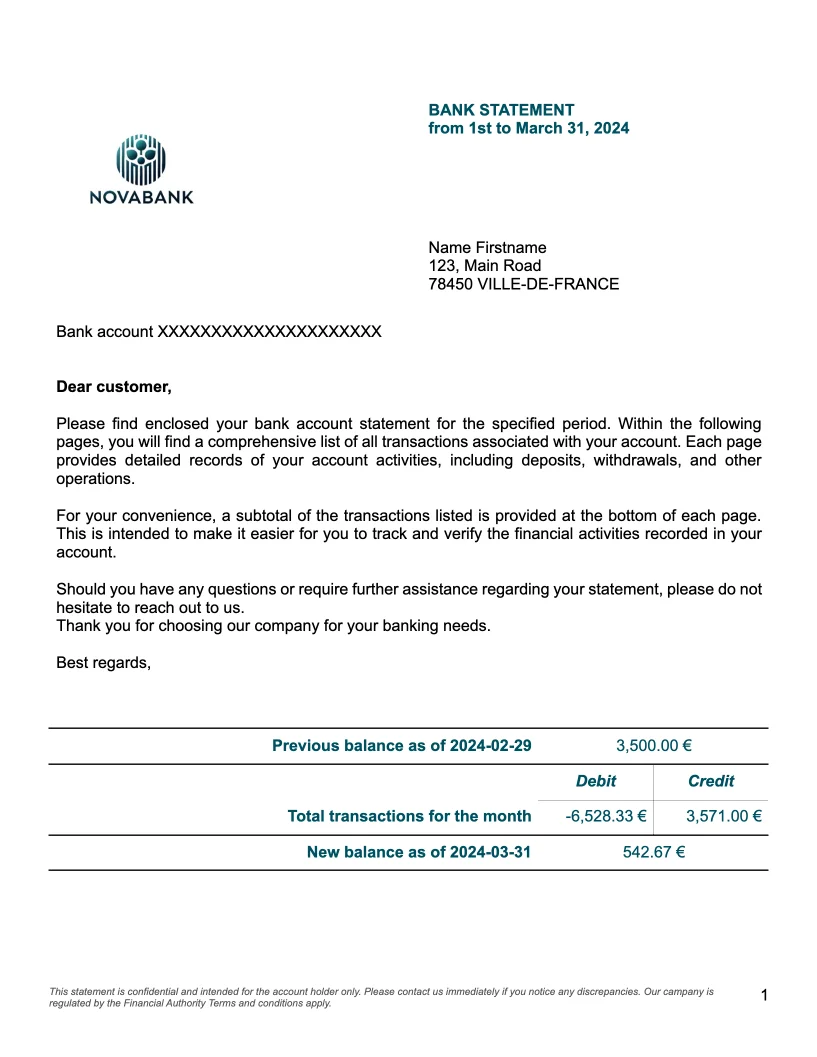
- Template type document docx expert
- Carbone min. v5.0.0+
- Features loop set count aggregator pagination subtotal
- Target bank insurance quote
Overview
This example shows how to generate a professional bank statement that includes:
- Multiple transactions spread across multiple pages
- Automatic calculation of intermediate balance per page
- Dynamic handling of varying transaction lengths
Step-by-Step Guide
The main challenge is to handle transactions of different lengths and display them correctly across multiple pages. Here's how to implement this using Carbone:
1. Organizing Data by Page
First, define your layout constraints:
- Characters per line (example:
45) - Lines per page (example:
35)
- Characters per line (example:
Calculate how many lines each transaction needs by following these steps:
Measure the transaction text length with the :len formatter
Divide it by characters per line (45) with the :div formatter
Round up to the next whole number with the :ceil formatter
Add 1 for line spacing with the :add formatter
Calculate running total with the :cumSum formatter
Store result in
nbLinenew variable with the :set formatter (v5 feature)Formula:
{d.operations[].transaction:len:div(45):ceil:add(1):cumSum:set(.nbLine)}
Calculate which page each transaction belongs to by following these steps:
Take the line count
Divide by maximum lines per page (35) with the :div formatter
Round up to get the page number with the :ceil formatter
Store result in
numPagenew variable with the :set formatter (v5 feature)Formula:
{d.operations[].nbLine:div(35):ceil:set(.numPage)}
Group transactions by page number with the :set formatter (v5 feature):
{d.operations[]:set(d.group[id=.numPage].data[])}Use the new structure in your template:
{d.group[i].data[i].transaction}
Data Structure Example
Before processing:
```json
{
  "operations": [
    {
      "transaction": "School fees payment - Sunshine High School for March tuition",
      "amount": -300
    },
    {...},
    {
      "transaction": "Doctor's consultation fee - CARDIO HOSPITAL - AVENUE DES CHAMPS ELYSEES - 85000 PARIS - SS284591478D21784512",
      "amount": -80
    }
  ]
}
```

After processing:
```json
{
  "operations": [
    ...
  ],
  "group":[
    {
      "data": [
      {
        "transaction": "School fees payment - Sunshine High School for March tuition",
        "amount": -300,
        "nbLine": 3,
        "numPage": 1
      },
      {...}
      ]
    },
    {
      "data": [
      {
        "transaction": "Doctor's consultation fee - CARDIO HOSPITAL - AVENUE DES CHAMPS ELYSEES - 85000 PARIS - SS284591478D21784512",
        "amount": -80,
        "nbLine": 41,
        "numPage": 2
      },
      {...}
      ]
    }
  ]
}
```
2. Calculating Financial Totals
For each page, calculate separate subtotals for debits and credits:
For debits (negative amounts):
For credits (positive amounts):
Calculate the running balance for each page:
{d.group[i].data[].amount:aggSum:cumSum:add(...open_bal):formatC}
Layout Tips
To ensure proper page breaks:
- Start each new page section with
{d.group[i]} - Configure Page Break settings in your template's Paragraph options
More Examples
Trusted by 800+ paid customers in 40+ countries