Fixed asset register
Depreciation schedule, class roll-forward and general ledger tie-out
- Template
- ODS
- Export as
- ODS, XLSX, PDF, CSV, HTML +19 more
- Carbone
- 5.18+
- Nested loop
- Filter
- Formula
- Conditional formatting
- Data bars
- Number format
- Date
- Multiple sheets
Generate the fixed asset register from your ERP
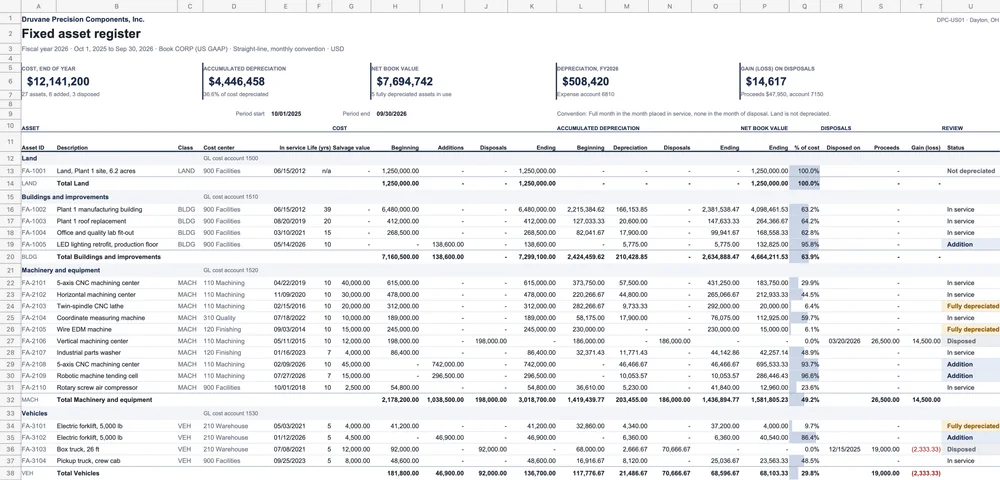
At every period end, the accounting team prints the fixed asset register from the fixed asset module of the ERP or from dedicated fixed asset software. The controller reviews it before the close, and the auditor ties it to the general ledger: beginning balances, additions, disposals, depreciation expense and ending balances, class by class. Your system sends the asset subledger to Carbone as JSON, and an ODS template returns a spreadsheet in which every computed amount is a formula, so the reviewer can trace each net book value back to its cost, salvage value and useful life.
In this example, Druvane Precision Components, a fictional machining company in Dayton, Ohio, closes fiscal year 2026 (October 1, 2025 to September 30, 2026). The register lists 27 assets in 6 classes, with 6 additions and 3 disposals. Book depreciation follows the structure of a US GAAP register under ASC 360: straight-line over the useful life, down to the salvage value, with a full month in the month placed in service and none in the month of disposal. Land is not depreciated. Tax depreciation (MACRS) is a separate book and is not part of this file.
In this example, you will:
- Group the assets by class with a nested loop, with a subtotal per class
- Write costs, lives and dates as native numbers
- Compute the depreciation schedule, the net book value and the gain or loss on disposal with formulas
- Flag fully depreciated assets and show the net book value as a data bar
- Build a roll-forward by class and tie it to the general ledger on a second sheet
How to build a fixed asset register
1. Repeat the classes and their assets
The register has one block per asset class: a header row, one row per asset and a subtotal row. A nested loop repeats the classes and the assets of each class:
{d.classes[i].name}                     GL cost account {d.classes[i].costAccount}
{d.classes[i].assets[i].id}  {d.classes[i].assets[i].description}  {d.classes[i].code}  {d.classes[i].assets[i].costCenter}
{d.classes[i].assets[i+1]}
{d.classes[i].code}  Total {d.classes[i].name}
{d.classes[i+1]}
Each asset row repeats the class code in column C. The subtotals and the roll-forward use this code to sum the assets of a class.
2. Write numbers and dates as native values
A cell becomes a native number with a single tag ending with :formatN, and the number format of the cell displays it: {d.classes[i].assets[i].openingCost:formatN} with #,##0.00;(#,##0.00);"-". A date becomes a spreadsheet date with the same rule: :formatD('X') gives the Unix time in seconds, and the math formatters turn it into a date serial number:
{d.classes[i].assets[i].inService:formatD('X'):div(86400):add(25569):round(0):formatN}The cell format mm/dd/yyyy displays it, and the formulas can compute months between dates. An asset that is not disposed has no disposal date: :ifGT(0):elseShow(0) writes 0, which the format [=0]"";mm/dd/yyyy hides (see inline conditions).
3. Compute the depreciation schedule with formulas
The JSON holds raw inputs only: cost, additions, salvage value, useful life, in-service date, disposal date and proceeds. In an ODS template, a formula keeps its cell addresses when Carbone repeats the row, so each formula points at its own row with INDEX(range, ROW()-11), where the register starts on row 12. The depreciation of the year, in column M, is the monthly amount times the months of service in the year, capped at the depreciable base:
=IF(life=0, 0, MIN(base - beginning AD, ROUND(base/(life*12) * months in the year, 2)))Columns J to P roll each asset forward: cost disposals, ending cost, beginning accumulated depreciation, depreciation, accumulated depreciation removed on disposal, ending accumulated depreciation and net book value. The gain or loss on disposal is the proceeds minus the net book value at disposal. Subtotals use SUMIFS on the class code of the rows above, so they cover every generated row.
4. Flag the assets a reviewer checks
Column U computes a status: Addition, Fully depreciated, Disposed or Not depreciated. A conditional format colors it, amber for a fully depreciated asset still in use, the first item an auditor asks about. A data bar shows the net book value as a percentage of cost, and losses on disposal print in red. The KPI block above the register sums the asset rows: ending cost, accumulated depreciation, net book value, depreciation expense and net gain on disposals.
5. Tie the roll-forward to the general ledger
The Roll-forward sheet loops over the classes twice. The cost table sums the register by class with SUMIFS: beginning balance plus additions minus disposals equals the ending balance, compared with the general ledger balance from the JSON. The accumulated depreciation table filters out land with {d.classes[i+1, depreciable=true]}. A last table ties the depreciation expense, the gain or loss on disposal, the ending cost and the net book value to their GL accounts, and every line prints "Agrees" or "Review".
Related Examples
Check out these similar templates to learn more:
Trusted by 800+ paid customers in 40+ countries