Form 1099-NEC recipient copies
Copy B and Copy 2 for each contractor, from AP data
- Template
- Export as
- Carbone
- 5.6+
Generate Form 1099-NEC recipient copies from your AP software
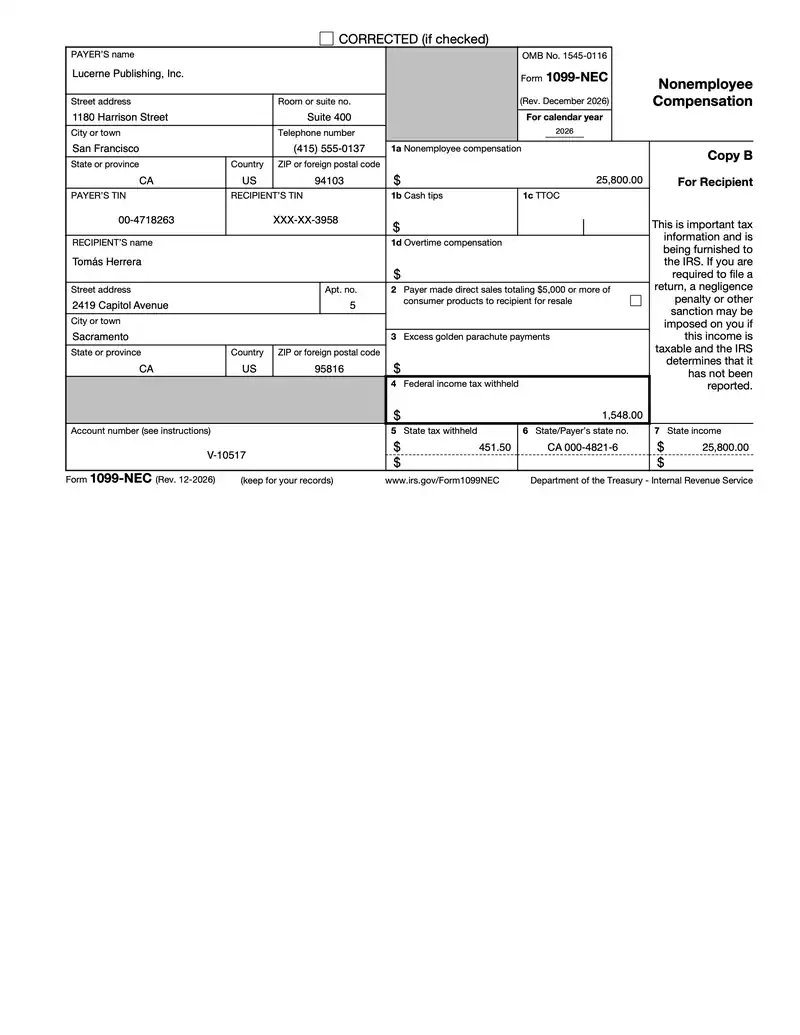
A US business that pays a contractor, a freelancer or a law firm $2,000 or more for services in 2026 reports the payments on Form 1099-NEC, and furnishes a copy to the recipient by February 1, 2027 (January 31 falls on a Sunday). Accounts payable, payroll and vendor management systems hold the payments and the Forms W-9: they send the totals of each contractor to the Carbone API as JSON, and get back the recipient copies on the official IRS form. Carbone generates the statements only: Copy A goes to the IRS through your filing system. In this example, Lucerne Publishing prepares the 2026 statements of three freelancers, and the result is the statement of Tomás Herrera, a copy editor.
In this example, you will:
- Use the official IRS PDF, Form 1099-NEC (Rev. December 2026), as a PDF template
- Target the fields of a government form by name
- Mask the recipient's TIN and format the amounts
- Leave the boxes that do not apply blank
- Generate one statement per contractor
Recipient copies only
The Form 1099-NEC PDF holds a notice, Copy A, Copy 1, Copy B, the instructions for the recipient and Copy 2. The IRS asks not to file a Copy A printed from this PDF, because only the official printed Copy A can be scanned, and allows Copy B and the other black copies to be printed to furnish the information to the recipient. The template keeps the recipient pages, and follows the rules of Publication 1179 for recipient statements and of Publication 1099.
| Rule | How the template follows it |
|---|---|
| Copy A is filed with the IRS, never furnished | The notice page, Copy A and Copy 1 are deleted. Each statement has 3 pages: Copy B, the Instructions for Recipient, then Copy 2, in the order of the official assembly |
| Recipient statements keep the wording of the official form | The form is untouched: Carbone fills its fields, and the result stays fillable |
| The recipient's TIN may be truncated on the statement, the payer's TIN never | XXX-XX-3958 for the recipient, 00-4718263 in full for the payer |
| The statement shows the telephone number of a person who can answer questions | (415) 555-0137 in the payer's block |
| Boxes that do not apply stay blank, without 0.00 | A null amount leaves the field empty |
| Up to two states in boxes 5 to 7 | Two state lines, filled from a list |
The TINs of the data can never be real: no Social Security number starts with 000 (SSA), and no EIN starts with 00 (IRS list of EIN prefixes).
Form 1099-NEC example
Template
The template is the IRS PDF with its fields, plus one text box of Carbone tags under Copy B and one under Copy 2. The key tags:
| Box | Tag in the text box under Copy B |
|---|---|
| Recipient's name | {d.recipient.name:fillField('topmostSubform[0].CopyB[0].LeftCol[0].f2_12[0]')} |
| Recipient's TIN | {d.recipient.tin:substr(-4):prepend('XXX-XX-'):fillField('topmostSubform[0].CopyB[0].LeftCol[0].f2_11[0]')} |
| 1a Nonemployee compensation | {d.nonemployeeCompensation:formatN(2):fillField('topmostSubform[0].CopyB[0].RightCol[0].f2_20[0]')} |
| 2 Direct sales checkbox | {d.directSales:ifEQ(true):checkField('topmostSubform[0].CopyB[0].RightCol[0].c1_3[0]')} |
| 4 Federal income tax withheld | {d.federalTaxWithheld:formatN(2):fillField('topmostSubform[0].CopyB[0].RightCol[0].f2_26[0]')} |
| 6 State/Payer's state no., first line | {d.states[0].payerStateNo:fillField('topmostSubform[0].CopyB[0].RightCol[0].Box6_ReadOrder[0].f2_29[0]')} |
JSON data
One request holds the statement of one contractor:
{
  "taxYear": "2026",
  "payer": {
    "name": "Lucerne Publishing, Inc.",
    "street": "1180 Harrison Street",
    "suite": "Suite 400",
    "city": "San Francisco",
    "phone": "(415) 555-0137",
    "state": "CA",
    "country": "US",
    "zip": "94103",
    "tin": "00-4718263"
  },
  "recipient": {
    "name": "Tomás Herrera",
    "street": "2419 Capitol Avenue",
    "apt": "5",
    "city": "Sacramento",
    "state": "CA",
    "country": "US",
    "zip": "95816",
    "tin": "000-61-3958"
  },
  "accountNumber": "V-10517",
  "nonemployeeCompensation": 25800,
  "cashTips": null,
  "ttoc": [],
  "overtimeCompensation": null,
  "directSales": false,
  "excessGoldenParachute": null,
  "federalTaxWithheld": 1548,
  "states": [
    { "payerStateNo": "CA 000-4821-6", "taxWithheld": 451.5, "income": 25800 }
  ]
}
Three contractors, three statements
| Recipient | Box 1a | Box 4 | Box 5 | Boxes 6 and 7 |
|---|---|---|---|---|
| Tomás Herrera, Sacramento, CA | 25,800.00 | 1,548.00 | 451.50 | CA 000-4821-6, 25,800.00 |
| Maya Okafor, Oakland, CA | 38,450.00 | CA 000-4821-6, 38,450.00 | ||
| Priya Natarajan, Reno, NV | 9,875.00 |
Tomás Herrera receives a monthly retainer of $2,150 and returned his Form W-9 in April, so the payments of January to March ($6,450) carry the 24% federal backup withholding and the 7% California backup withholding. Priya Natarajan works from Nevada for the publisher, so her statement has no California line.
How to fill Form 1099-NEC from JSON
1. Keep the recipient pages of the official form
Download Form 1099-NEC from IRS.gov. The December 2026 revision is the first one for calendar year 2026, and the year is a field of the form, filled by {d.taxYear}. In Acrobat, delete the notice page, Copy A and Copy 1 with Organize Pages: the PDF template keeps Copy B, the Instructions for Recipient printed on its back, and Copy 2.
2. Target each field by its name
The IRS names the fields by copy and by column: topmostSubform[0].CopyB[0].LeftCol[0].f2_12[0] is the recipient's name on Copy B, and Prepare a form in Acrobat shows these names. Under Copy B, a text box holds one tag per field, each ending with :fillField and the full name of its field:
{d.recipient.name:fillField('topmostSubform[0].CopyB[0].LeftCol[0].f2_12[0]')}Copy 2 has the same fields under Copy2[0], so its text box repeats the tags with these names. A label before each tag, like "RECIPIENT'S name", keeps the box readable. Carbone fills the fields and removes both text boxes from the result.
3. Print the TINs
{d.recipient.tin:substr(-4):prepend('XXX-XX-')} prints XXX-XX-3958: :substr(-4) keeps the last four digits, and :prepend adds the mask. The payer's TIN prints in full with {d.payer.tin}. Your system keeps the full TIN of the recipient for Copy A.
4. Format the amounts and leave the other boxes blank
{d.nonemployeeCompensation:formatN(2)}prints 25,800.00 with"lang": "en-us"in the request, after the $ sign of the form. See :formatN.- A box with a
nullamount stays empty: boxes 1b, 1d and 3 of Tomás Herrera. - Box 1c holds up to two occupation codes: :arrayJoin prints the first one with
{d.ttoc:arrayJoin('', 0, 1)}and{d.ttoc:arrayJoin('', 1, 1)}the second, from"ttoc": []. {d.directSales:ifEQ(true):checkField('topmostSubform[0].CopyB[0].RightCol[0].c1_3[0]')}checks box 2 only for direct sales of $5,000 or more. For a contractor,falseleaves it unchecked.
5. Report up to two states
Line 1 of boxes 5 to 7 reads d.states[0], line 2 reads d.states[1]. Box 6 takes the state code and the payer's state number, the EDD employer account number in California: "payerStateNo": "CA 000-4821-6". With "states": [], as for Priya Natarajan, boxes 5 to 7 stay blank.
6. Generate one statement per contractor
Send one render request per contractor, with the data of the contractor and "lang": "en-us", without convertTo: the template is already a PDF. Each response is the 3-page statement of one recipient.
- Post the statement on your supplier portal, or send it by email to the recipients who agreed to receive it electronically.
- To print and mail all the statements in one run, merge the PDFs with your PDF library.
PDF templates require Carbone v5. To see the filled fields in Studio, turn off the embedded PDF viewer in Preview options.
Related Examples
Trusted by 800+ paid customers in 40+ countries