Time and attendance record
Monthly timesheet with punches, overtime, exceptions and approvals
- Template
- DOCX
- Export as
- PDF, DOCX, ODT, HTML, PNG +25 more
- Carbone
- 5.18+
Generate timesheets from your time and attendance system
Time clocks, workforce management (WFM) platforms and payroll preparation tools close each period with a time and attendance record per employee. The employee attests the hours, the manager approves them, and payroll runs from the approved record. In the US, the Fair Labor Standards Act requires employers to keep the hours worked each workday and each workweek for nonexempt employees (29 CFR 516.2), and overtime is due for hours worked above 40 in a workweek (29 CFR 778.101).
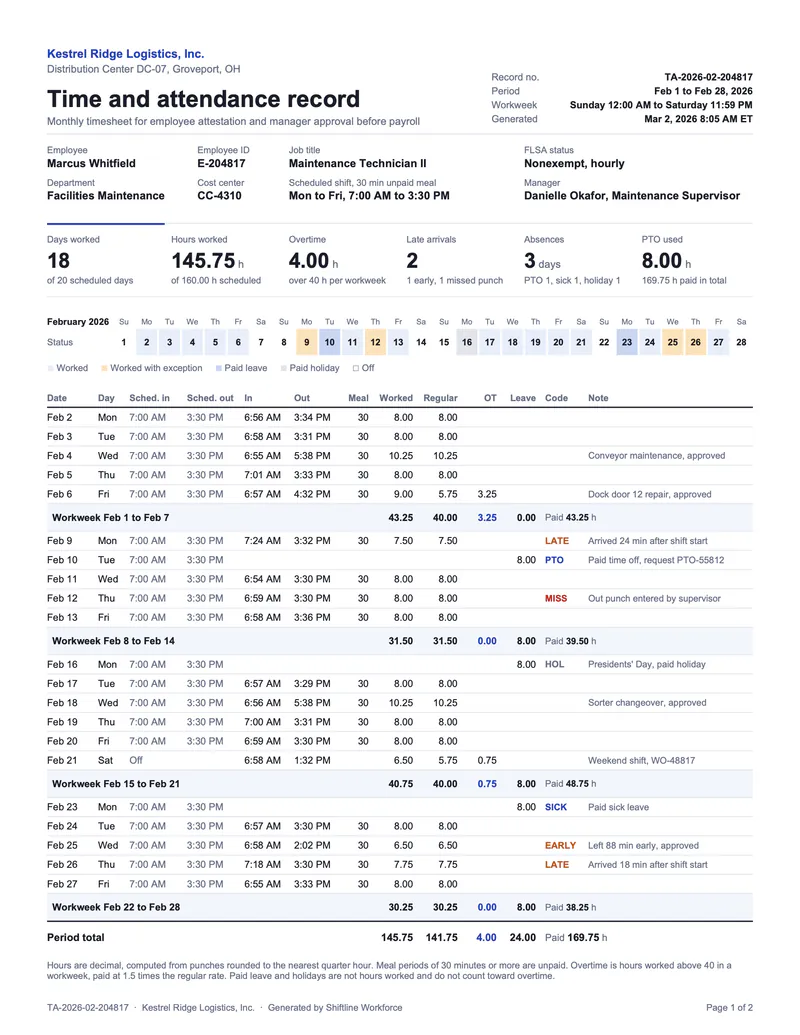
In this example, a fictional distribution center prints the February record of a maintenance technician: punches rounded to the quarter hour, unpaid meal periods, overtime per workweek, paid leave and holidays kept out of the overtime count, and exception codes for late arrivals, early leaves and missed punches. Your system sends the punches to the Carbone API as JSON, and the Word template computes every total.
In this example, you will:
- Repeat the days inside each workweek with a nested loop, and print a subtotal per workweek
- Count days and sum hours with aggregators and array filters
- Color the exception codes and a month calendar from the status of each day
Time and attendance record example
Template
The DOCX template is a Word document with Carbone tags. The key tags:
| Where | Tag |
|---|---|
| Day row | {d.weeks[i].days[i].date:formatD('MMM D')} {d.weeks[i].days[i].in} {d.weeks[i].days[i].out} |
| Hours of the day, blank when zero | {d.weeks[i].days[i].worked:formatN(2):ifEQ('0.00'):show('')} |
| Workweek subtotal | {d.weeks[i].days[].worked:aggSum:formatN(2)} |
| Days worked | {d.weeks[].days[worked>0].date:aggCount} |
| Late arrivals | {d.weeks[].days[code='LATE'].date:aggCount} |
| Total paid hours | {d.weeks[].days[].worked:add(.leave):aggSum:formatN(2)} |
| Calendar day | {d.calendar[i].date:formatD(D)} in a horizontal loop |
JSON data
An excerpt; the data sample has the 21 days of the period.
{
  "employee": { "name": "Marcus Whitfield", "id": "E-204817", "jobTitle": "Maintenance Technician II", "flsaStatus": "Nonexempt, hourly" },
  "period": { "start": "2026-02-01", "end": "2026-02-28", "workweek": "Sunday 12:00 AM to Saturday 11:59 PM" },
  "weeks": [
    {
      "start": "2026-02-01", "end": "2026-02-07",
      "days": [
        { "date": "2026-02-06", "schedIn": "7:00 AM", "schedOut": "3:30 PM", "scheduled": 8, "in": "6:57 AM", "out": "4:32 PM",
          "meal": 30, "worked": 9, "regular": 5.75, "overtime": 3.25, "leave": 0, "code": "", "status": "worked", "note": "Dock door 12 repair, approved" }
      ]
    }
  ],
  "calendar": [ { "date": "2026-02-01", "status": "off" }, { "date": "2026-02-02", "status": "worked" } ]
}
How to build a time and attendance record
1. Repeat the days inside each workweek
Overtime is counted per workweek, so the data groups the days by workweek. In the daily table, the day row repeats the days of the current week with a nested loop: {d.weeks[i].days[i].date:formatD('MMM D')}, {d.weeks[i].days[i].in}, {d.weeks[i].days[i].out}, and so on. The next row ends the day loop with {d.weeks[i].days[i+1]}.
Below it, the subtotal row prints Workweek {d.weeks[i].start:formatD('MMM D')} to {d.weeks[i].end:formatD('MMM D')} and sums the hours of the week with :aggSum: {d.weeks[i].days[].worked:aggSum:formatN(2)}. A last row, {d.weeks[i+1]}, ends the week loop.
Quote a date pattern that contains a space or a comma: formatD('MMM D, YYYY').
2. Count days and sum hours with array filters
The KPI strip and the period total use aggregators on all the days of all the weeks, reduced by array filters:
{d.weeks[].days[].worked:aggSum:formatN(2)}
{d.weeks[].days[worked>0].date:aggCount}
{d.weeks[].days[code='LATE'].date:aggCount}
{d.weeks[].days[code='PTO'].leave:aggSum:formatN(2)}
The total paid hours add the paid leave to the hours worked on each day before the sum: {d.weeks[].days[].worked:add(.leave):aggSum:formatN(2)}.
3. Hide zeros and color the exceptions
An empty cell reads better than 0.00 for a day without overtime: {d.weeks[i].days[i].overtime:formatN(2):ifEQ('0.00'):show('')}. A weekend day without a schedule prints Off with {d.weeks[i].days[i].schedIn:ifEM:show(Off)}.
The code cell takes its color from a switch case and the :color formatter: {d.weeks[i].days[i].code:ifEQ(MISS):show(#B42318):ifEQ(LATE):show(#B45309):ifEQ(EARLY):show(#B45309):ifEQ(HOL):show(#667085):elseShow(#1E40AF):color(p)}.
4. Draw the month calendar
The calendar strip is a table with a horizontal loop: {d.calendar[i].date:formatD(dd)} and {d.calendar[i].date:formatD(D)} in one column, {d.calendar[i+1]} in the next. The day cell colors its background from the status with :color(cell,background). Each generated column takes the width of the [i] column: size it for 28 to 31 days.
Save the DOCX template, connect it to your time and attendance data, and let Carbone generate one record per employee for each period.
Related Examples
Check out these similar templates to learn more:
Trusted by 800+ paid customers in 40+ countries