Certificate of completion
Learner, skills and a verification QR code, as a PDF
- Template
- DOCX
- Export as
- PDF, DOCX, ODT, HTML, PNG +25 more
- Carbone
- 5.18+
Generate certificates of completion from your LMS
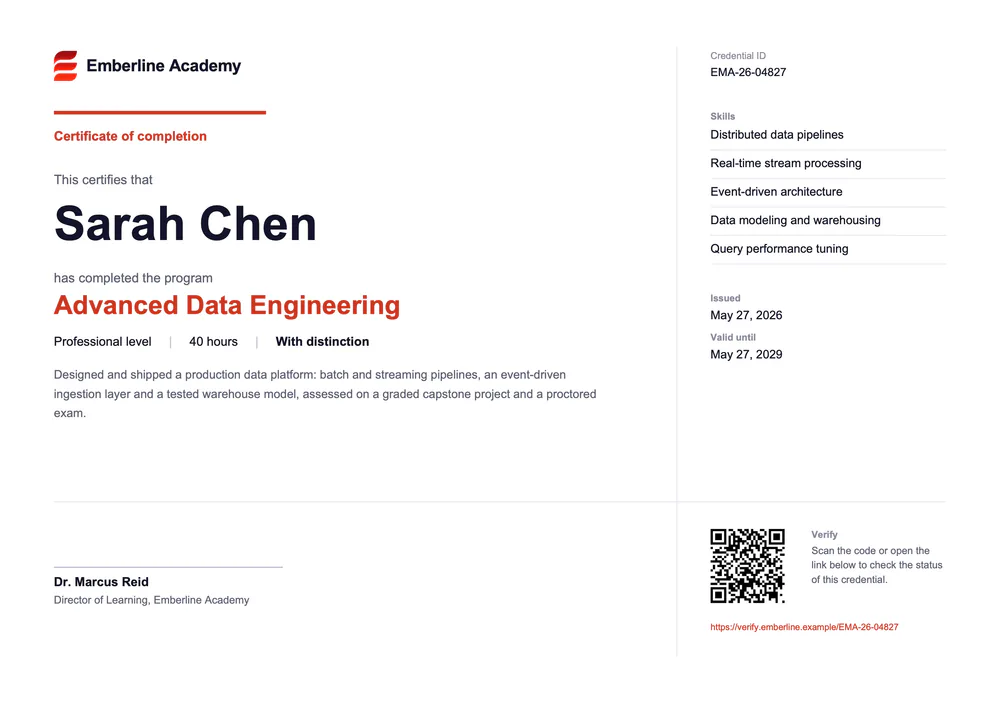
Learning platforms, corporate academies and training providers issue a certificate each time a learner completes a program. The LMS sends the learner and the credential to the Carbone API as JSON and gets back a PDF, ready to email or to download from the learner's profile. Like a digital badge, the certificate carries a credential ID and a verification link: anyone who scans the QR code can check that it is genuine. In this example, the fictional Emberline Academy certifies a professional program in data engineering.
In this example, you will:
- Print the learner and the credential with simple tags
- Repeat the list of skills with a loop
- Show "With distinction" with an inline condition
- Format the dates and generate the verification QR code
How to build a certificate of completion
1. Print the learner and the credential
In a landscape DOCX, a borderless table splits the page into a main column and a narrow side column. Write the tags where the values go: {d.learner.name}, {d.credential.title}, {d.credential.level} level, {d.credential.hours} hours and {d.credential.description}. Each value takes the font, size and color of its tag in Word.
2. Repeat the skills
The side column lists the skills with a loop: {d.skills[i].name} in a first paragraph, {d.skills[i+1].name} in the next one. Carbone prints one paragraph, with its hairline border, per skill of the array.
3. Show the distinction
An inline condition prints a word from the score: {d.credential.score:ifGTE(90):show('With distinction'):elseShow('Completed')}. With a score of 92, the certificate shows "With distinction".
4. Format the dates and add the QR code
- Format the dates with
{d.credential.issuedOn:formatD(LL)}and{d.credential.expiresOn:formatD(LL)}: "May 27, 2026" in English. - The QR code is a temporary picture with
{d.credential.verifyUrl:barcode(qrcode, scale:6, includetext:false)}in its alternative text. Carbone replaces the picture with a QR code of the verification link, also printed as text under it with{d.credential.verifyUrl}.
Save the template, send the JSON of each learner, and Carbone generates every certificate in the same layout.
Related Examples
Trusted by 800+ paid customers in 40+ countries