CMS-1500 claim form
The 1500 professional claim filled from your billing data
- Template
- Export as
- Carbone
- 5.18+
- PDF form
- Radio button
- Aggregation
- Condition
- Date format
- Text
Generate CMS-1500 claim forms from your medical billing software
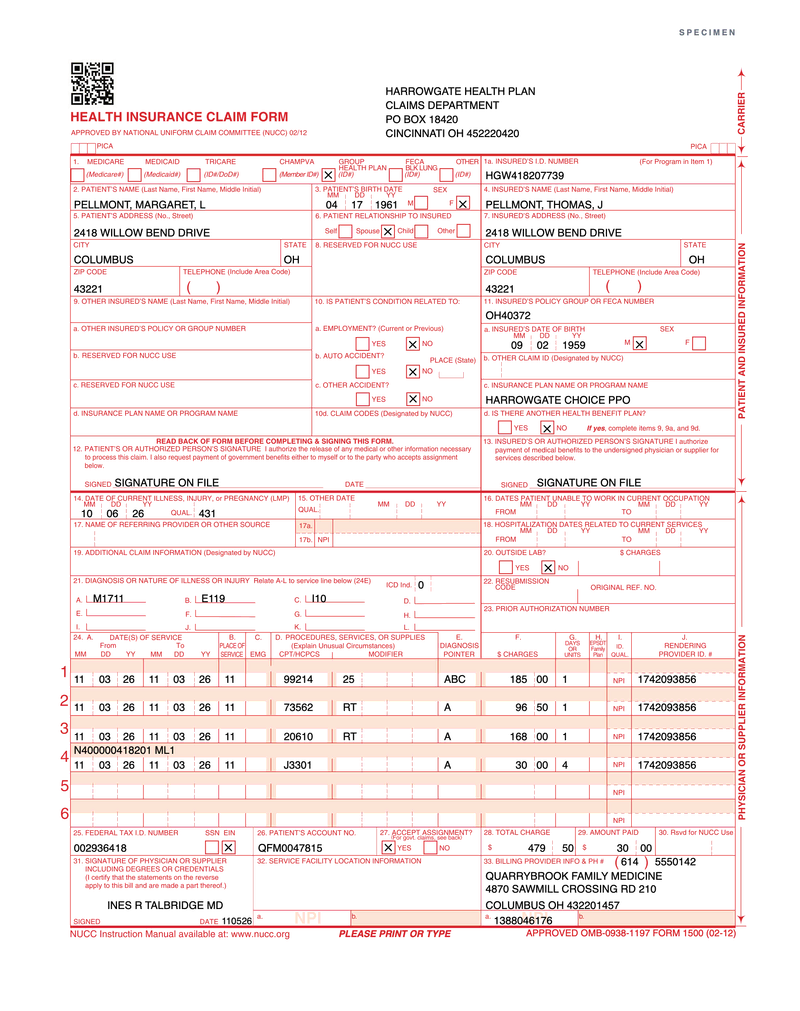
Physician practices, therapists, ambulance services and suppliers bill their professional services on the 1500 Health Insurance Claim Form, version 02/12, known as the CMS-1500. Practice management and medical billing systems hold the encounter: the patient, the coverage, the ICD-10-CM diagnoses and the CPT or HCPCS codes of each service. At the end of each billing run, they send each claim to the Carbone API as JSON, and get back the 1500 form, filled item by item. In this example, Quarrybrook Family Medicine bills Harrowgate Health Plan for a knee injection visit: an office visit, a knee X-ray, the injection and the drug.
In this example, you will:
- Use the official 1500 claim form PDF as a PDF template
- Fill the form fields with the tags typed in each field
- Mark the insurance type, the relationship and the YES or NO boxes from your data
- Print dates, codes and amounts in the formats of the NUCC instructions
- Compute the total charge of item 28 from the service lines
The 1500 form, item by item
The National Uniform Claim Committee maintains the form and its Reference Instruction Manual (version 13.0, July 2025), which defines the content and the format of every item. The template follows these instructions:
| Item | NUCC instruction | In the template |
|---|---|---|
| Carrier block | Payer name and address on up to 4 lines, at the top right | 4 fields, from d.payer |
| 2, 4 | Last name, first name and middle initial, separated by commas | PELLMONT, MARGARET, L |
| 3, 11a | 8-digit birth date (MM DD YYYY) and one sex box | 3 fields per date, one radio group |
| 21 | ICD indicator 0 for ICD-10-CM, up to 12 codes, without the decimal point | M17.11 in the data prints M1711 |
| 24A | 6-digit dates of service (MM DD YY) | 11 03 26 |
| 24D | CPT or HCPCS code and up to 4 modifiers, without description | 99214 with modifier 25 |
| 24E | Diagnosis pointers A to L, without commas | ABC |
| 24F, 28, 29 | Dollars right-justified, cents in their own area, no $ or commas | 479 and 50 |
| 24J | Rendering provider NPI on the unshaded line | 1742093856 |
| Shaded line of 24 | Supplemental information, such as the NDC of a drug | N400000418201 ML1 |
| 25 | Billing provider's tax ID, without hyphen, and one box: SSN or EIN | 002936418, EIN |
| 33, 33a | Billing provider name, address with a 9-digit ZIP code, phone, NPI | 3 lines, phone in the title area |
Medicare scans paper claims with OCR and accepts only the original form printed in red ink: CMS states that a copy of the downloaded form cannot be used to submit a claim. The result is the claim image that your system keeps with the encounter and attaches to an appeal or a review.
The identifiers of the data can never be real: the NPIs fail the check digit defined by CMS for the National Provider Identifier, no EIN starts with 00, the NDC has no labeler, and the phone number is in the 555-01xx range reserved for fiction.
CMS-1500 example
Template
The template is page 1 of the form published by CMS, without its SAMPLE watermark, with 185 text fields and 11 radio groups placed on the print grid of the NUCC manual, and a discreet SPECIMEN mark in the top margin. Each text field holds its tag:
| Item | Tag typed in the field |
|---|---|
| 2 Patient's name | {d.patient.lastName:upperCase}, {d.patient.firstName:upperCase}, {d.patient.middleInitial} |
| 3 Birth date, month | {d.patient.birthDate:formatD('MM')} |
| 21 Diagnosis A | {d.diagnoses[0].code:replace('.', '')} |
| 24A Line 1, from, year | {d.lines[0].from:formatD('YY')} |
| 24D Line 1, first modifier | {d.lines[0].modifiers[0]} |
| 24F Line 1, dollars | {d.lines[0].charge:floor} |
| 24F Line 1, cents | {d.lines[0].charge:formatN(2):substr(-2)} |
| 28 Total charge, dollars | {d.lines[].charge:aggSum:floor} |
A text box in the top margin fills the radio groups by name. Carbone removes it from the result:
{d.insuranceType:fillField('1_insurance_type')}
{d.patient.relationshipToInsured:fillField('6_relationship')}
{d.condition.employment:ifEQ(true):show(YES):elseShow(NO):fillField('10a_employment')}
{d.billingProvider.taxIdType:fillField('25_tax_id_type')}
{d.acceptAssignment:ifEQ(true):show(YES):elseShow(NO):fillField('27_accept_assignment')}
JSON data
One request holds one claim. An extract:
{
  "insuranceType": "group",
  "patient": {
    "lastName": "Pellmont",
    "firstName": "Margaret",
    "middleInitial": "L",
    "birthDate": "1961-04-17",
    "sex": "F",
    "relationshipToInsured": "spouse",
    "accountNumber": "QFM0047815"
  },
  "icdIndicator": "0",
  "diagnoses": [
    { "code": "M17.11" },
    { "code": "E11.9" },
    { "code": "I10" }
  ],
  "lines": [
    { "from": "2026-11-03", "to": "2026-11-03", "placeOfService": "11", "cpt": "99214", "modifiers": ["25"], "pointers": "ABC", "charge": 185.00, "units": 1, "renderingNpi": "1742093856" },
    { "from": "2026-11-03", "to": "2026-11-03", "placeOfService": "11", "cpt": "J3301", "modifiers": [], "pointers": "A", "charge": 30.00, "units": 4, "renderingNpi": "1742093856", "supplemental": "N400000418201 ML1" }
  ],
  "acceptAssignment": true,
  "amountPaid": 30.00
}
Four service lines, one total
| Line | 24D | 24E | 24F | 24G |
|---|---|---|---|---|
| 1 | 99214 25 | ABC | 185.00 | 1 |
| 2 | 73562 RT | A | 96.50 | 1 |
| 3 | 20610 RT | A | 168.00 | 1 |
| 4 | J3301 | A | 30.00 | 4 |
| 28 Total charge | 479.50 |
The office visit carries modifier 25, because the injection of line 3 is billed the same day. Line 4 bills 40 mg of triamcinolone acetonide as 4 units of 10 mg, with the NDC on the shaded line. Item 29 reports the $30.00 copay paid at the visit.
How to fill the CMS-1500 from JSON
1. Add fields to the official form
Download the 1500 form from CMS.gov. The PDF has no form fields: in Acrobat, use Prepare a form to add a text field on each item, a radio group on each set of boxes, and keep page 1. The NUCC manual gives the number of characters of every item: size each field to fit them. Give each field a name that starts with its item number, like 24F_dollars_1, so the tags stay readable.
2. Type a tag in each text field
Type the tag as the value of the field, as described in Write tags in the fields. Carbone replaces it with the value, and the field stays editable in the result:
- Names and addresses print in capitals with :upperCase.
- A date field holds one part of the date:
{d.patient.birthDate:formatD('YYYY')}prints 1961,{d.lines[0].from:formatD('YY')}prints 26. See :formatD, and send"timezone"with the time zone of the practice. {d.diagnoses[0].code:replace('.', '')}prints M1711 from M17.11: :replace removes the decimal point, as the NUCC asks.
3. Repeat the six service lines
Item 24 has six numbered lines, so line 1 reads d.lines[0], line 2 reads d.lines[1], up to d.lines[5]. A line with no data stays blank. The shaded line above each service line reads {d.lines[0].supplemental}, for an NDC or a narrative. A claim with more than six services continues on a second form, with the same diagnoses.
4. Split dollars and cents
The charge areas have a vertical line between dollars and cents. In each line, {d.lines[0].charge:floor} prints the dollars, and the field is right-aligned. {d.lines[0].charge:formatN(2):substr(-2)} prints the cents: :formatN(2) writes 96.50, and :substr(-2) keeps 50. A whole amount prints 00 in the cents area.
5. Compute the total charge
Item 28 is the total of all the charges in 24F. {d.lines[].charge:aggSum:floor} and {d.lines[].charge:aggSum:formatN(2):substr(-2)} compute it from the lines with :aggSum, so the total always matches the lines printed above.
6. Mark the boxes from your data
Each set of boxes is a radio group, so only one box can be marked, as the NUCC asks. The text box in the margin targets each group by name with :fillField:
- The data holds the name of the option:
"insuranceType": "group"marks Group Health Plan,"sex": "F"marks F. - For a boolean,
{d.condition.employment:ifEQ(true):show(YES):elseShow(NO):fillField('10a_employment')}marks YES or NO. See :show and :elseShow.
Send one render request per claim, with "lang": "en-us" and without convertTo: the template is already a PDF.
PDF templates require Carbone v5. To see the filled fields in Studio, turn off the embedded PDF viewer in Preview options.
Related Examples
Trusted by 800+ paid customers in 40+ countries