Airline boarding pass
The check-in document your reservation system prints for each flight
- Template
- DOCX
- Export as
- PDF, DOCX, ODT, HTML, PNG +25 more
- Carbone
- 5.0+
Generate boarding passes from your airline reservation system
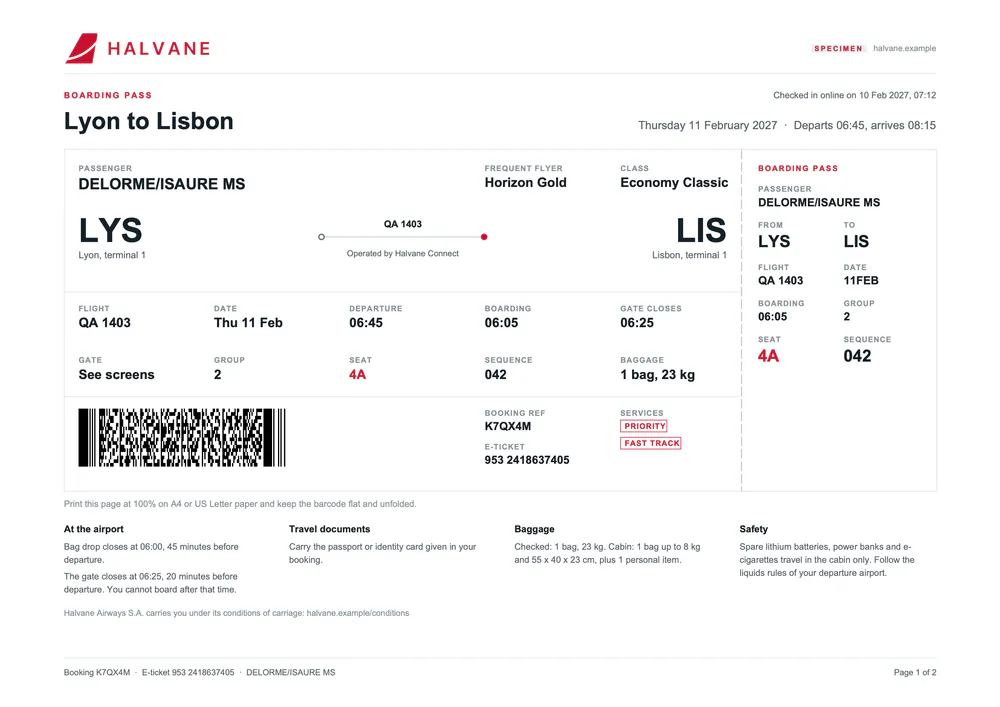
When a passenger checks in online, at a kiosk or at the counter, the departure control system of the airline issues one boarding pass per passenger and per flight. The gate agent checks the name, the flight, the date, the seat, the boarding group and the boarding time, and the scanners at security and at the gate read the barcode. That barcode follows IATA Resolution 792, the Bar Coded Boarding Pass (BCBP) standard: a fixed-width string printed as a PDF417 symbol on paper boarding passes. Your airline reservation system or check-in platform sends the boarding passes to the Carbone API as JSON and gets back a PDF to print or attach to the check-in email.
In this example, Isaure Delorme, who booked a Halvane Airways flight e-ticket from Lyon to Boston, checks in online the day before her departure. She gets two boarding passes, one for each flight of the outbound journey, on one landscape page each: the main pass and the stub side by side. Halvane Airways is fictional: its airline code QA and its ticket prefix 953 do not appear in IATA's public airline lists, the header carries a specimen tag, and the web address uses the .example domain.
In this example, you will:
- Print one page per boarding pass with a loop
- Build the BCBP string of each pass from the data with
:padl,:padr,:appendand:set - Compute the Julian date of the flight with date formatters
- Draw the PDF417 barcode from that string
- Show "See screens" when the gate is not assigned yet, and remove the marks and notices that do not apply
What the barcode contains
The PDF417 barcode encodes one flight leg, in the fields and widths of Resolution 792. Text fields are padded with spaces on the right, numbers with zeros on the left.
| Part | Fields | Example |
|---|---|---|
| Mandatory items, 60 characters | Format code, number of legs, passenger name (20), electronic ticket indicator, booking reference (7), from and to airports, operating carrier (3), flight number (5), Julian date of the flight, compartment code, seat (4), check-in sequence number (5), passenger status, size of the conditional section in hexadecimal | M1DELORME/ISAURE MS EK7QX4M LYSLISQA 1403 042Y004A0042 148 |
| Conditional items, unique | Version number, passenger description, source of check-in and of boarding pass issuance, issue date of the boarding pass, document type, issuer, baggage tag numbers | >6180WW7041BQA and 13 spaces: no bags tagged yet at online check-in |
| Conditional items, repeated for each leg | Airline numeric code and ticket number, selectee indicator, document verification, marketing carrier, frequent flyer airline and number, ID/AD indicator, free baggage allowance, fast track | 2A9532418637405 0QA QA 418205773 1PCY |
The ticket number in the barcode, 953 2418637405, is the number printed on the e-ticket. On the Lisbon to Boston pass, the selectee indicator is set to 0, as Resolution 792 requires for travel to the United States, and the document verification field to 1: the passenger must have her passport and ESTA checked at a transfer desk, which the pass also says in words.
How to build the boarding pass template
1. Repeat one page per boarding pass
- Write
{d.boardingPasses[i]}in the first paragraph of the page, next to the "Boarding pass" title, and set the paragraph to Page break before in Word. Each boarding pass then starts on a new page. - A last paragraph with
{d.boardingPasses[i+1]}, after the conditions of carriage, closes the loop. Carbone removes it. - The passenger, the booking and the e-ticket are outside the array, so each page reads them with their full path, like
{d.passenger.name}or{d.booking.pnr}.
2. Build the BCBP string with :set
The first paragraph also holds the tags that build the barcode data. :set stores each value without printing anything, and the next tags reuse it:
{d.booking.pnr:padr(7):set(c.pnr)}
{d.boardingPasses[].flightNumber:padl(4, '0'):padr(5):set(.bcFlight)}
{d.boardingPasses[].seat:padl(4, '0'):set(.bcSeat)}
{d.boardingPasses[].sequence:padl(4, '0'):padr(5):set(.bcSeq)}- :padl and :padr give each field its fixed width: flight 217 becomes
0217, seat 4A becomes004A. c.pnrstores a value shared by all passes in the complement object.d.boardingPasses[]runs the tag once for each pass, and.bcFlightstores the result in the pass itself.- The Julian date is the number of the day in the year. :startOfD and :diffD compute it:
{d.boardingPasses[].date:startOfD('year'):diffD(.date, 'days'):add(1):padl(3, '0'):set(.bcDay)}stores 042 for 11 February.
A last tag chains the fields in their order with :append and stores the full string in .bcbp:
{d.boardingPasses[].seat:print(..passenger.name):padr(20):substr(0, 20):prepend('M1'):append('E'):append(c.pnr):append(.from.code):append(.to.code) ... :set(.bcbp)}:print(..passenger.name)replaces the seat with the passenger name, read from the parent object, then:padr(20):substr(0, 20)sets it to 20 characters.- The sizes of the conditional sections,
48,18and2A, are fixed text: every field of these sections has a fixed width.
3. Draw the PDF417 barcode
Insert a temporary image where the barcode goes, right-click it, select View Alt Text and write:
{d.boardingPasses[i].bcbp:barcode(pdf417, scale:3)}The :barcode formatter replaces the image with the PDF417 symbol. The temporary image is 61 x 20 mm, within the range of barcode sizes recommended by the IATA implementation guide.
4. Print the gate and the marks that apply
- At online check-in, the gate is often not assigned yet:
{d.boardingPasses[i].gate:ifEM:show('See screens'):elseShow(.gate)}prints See screens until your system sends a gate. See inline conditions. - The Priority and Fast Track marks each sit in their own paragraph:
{d.passenger.fastTrack:ifNE('Y'):drop(p)}removes the mark for a passenger without fast track. See :drop. - In the travel documents column,
{d.boardingPasses[i].documentCheck:ifNE('1'):drop(p)}keeps the document check notice on the Boston pass only, and the first flight prints the general reminder instead. {d.boardingPasses[i].date:formatD('DDMMM'):upperCase}prints the airline date 11FEB on the stub.
Save the DOCX template, send it with the JSON of the boarding passes and "convertTo": "pdf", and Carbone returns one landscape page per boarding pass.
Related Examples
Check out these similar templates to learn more:
Trusted by 800+ paid customers in 40+ countries