DPE energy performance certificate
French energy certificates with the double label, from your diagnostic software
- Template
- HTML
- Export as
- PDF, HTML, PNG, WebP +7 more
- Carbone
- 5.18+
Generate DPE certificates from your diagnostic software
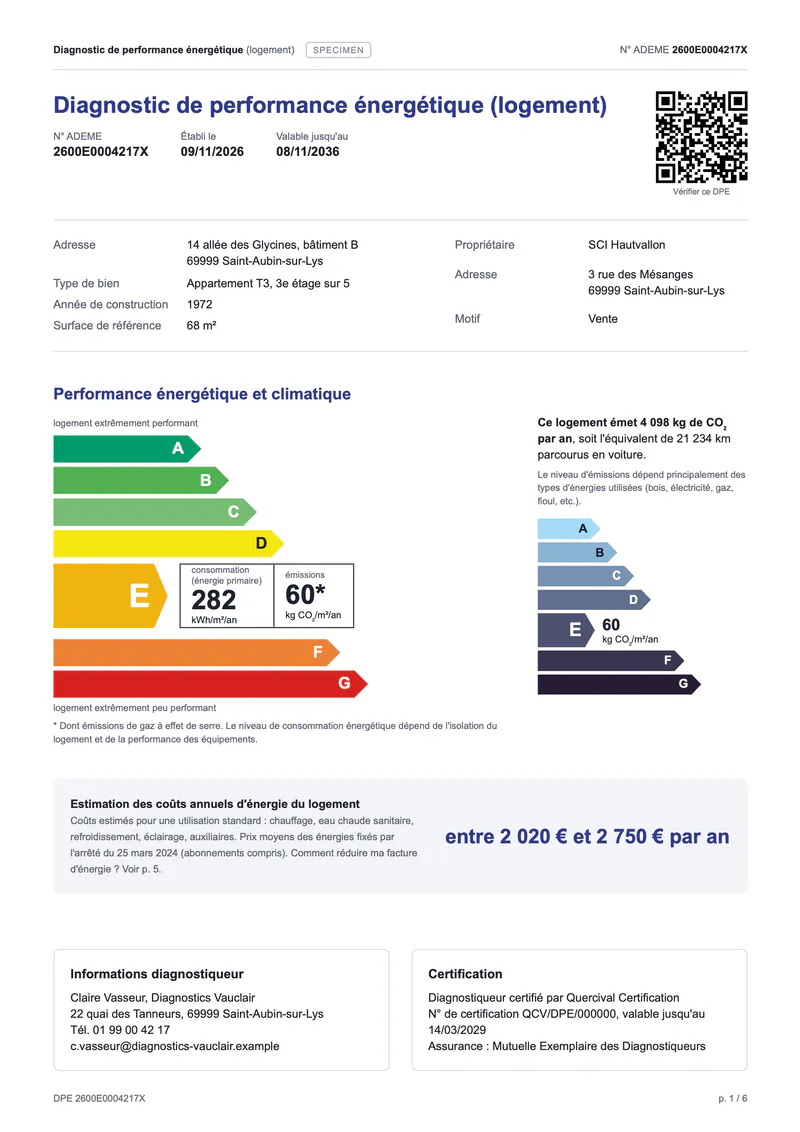
The DPE, diagnostic de performance énergétique, is the French energy performance certificate. Every dwelling sold or rented in France needs one, issued by a certified diagnostician (diagnostiqueur) after a site visit, and valid for 10 years. The content of the report is set by the arrêté du 31 mars 2021 on the DPE of dwellings. The diagnostician enters the building and its systems in a DPE software (logiciel DPE, part of every logiciel de diagnostic immobilier), which runs the official 3CL-DPE 2021 calculation and registers the result with ADEME. Your software sends the results to the Carbone API as JSON, and an HTML template returns the six-page PDF that the owner hands over to the buyer or the tenant. In this example, Diagnostics Vauclair, a fictional firm, certifies a 68 m² apartment built in 1972, heated by an old gas boiler: class E, with two packages of works that bring it to C, then B.
In this example, you will:
- Compute the class of the double label: the worse of the energy class and the climate class
- Point the energy and climate labels to the class of the dwelling
- Print the estimated annual energy costs as a range, by use
- Describe the building, its systems and its heat losses
- Repeat the packages of works, each with its lots and its class after works
- Print the ADEME QR code from your data
Report layout
The template follows the structure of the official model that the French ministry publishes for software vendors. The DPE is in French: the table gives the English meaning of each part.
| Page | Content | Rule |
|---|---|---|
| 1 | Double label, CO2 emissions, annual energy costs, diagnostician | The class is the worse of the energy class and the climate class (annexe 5). The emissions also show as kilometers driven by car |
| 2 | Déperditions, isolation, ventilation, confort d'été | Share of each heat loss, insulation from insuffisante to très bonne, summer comfort from insuffisant to bon |
| 3 | Montants et consommations annuels d'énergie | Final and primary energy and cost range for heating, hot water, cooling, lighting and auxiliaries |
| 4 | Building and systems, maintenance | Description of the envelope and of each system |
| 5 | Recommandations d'amélioration | One or two packages of works aiming at class A or B, each with a cost range and its class after works |
| 6 | Fiche technique | Every input of the calculation with its origin: measured, document provided or default value |
The thresholds of the double label, for a dwelling over 40 m² below 800 m of altitude:
| Class | Primary energy (kWh/m²/year) | Emissions (kg CO2/m²/year) |
|---|---|---|
| A | 70 or less | 6 or less |
| B | 110 or less | 11 or less |
| C | 180 or less | 30 or less |
| D | 250 or less | 50 or less |
| E | 330 or less | 70 or less |
| F | 420 or less | 100 or less |
| G | above 420 | above 100 |
Since 1 January 2026, one kWh of electricity counts as 1.9 kWh of primary energy instead of 2.3, after the arrêté du 13 août 2025. Since 1 July 2024, the arrêté du 25 mars 2024 raises the thresholds for dwellings of 40 m² or less, and sets the energy prices of the cost estimate.
How to generate a DPE from JSON
Follow these steps to build the DPE template with Carbone:
1. Lay out the six A4 pages
- Each page is a
sectionof 210 x 297 mm. The CSS of the template sets@page { size: A4; margin: 0; }, and<carbone-pdf-options prefer-css-page-size="true" print-background="true" />keeps the A4 size and the colors of the labels in the PDF. See the PDF conversion options. - The header of every page repeats the ADEME number,
{d.dpe.number}. - In the CSS, never start a rule with
{ t, liketh { text-align: left }: Carbone reads{t(as a translation tag. Writeth { font-size: 7.4pt; text-align: left; }instead.
2. Compute the class of the double label
Your DPE software sends the results of the 3CL-DPE calculation: cep, the primary energy in kWh/m²/year, and eges, the emissions in kg CO2/m²/year. A comment at the top of the template turns each value into a rank from 1 to 7 with a switch case, and keeps the worse one with :set:
{d.performance.cep:ifLTE(70):show(1):ifLTE(110):show(2):ifLTE(180):show(3):ifLTE(250):show(4):ifLTE(330):show(5):ifLTE(420):show(6):elseShow(7):set(d.performance.rc)}
{d.performance.eges:ifLTE(6):show(1):ifLTE(11):show(2):ifLTE(30):show(3):ifLTE(50):show(4):ifLTE(70):show(5):ifLTE(100):show(6):elseShow(7):set(d.performance.rg)}
{d.performance.rc:ifLT(d.performance.rg):show(d.performance.rg):elseShow(d.performance.rc):set(d.performance.rank)}
{d.performance.rank:ifEQ(1):show('A'):ifEQ(2):show('B'):ifEQ(3):show('C'):ifEQ(4):show('D'):ifEQ(5):show('E'):ifEQ(6):show('F'):elseShow('G'):set(d.performance.cls)}- A formatter reads another value of the data as its parameter, like
show(d.performance.rg). See dynamic parameters. - The apartment of the example uses 282 kWh/m²/year and emits 60 kg CO2/m²/year: E for both, so the class is E. An all-electric dwelling often has a better climate class than energy class: the double label keeps the worse one.
3. Point the labels to the class
Each of the seven rows of the energy label gets the on class when its letter is the class of the dwelling:
<div class="row {d.performance.cls:ifEQ('E'):show('on'):elseShow('off')}">- The CSS makes the active row taller and shows the box with the two values,
{d.performance.cep}and{d.performance.eges}. The other rows hide it. - The small climate label on the right works the same way, with the climate class alone.
- The emissions in kilometers by car divide the yearly emissions by 0.193 kg CO2 per km:
{d.performance.km:formatN(0)}prints 21 234 with the French thousands separator, from"lang": "fr-fr"in the request.
4. Print the energy costs by use
The table of page 3 is a loop on d.uses, the five uses of the calculation. The cost range prints as {d.uses[i].costMin:formatN(0)} € à {d.uses[i].costMax:formatN(0)} €, and a use without consumption prints "0 €" with an inline condition on costMax. The total row reads d.totals, which your software computes from the same values.
5. Repeat the packages of works
Each package holds its lots in items, printed with a nested loop: the rows use {d.packages[i].items[i].lot} and {d.packages[i].items[i+1].lot}, and the package closes with {d.packages[i+1].title}. The class after works uses the same rule as step 2, computed for every package with relative paths:
{d.packages[].rc:ifLT(.rg):show(.rg):elseShow(.rc):set(.rank)}- The first package of the example, wall insulation, windows and a condensing boiler, brings the apartment to C. The second one, a hybrid heat pump, a heat pump water heater and humidity-controlled ventilation, brings it to B.
- Each package lowers the emissions, as the arrêté requires.
6. Add the ADEME QR code
The first page carries the QR code that links to the DPE on the ADEME website. The src of an image creates it from the URL of your data with the barcode formatter:
<img src="{d.dpe.qrUrl:barcode(qrcode, svg:true)}" alt="QR code ADEME">- The DPE of this example is a specimen: its ADEME number, its certification number and its certifying body are fictional, and the QR code links to the reserved
observatoire-dpe.exampledomain. - Send the request with
"convertTo": "pdf"and"converter": "C", to draw the HTML with Chrome.
The conversion of HTML to PDF with Chrome requires Carbone v5.
Related Examples
Trusted by 800+ paid customers in 40+ countries