Sales pipeline review slide
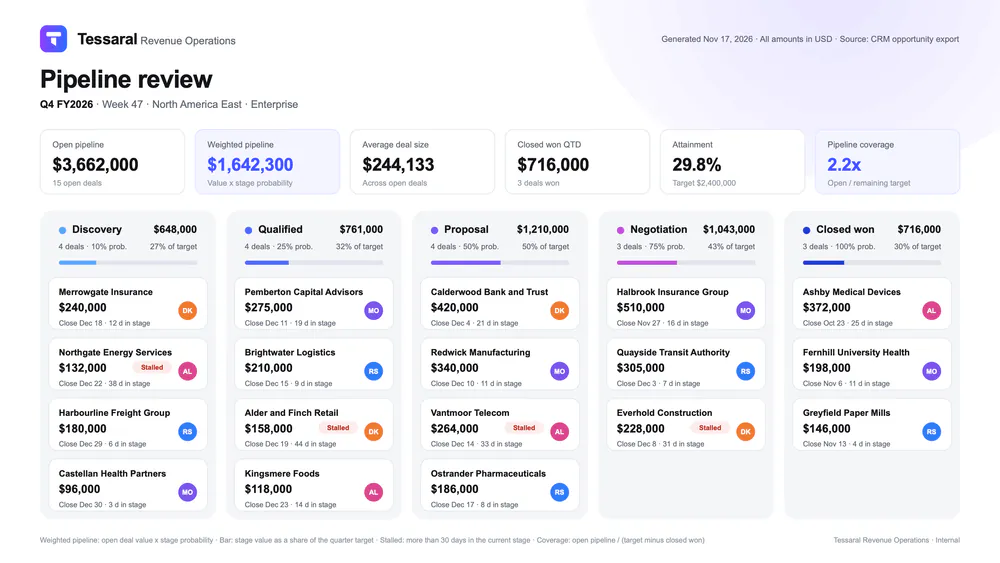
Weekly forecast slide from your CRM, each deal in its stage
- Template
- ODP
- Export as
- PDF, ODP, PPTX, PNG, SVG +29 more
- Carbone
- 5.18+
Generate the pipeline review from your CRM
Revenue Operations teams open the weekly forecast call with one slide: the open pipeline of a region and segment, the weighted forecast, the progress against the quarter target, and every deal placed in its stage column. Your CRM (Salesforce, HubSpot, Pipedrive or your own) exports the opportunities as JSON every Monday, and the Carbone API turns them into the slide. In this example, Tessaral, a fictional software vendor, reviews week 47 of Q4 FY2026 for its North America East enterprise team: 18 deals over five stages, from Discovery to Closed won.
The JSON holds raw inputs only: the stages with their probability and accent color, and for each deal the account, value, probability, expected close date, owner initials and days in the current stage. Carbone computes every count, total, ratio and flag.
In this example, you will:
- Repeat one column per stage and place each deal card in its column with
:transform - Compute the KPI strip and the stage totals with aggregators and
:set - Flag the stalled deals with an inline condition
- Color the stage accents from the JSON data
How to build a pipeline review slide
1. Design one column and one card
Set the slide to 16:9 (33.87 x 19.05 cm) in LibreOffice Impress. Draw the header with the brand mark, the KPI cards and the footer, then design the first column only: a rounded light background, a stage dot, the stage name and its totals, a thin progress bar, and one deal card at the top. Carbone creates the other columns and cards.
2. Repeat the stage columns
The column shapes display the stage with Carbone tags in a loop: {d.stages[i].name} and {d.stages[i].probability}%. A text box with {d.stages[i+1]} ends the loop.
Right-click each column shape, open its Description, and enter the position formula:
{d.stages[i].name:print(.i):mul(6.3):transform(x,cm)}- :print(.i) returns the position of the stage in the list
- :mul(6.3) multiplies it by the column pitch, in centimeters
- :transform(x,cm) moves the shape to the right by the result
The stage dot and the progress bar also have {d.stages[i].accentColor:color(shape,background)}, which fills them with the color of the stage. Learn more about colors.
3. Total each column with aggregators
In the column header, {d.stages[i].deals[].value:aggCount} deals counts the deals of the stage and {d.stages[i].deals[].value:aggSum:formatC(0)} sums their value, with the aggregators on nested arrays and the currency formatter. {d.stages[i].deals[].value:aggSum:div(d.quarterTarget):mul(100):formatN(0)}% of target compares the stage with the quarter target.
The progress bar is a colored bar under a gray track of the same width. The track moves right by the share of the target, and uncovers that share of the bar:
{d.stages[i].deals[].value:aggSum:div(d.quarterTarget):mul(4.68):div(6.3):add(.i):mul(6.3):transform(x,cm)}:aggSum:div(d.quarterTarget):mul(4.6)converts the share of the target into a distance on the 4.68 cm bar:div(6.3):add(.i):mul(6.3)adds the column offset, because one shape takes one:transformper axis
Two small shapes after the track, filled with the column and slide colors, hide the part of the track that passes the end of the bar.
4. Place each deal card in its column
An alias in the footnote keeps the card tags short: {#deal=d.stages[i].deals[i]}. The card displays {$deal.account}, {$deal.value:formatC(0)}, Close {$deal.closeDate:formatD('MMM D')}, {$deal.daysInStage} d in stage and the owner initials {$deal.owner}. The owner avatar takes one color per owner with a switch-case condition in its description, written with the full path because :color does not read aliases:
{d.stages[i].deals[i].owner:ifEQ(DK):show(#EE7B30):ifEQ(AL):show(#D9468F):ifEQ(RS):show(#2F7DF6):elseShow(#7B55E8):color(shape,background)}The description of each card shape holds two position formulas:
{d.stages[i].deals[i].id:print(.i):mul(6.3):transform(x,cm)}
{d.stages[i].deals[i].id:print(..i):mul(2.05):transform(y,cm)}print(.i)returns the position of the stage, which moves the card to its columnprint(..i)returns the position of the deal in the stage, which moves the card down by its pitch (2.05 cm)
Note: the number of dots is inverted compared to the depth of the loops: .i is the index of stages[i], and ..i the index of deals[i].
A text box with {d.stages[i+1].deals[i+1]} ends the loop. It sits above the card shapes in the layer order.
5. Flag the stalled deals
The Stalled label of the card prints only when the deal has spent more than 30 days in its stage, with an inline condition:
{$deal.daysInStage:ifGT(30):show('Stalled'):elseShow('')}The pill behind the word turns muted red only for these deals, and white like the card for the others:
{d.stages[i].deals[i].daysInStage:ifGT(30):show(#FDECEA):elseShow(#FFFFFF):color(shape,background)}6. Compute the KPI strip
The first KPI stores the open and won totals with :set, filtered by probability with array filters:
{d.stages[].deals[probability<100].value:aggSum:set(c.open)}
{d.stages[].deals[probability=100].value:aggSum:set(c.won)}
{d.quarterTarget:sub(c.won):set(c.gap)}
The other KPIs read these values:
- Weighted pipeline:
{d.stages[].deals[probability<100].value:mul(.probability):div(100):aggSum:formatC(0)} - Average deal size:
{d.stages[].deals[probability<100].value:aggAvg:formatC(0)} - Attainment:
{c.won:div(d.quarterTarget):mul(100):formatN(1)}% - Pipeline coverage:
{c.open:div(c.gap):formatN(1)}x, the open pipeline divided by the target still to close
Render the report with "lang": "en-us" and "currencySource": "USD", and convert it to PDF for the call, or to PPTX to edit the slide in PowerPoint.
Tip: :transform is available in ODP, PPTX and ODT templates. To split a long pipeline over several slides, see Slides.
Related Examples
Check out these similar templates to learn more:
Trusted by 800+ paid customers in 40+ countries