Maintenance work order
Asset, lockout points, tasks, labor and parts from your CMMS
- Template
- ODT
- Export as
- PDF, ODT, DOCX, HTML, PNG +25 more
- Carbone
- 5.18+
Generate maintenance work orders from your CMMS
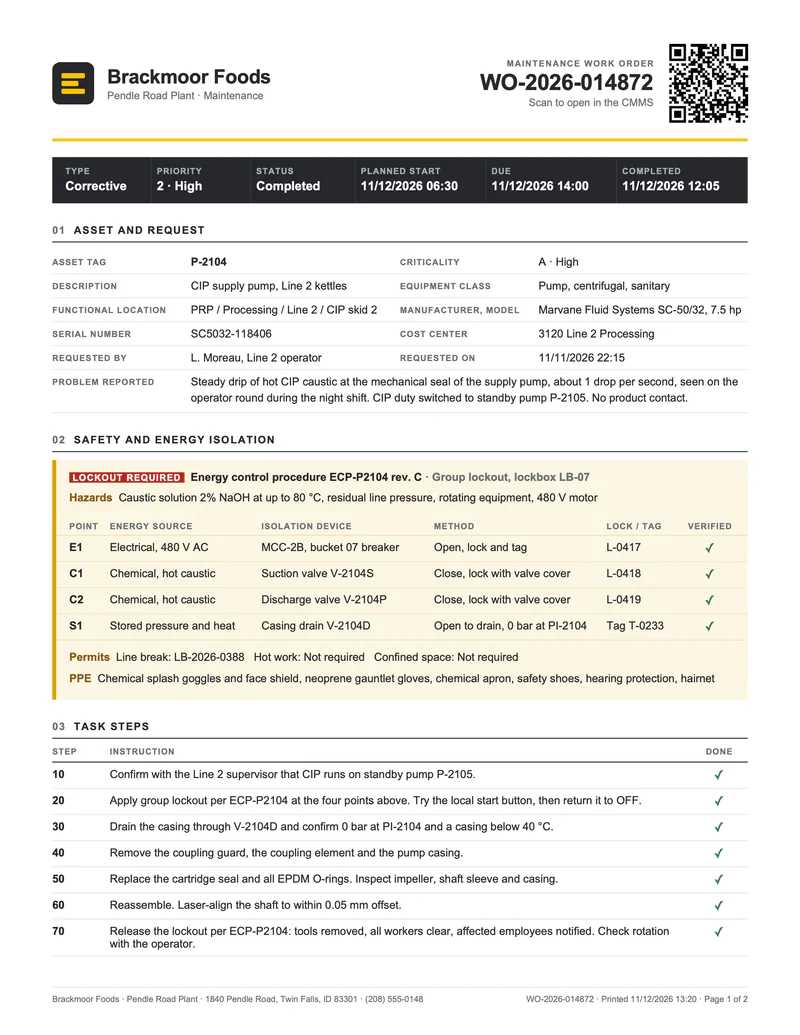
In a plant, every repair and every preventive task runs on a work order. The CMMS or EAM system creates it from an operator request or a maintenance plan, the planner adds the steps, the energy isolation points and the spare parts, and the technician gets it on paper or on a tablet. When the job is done, the same work order comes back with the actual hours, the parts issued, the failure codes and the sign-offs. Your work order software sends each work order to the Carbone API as JSON and gets back the PDF.
In this example, Brackmoor Foods, a fictional food processor, closes a corrective work order on a CIP supply pump with a leaking mechanical seal. The safety section lists the lockout points of the energy control procedure that OSHA 29 CFR 1910.147 requires, and the failure report follows the failure mode, mechanism and cause codes of ISO 14224.
In this example, you will:
- Repeat the lockout points, the task steps, the labor and the parts with loops
- Tick the checkboxes of the completed steps with a condition
- Compute the labor, parts and work order totals in the template
- Print a QR code that opens the work order in the CMMS
- Print the dates in the time zone of the plant
How to create a maintenance work order
1. Repeat the rows of each table
The lockout points, the task steps, the labor and the parts are four tables, each with a loop on two rows: {d.tasks[i].step} and {d.tasks[i].text} in the first row, {d.tasks[i+1].step} in the second. Carbone prints one row per item: four isolation points, nine steps, three crafts and five parts. The table headers are repeated header rows, so a table that runs onto page 2 keeps its column labels.
The permits line uses the same loop inside a single paragraph: {d.safety.permits[i].name}: {d.safety.permits[i].ref} followed by {d.safety.permits[i+1].name} prints the three permits one after the other.
2. Tick the checkboxes of the completed steps
The Done column holds {d.tasks[i].done:ifEQ(true):show(✓):elseShow(☐)}. The inline condition prints a check mark for a completed step and an empty box for a step still open, so the same template prints the blank work order for the technician and the completed record for the archive. The Verified column of the lockout table does the same with {d.safety.isolations[i].verified}.
3. Compute the costs in the template
The JSON holds the raw values only: hours, rates, quantities and unit costs. The template computes everything else:
- each labor line:
{d.labor[i].actualHours:mul(.rate):formatC}; - the labor total, with an aggregator:
{d.labor[].actualHours:mul(.rate):aggSum:formatC}, and the hour totals with{d.labor[].actualHours:aggSum:formatN(2)}; - the parts total:
{d.parts[].qty:mul(.unitCost):aggSum:formatC}; - the work order total:
{d.labor[].actualHours:mul(.rate):aggSum:set(c.labor)}and{d.parts[].qty:mul(.unitCost):aggSum:set(c.parts)}store both totals, then{c.labor:add(c.parts):formatC}prints $1,231.95.
:formatC prints US dollars with "lang": "en-us", "currencySource": "USD" and "currencyTarget": "USD" in the render request.
4. Print the QR code of the work order
The header holds a temporary picture with {d.wo.url:barcode(qrcode, scale:6):imageFit(contain)} in its title. Carbone replaces it with a QR code of the work order URL: the technician scans it to open the work order in the CMMS, attach photos or log the hours.
5. Print the dates in the time zone of the plant
The CMMS sends the dates with their offset, like "2026-11-12T06:30:00-07:00", and the render request sets "timezone": "America/Boise". {d.wo.plannedStart:formatD('MM/DD/YYYY HH:mm')} prints 11/12/2026 06:30, the local time of the plant, wherever the document is generated. See time zones.
Save the ODT template in LibreOffice Writer, connect it to your CMMS, and let Carbone print each work order automatically.
Related Examples
Check out these similar templates to learn more:

Trusted by 800+ paid customers in 40+ countries